Bring in Meta leads
Connect a Facebook Page and its Instant Forms. New submissions appear as contacts without repeated CSV downloads; you can also send them to Google Sheets.
LeadSavvy Pro is a web app and CRM for businesses and agencies that collect enquiries through Facebook and Instagram Instant Forms. It brings new leads into a contact record, can send them to Google Sheets, and helps a team respond and track deals. The iPhone app adds new-lead push notifications and mobile follow-up.
You run your own Meta ads and forms. LeadSavvy Pro manages the enquiries they produce; it does not supply a list of free leads or create your ad campaigns.
Start a 7-day free trialNo credit card required for the trial. Compare current plans.
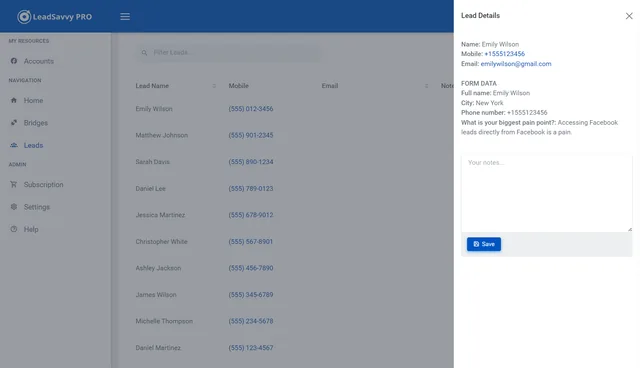
Choose a simple spreadsheet hand-off or manage the full lead-to-deal process in LeadSavvy Pro.
Connect a Facebook Page and its Instant Forms. New submissions appear as contacts without repeated CSV downloads; you can also send them to Google Sheets.
Configure new-lead email notifications. Eligible iPhone app users can receive push alerts and open the contact away from a desk.
Review form answers, contact the prospect, and move opportunities through a visual pipeline. Available routing, pipeline and Meta Conversions API features depend on the plan.
For a detailed setup and troubleshooting walkthrough, read the Facebook Lead Ads integration guide.
Small businesses that run their own Meta lead ads and want enquiries in a Sheet, inbox or simple CRM.
Sales teams that need contact records, alerts and a pipeline for the next follow-up.
Agencies that manage Meta leads across client organizations, using the capabilities of the agency plan.
A prospect can submit your form even when the notification to your connected tools is delayed or fails. Smart Recovery gives your lead workflow another way to find that enquiry.
Tools such as Zapier use Facebook's instant lead notifications, called webhooks, to start a workflow. If a notification is missed and the integration never checks back for it, that enquiry may never reach your CRM, inbox or spreadsheet. Your ads keep running, but your team does not see the lead.
LeadSavvy Pro also checks your connected forms for recent submissions, rather than relying only on the instant notification. It compares the results with leads already imported and brings in missing enquiries through your configured workflow.
Facebook makes Instant Form leads available to download for only 90 days, roughly three months. Importing enquiries into LeadSavvy Pro and your connected Google Sheet gives your business its own records for follow-up, rather than relying on Facebook as a long-term lead archive.
For example: a customer requests a quote, but the instant notification does not arrive. A later recovery check finds the submission in Meta and adds it to your connected workflow.
A missed notification should not mean a forgotten customer. Smart Recovery checks for recent submissions while they are still available in Meta and brings missing leads into your configured workflow, including selected alerts. It cannot retrieve a lead after Meta's availability window has passed. See current plans and recovery options.
A form submission tells Meta someone was interested. It does not tell Meta whether they were a good fit, booked an appointment or became a customer after a phone call. Those later results are often called offline conversions because they happen outside the original ad or form.
With Meta Conversions API (CAPI) configured in LeadSavvy Pro, supported pipeline stage changes can send those outcomes back to your connected Meta dataset. You record the progress of the deal in your CRM, and the integration shares that signal with Meta.
That feedback can support Meta's conversion reporting and lead-quality optimisation, so you can look beyond the number of form fills. CAPI is included on Grow and Scale.
Connect your Meta dataset and configure CAPI for the relevant lead source, then keep pipeline stages accurate as your team works. A result in LeadSavvy Pro still needs to be accepted and matched by Meta; campaign setup and sufficient useful event data also matter. Enabling CAPI alone does not guarantee better leads or lower ad costs.
Two different jobs: Smart Recovery helps bring enquiries into your workflow. CAPI sends their later outcomes back to Meta. Together, they help you capture and measure more of the lead journey.
Connect the Meta form you already use, send a test lead, and decide whether your team needs a Google Sheet, email alerts, mobile follow-up or a pipeline. You can expand the workflow as the need becomes clear.
Start a 7-day free trial