Now available for iPhone

Manage Facebook leads from anywhere

Get new-lead notifications, find contacts, call or text prospects, and keep deals moving with the LeadSavvy Pro iPhone app.

Requires a LeadSavvy Pro account and an eligible plan. No separate mobile account needed.
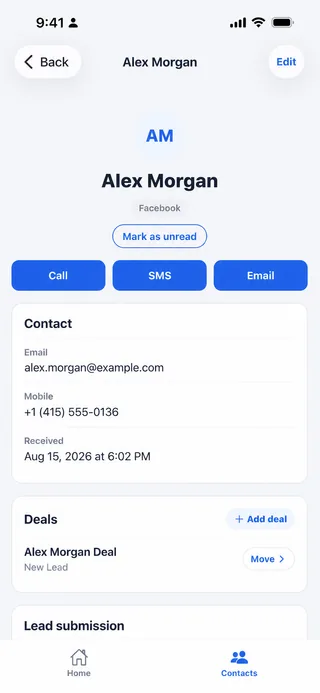
LeadSavvy Pro iPhone contact details with call, SMS, email, and deal actions
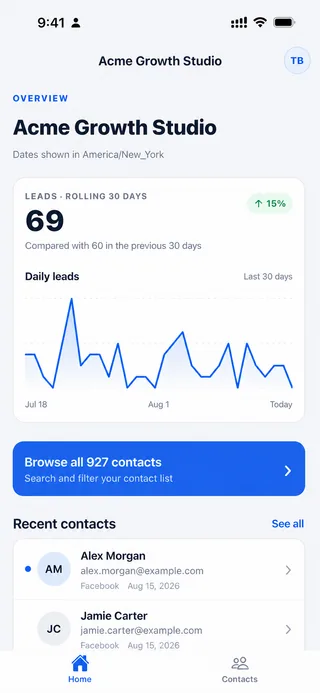
LeadSavvy Pro iPhone dashboard showing lead trends and recent contacts
Faster lead response

Your leads do not wait for you to get back to your desk

LeadSavvy Pro gives you a focused mobile workflow for the moments that matter after a Facebook Instant Form is submitted.

Know when leads arrive

Receive push notifications for new leads so you can respond while interest is still high.

Start the conversation

Open a contact and call, text, or email with a tap—without copying details between apps.

Keep deals moving

Create deals and move opportunities through your pipeline from wherever the work takes you.

At-a-glance visibility

See lead activity the moment you open the app

Your mobile dashboard shows lead volume, recent activity, and a rolling 30-day trend. Switch between organizations to stay on top of your own business or multiple client workspaces.

  • Lead totals and 30-day performance trends
  • Recent contacts ready for follow-up
  • Organization switching for multi-client teams
  • Unread lead indicators that help prioritize action
Mobile dashboard for monitoring Facebook lead activity in LeadSavvy Pro
Every lead in your pocket

Search contacts and act without delay

Search by name, email, or phone number, filter unread leads, and open the complete contact record. Lead source details and Facebook form answers stay connected to the contact.

When it is time to follow up, call, send an SMS, or start an email directly from the app.
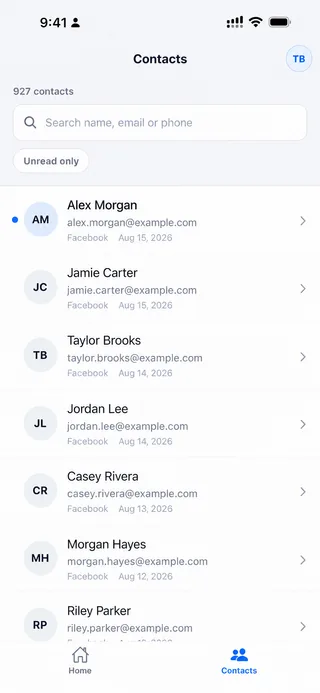
Searchable Facebook lead contact list in the LeadSavvy Pro iPhone app
LeadSavvy Pro contact record with call, text, email, and deal controls
Mobile pipeline management

Turn a new lead into the next sales action

Create a deal from the contact record, choose the right pipeline, and move the deal as the conversation progresses. Mark converted opportunities as won and keep non-proceeding leads out of the active workflow.

The mobile app works with the pipelines already configured in LeadSavvy Pro Web, giving your team a consistent process on desktop and iPhone.
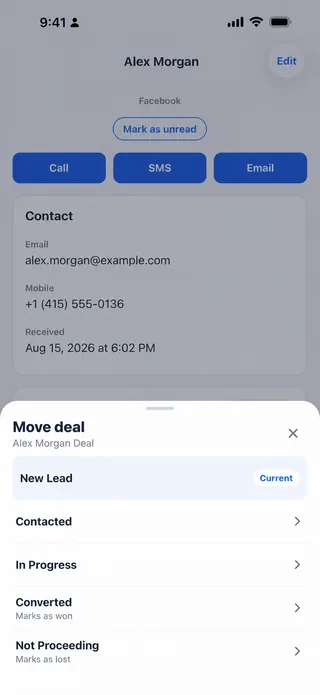
Moving a Facebook lead deal between pipeline stages in the LeadSavvy Pro iPhone app
Web and mobile together

Set up once. Follow up from anywhere.

LeadSavvy Pro connects Facebook lead capture, your web workspace, and the iPhone app in one practical workflow.

  1. 1Connect Meta Instant Forms

    Configure your lead source and routing in LeadSavvy Pro Web.

  2. 2Receive leads automatically

    New contacts flow into LeadSavvy Pro without manual CSV downloads.

  3. 3Respond on your iPhone

    Open the notification, contact the lead, and update the opportunity.

Frequently asked questions

LeadSavvy Pro mobile app FAQ

Yes. The iPhone app uses your existing LeadSavvy Pro login and connected organizations. New customers can start with a free trial before choosing an eligible plan.

You can monitor lead activity, search contacts, review Facebook form responses, mark contacts read or unread, call, text, email, edit contact details, create deals, and move deals between pipeline stages.

Yes. Users with access to more than one organization can switch between available workspaces in the app, subject to their LeadSavvy Pro permissions and plan.

LeadSavvy Pro is currently available on the Apple App Store for iPhone. If you would like an Android app, please use our contact form to register your interest. We will use that feedback to help guide future availability.
Lead follow-up, wherever you are

Put LeadSavvy Pro in your pocket

Download the iPhone app if you already have an account, or start your LeadSavvy Pro trial today.