A Guide to Retargeting on Facebook Ads That Actually Converts
Let's be real for a minute. The vast majority of people who visit your website for the first time are going to leave without buying anything. That’s not a failure on your part; it's just how people shop online.
But what if you could continue the conversation? This is exactly where retargeting on Facebook ads becomes your secret weapon. Instead of constantly chasing brand-new, cold leads, you get a second (and third, and fourth) chance to connect with people who already know who you are.
Why Retargeting on Facebook Is Your Unfair Advantage
Think about your ad budget. You spend good money to get people to click through to your website. But when a staggering 97% of those first-time visitors leave without converting, it feels like you're just burning cash.
Retargeting is how you stop the waste. It lets you reconnect with that warm audience who already showed some interest. They clicked your ad, they browsed your products, they read your blog—they're not strangers. You’re just giving them a gentle, relevant nudge to remind them why they were interested in the first place.
This is a massive shift in strategy. Instead of shouting at a crowd, you're having a one-on-one conversation. For a deeper dive into the numbers, check out this great piece on why you should be using retargeting as part of your PPC strategy.
The Tangible Impact on Conversions and ROI
There's real power in familiarity. When someone sees your ad pop up in their Facebook feed again, it’s not just another random ad. It’s a brand they recognize. That recognition builds trust, and trust drives sales.
It’s this simple act of reappearing that delivers such impressive results.
The real magic of retargeting is its incredible efficiency. You stop throwing money at people who have no clue who you are. Instead, every dollar is focused on prospects who are already partway down the funnel, which naturally leads to a much stronger return on ad spend (ROAS).
The data doesn't lie. Retargeting ads are 76% more likely to get clicked than a standard display ad. Why? Because they’re relevant. They cut through the noise of a crowded feed and speak directly to a user's recent actions. This translates directly into more sales and a healthier bottom line.
Ultimately, running retargeting campaigns on Facebook helps you:
- Maximize Your Ad Budget: Get way more value from the traffic you already paid for.
- Increase Conversion Rates: Nudge those "maybe later" visitors over the finish line.
- Build Brand Recognition: Stay top-of-mind so when they're finally ready to buy, you're their first choice.
Get Your Foundation Right with the Meta Pixel
Before you can even think about running a slick retargeting campaign, you need a way to listen to what people are doing on your website. That’s exactly what the Meta Pixel is for.
Think of it as your website’s security camera, but for marketing. It’s a small piece of code that watches every action a visitor takes. Without it, you’re just guessing. You can’t tell the difference between someone who bounced off your homepage and someone who abandoned a full shopping cart. The Pixel is what gives you that critical insight.
Installing and Verifying Your Pixel
Getting the Pixel on your site sounds more technical than it actually is. You really don't need to be a developer. Meta has made it pretty straightforward with clear instructions and partner integrations for platforms like Shopify, WordPress, and Google Tag Manager.
First, you'll head into Meta's Events Manager to create your Pixel and get your unique Pixel ID. From there, it’s usually just a copy-and-paste job into a specific field in your website's admin panel.
Pro Tip: Don't just install the base Pixel and move on. The real magic happens when you set up standard events. These are specific actions (like "add to cart") that give Meta the context it needs to build powerful, high-intent audiences for you.
Once it's installed, grab the Meta Pixel Helper extension for your browser. It’s a free tool that will show you if your Pixel is firing correctly on each page. You should also keep an eye on your Events Manager dashboard to monitor activity. To get the full picture, you need to know how to track Facebook ads properly to make sure your data is clean from day one.
Understanding Key Pixel Events
Standard events are the lifeblood of a good retargeting strategy. They’re predefined actions Meta understands, and tracking them is what lets you segment your audience based on how serious they are about buying.
Here are the non-negotiables you should be tracking:
- ViewContent: Someone checked out a key page, like a product or service page.
- AddToCart: They showed serious interest by adding an item to their cart. This is a high-intent signal.
- InitiateCheckout: They’re this close to buying. They started the checkout process but got distracted.
- Purchase: The finish line. They completed a transaction.
This flowchart breaks down how the Pixel makes it all possible.
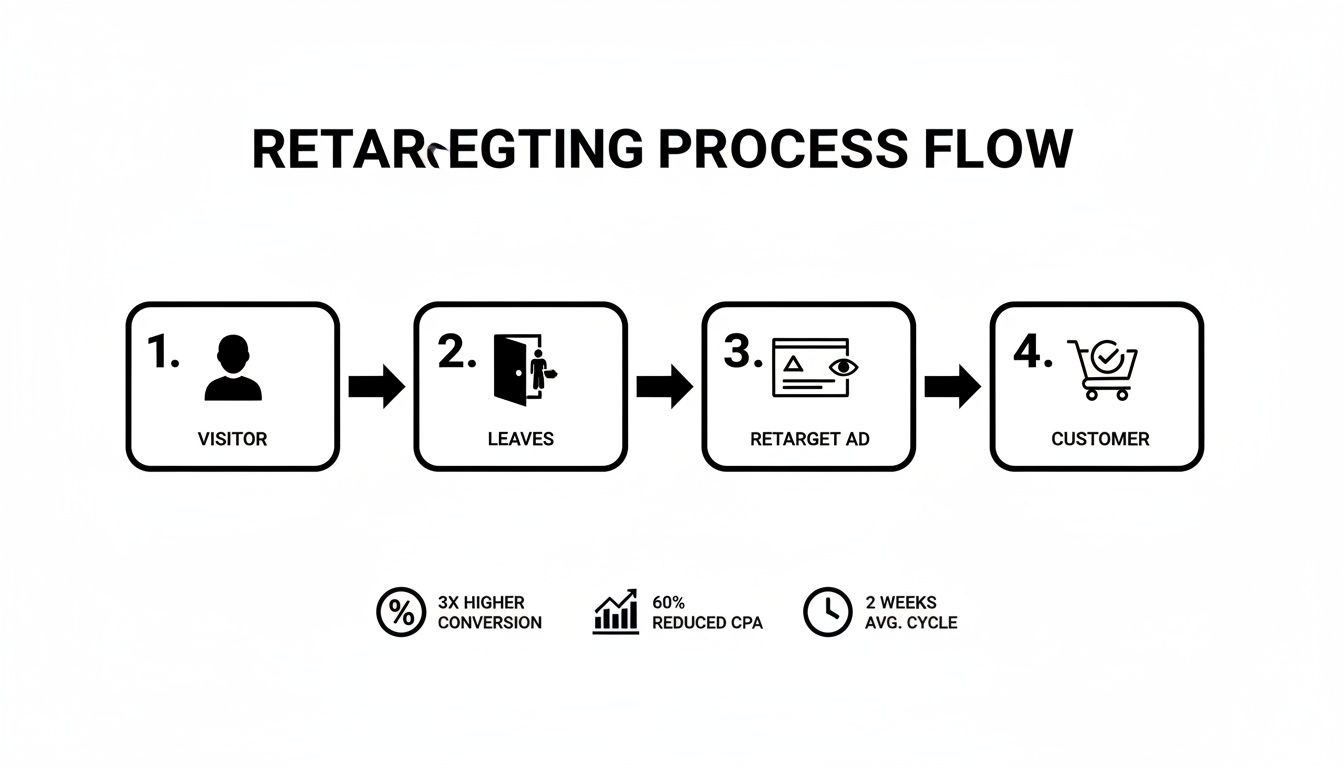
As you can see, the Pixel is the engine driving the whole operation. It tracks the user’s journey, which allows you to serve them a perfectly timed ad that nudges them toward the next step. By tracking these different actions, you can tailor your message to exactly where they are in their buying journey, making your ads feel more like helpful reminders and less like creepy interruptions.
Build Custom Audiences That Feel Personal
Okay, your Meta Pixel is fired up and collecting data. Now we get to the fun part: the actual strategy of retargeting on Facebook ads. This is where you stop just collecting data and start turning it into smart, motivated audiences.
Forget dumping everyone into a generic "all website visitors" bucket. That's a rookie mistake. Real retargeting magic happens when you get granular with segmentation.
The whole point is to create small, high-intent groups so you can send them an ad that feels like it was made just for them. When you match your creative to a specific action they took, you go from being an annoying interruption to a helpful reminder.
Segmenting Based on Website Behavior
Let's be real: not all website visitors are created equal. Your Pixel data is the key to slicing up your traffic into groups that actually mean something. Instead of one giant, lukewarm audience, we're going to build several smaller, sizzling-hot ones.
Think about it. Someone who bounced off your homepage is worlds apart from someone who checked out a specific product, visited your pricing page, and stuck around for over three minutes. That second person is a hot lead, and you need to treat them differently.
Here are a few high-value website Custom Audiences you should build right away:
- Cart Abandoners: This one's a no-brainer. Target anyone who triggered the
AddToCartevent but not thePurchaseevent in the last 14 days. These folks are your lowest-hanging fruit. - High-Engagement Visitors: Create a group of the top 25% of visitors based on how much time they spent on your site. They're clearly hooked on what you have to offer.
- Key Page Visitors: Group together people who viewed high-intent pages, like your pricing, case studies, or "request a demo" page. They're actively considering a purchase.
This level of segmentation is the absolute core of good retargeting. It lets you get hyper-specific with your ad copy. You can offer a discount code to the cart abandoner or show a powerful testimonial to the person who was glued to your features page.
Leveraging Your Off-Platform Data
Your best data doesn't always live on your website. Facebook lets you build powerful Custom Audiences from data you already own, like customer lists and lead form submissions. This is how you bridge the gap between your other marketing efforts and your ad campaigns.
The most common way to do this is by uploading a customer list. You can take a simple CSV file of customer emails or phone numbers, and Facebook will match them to user profiles. This is perfect for running upsell campaigns or finding new customers by creating Lookalike Audiences from your best buyers.
You can also create audiences based on how people engage with you right on Facebook or Instagram. Did someone watch 75% of your latest video ad? Did they save one of your Instagram posts? You can retarget them. These people have already raised their hand and shown interest, making them incredibly receptive to your next ad. You can dive deep into all the different Facebook ads targeting options to see just how powerful this can get.
This approach gives your audience a seamless experience. They see your brand in different places, and each touchpoint builds on the last, gently guiding them from just being curious to becoming a customer.
Custom Audience Segmentation Strategies
To make this crystal clear, here’s a quick breakdown of how you can segment your audiences based on where they are in their journey and what kind of message they need to see.
| Audience Segment | Source & Intent Level | Suggested Retargeting Message |
|---|---|---|
| Window Shoppers | Homepage/Blog Visitors (Low Intent) | Brand awareness, educational content, soft call-to-action (e.g., "Learn More"). |
| Consideration Stage | Product/Service Page Visitors (Medium Intent) | Highlight key features, show social proof (testimonials, reviews), address common objections. |
| Hot Leads | Pricing Page/Demo Request Visitors (High Intent) | Create urgency with a limited-time offer, show a direct comparison, offer a free consultation. |
| Almost-Customers | Added to Cart / Initiated Checkout (Very High Intent) | Remind them what they left behind, offer a small discount or free shipping to close the deal. |
| Existing Customers | Uploaded Customer List (Existing Relationship) | Announce new products, offer an exclusive loyalty discount, ask for a review or referral. |
| Engaged Followers | Video Viewers / Instagram Engagers (Brand Aware) | Promote your latest content or a popular product they haven't seen yet. |
This table is your cheat sheet. By matching the right message to the right person at the right time, you make your ads feel less like ads and more like a helpful nudge in the right direction.
Create Retargeting Ads That Don't Feel Like Ads
Your retargeting audience isn't cold. They already know you. They’ve clicked around your site, checked out your products, and maybe even started a checkout. The absolute biggest mistake you can make now is hitting them with the same generic, top-of-funnel ad they saw the first time around.
The goal here is to continue the conversation, not restart it. This means your retargeting on Facebook ads needs a completely different creative strategy. Think less like a billboard and more like a helpful, personalized reminder. Acknowledge their visit without being creepy about it. You want to be a helpful guide, not a digital stalker.
Harness the Power of Dynamic Ads
For any e-commerce brand, dynamic ads are an absolute game-changer. Forget about manually creating an ad for every single product in your store. Instead, you can set up a campaign that automatically shows people the exact items they viewed, added to their cart, or browsed on your site.
It's personalization at its simplest and most effective. Someone spends ten minutes looking at a specific pair of blue running shoes. An hour later, an ad for those exact shoes pops up in their feed. That’s a powerful nudge that reminds them why they were interested in the first place.
Dynamic ads are so effective because they close the gap between window shopping and actually buying. You're showing users the precise products they already want, which removes all the friction and makes it incredibly easy for them to just come back and finish the purchase.
Yes, setting this up requires connecting your product catalog to your Meta Business Account, but the return on that initial time investment is massive. You’re essentially turning your ad creative into a hyper-relevant, automated sales machine that works for you 24/7.
Master Ad Sequencing and Copywriting
Beyond dynamic ads, you can strategically guide users with a sequence of different messages. Don't just hammer them with the same offer over and over again. That's how you get ad fatigue and frustrated users. Instead, build a narrative over a few days.
Here’s a simple, practical ad sequencing strategy I’ve used countless times:
- Days 1-3 Post-Visit: Show them social proof. A powerful customer testimonial or a case study highlighting your product's benefits works wonders to address any lingering doubts.
- Days 4-7 Post-Visit: Still no conversion? Time for a soft offer. Think free shipping, a free guide related to their viewed product, or a small bonus. It's a gentle nudge.
- Days 8-14 Post-Visit: For the most hesitant folks, it's time to bring out a clear, compelling offer. A 15% discount often creates just enough urgency to get them to finally pull the trigger.
Your ad copy needs to evolve with the sequence, too. Ditch the broad, awareness-level messaging and speak directly to their potential hesitations. Try using phrases like:
- "Still thinking it over?"
- "Any questions about the [Product Name]?"
- "Here’s what other customers are saying."
This conversational tone shows you understand where they are in their decision-making process. You're not just shouting into the void; you're addressing their specific situation and guiding them toward a solution. Pair this thoughtful copy with visuals like carousels showing off different product features or short, snappy videos of the product in action.
Squeeze Every Drop of ROI Out of Your Campaigns
Getting your retargeting campaign live is just the starting line. The real money is made in the day-to-day grind of monitoring, tweaking, and optimizing. A "set it and forget it" mindset is a surefire way to burn through your budget with little to show for it. You have to be hands-on.
Forget about vanity metrics like clicks and impressions for a minute. To really know if your campaigns are working, you need to live and breathe profitability. The only two numbers that truly matter are your Return On Ad Spend (ROAS) and Cost Per Purchase. They tell you the real story.
Setting Smart Budgets and Bids
So, how much should you actually spend on retargeting? There's no magic formula, but a solid rule of thumb is to carve out 10-20% of your total Facebook ad budget for these warm audiences. They are your lowest-hanging fruit and your most likely converters, so they absolutely deserve a dedicated piece of the pie.
When it comes to bidding, don't try to outsmart the machine. For most retargeting campaigns, just let Meta's algorithm do the heavy lifting. Stick with the "Highest Value" or "Highest Volume" bidding strategies. This tells Facebook to hunt down the people in your audience who are most likely to buy, and it will adjust bids on the fly to get you the best possible ROAS.
The real magic of retargeting is how it can supercharge your conversion rates. We've seen campaigns get a boost of up to 150%. You're talking to people who already know you, so you're not just buying clicks—you're driving real, profitable action.
This data-first approach takes the guesswork out of the equation and makes sure your money is working as hard as you do.
Facebook Retargeting Cost Benchmarks
Knowing what to expect can help you budget more effectively. While costs vary, here's a look at some industry benchmarks for retargeting campaigns.
| Industry | Average CPC | Average CPM (Retargeting) |
|---|---|---|
| Retail | $0.70 | $12.50 |
| Technology | $1.27 | $18.90 |
| B2B | $2.52 | $25.00 |
| Finance | $3.77 | $30.15 |
| Travel | $0.45 | $9.80 |
These numbers give you a ballpark figure, but remember that your own costs will depend on your audience, creative, and overall campaign strategy.
Keep an Eye on Frequency to Avoid Ad Fatigue
You know that feeling when an ad seems to follow you everywhere you go online? That’s ad fatigue, and it will absolutely tank your campaign performance. Once someone sees your ad too many times, they tune it out or, even worse, get annoyed with your brand.
The metric you need to watch like a hawk is Frequency. You can add this column in your Facebook Ads Manager.
- For most campaigns: Try to keep your weekly frequency under 5.
- If you see it creeping up: That’s your cue. It's time to swap in fresh ad creative or pull back the budget on that ad set.
Keeping your ads fresh and your frequency low ensures your message stays effective instead of becoming digital noise.
Find What Works, Then Scale It
You have to get in the habit of regularly digging into your ad performance. This is non-negotiable. Getting comfortable with Facebook Ads Manager reporting is the only way to figure out what's actually driving sales. Look for the patterns. Is it a certain type of image? A specific headline? A particular call-to-action?
When you find a winner—an ad with a killer ROAS and a solid conversion rate—it's time to pour some fuel on the fire. But do it slowly. Increase its budget by about 20% every few days to avoid sending the algorithm into shock. This gradual scaling lets you amplify what's working without messing up your campaign's momentum.
And if you need a refresher on the most important metric of all, we've got you covered in our guide on how to calculate Return On Ad Spend. This cycle of analyzing, testing, and scaling is how you turn a good retargeting campaign into a profit-generating machine for your business.
Answering Your Top Facebook Retargeting Questions
Even when you have a solid game plan, you're bound to run into a few head-scratchers once your retargeting campaigns are live. Let's get into the most common questions I hear and give you some straight answers.
How Long Should My Retargeting Window Be?
This is a big one, and the answer is always: it depends on your sales cycle. There’s no magic number here, but you can get pretty close by thinking about how long it really takes your average customer to make a decision.
If you’re running an e-commerce store selling clothes or accessories, the buying decision is fast. Almost an impulse. A shorter window of 14 to 30 days usually works perfectly.
But what if you're a B2B SaaS company or you sell high-ticket items like custom-built sheds? Your prospects are doing a lot more research, comparing options, and probably getting approval from a spouse or a boss. For these businesses, a longer window of 60 to 90 days makes more sense.
My Go-To Advice: When in doubt, start with a 30-day window. It's a great middle-ground. Keep a close eye on your performance data and don't be afraid to adjust it based on what you see.
What’s a Good Ad Frequency for Retargeting?
Frequency is a metric you absolutely have to watch like a hawk. If someone sees your ad too many times, you hit "ad fatigue." Best case, they ignore you. Worst case, they get annoyed and hide your ads, which tells Facebook your content is bad. Either way, your costs go up, and your results tank.
I aim for a weekly frequency of around 3 to 5 impressions per user. That’s the sweet spot for staying on their radar without becoming that annoying brand they can't escape.
You can check this right in your Ads Manager. If you see the lifetime frequency for any one person creeping past 8 to 10, that’s your red flag. It’s time to swap in fresh ad creative or pull back the budget on that ad set.
Help! Why Are My Retargeting Ads Not Delivering?
It's the absolute worst feeling: you launch a campaign you're excited about, and… crickets. Zero impressions. When this happens, it’s usually one of a few common culprits.
- Your audience is just too small. Meta needs a decent-sized pool to work with, typically at least 1,000 active users in a custom audience. If yours is smaller than that, the algorithm will struggle to find anyone to show your ad to.
- Your budget or bid is too low. The ad auction is a battlefield. If your budget is tiny, you're going to get outbid by bigger spenders every single time, meaning your ad never gets a chance to run.
- Your ad got rejected. It happens to the best of us! Always double-check your ad status in Ads Manager. Sometimes a minor policy violation can get your ad disapproved and shut down delivery instantly.
- Your Pixel isn't firing. This is a big one. Head over to your Events Manager and make sure your Meta Pixel is active and tracking recent website events. If the Pixel is broken, your audience isn't growing, and your campaign is dead in the water.
Ready to stop downloading CSV files and start converting leads faster? LeadSavvy Pro automatically syncs your Facebook Lead Form data directly to your CRM or Google Sheets, sending you instant notifications so you never miss a hot lead. Get started with LeadSavvy Pro today.