Mastering integration in crm: A Practical Guide to Connecting Tools
Let's be honest, trying to run a business with a bunch of disconnected software is a nightmare. It's like having a team of all-stars—a marketing genius, a sales closer, and a support pro—but they all work in separate buildings and never talk to each other.
This is where CRM integration comes in. Think of it as the central nervous system for your business, connecting all your tools so they can finally share information and work together. It stops the madness of manually downloading lead lists from Facebook, losing sales because of slow follow-up, and giving customers a disjointed, frustrating experience.
What Is a CRM Integration and Why Does It Matter So Much?
A CRM integration is what connects your Customer Relationship Management software to all the other tools you use—your email marketing platform, e-commerce store, social media accounts, you name it. When everything is connected, data flows freely and tasks can be automated.
Instead of your teams working in isolation, everyone gets a complete picture of the customer. It transforms your CRM from a simple digital rolodex into a powerful, automated machine that drives real growth.
The High Cost of Disconnected Systems
Without a solid integration strategy, your business is operating with data silos. This is just a fancy way of saying that critical customer information is trapped inside individual apps, totally invisible to everyone else.
For example, your sales team might be chasing a lead who just had a terrible experience with your support team. Or your marketing team might be sending "special offers" to an already unhappy customer. It's inefficient, and frankly, it's embarrassing.
These manual processes aren't just slow; they're costing you money. Here are the biggest problems:
- Wasted Time: How many hours do your employees spend manually exporting and importing data? Think about downloading CSV files from Facebook Lead Ads every single day.
- Inaccurate Data: Let's face it, manual data entry leads to mistakes. Typos, duplicates, and outdated info start creeping in, making your data unreliable.
- Poor Customer Experience: When your teams don't have the full story, customers get inconsistent messages. They end up repeating themselves, which is a one-way ticket to frustration.
- Lost Revenue: Slow lead response times are deal-killers. By the time you manually transfer a new lead from Facebook to your sales team, they've already moved on to your competitor.
To see just how different these two worlds are, take a look at this quick comparison.
Integrated vs. Siloed CRM Systems at a Glance
This table breaks down the practical differences between a business running on integrated systems versus one stuck with disconnected data silos.
| Feature | Siloed System (Without Integration) | Integrated System (With CRM Integration) |
|---|---|---|
| Data Flow | Manual CSV uploads/downloads; data is often outdated. | Automatic, real-time data sync between all connected apps. |
| Customer View | Fragmented; each department sees only a small piece of the puzzle. | A complete 360-degree view of every customer interaction. |
| Lead Follow-Up | Slow and manual; leads get cold waiting for a response. | Instantaneous; new leads are automatically routed to sales. |
| Efficiency | High manual workload, prone to human error and wasted time. | Automated workflows handle repetitive tasks, freeing up your team. |
| Customer Service | Inconsistent; support agents lack full context of a customer's history. | Proactive and informed; agents see every past interaction. |
The takeaway is clear: integrated systems don't just make your life easier—they give you a serious competitive advantage.
An Absolute Must-Have for Modern Business
Switching to an integrated system isn't a luxury anymore; it's a necessity. The market for CRM integrations is exploding and is projected to hit a massive $12.2 billion by 2025.
With 91% of companies (with 10+ employees) now using a CRM and 65% already adopting AI integrations, standalone software is quickly becoming a thing of the past.
An integrated CRM doesn't just store data; it makes that data actionable. It transforms your collection of separate software tools into a powerful, automated machine that drives efficiency and growth.
For a great example of a platform built around this principle, check out Microsoft Dynamics 365. This is the kind of foundation modern, agile businesses are built on.
The Four Core Methods of CRM Integration
Connecting all your business software isn't a one-size-fits-all deal. Think of it like building bridges between islands. You could have a pre-built bridge, a custom-designed ferry route, an instant alert system for new arrivals, or a central shipping hub that handles all the traffic for you.
Each method for integration in crm solves a different problem and comes with its own trade-offs.
Understanding these four core methods—Native, API, Webhooks, and Middleware—is key to picking the right tool for the job. You don't need to be a developer to get a handle on this. Let's break them down into plain English.
The map below shows how a CRM should act as the central brain for your business, connecting your sales, marketing, and support teams so everyone is on the same page.
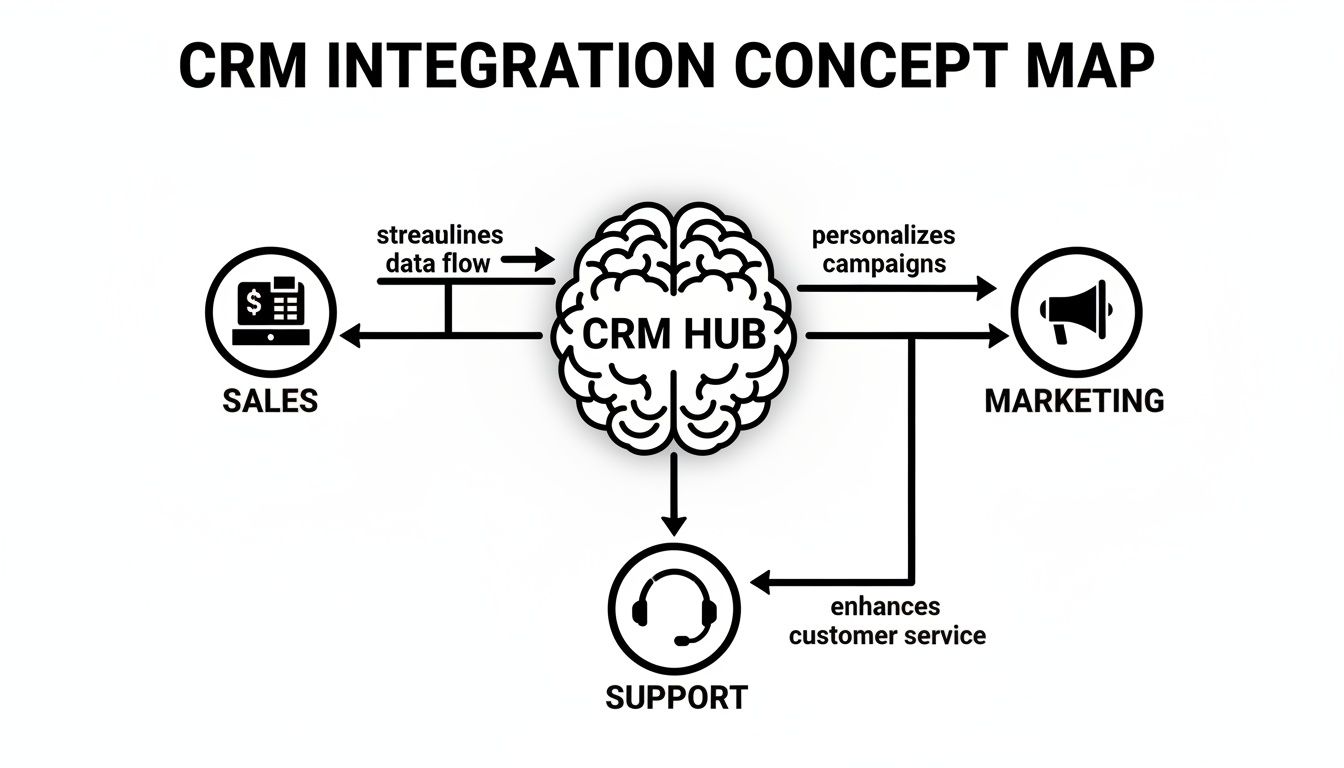
When done right, integration in crm lets data flow freely between departments. This gives your entire team a complete, up-to-the-minute picture of every customer interaction.
Native Integrations
Ever buy a new smartphone where the camera app just works perfectly with the photo gallery right out of the box? That’s a native integration.
It's a pre-built, plug-and-play connection created by the software companies themselves. They're usually the easiest to set up, often just needing a few clicks to connect your accounts.
- Pros: They are incredibly simple, reliable, and typically included with your subscription at no extra cost.
- Cons: You’re stuck with whatever connections the developers decided to build. If they don’t offer a direct link to a tool you love, you're out of luck.
API Integrations
Think of an API (Application Programming Interface) as a universal translator or a set of rules that lets two totally different software programs talk to each other. Instead of a ready-made bridge, an API gives developers the blueprints and raw materials to build custom connections between almost any app.
This approach offers massive flexibility.
An API doesn't move the data itself; it sets the rules for how data can be shared. It’s the common language that different software programs agree to speak so they can work together.
APIs are the backbone of most custom integration projects. They allow for deep, two-way conversations where systems can send data back and forth, request information, and even trigger complex actions in each other.
Webhooks
If an API is like calling a restaurant to ask if your table is ready, a webhook is like getting a text message the second it becomes available.
Webhooks are automated, one-way pushes of data triggered by a specific event. For example, when someone fills out your Facebook Lead Form, a webhook can instantly "push" their contact info straight into your CRM. No waiting, no delays.
This real-time action makes them incredibly efficient. Instead of your CRM constantly having to ask, "Any new leads yet?" the webhook delivers the info the moment it happens. It's perfect for time-sensitive tasks where every second counts.
Middleware Platforms
Finally, there's middleware. This is like hiring a central post office for all your software.
Instead of building dozens of direct connections between every single app you use, you just connect each app to the middleware platform. This "hub" then sorts and routes data between all your tools based on rules you create.
Platforms like Zapier or Make are the perfect example. They act as universal translators, connecting thousands of different apps without you ever needing to write a single line of code. They are the go-to solution when a native integration isn't an option and a custom API project is overkill. You can even get started on a budget by checking out options like the Zapier free plan.
Powerful Business Use Cases for CRM Integration
Understanding the theory behind CRM integrations is a great start, but seeing them in action is where it all clicks. A smart integration in crm isn't just about connecting two pieces of software; it's a business strategy that solves frustrating, real-world problems and unlocks massive efficiencies.
When your systems finally start talking to each other, you can automate marketing, supercharge your sales process, and give your customers an experience that makes them stick around. Let's dig into a few of the most powerful ways businesses put this to work.
Automating Marketing and Sales Workflows
One of the most immediate wins is connecting your CRM to your marketing automation platform. This simple sync transforms two separate tools into one cohesive lead-nurturing machine.
- Email Marketing Sync: Imagine your email platform like Mailchimp or ConvertKit is perfectly in sync with your CRM. New subscribers instantly appear in your CRM, and key customer segments in the CRM can automatically trigger hyper-targeted email campaigns. No more exporting and importing CSVs.
- E-commerce Integration: When you connect your Shopify or WooCommerce store to your CRM, your sales team gets a full 360-degree view of every customer's purchase history. This context is gold for smart upselling, personalized follow-ups, and truly understanding customer lifetime value.
These connections get rid of tedious manual work and ensure your data is always up-to-date and ready for action.
The Facebook Lead Ad Integration: A Real-World Example
If there's one headache almost every modern marketer shares, it's getting leads out of social media and into the hands of sales. Facebook Lead Ads are incredible for capturing interest, but without an integration, they create a huge bottleneck.
The old way is a productivity nightmare. A team member has to remember to log into Facebook, dig through the ad account, find the right form, download a CSV file of new leads, and then manually upload that file into the CRM. This isn't a once-a-week task—it often needs to be done multiple times a day.
That delay—the time between a lead raising their hand and a salesperson reaching out—is a black hole where opportunities vanish. The lead gets cold, loses interest, or worse, has already been contacted by a competitor who was faster.
An automated integration flips the script entirely.
The moment a potential customer hits "submit" on your Facebook Lead Form, the integration instantly fires that data straight into your CRM. A new contact record is created on the spot. You can even set it up to automatically assign the lead to a specific salesperson and trigger an immediate notification.
This screenshot shows the native integration options inside Facebook's platform, which is the starting point for getting your leads connected.
Facebook itself presents connecting a CRM as a primary step, highlighting just how critical it is for an effective lead management workflow.
Quantifying the Impact of Automation
This direct integration in crm delivers hard numbers that you can see on your bottom line. The benefits go way beyond just saving a few minutes here and there.
- Drastically Improved Speed to Lead: Instead of waiting hours (or even days) for a manual transfer, your sales team can be on the phone with a new lead in minutes. This speed can boost conversion rates by an order of magnitude.
- Higher Conversion Rates: A fast follow-up shows you're serious and catches leads when their interest is at its absolute peak. This leads to better conversations and, you guessed it, more closed deals.
- Clearer ROI on Ad Spend: When leads are automatically tracked in your CRM from the initial click to the final sale, you can finally see which Facebook campaigns are actually making you money. This lets you kill the underperforming ads and double down on what works.
- Elimination of Human Error: Manual data entry is a recipe for typos, formatting disasters, and lost information. Automation ensures every single piece of data from your lead form is transferred perfectly, every time.
By transforming a slow, error-prone manual chore into an instant, automated workflow, this one integration empowers your sales team to do what they do best and gives you undeniable proof of your marketing success.
The Impact of AI and Cloud-Based Integrations

If you're still thinking of your CRM as just a digital rolodex, it's time for an update. Two huge forces—artificial intelligence and the cloud—are completely rewriting the rules. They’re transforming what an integration in crm can actually do, turning these systems from simple databases into smart, proactive business tools.
The days of clunky, disconnected software running on a server in the office closet are over. Cloud-based integrations are now the standard, and for good reason. They give businesses of all sizes the kind of flexibility and power that used to be reserved for giant corporations with massive IT teams.
The Rise of the Intelligent CRM
Let's be clear: AI-powered integrations are turning your CRM from a passive record-keeper into an active partner in your business. Instead of just showing you a list of contacts, an intelligent CRM connects to your other tools, crunches the data, and tells you what to do next. It learns from every interaction to help you predict what's coming.
Here’s how this actually works in the real world:
- Predictive Lead Scoring: Forget guessing which leads are hot. AI algorithms look at a lead's behavior, demographics, and how they’ve engaged with you to give them a score. Your sales team can immediately see who to call first.
- Automated Customer Conversations: AI-driven chatbots, connected right to your CRM, can handle those first-touch customer questions 24/7. They qualify leads on the spot and then hand them off to a human, along with the full chat history.
- Sales Forecasting: By pulling in historical sales data, market trends, and team performance from all your connected apps, AI can generate surprisingly accurate sales forecasts. This makes planning and setting goals a whole lot easier.
An AI-integrated CRM doesn't just manage relationships; it anticipates customer needs. It spots hidden patterns in your data to suggest the next best move—whether that's a personalized email, a perfectly timed follow-up call, or a special offer.
Of course, this kind of proactive intelligence needs good, clean data to work its magic. To get your system ready for AI, take a look at our guide on data management best practices.
Why the Cloud Is the New Standard
The biggest reason these powerful integrations are now available to everyone? The cloud. Old on-premise systems were rigid, expensive to maintain, and a nightmare to connect with modern web tools. Cloud-based CRMs and integration platforms just wipe those problems away.
The numbers don't lie. Cloud-based CRM integrations are expected to power a staggering 87% of systems by 2025—a massive leap from just 12% back in 2008. The entire CRM integration market is booming, valued at $12.2 billion in 2025 in North America alone, all thanks to this demand for flexible, cloud-first tools.
The cloud is the perfect home for a modern integration in crm strategy. Here’s why:
- Scalability: Cloud systems grow right alongside your business. Adding new users, connecting more apps, or handling more data doesn't require buying new hardware.
- Ease of Use: Most cloud integrations are built for regular people, not IT wizards. You can often get them set up in minutes with a few clicks.
- Accessibility: Your team can log into the CRM and access all its connected data from anywhere with an internet connection. It’s perfect for remote and hybrid teams.
- Automatic Updates: The software providers handle all the boring stuff—maintenance, security, and updates—so your tools are always secure and up-to-date without you lifting a finger.
Putting It All Together: From Facebook Lead to Your CRM in Seconds

Knowing the theory is one thing, but the real magic of integration in crm happens when you solve a real, costly business problem. For most marketers, that problem is the agonizing delay between getting a hot lead on Facebook and actually getting it to the sales team. Manually downloading CSV files is a classic bottleneck that kills deals.
This is exactly where specialized tools come in. Instead of wrestling with complex custom setups or pricey middleware, a dedicated solution like LeadSavvy Pro builds a seamless bridge from your Facebook ad right into your sales workflow. It's designed to make powerful automation accessible to everyone, not just the tech wizards.
A No-Code Setup That Takes Minutes
The best part? It's ridiculously simple. You can connect your Facebook Lead Ads to your CRM (or even just a Google Sheet) in a few clicks. Seriously, you can be up and running in less than five minutes.
Here’s what that looks like:
- Connect Your Facebook Page: Securely link the page where your lead forms are running.
- Pick Your Destination: Tell the system where you want the leads to go—your CRM, email tool, or a Google Sheet.
- Map the Fields: Just match up the fields. Facebook's "Name" field goes to your CRM's "Name" field, "Email" goes to "Email," and so on.
That’s it. Once you flip the switch, the system works 24/7 in the background. No lead ever gets left behind. This instant, automated handoff is how you capitalize on a prospect's interest when it's at its absolute peak.
The Real-World Business Impact
Automating this one connection delivers tangible results almost immediately. It’s not just about saving a few minutes of admin time; it's about fundamentally upgrading your sales process and getting more from your ad spend. This is what a smart integration in crm strategy is all about. If you want to dig even deeper, check out our guide on setting up a CRM with Facebook integration.
This kind of automation is where the industry is heading. The global AI-in-CRM market is expected to rocket from $11.04 billion in 2025 to a massive $48.4 billion by 2033, all because businesses need smarter, faster systems. The tools that enable real-time notifications and CRM syncs are a huge part of this, helping companies achieve the 30-50% faster response times that early adopters are already seeing.
The outcomes are crystal clear:
- Instant Lead Alerts: Your sales team gets a ping the second a new lead hits.
- Zero Manual Work: Forget about ever downloading a CSV file again.
- Lightning-Fast Response Times: Engage leads in minutes, not hours (or days).
- Higher Conversion Rates: A fast response is proven to dramatically increase the chances of closing a deal.
By turning a manual chore into an automated superpower, this simple integration gives your team a massive competitive edge.
Your Checklist for a Successful CRM Integration
Jumping into an integration project without a clear plan is like building IKEA furniture with no instructions. You might end up with something, but it’s definitely not the bookshelf you saw in the catalog. A successful integration in crm comes from a smart strategy, not just a quick technical fix.
Think of this checklist as your roadmap. It'll help you sidestep the common traps and ensure your systems are talking to each other perfectly from day one.
Define Your Business Goals First
Before you touch any tech, ask yourself one simple question: "What problem are we trying to solve?" Don't lead with the technology; lead with the business outcome you're chasing. Are you trying to slash lead response times? Eliminate soul-crushing manual data entry? Or finally get a single, clear picture of your customer's journey?
When you clearly define your "why," the project transforms from a vague IT task into a focused business mission. It also gives you a clear yardstick to measure success against later.
- A Bad Goal: "We need to integrate our CRM with Facebook." (Why? What does this achieve?)
- A Good Goal: "We need to get new Facebook leads into our sales reps' hands in under five minutes to boost our lead-to-opportunity conversion rate by 15%." (Now that's a goal.)
Assemble Your Integration Team
An integration isn't just an IT job—it's a company-wide upgrade that touches multiple departments. You absolutely need the right people in the room from the start. This ensures everyone's needs are heard and gets the whole team on board with the change.
Your dream team should include:
- A Project Lead: The person who owns the project and keeps the train on the tracks.
- Key Stakeholders: These are the people who will actually use the integration every day. Think sales reps, marketing managers, and customer support agents.
- A Technical Expert: The person who knows the nuts and bolts—whether that’s an in-house developer, an agency partner, or a consultant.
Map Your Data and Processes
Okay, now it's time to get into the weeds. You need to know exactly what data is moving, where it's coming from, and where it's going. Think of it like planning a shipping route for valuable cargo—you need to map out every single stop.
A common failure point is mismatched data. One system's "First Name" field might not match another's, causing sync errors and data corruption. Meticulous mapping prevents these headaches.
Create a simple map. A spreadsheet works perfectly. Document which data fields in System A correspond to the fields in System B. This step is non-negotiable if you want to maintain data integrity and avoid a complete mess later.
Choose the Right Integration Method
With your goals set and your data mapped, you can finally pick the right tool for the job.
- Check for Native Integrations: Always, always start here. Is there a pre-built, one-click connection available? If so, your life just got a lot easier.
- Explore Middleware Platforms: If there's no native option, a no-code tool like Zapier is usually the fastest and most budget-friendly path forward.
- Consider Custom API Work: This is the heavy-duty option. Reserve it for complex, mission-critical integrations where off-the-shelf tools just won't cut it. For a custom build to succeed long-term, you have to follow established guidelines. That includes understanding general API integration best practices to make sure your connections are both secure and scalable.
Test, Deploy, and Monitor
Never, ever launch an integration without putting it through its paces first. Set up a "sandbox" or testing environment where you can run fake data through the workflow without breaking anything.
Get your stakeholders to test it out, too. Does it actually work the way they expected? Once everyone gives the thumbs-up, you can deploy it. But the job isn't done. Keep a close eye on its performance for the first few weeks to catch any little gremlins that might pop up.
Common Questions About CRM Integration
Even the best-laid plans run into questions once you start getting your hands dirty with CRM integration. Let's tackle some of the most common ones we hear from businesses, so you can move forward with confidence.
Which Integration Type Is Best for a Small Business?
For most small businesses, the simplest path forward is usually the best one. Start by looking for native integrations—those are the pre-built connections that come standard with the software you're already paying for. They’re almost always the most reliable and budget-friendly option, often taking just a few clicks to turn on.
But what if a tool you absolutely depend on, like Facebook Lead Ads, doesn’t have a native hookup? Your next best move is a specialized third-party tool. These platforms are built to solve one problem really well, and they do it without asking you to write a single line of code.
What Are the Main Security Risks to Consider?
The big worries with any integration are data breaches and running afoul of privacy laws like GDPR. Protecting your customer and business data has to be priority number one from the moment you start planning.
The most secure integrations follow the "least privilege" principle. This just means any connected app should only get the absolute minimum access it needs to do its job—and not an ounce more.
To keep your data locked down, stick to these practices:
- Use Reputable Platforms: Only connect your CRM to well-known, trusted tools that offer data encryption.
- Manage Permissions Tightly: Be stingy with user permissions and API keys. Never share them widely, and always revoke access for people who've left the company immediately.
- Review the Fine Print: Always read the security and privacy policies of any app you plan to plug into your CRM. Make sure they meet your standards before you connect anything.
Can I Integrate My CRM with Google Sheets?
You bet. Connecting a CRM to Google Sheets is a super popular and practical use for CRM integration. It's a fantastic way to whip up quick reports, create a simple backup of important data, or share key info with team members who don’t need a full CRM license.
Lots of integration platforms are designed to do exactly this. For example, you could set up a simple automation that zaps new leads from a Facebook campaign straight into a Google Sheet in real-time. Just like that, you’ve got a live, shareable database for your team.
How Much Does CRM Integration Typically Cost?
The cost of integrating your CRM can swing wildly depending on how you do it. There's no single price tag, but the costs generally fall into three buckets.
- Native Integrations: These are often baked into your existing software subscription, so they usually don't cost anything extra.
- Middleware Platforms: No-code tools typically charge a monthly subscription. This can be anything from a generous free plan for light use to several hundred dollars a month if you're moving a lot of data.
- Custom Development: This is the most expensive route. Hiring a developer to build a custom API integration can run you thousands of dollars upfront, plus ongoing costs for maintenance and updates.
For a common, specific need, a specialized tool is almost always the most affordable and efficient way to go.
Stop wasting time on manual downloads and start converting leads faster. LeadSavvy Pro automates your entire Facebook Lead Form workflow in minutes, sending new leads directly to your CRM or Google Sheet the second they come in. Try our free plan today and see the difference for yourself!