IFTTT vs Zapier The Ultimate Automation Tool Showdown
Trying to pick a side in the IFTTT vs Zapier debate? Here’s the bottom line: IFTTT is your best bet for simple, personal, and smart home automations. On the flip side, Zapier is the undisputed champion for complex, multi-step business workflows.
The right choice really boils down to whether you need dead-simple connections for everyday life or a powerful engine to run your business processes.
Choosing Your Automation Platform A Quick Comparison
Automation isn't just a buzzword for giant corporations anymore. It’s a core strategy for businesses of any size looking to get more done with less manual effort. While both IFTTT and Zapier are big names in the automation game, they were built for fundamentally different people with different goals. For a deeper dive into the nuts and bolts of automation, this guide on how to automate business processes is a great starting point.
IFTTT, which stands for "If This, Then That," is beautifully simple. It connects one trigger to one action, period. Think of it like a digital domino—one event tips over another. This straight-line logic makes it incredibly easy to use, especially for connecting your smart home devices or social media accounts.
Zapier, however, was built from the ground up for the messy, complicated world of business. It lets you build multi-step workflows—called "Zaps"—that can use conditional logic (if/then rules), format data on the fly, and plug into thousands of business apps. This is the kind of power you need to create serious workflows, like automatically nurturing new leads or streamlining your customer onboarding.
IFTTT vs Zapier At a Glance
To give you a quick snapshot, this table breaks down the core differences between the two platforms. It should help you see right away which one is a better fit for your needs.
| Criterion | IFTTT (If This Then That) | Zapier |
|---|---|---|
| Primary Audience | Individuals, Smart Home Users, Solopreneurs | Small to Large Businesses, Marketing Teams |
| Workflow Complexity | Simple, single-step (one trigger, one action) | Advanced, multi-step with conditional logic |
| Integration Focus | Consumer Apps, IoT, Social Media | Business Software, SaaS, CRMs, Marketing Tools |
| Pricing Model | Low-cost entry, with a generous free plan | Task-based, higher cost but more scalable |
Ultimately, the table highlights a clear divide: IFTTT is for personal or very simple business tasks, while Zapier is the professional-grade tool for when your automations absolutely must work and can handle complexity.
Understanding The Core Philosophy of Each Platform
To really get the difference between IFTTT vs Zapier, you have to look past the feature lists and understand what makes each one tick. Their core designs tell you everything about who they were built for and what problems they solve best.
IFTTT, true to its name, is built on a dead-simple, linear idea: If This Happens, Then That Happens. That’s the entire game plan. It’s designed to create a direct, one-to-one connection between two apps. A single trigger fires off a single, pre-set action.
Think of it like a light switch. Flipping the switch (the trigger) has only one possible outcome: the light turns on (the action). It’s predictable, reliable for that one specific job, and incredibly easy for anyone to grasp. This simplicity is its biggest strength, making it perfect for straightforward personal automations.
IFTTT: The Domino Effect
An IFTTT "Applet" is basically a single domino. When you get a new email from a specific person (the "This"), IFTTT can automatically save its attachment to your Dropbox (the "That"). The first domino falls, and it knocks over the next one. It's clean and simple.
- Trigger: You post a new photo to your Instagram account.
- Action: That photo is automatically saved to a specific album in Google Photos.
This single-step logic is perfect for linear tasks. But it was never meant to handle complex decisions or a long sequence of actions. It’s a point-A-to-point-B system, and it does that job well.
Zapier: The Assembly Line
Zapier, on the other hand, was built from the ground up for business processes, which are almost never that simple. Its philosophy is more like building a sophisticated assembly line. A "Zap" isn't just a single connection; it's a multi-step workflow that can handle complex logic, reformat data, and follow conditional paths.
A single trigger can kick off a whole chain reaction of different actions, with each step building on the last. You can add steps that filter out junk, change date formats, or even send the workflow down different paths based on the information it received. Zapier wasn't just built to connect apps—it was built to orchestrate them.
Zapier’s real power is in building multi-step workflows. While IFTTT connects two dots, Zapier builds a road with forks, roundabouts, and custom signposts, guiding your data exactly where it needs to go.
Take a new lead from a Facebook Ad, for example. In the business world, that lead doesn't just go to one place. A Zap can run a whole process automatically:
- Trigger: A new lead comes in from a Facebook Lead Ad.
- Action 1 (Filter): The Zap first checks if the lead's email is from a business domain.
- Action 2 (Path A): If it is, the lead is added to your CRM as a high-priority contact.
- Action 3 (Path B): If it’s a personal email (like Gmail), it’s added to a "nurture" sequence in your email marketing tool instead.
- Action 4 (Formatter): It then standardizes the phone number to the correct format.
- Action 5 (Notification): Finally, a Slack message is sent to the sales team with the new lead's details.
This difference in philosophy is the single most important thing to understand in the IFTTT vs Zapier debate. IFTTT gives you simplicity and accessibility, while Zapier offers the depth, flexibility, and power you need to run complex business operations.
Comparing The Integration Ecosystems
The real muscle behind any automation tool is its connections. A massive library of integrations opens up a world of possibilities, while a small one just leads to dead ends. When you put IFTTT vs Zapier head-to-head, their app ecosystems reveal everything you need to know about who they're built for.
This isn't just about quantity vs. quality, because both platforms have great integrations. It’s about focus. Their approaches are worlds apart, and understanding that difference is key to deciding where your business should invest its time and money.
Zapier: The Business-Centric Behemoth
Zapier is an absolute giant, connecting to over 8,000 applications. That number isn't just for show; it's the result of a deliberate strategy to become the central hub for any modern business. Zapier is laser-focused on the tools companies use every single day.
You'll find powerhouse integrations with:
- CRMs: Salesforce, HubSpot, Pipedrive
- Project Management Tools: Asana, Trello, Jira
- Marketing Platforms: Mailchimp, ActiveCampaign, Google Ads
- E-commerce Solutions: Shopify, WooCommerce, Stripe
- Niche SaaS Tools: A seemingly endless list of specialized software for practically any industry.
But Zapier's real secret weapon is depth. It doesn't just "connect" to an app; it drills down into a huge range of specific triggers and actions. For example, a single HubSpot integration in Zapier gives you dozens of triggers like "New Deal in Stage" or "Contact Property Changed," giving you incredible control over your workflows. Our marketing automation software comparison dives deeper into why this level of detail is a game-changer for building effective campaigns.
IFTTT: The Consumer and IoT Specialist
By contrast, IFTTT has a much tighter library of around 900+ integrations. Its superpower lies in the consumer tech world, especially smart home devices and personal social media. IFTTT is built to connect your digital life to your physical one.
It’s the go-to for linking services like:
- Smart Home Devices: Philips Hue, Google Nest, Amazon Alexa
- Social Media: Instagram, Twitter, Facebook
- Lifestyle Apps: Spotify, Strava, Weather Underground
While IFTTT does connect to some business staples like Google Drive or Slack, the options are pretty basic. The triggers and actions are designed for simple, one-step tasks, not the complex processes that businesses run on.
IFTTT is designed to automate your life, connecting your smart lights to your calendar. Zapier is built to automate your business, connecting your lead forms to your entire sales and marketing stack.
The automation world has split, with Zapier becoming the clear enterprise choice by connecting to over 8,000 apps, while IFTTT sticks to its more focused portfolio of 900+. For businesses using a tool like LeadSavvy Pro for lead management, this difference is critical. Zapier’s massive ecosystem allows for sophisticated, multi-step automations that can sync leads with CRMs and email platforms without needing a developer. IFTTT, built for simple "if this, then that" tasks, is better for straightforward lead capture alerts. As a case in point, Zapier offers 25+ trigger events for HubSpot alone, letting you automate workflows based on new deals or updated contact info.
Practical Implications for Businesses
Let’s put this into a real-world scenario. Your business just got a hot new lead from a Facebook Lead Ad.
-
With IFTTT: You could set up an Applet to shoot you an email or add a new row to a Google Sheet. It’s a clean, simple task, and it works flawlessly for that purpose.
-
With Zapier: You can build a multi-step "Zap." That same lead can instantly trigger a workflow that adds the contact to HubSpot, assigns them a lead score, drops them into a specific email nurture sequence in Mailchimp, and pings the sales team with a personalized Slack notification.
This one example shows why the ecosystem is everything. IFTTT handles the simple notification perfectly, but it hits a wall when faced with the kind of multi-app process a growing business relies on. The sheer breadth and depth of Zapier's app library make it the hands-down winner for any company serious about building powerful, scalable workflows.
Workflow Complexity and Automation Power

When you look at IFTTT vs Zapier, the real dividing line appears when you move past simple, one-step tasks and into complex business logic. This is where you separate the hobbyist tools from the professional ones, and it's why most businesses eventually outgrow IFTTT.
IFTTT is brilliant at what it does. Its "If This, Then That" model is incredibly easy to grasp. But that simplicity is also its biggest weakness for any serious business use case. It’s perfect for a single command, like turning on your smart lights. It’s not built to run an entire orchestra of business processes.
While the Pro+ plan adds some basic conditional logic, it doesn't come close to the multi-layered workflows that modern businesses need to build smart, scalable systems.
Zapier: The Multi-Step Workflow Engine
Zapier was built from the ground up to solve complex business problems. Its true strength isn't just the sheer number of apps it connects, but how it lets you move and manipulate data between them. This is where IFTTT hits a wall.
Zapier’s advanced features are what set it apart:
- Multi-Step Zaps: This is the big one. You can chain multiple actions from a single trigger. A new lead comes in? Zapier can add it to your CRM, create an invoice, and send a Slack alert to your sales team—all in one seamless flow.
- Filters: Think of these as bouncers for your workflow. A Zap will only run if specific conditions are met, preventing junk data and unnecessary tasks. For example, you could set a filter to only proceed if a new lead's email contains a business domain like
@company.com. - Paths: This is where Zapier’s logic really flexes its muscles. Paths let you create branching, "if/then" workflows. Based on the data that comes in, a Zap can follow different sets of actions. It’s like having multiple automations baked into one.
These tools don’t just connect apps; they create intelligent processes that can adapt on the fly.
The core difference is this: IFTTT executes a single, pre-defined command. Zapier runs a process, making decisions and manipulating data along the way to achieve a business outcome.
A Practical Business Scenario
Let’s walk through a real-world example: processing a new lead from a Facebook Lead Form.
- Trigger: A potential customer submits your form.
- Filter: The Zap instantly checks if the lead is from your target country (e.g., the United States). If not, the workflow stops right there. No wasted time for your sales team.
- Formatter: Zapier’s Formatter tool grabs the submitted phone number and standardizes it to a consistent format like
(555) 123-4567. This keeps your CRM data clean and reliable. - Paths: Now the magic happens. The workflow splits based on the industry the lead selected.
- Path A (Tech Industry): If they chose "Technology," Zapier adds them to a tech-focused email sequence in Mailchimp.
- Path B (Retail Industry): If they chose "Retail," they're added to a completely different welcome series tailored for retail clients.
- Final Action: No matter which path they went down, the clean, formatted lead data is added as a new contact in HubSpot, and a notification pings the right sales channel in Slack.
Trying to build this kind of detailed, decision-based workflow in IFTTT is simply impossible. And while Zapier is incredibly powerful, it's just one player in the game. As you weigh your options, it’s worth checking out other powerful no-code automation platforms like Make.com, which offers a more visual approach to building complex workflows.
For any business that needs to build scalable and intelligent automations, Zapier is the clear winner here. It’s not just about connecting apps; it’s about automating your processes from start to finish.
Diving Into Pricing and Real-World Value
When you stack up IFTTT vs Zapier, just looking at the price tag is a classic rookie mistake. It's not about the monthly bill; it's about the total value and what each platform unlocks for your business. Think of it this way: the cheaper option isn't always the most cost-effective one when you're trying to grow.
IFTTT definitely catches your eye with its low cost. For a solopreneur or a tiny business with just a couple of simple "if this, then that" needs, it’s an incredibly tempting offer. But that affordability comes with some serious handcuffs that you'll feel the moment your business starts to scale.
On the other hand, Zapier looks like the premium option because, well, it is. Its pricing revolves around the number of "tasks" you run each month. While that might seem a bit more complicated than IFTTT's simple subscription, it’s a model built for ambition. It delivers the kind of power and flexibility that actually saves you money in the long run through pure operational efficiency.
IFTTT Pricing: The Low-Cost Starting Line
IFTTT's pricing is straightforward: a small monthly fee gets you a fixed number of "Applets," which are their single-step automations. This is great if all you need is to connect a few simple things, like automatically tweeting your new blog posts or saving email attachments to Dropbox. Simple and clean.
The trouble starts when your needs get more complex. Imagine you're a marketing agency trying to manage unique lead forms, social media posts, and email campaigns for five different clients. IFTTT's hard cap on Applets means you'll hit a wall, and you'll hit it fast. You're left either compromising your client's workflows or starting the painful search for a new tool.
The real cost of IFTTT for a growing business isn't the monthly fee—it's the operational ceiling it slams you into. When you outgrow its limits, you’re forced into a time-consuming and expensive migration to another platform.
Zapier Pricing: An Investment in Growth
Zapier’s task-based pricing is designed to grow with you. A "task" is just one successful action in a "Zap" (their word for a workflow). So, a multi-step Zap that adds a new lead to your CRM, pings your team on Slack, and creates a follow-up task in your project manager would use three tasks.
It sounds like tasks could pile up, but that’s where the value is. You aren't limited by the number of workflows you build, only by how much work they do. This frees you up to automate absolutely everything—from lead processing to client onboarding—without worrying about hitting an arbitrary limit. For anyone new to the platform, it’s a good idea to see what you can accomplish with the Zapier free plan before you even think about paying.
Looking ahead to 2026, the positioning is crystal clear. IFTTT’s Pro plan sits at just $3.99 per month but locks you into only 20 Applets. Zapier's Professional plan starts at $29.99 monthly and offers exponentially more capacity. For a business, this isn't about price; it's about potential. An agency using LeadSavvy Pro to manage lead flows for multiple clients would burn through IFTTT's 20-Applet limit in a heartbeat. In contrast, Zapier's Team plan at $103.50 per month for 2,000 tasks is built for exactly that kind of volume, making it a smart long-term investment. You can find more analysis of current automation platform pricing on Activepieces.com.
Comparing Value Beyond the Price Tag
Let's cut through the noise and look at what you’re really getting.
| Feature | IFTTT | Zapier |
|---|---|---|
| Ideal User | Individuals, hobbyists, micro-businesses | Scaling SMBs, marketing teams, agencies |
| Cost Structure | Low-cost subscription with workflow limits | Task-based subscription built for volume |
| Scalability | Limited; quickly outgrown by business needs | High; grows with your task volume |
| Core Value | Simplicity and affordability for basic tasks | Power, flexibility, and operational efficiency |
The choice really comes down to where your business is headed. If you’re confident your automation needs will stay simple, IFTTT is a perfectly fine, budget-friendly pick. But if you have any plans to grow, starting with Zapier will save you the headache of rebuilding all your workflows down the road. It's less of a tool and more like essential infrastructure for an efficient, scalable business.
Making The Right Choice for Your Specific Needs
So, how do you decide between IFTTT vs Zapier? It really just boils down to one simple question: what are you actually trying to do? Both platforms are fantastic at what they were built for, but their core philosophies are miles apart. The right choice comes from being honest about your needs, your budget, and where you see your business going.
Forget getting lost in a side-by-side feature comparison. Instead, think about the type of user you are and the problems you need to solve. Once you have that clarity, the decision becomes a lot easier.
The Ideal IFTTT User Profile
IFTTT is the clear winner for individuals and small-scale professionals who need simple, one-to-one automations. It's the perfect choice when cost is a huge factor and you don't need a ton of complexity.
You're a perfect fit for IFTTT if you're a:
- Smart Home Enthusiast: You just want to connect your Philips Hue lights to your Google Calendar or tell your smart thermostat to adjust when you leave the house. Simple, personal stuff.
- Solopreneur or Content Creator: Your needs are straightforward, like automatically pushing new blog posts to Twitter or saving your Instagram photos to a Dropbox folder.
- User with Minimal Needs: You just want a handful of simple connections to make life a little easier, without a steep learning curve or a monthly bill.
The Ideal Zapier User Profile
Zapier was built from the ground up for business. It understands that business processes are rarely simple and almost always involve multiple apps working in harmony. Think of it as an investment in your company's efficiency, especially when you need power and the ability to scale.
Zapier is the right tool for you if you're a:
- Scaling Business: You need multi-step workflows that can handle more leads and customer interactions as you grow, without everything falling apart.
- Marketing or Sales Team: Your goal is to build smart funnels—capturing a lead from a Facebook Ad, adding them to your CRM, and triggering a specific email sequence in your marketing platform.
- Company Requiring Deep SaaS Integrations: You rely on specialized software and need rock-solid connections between your CRM, project management tools, and communication platforms.
If you're exploring specific business use cases, our guide on the ultimate alternative to Zapier for sending Facebook Leads to Google Sheets offers a deeper look.
This simple decision tree helps visualize how budget and complexity should guide your choice.
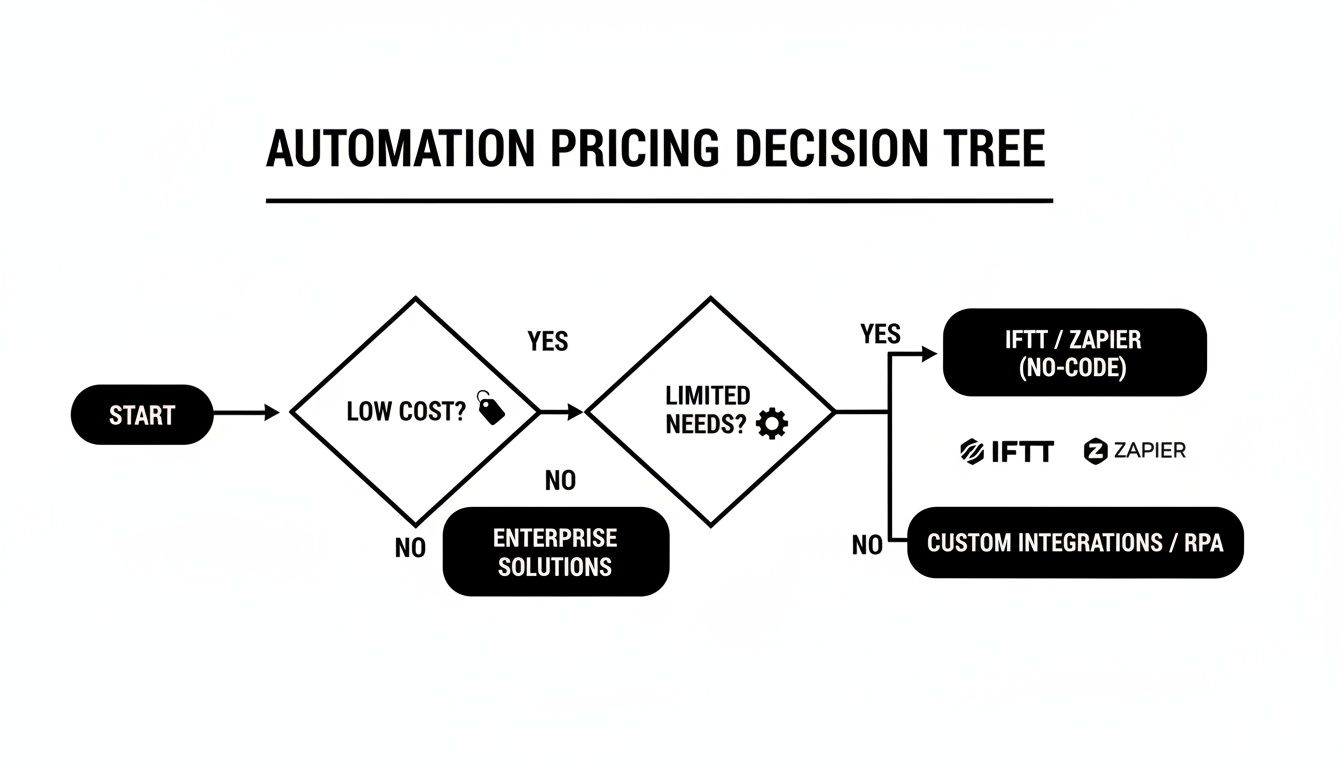
As the flowchart shows, if low cost and simple tasks are your main drivers, IFTTT is the obvious place to start.
A Quick Decision-Making Checklist
Still on the fence? Run through these questions. If you answer "yes" to more than one, your needs are almost certainly pointing toward Zapier.
- Do you need to connect more than two apps in a single workflow?
- Is conditional logic (if this happens, do that) a must-have for your processes?
- Do you need to format or change data (like dates or text) as it moves between your apps?
- Are the apps you need to connect mostly business tools (like Salesforce, HubSpot, or Asana)?
- Is speed a critical factor for your automations (like following up with a new lead instantly)?
At the end of the day, the best choice is the one that actually helps you get your work done. IFTTT offers easy, accessible automation for personal tasks, while Zapier delivers the powerful, scalable engine that modern businesses need to run smoothly and grow.
Got Questions? Here Are Some Quick Answers
When you're weighing IFTTT vs Zapier, a few key questions always pop up. Let's get straight to the point and clear up the common sticking points so you can pick the right tool for the job.
Which One Is Easier for a Total Beginner?
Hands down, IFTTT is the winner here. Its whole "If This, Then That" philosophy is as simple as it gets. The interface is clean, intuitive, and you can build your first "Applet" in a couple of minutes without any technical know-how. It’s designed for simplicity.
Zapier isn't exactly difficult, but it has a slightly steeper learning curve. That's because it’s built to do much more. While its guided setup is fantastic for walking you through your first multi-step "Zap," you'll need a bit more time to explore its full potential.
For anyone brand new to automation, IFTTT is the frictionless choice. Zapier asks for a little more upfront effort but pays you back with serious power for business tasks.
Can I Use Both IFTTT and Zapier at the Same Time?
Absolutely. In fact, it’s a smart, budget-friendly strategy that many people use. You don't have to be on "Team IFTTT" or "Team Zapier"—you can use each for what it does best.
Here’s a practical way to combine them:
- Use IFTTT for simple, personal, or high-volume tasks. Think of things like automatically saving your Instagram posts to a cloud drive, turning on your smart lights, or getting a weather notification. It's perfect for the low-stakes stuff.
- Save Zapier for your mission-critical business workflows. When you need reliability, speed, and advanced logic for things like lead nurturing, customer onboarding, or complex financial tracking, Zapier is the right tool.
This hybrid approach lets you enjoy IFTTT's affordability for everyday automations while keeping Zapier’s heavy-duty power for the workflows that make you money.
What Are the Best Alternatives to IFTTT and Zapier?
While these two are the giants, the automation space has other fantastic players that might be a better fit for your specific situation. If neither IFTTT nor Zapier feels quite right, check these out.
Two of the strongest contenders are:
- Make (formerly Integromat): Known for its visual, flowchart-style builder. It’s a powerhouse for complex logic and data manipulation, often at a price point that gives Zapier a run for its money. It’s a favorite for more technical users who love to see how everything connects.
- Pabbly Connect: This one has made a name for itself with incredibly generous task limits at a very competitive price. For businesses running a high volume of automations, Pabbly often delivers unbeatable value without the premium price tag.
Ultimately, the "best" alternative comes down to your needs. What apps do you use? How complex are your workflows? What’s your budget? Each platform has its own sweet spot.
Ready to stop manually downloading Facebook leads and start converting them faster? LeadSavvy Pro automates the entire process, sending your leads directly to Google Sheets or your CRM in real time. Get started for free today and see how effortless lead management can be.