Mobile CRM for Small Business Unlocking Growth on the Go
Think of a mobile CRM for small business as your entire sales command center, right in your pocket. It's what lets your team manage customer relationships, keep an eye on new leads, and close deals from literally anywhere with a smartphone. This isn't just about convenience; it's about transforming your sales process from something stuck at a desk into a fast, fluid system that gives you a real competitive edge.
The Pocket-Sized Advantage of Mobile CRM
Imagine running your sales operation from your phone. That's exactly what a mobile CRM delivers. This is so much more than a digital address book; it's a powerful tool that completely untethers your team from their desks.
It gives them the freedom to connect with leads, update a customer's details, or move a deal forward whether they're grabbing coffee, on-site with a client, or just between appointments.
It’s like ditching an old-school paper Rolodex for an intelligent, dynamic system that fits in your hand. In a market that moves at lightning speed, having that immediate access to information is a game-changer.
Turning Agility into a Sales Weapon
For any small business, speed is everything. A potential customer who fills out a form online isn't going to sit around waiting for hours. The first person to reach out usually wins the business. This is where a mobile CRM for small business becomes your secret weapon.
This is especially true when you're capturing leads with a tool like LeadSavvy Pro, which instantly gets new leads from sources like Facebook Lead Ads into your hands without any manual data entry.
A mobile CRM puts every critical piece of customer data at your team's fingertips. It turns agility into your most powerful sales tool by closing the gap between a lead showing interest and you having that first crucial conversation. That first interaction is often what makes or breaks a deal.
This isn't just a nice-to-have feature anymore; it’s a non-negotiable part of a modern sales strategy. The numbers don't lie. Data shows that 65% of sales reps who use a mobile CRM hit their sales targets. Compare that to just 22% of reps trying to manage without one. That massive gap shows you everything you need to know.
And it gets better. Companies that adopt mobile CRM solutions see an average productivity boost of 14.6%, simply by empowering their teams to get things done on the move. You can dig deeper into how vital that first touchpoint is by reviewing key speed to lead statistics.
Beyond Convenience: The Real Business Impact
The perks of a mobile CRM go way beyond just being handy. It fundamentally rewires how your team works, leading to real, measurable improvements across the board.
Here’s where you’ll see the biggest wins:
- Spot-On Data Accuracy: When your team can log notes or update contact info right after a meeting, the data in your CRM stays fresh and reliable. No more trying to remember important details hours later.
- Stronger Customer Relationships: Having instant access to a customer's entire history—what they bought, conversations you've had, any support issues—lets you have smarter, more personal conversations. That's how you build real loyalty.
- A More Productive Team: A mobile CRM gets rid of the administrative drag. Instead of waiting to get back to the office, your team can send follow-up emails, schedule calls, and update deal stages in real-time, right from their phone.
Must-Have Features in a Small Business Mobile CRM
When you're hunting for a mobile CRM for your small business, it’s easy to get bogged down by a laundry list of technical specs. But let's be real—the best features aren't about what the software can do. They're about what it can do for you to solve the day-to-day headaches your team actually faces.
Forget the buzzwords for a minute. Let's talk about the practical, non-negotiable tools that turn a simple mobile app into a genuine growth engine for your company. These are the features that save you time, eliminate friction, and flat-out help you close more deals.
An Intuitive Mobile-First User Interface
Here's the hard truth: the most powerful CRM on the planet is worthless if your team hates using it. A true mobile-first design isn't just a shrunken-down desktop website crammed onto a small screen. It’s an experience built from the ground up for quick, on-the-go actions.
Think of it like this: would you rather read a complicated restaurant menu with tiny print or a simple, clear one you can scan in seconds? The right mobile UI lets you find a contact, log a quick note, or update a deal in just a few taps. It feels natural, not like a chore, which is the key to getting your team to actually use it.
Instant and Automated Lead Capture
Manually downloading spreadsheets of new leads is a massive time-sink for any small business. It's slow, full of potential for human error, and creates a painful delay between a lead showing interest and you actually following up. The best mobile CRMs get rid of this process entirely.
This feature is your escape from tedious data entry, and it’s especially powerful when you connect it to your lead sources, like Facebook Lead Ads.
A mobile CRM with instant lead capture acts like a dedicated digital assistant. The moment a prospect hits "submit," their info is automatically and instantly in your system, ready for your team to pounce.
Tools like LeadSavvy Pro were built specifically to solve this problem, making the old "download the CSV" dance a thing of the past. It ensures no lead ever slips through the cracks and your team can engage people while they're still hot.
Real-Time Push and Email Notifications
In sales, timing isn't just important—it's everything. A lead that's only five minutes old is exponentially more likely to convert than one that's been sitting in an inbox for an hour. This is where real-time notifications become an absolute game-changer for a small team.
Think of these alerts as your own personal rapid response system. A push notification on your phone or an instant email lets you know the second a hot lead comes in from a Facebook ad or your website form. You can jump on the opportunity immediately, wowing potential customers with your speed and dramatically boosting your chances of making a sale.
Seamless and Smart Integrations
Your mobile CRM shouldn't be an island. It needs to be the central hub that connects all the other tools you already use every day. Seamless integrations are the bridges that create a smooth, automated workflow.
For most small businesses, a couple of integrations are absolutely vital:
- Facebook Lead Ads: A direct connection automates your entire lead capture from social media, dropping new prospects right into your pipeline without you lifting a finger.
- Google Sheets: Let's face it, many small teams live in spreadsheets. A CRM that syncs with Google Sheets lets you keep your existing workflows while adding the power of a proper customer management system.
The proof is in the numbers. Mobile CRM usage recently saw a 22% year-over-year growth rate, with a whopping 70% of businesses now using these systems. This isn't just a trend; it's driving real results, boosting on-site productivity by up to 50% for teams in the field. And with affordable solutions costing just $10-$20 per user monthly, this technology is well within reach for any small business. You can learn more about the latest CRM adoption statistics on designrush.com.
When you look for a mobile CRM, focusing on these core features is key. They aren't just bells and whistles; they're the engine that drives efficiency and growth.
Core Mobile CRM Features and Their Business Impact
To make it even clearer, let's break down exactly what these essential features do and why they're so critical for a small business trying to punch above its weight.
| Essential Feature | What It Does | Why Your Small Business Needs It |
|---|---|---|
| Mobile-First UI | Provides a clean, easy-to-navigate interface designed for small screens and quick tasks. | Encourages your team to actually use the tool, leading to better data and a higher ROI. No one wants to fight with a clunky app. |
| Instant Lead Capture | Automatically pulls new leads from sources like Facebook Lead Ads directly into the CRM. | Eliminates manual data entry, prevents leads from getting lost, and saves hours of administrative work each week. |
| Real-Time Notifications | Sends instant push or email alerts to your phone the moment a new lead arrives. | Lets you respond to hot leads in minutes (not hours), dramatically increasing your chances of converting them into customers. Speed wins. |
| Key Integrations | Connects the CRM to other essential tools like Facebook Lead Ads and Google Sheets. | Creates a unified system where all your tools talk to each other, automating workflows and keeping all your data in sync without effort. |
These features work together to build a system that doesn't just store your contacts—it actively helps you grow your business by saving time, speeding up your response, and connecting your most important tools.
Choosing the Right Mobile CRM for Your Team
Picking the right mobile CRM isn't about finding the one with the most bells and whistles. It’s about finding the one that actually fits how your team works. Think of it less like software shopping and more like a self-assessment for your business. Before you even glance at a pricing page, you have to get brutally honest about the real problem you're trying to solve.
Is your biggest headache slow response times to new leads? Are you trying to give a field sales team instant access to client history? Or do you just need to stop managing customer conversations from a messy spreadsheet? Nailing this down first is your compass for everything that follows.
Start with a Needs Analysis
Imagine you're outfitting a kitchen. A Michelin-star restaurant needs a massive, complex industrial setup. A small coffee shop just needs a great espresso machine and a reliable oven. Buying an enterprise-level system for your nimble team of five is a surefire way to waste money and create frustration.
To find your perfect fit, ask these questions:
- What's our single biggest bottleneck? Is it the soul-crushing manual data entry? Disorganized follow-ups? Zero visibility into our sales pipeline?
- Who is actually using this thing every day? Are they tech-savvy, or do they need something so simple it requires zero thought?
- What does a "win" look like in six months? Is it a 20% faster response to new leads? Is it better team collaboration? Or is it just having a sales forecast that isn't a wild guess?
Answering these honestly creates a shortlist of CRMs that solve your problems, not just the ones a salesperson says you have.
Evaluate Core Usability and Support
Once you know what you need, it's time to see how the software actually feels to use. The best mobile CRM for small business teams is the one that doesn't feel like a chore. True ease-of-use means your team can log a call, update a deal, or find a contact in seconds—without ever needing to open a user manual.
Don't overlook customer support. This is a huge one. When something goes wrong (and it will), you need a real human who can help, not an endless loop of automated emails. Check reviews and see what actual users say about a company’s support. It tells you everything about how much they care about their small business clients.
A mobile CRM should reduce friction, not create it. If the app is clunky or the support is non-existent, your team will abandon it, and your investment will be wasted. The goal is enthusiastic adoption, not forced compliance.
Prioritize Seamless Integrations
Your CRM absolutely must play well with the other tools you already use every day. A CRM that stands alone on an island creates more work, forcing you to manually shuttle data between systems. That defeats the whole purpose. Integration isn't a nice-to-have; it's a dealbreaker.
For most small businesses, this means your CRM needs to connect flawlessly with:
- Facebook Lead Ads: To pull in new leads automatically and kill the CSV download for good.
- Google Sheets: For teams that still live and breathe spreadsheets for reports or data management.
- Email Clients (Gmail/Outlook): To sync every conversation and create a complete record of communication.
These connections stop data from getting trapped in silos and create one single source of truth for every customer interaction. You can learn more about what to look for in our guide on choosing the right CRM software for a small business.
Demystify Pricing and Use Free Trials
CRM pricing can be a minefield of hidden fees and confusing tiers. Look for providers with transparent plans built for small businesses. Steer clear of long-term contracts until you’re 100% sure it’s the right platform for you. The best options offer simple, per-user monthly pricing that you can scale up or down as your team grows.
Finally, never, ever commit without a test drive. The free trial is your chance to put the system through its paces in the real world. Have your team use the mobile app, connect your critical integrations, and see if it genuinely makes their day easier. This hands-on experience is the single best way to know you’re choosing a partner for growth, not just another piece of software.
From Facebook Clicks to Sales Calls
Let's get real for a second. Your Facebook Lead Ad campaign is crushing it, bringing in a steady stream of prospects. But you're stuck in a loop: download a CSV, copy-paste the data, and watch precious minutes tick by with every new lead. It's a painful "before" picture that too many small businesses know all too well.
Now, picture this: you've got a mobile CRM for small business like LeadSavvy Pro working for you. Your Facebook page is connected. The second a prospect hits 'submit,' their info lands in your mobile CRM or a Google Sheet. Your phone buzzes. Before they can even switch apps, you're on the phone with a warm lead who's genuinely impressed by how fast you are.
This isn't just about convenience. It’s about turning a clunky, time-sucking process into a smooth, revenue-driving machine. It closes that dangerous gap between getting a lead and actually talking to them.
The Manual Nightmare: The Old Way of Handling Leads
For most small teams, the standard way of handling Facebook leads is a total productivity killer. It’s a messy, multi-step routine that works against the one thing that matters most: speed.
Here’s what that manual slog usually looks like:
- Wait and See: Leads just pile up inside your Facebook Ads Manager, often sitting there unchecked for hours, or even days.
- The CSV Dance: You have to log in, find the right page, and download a spreadsheet.
- Data Entry Drudgery: Then you open the CSV and start the mind-numbing task of copying and pasting names, emails, and phone numbers into another system.
- The Follow-Up Fail: By the time you finally make the call, the lead is ice-cold. They’ve forgotten they filled out your form, or worse, they've already talked to your competitor.
This isn't just inefficient; it's costing you money. Every minute you're stuck doing admin is a minute you're not selling. And every delayed follow-up sends your conversion rate into a nosedive.
The Automated Dream: How a Mobile CRM Changes Everything
Plugging in a tool like LeadSavvy Pro flips this entire process on its head. It automates all the boring stuff, freeing you up to focus on what actually grows your business—building relationships and closing deals.
A mobile CRM with Facebook integration is like a direct pipeline from your ads to your sales team. It kills the manual work, makes sure no lead gets lost, and lets you engage prospects the moment they're most interested.
This flowchart breaks down the simple process of picking the right CRM to make this happen.
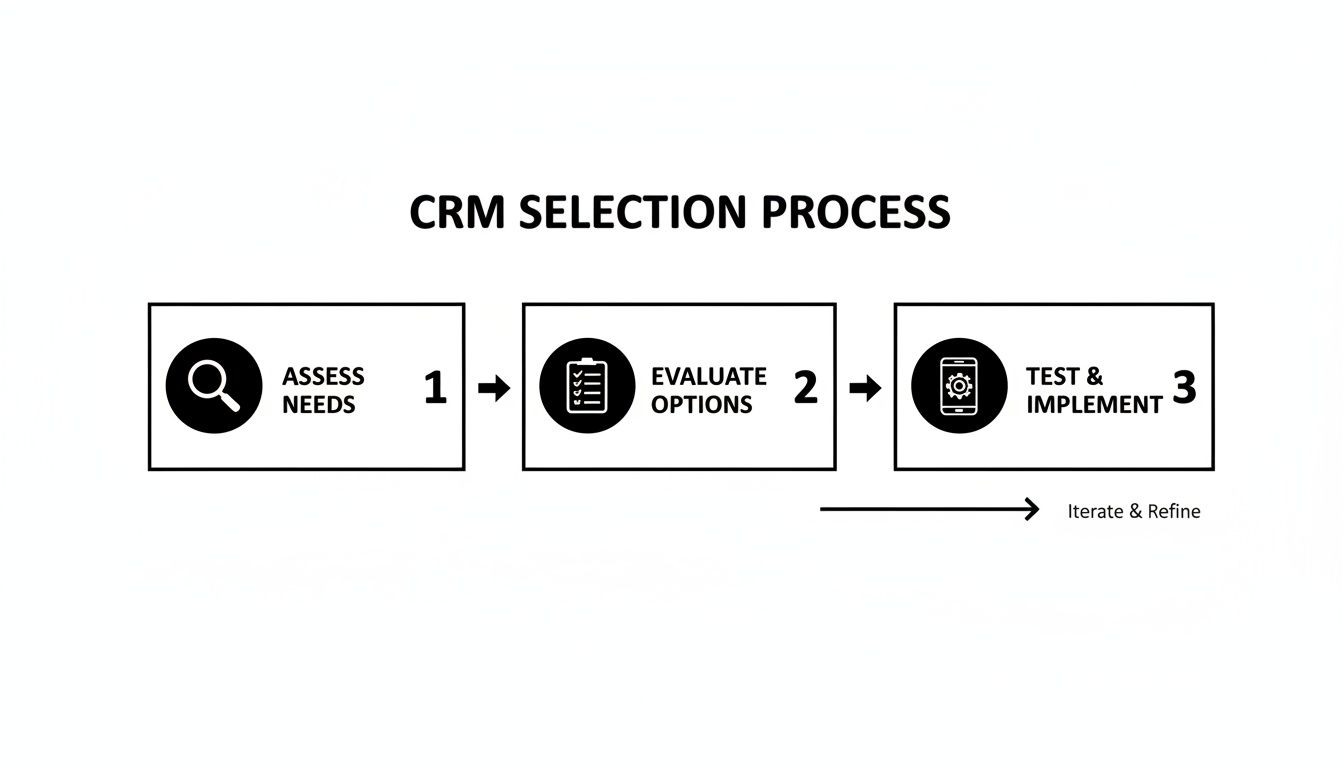
The takeaway here is that it's a straightforward path: figure out what you really need, look at the tools that fit the bill, and then test them out in the real world.
This automated approach doesn't just save you time—it creates a way better experience for your customers. Prospects are wowed by the quick, professional response, which starts the relationship off on the right foot. You can dive deeper into the setup in our complete guide on finding a CRM with Facebook integration.
Expanding Your Lead Generation Strategy
Once you've got your Facebook lead flow on autopilot, you can apply the same logic to other platforms. While Facebook is a great start, it's smart to explore channels like LinkedIn lead generation for small businesses. A good mobile CRM can handle leads from all over the place. The goal is to build a single, unified system where every incoming lead gets the same speedy, efficient treatment, no matter where it came from.
Ultimately, fixing your lead management means switching from being reactive and manual to being proactive and automated. A mobile CRM for small business isn't just software; it's the engine that powers this shift, turning your ad spend into actual sales conversations and real growth.
Putting Your Mobile CRM to Work for Maximum Impact
Choosing the right mobile CRM for small business teams is a huge step, but the real work starts the moment you sign up. A successful rollout isn't just about the software; it’s about your people. The goal is to turn this new app from "just another thing to check" into a daily habit your team can't imagine working without.

This all starts with laying a solid foundation. Before you even think about inviting your team, you need to get your data in order. This means cleaning up your existing contact lists—making sure names, emails, and phone numbers are consistent—and getting them imported cleanly into the new system.
Once your contacts are in, it's time to set up those all-important automated notifications. These real-time alerts are the engine of a mobile CRM, making sure no hot lead ever goes cold. This initial setup is what prepares the system to deliver value from day one.
Getting Your Team on Board
Honestly, the biggest hurdle with any new CRM is getting people to actually use it. If your team sees it as just one more task on their to-do list, it’s doomed. The secret is to frame the CRM not as a management tool, but as a personal assistant that makes their job easier.
Show them how it kills the tedious work they hate, like manually logging calls or digging through old emails for a phone number. Point out how instant lead notifications help them connect with prospects faster, giving them a real edge.
A mobile CRM should feel like a superpower, not a chore. When your team sees that the tool directly helps them close more deals and earn more commission, they won't just use it—they'll embrace it.
Focus on the "what's in it for me" angle. Show them how they can prep for a client call while grabbing a coffee or log meeting notes in the car right after the conversation, when the details are still fresh. That’s how you build genuine excitement and drive real adoption.
Building Smart Mobile Habits
To make the CRM a true daily habit, you need a few simple, non-negotiable ground rules. These routines keep the data clean and ensure the system remains a reliable source of truth for everyone.
Here are three simple habits to lock in from the start:
- Log It Immediately: Every call, meeting, or important email gets logged in the mobile app the second it happens. Waiting until the end of the day is a recipe for forgotten details and messy records.
- Update on the Go: Did a prospect's title change? Did you get a new cell number? Update it in the CRM right then and there. It takes two seconds and keeps the whole team working with the right info.
- Prep Before You Connect: Before any sales call, team members should spend two minutes reviewing the contact's history in the app. This simple prep leads to smarter, more personal conversations that build much stronger relationships.
Making It an Indispensable Tool
The final piece of the puzzle is weaving the CRM into your daily workflows. It shouldn't feel like a separate island. By connecting it to tools you already use, like your email and calendar, it becomes a natural extension of how your team already operates.
For example, when a calendar event for a client meeting is created, a task should automatically pop up in the CRM to follow up afterward. When a lead comes in from a Facebook ad, it should instantly appear on their phone with all the context they need to make that first critical call.
These small, automated connections are what stitch the mobile CRM into the fabric of your daily operations. Over time, your team won't even have to think about using it; it will just become the natural way they manage relationships and drive sales forward.
Common Mobile CRM Pitfalls and How to Avoid Them
Picking a mobile CRM feels like a huge win, but even the best software can fall flat if you trip over a few common hurdles. A lot of CRM rollouts don't live up to the hype, but yours doesn't have to be one of them.
If you know what to watch out for, you can sidestep the traps and make sure your investment actually pays off. It all comes down to keeping things simple, getting your team on board, and making sure your data is clean.
Pitfall 1: Choosing a System That's Way Too Complicated
One of the fastest ways to make sure nobody uses your new CRM is to pick one with a million features you'll never touch. It’s easy to get wowed by fancy dashboards and endless options, but if your team needs a week of training just to log a call, they won't bother.
For a mobile CRM for small business teams, simplicity is the most important feature.
Anything too complex just creates friction. Your team will quickly go back to their old ways—spreadsheets, sticky notes, or just trying to remember everything. Your shiny new tool will end up gathering digital dust.
The Solution: Make "easy to use" your number one priority. When you're in a free trial, ask the least tech-savvy person on your team to try it out on their phone. If they can add a new contact, log a note, and update a deal without asking for help, you've probably found a winner.
Pitfall 2: Forgetting to Train Your Team
You can't just drop a new app on your team and expect them to love it. Without showing them the ropes and explaining why this change is happening, you’re setting yourself up for failure. They'll just see it as more busywork, not a tool to make their lives easier.
This lack of buy-in is the silent killer of CRM success. If the team doesn't get what's in it for them—like faster follow-ups and less typing—they’ll never fully get on board.
A CRM is as much about people as it is about software. It really clicks when your team starts to see it as a personal assistant that helps them win, not just another way for management to track them.
The Solution: Don't train on features; train on benefits. Instead of saying, "Here's how to log a call," try, "Here's how this app helps you follow up in seconds so you can close more deals." Show them how it helps them, and you'll get real excitement.
Pitfall 3: Letting Your Data Get Messy
Your CRM is only as good as the information inside it. The old saying "garbage in, garbage out" is especially true here. If you have wrong phone numbers, duplicate contacts, and outdated deal info, the whole system becomes unreliable.
Once your team loses trust in the data, they'll stop using the CRM. It's a quick downward spiral.
A single bad phone number can lose you a sale. A few of those, and nobody will trust the system enough to use it for anything important.
The Solution: Set up a few simple data rules from day one.
- Log it live: Make it a rule that all notes and updates get entered right after a call or meeting, straight from the mobile app. No more "I'll do it later."
- One owner per lead: Assign every contact or deal to a specific person. This avoids confusion and stops leads from falling through the cracks.
- Quick clean-up: Schedule a quick, 15-minute data review once a month to catch and fix any mistakes.
Answering Your Top Mobile CRM Questions
Jumping into the world of mobile CRMs can bring up a lot of questions, especially for a small business. You need straight answers, not a bunch of jargon. Let's tackle the most common questions we hear from business owners just like you.
My goal here is to cut through the noise and give you the info you need to feel confident about your next move.
How Much Does a Mobile CRM Cost for a Small Team?
Thankfully, most mobile CRM pricing is built for small business budgets. You're typically looking at a range of $10 to $50 per user per month, with different plans based on the features you actually need.
Some tools, like LeadSavvy Pro, even offer a completely free plan to get you started. This is huge because it lets you manage leads without a financial commitment, and you only upgrade if and when your business grows enough to need more firepower.
How Hard Is It to Import My Existing Contacts?
This used to be a nightmare, but most modern CRMs have made it incredibly simple. You can usually upload all your contacts at once from a spreadsheet file, like a CSV. The single most important step, however, happens before you even log in to the CRM.
Take 15 minutes to clean up your spreadsheet. Make sure names, emails, and phone numbers are all in a consistent format. This little bit of prep will save you hours of headaches down the road. A clean import is the bedrock of a good CRM.
Once your data is tidy, the CRM itself will almost always have a simple, step-by-step guide to walk you through the upload.
Can a Mobile CRM Connect Directly to Social Media Ads?
Yes, and honestly, this feature is an absolute game-changer. Any mobile CRM for small business worth its salt should connect directly with platforms like Facebook Lead Ads.
This is exactly what tools like LeadSavvy Pro were built for. They sync new leads the second they come in, which means no more manually downloading CSV files. It empowers you to follow up with an interested person while they're still thinking about you.
Ready to stop downloading spreadsheets and start having real-time sales conversations? LeadSavvy Pro connects directly to your Facebook Lead Ads, sending new leads instantly to your team's phones or a Google Sheet. Get started for free today and see what a difference speed makes.