A Complete Guide to the Meta Conversion API
If you’ve been pouring money into Meta ads since the iOS 14 update, you’ve probably felt the sting of declining performance. You’re not imagining it, and you're definitely not alone. This is where the Meta Conversions API (CAPI) comes in. It’s a server-to-server tool built specifically to fix this data gap, creating a direct pipeline between your marketing data and Meta's ad platform.
Think of it as the ultimate workaround for browser-based tracking issues, designed to bring back the data accuracy you need for killer ad results.
Why Your Ad Tracking Is Broken and How CAPI Fixes It
Does this sound familiar? You’re running a campaign that should be crushing it. Your website analytics are showing sales, but when you look at Meta Ads Manager, it's a ghost town. The numbers just don't match up. This isn't a sign of a bad campaign; it's a symptom of a broken tracking system.
The old way of tracking with tools like the Meta Pixel is hitting a wall. It’s a browser-based system, which means it’s easily blocked by ad blockers, new browser privacy settings, and of course, Apple's App Tracking Transparency (ATT) framework. Every time the Pixel gets blocked, you lose data. This leaves Meta’s algorithm flying blind, trying to guess which of your ads are actually driving results.
The Problem With Incomplete Data
When your ad platform only gets half the story, a whole chain of bad things starts to happen. This isn’t just about making your reports look pretty—it hits your bottom line.
Gaps in your data lead directly to:
- Poor Ad Optimization: Meta can't optimize for conversions it can't see. Your ad spend gets wasted on audiences and creative that aren't actually working.
- Inaccurate Attribution: You can no longer tell which ads, ad sets, or campaigns are responsible for your sales. It becomes impossible to know where to double down and what to cut.
- Weakened Retargeting Audiences: The Pixel is missing visitors and actions, so your custom audiences for retargeting shrink and become far less effective.
Solid Meta Ads Management is built on a foundation of accurate data, and that’s exactly what CAPI delivers. If you want a deeper dive into these challenges, our guide on https://leadsavvy.pro/post/facebook-ad-tracking/ breaks it all down.
Think of the Meta Conversions API as a secure, direct channel from your server straight to Meta's. It's like a VIP courier that completely bypasses all the digital roadblocks that stop the Pixel in its tracks.
This server-to-server connection makes sure your conversion data gets delivered reliably, no matter what happens with third-party cookies or future privacy updates. In fact, advertisers using CAPI report 16.4% higher attribution confidence than those just using the Pixel. CAPI isn’t just some techy fix; it’s a strategic must-have for anyone serious about getting real, measurable results from their Meta ads.
Understanding the Shift from Browser to Server-Side Tracking

To really get why the Meta Conversions API is such a big deal, you have to look at how we used to track ad results. For years, the Meta Pixel was the go-to tool, but the internet has changed, and the Pixel is struggling to keep up. Understanding this shift is the key to future-proofing your entire ad strategy.
Think of the Meta Pixel like sending a postcard. You jot down a message (a purchase, a lead sign-up), and you drop it into a public mailbox (the user's web browser). Most of the time it gets there, but it’s completely exposed. Anyone can interfere with it, it can get lost, or it can get blocked before it ever reaches its destination.
Now, picture the Conversions API as sending a sealed, tracked package straight from your company headquarters (your server). This package is secure, private, and its delivery is basically guaranteed. It completely bypasses the messy public mail system, creating a direct and reliable line of communication with Meta.
Why the Old "Postcard" Method Is Failing
That browser-based "postcard" approach is becoming less reliable by the day. Every time it fails, it creates a hole in your data, leaving you with a blurry picture of how your ads are actually performing.
The main culprits are pretty clear:
- Ad Blockers: Let's be real, a lot of people use them. Over 42% of internet users globally have ad blockers, and these tools often stop the Meta Pixel from even loading. When that happens, any action that user takes is completely invisible to you.
- Cookie Deprecation: Browsers like Safari and Firefox are already cracking down on tracking, and Google is phasing out third-party cookies in Chrome. This guts the Pixel’s ability to follow users across sessions and properly attribute conversions.
- Privacy Regulations: Apple’s App Tracking Transparency (ATT) was a game-changer. It forces apps to ask for permission to track users, and when people say no, the Pixel’s effectiveness on iPhones and iPads drops like a rock.
Relying only on the Pixel today is like trying to fill a bucket with holes. You're losing valuable conversion data with every single visitor.
The Rise of the Server-Side Solution
This is where server-side tracking with the Meta Conversions API steps in and fixes the problem. Because your server sends the data directly to Meta's server, it isn't affected by the user's browser, ad blockers, or most cookie rules. It creates a much stronger and more trustworthy data pipeline.
Server-side tracking isn't just a clever workaround; it's a fundamentally more robust and secure way to handle data. It puts you, the advertiser, back in control of what information gets shared, leading to better accuracy and easier privacy compliance.
This direct connection means more of your actual conversions get recorded. For instance, if a customer using an ad blocker makes a purchase, the Pixel misses it completely. But your server knows the sale happened. With the Conversions API, your server can securely report that event to Meta, ensuring your campaign gets the credit it deserves.
Meta Pixel vs. Conversions API A Head-to-Head Comparison
To see the differences clearly, let's break down how browser-side tracking with the Pixel stacks up against server-side tracking with the Conversions API.
| Feature | Meta Pixel (Client-Side) | Meta Conversion API (Server-Side) |
|---|---|---|
| Data Transmission | Sent from the user's browser | Sent directly from your server |
| Reliability | Vulnerable to ad blockers, cookie restrictions, and browser errors | Highly reliable; bypasses most client-side interruptions |
| Data Control | Limited control; data is sent automatically by the browser | Full control over what data is sent and when |
| Privacy Compliance | Can be complex to manage with evolving privacy laws (e.g., ATT) | Easier to manage user consent and control data sharing |
| Offline Events | Cannot track offline events (e.g., phone sales, in-store purchases) | Can track both online and offline conversions |
| Setup Complexity | Relatively simple; add a JavaScript snippet to your site | More involved; requires server-side configuration or a partner integration |
Ultimately, while the Pixel is easier to set up, the Conversions API provides a far more durable and accurate solution for the modern web.
The key takeaway is that CAPI bypasses the browser's limitations, creating a stable data path that strengthens your ad attribution and optimization. By moving to a server-side approach, you’re not just patching a leak—you're building a stronger foundation for all your advertising on Meta's platforms.
The Core Benefits of Using the Conversions API
Switching to the Meta Conversions API isn't just some techy upgrade—it's a serious strategic move that pays off in real, measurable results. By setting up a direct line from your server to Meta's, you step past the shaky ground of browser tracking and unlock a whole new level of performance for your ads.
Think of it as moving from a fuzzy radio signal to a crystal-clear fiber optic connection. This shift delivers three huge wins: way better data, smarter ad performance, and a marketing strategy that's actually built to last.
Enhanced Data Accuracy
The biggest and most immediate advantage of the Conversions API is the massive jump in data quality. CAPI sends data directly from your server, so it completely sidesteps the common roadblocks that trip up the Pixel, like ad blockers, browser privacy settings, and spotty network connections.
This gives you a much more complete and honest picture of what your customers are actually doing. You can finally track every single conversion with confidence, from online purchases to offline events like phone calls or in-store visits—stuff the Pixel could never see. A clear view of your data is the first step to truly optimizing your campaigns. For a deeper dive, check out our guide on what is conversion tracking.
With this full picture, your attribution gets a whole lot smarter, helping you see which ads are actually pulling their weight.
Improved Ad Performance
Here’s the simple truth: better data fuels Meta’s powerful ad algorithms. When the system gets clean, complete conversion signals, it gets ridiculously good at finding more people who are likely to become your customers. This is absolutely critical for automated campaigns like Advantage+.
A solid Meta Conversion API setup helps the algorithm learn faster and more effectively, which leads to some pretty great outcomes:
- Lower Cost Per Acquisition (CPA): You stop wasting money on the wrong audience and start acquiring customers more efficiently.
- Higher Return On Ad Spend (ROAS): Your budget automatically flows to the campaigns and ads that are actually working.
- Better Audience Building: Your Custom and Lookalike Audiences become razor-sharp because they're built from a much richer, more reliable dataset.
The quality of your CAPI setup has a direct and immediate impact on your campaign performance. We've seen it time and again: a flawed implementation is often the culprit behind sudden performance drops, while a clean setup gives Meta's AI the fuel it needs to work its magic.
The link between a strong Meta Conversion API and AI-driven ad success became painfully obvious in 2025. Bad CAPI setups were a leading cause of major performance crashes, with some advertisers watching their CPMs rocket from $14 to $21 and CTRs tank from 1.5% to 0.8%. On the flip side, accounts with optimized setups saw a 46% reduction in campaign setup time, letting them test and scale faster than ever. To really appreciate what CAPI does for your campaigns, you have to understand What Is Conversion Rate in Marketing.
Future-Proofing Your Strategy
The ad world is always changing. Privacy rules are getting tighter and third-party cookies are on their way out. The Meta Conversion API was built for this new reality, giving you more control and getting you ready for whatever comes next.
By leaning on server-side tracking, you're no longer dependent on the browser cookies that are quickly becoming obsolete. This server-first approach ensures your tracking works today and will keep working tomorrow. You also get full control over what data you share with Meta, making it far easier to comply with privacy laws like GDPR and CCPA while still running powerful, personalized ads.
This isn't just about patching a hole in your current setup; it's about building a smarter, more resilient advertising foundation for the years to come.
Picking the Right Way to Set Up CAPI
Alright, so you’re sold on the Meta Conversions API. Now for the big question: how do you actually get it working?
Meta gives you a few different paths to get up and running. Think of it like getting across town: you can hop on the public bus, build your own custom car, or call a special delivery service for those tricky packages. Each one gets you to the same destination—sending your server data to Meta—but the journey is totally different.
The right choice really boils down to your current tech setup, whether you have developers on hand, and what kinds of conversions you're trying to track. Let's walk through the three main options so you can find the perfect fit.
Partner Integrations: The Easiest On-Ramp
For most businesses, this is the way to go. If you're using a popular e-commerce or marketing platform, partner integrations are hands-down the fastest and simplest way to set up the Meta Conversions API. It requires little to no coding because you’re using connections that have already been built by the platforms you use every day.
This is your "public bus" route—it's super efficient, follows a set path, and you don't have to build the engine yourself. The big players have already done all the heavy lifting.
Common partner integrations include:
- E-commerce Platforms: Tools like Shopify, WooCommerce, and BigCommerce have native setups or apps that you can get running in just a few clicks.
- Tag Management Systems: Google Tag Manager (GTM) is a game-changer here. Its server-side container lets you roll out CAPI without ever having to touch your website's backend code.
- Customer Data Platforms (CDPs): If you use a tool like Segment, it can pull event data from all over and send it straight to the Conversions API as part of your bigger data strategy.
This screenshot from Meta's own docs shows just how easy it is to pick your platform and get started.
The key takeaway? Meta has gone out of its way to make CAPI accessible for everyone by teaming up with the tools you already know and trust.
Direct API Integration: The Developer-Led Path
Got a custom-built website, a unique tech stack, or just want total control over your data? Then a direct API integration is your most powerful option. This is the "custom-built car" approach—you'll need a skilled mechanic (your developer), but you get to dictate every last detail of its performance and design.
With this method, your dev team writes code that sends data directly from your server to Meta's Conversions API endpoint. It's definitely more technical, but the flexibility is unbeatable.
A direct integration gives you the ultimate say over your data. You can fine-tune exactly which events get sent, what customer info is included, and how the entire flow lines up with your own internal privacy and security rules.
This path is perfect for businesses that:
- Have developers in-house or on retainer.
- Need to track very specific or custom conversion events.
- Run on a proprietary CRM or backend system that doesn't have a ready-made integration.
While it's more involved, this method ensures the Meta Conversions API is molded perfectly to your unique business needs.
Offline and CRM Solutions: The Hybrid Approach
But what about sales that don't even happen on your website? Think about a deal closed over the phone, a subscription upgrade processed in your billing system, or a purchase made in your physical store. The Pixel is completely blind to these, but they are pure gold for optimizing your ads.
This is your "special delivery" service, built for tracking conversions that don't follow the typical online path. Tools like Zapier or LeadsBridge act as the middleman, grabbing data from one system (like your CRM) and reformatting it for the Conversions API.
For example, when a sales rep marks a lead as "Won" in Salesforce, an automation can fire off a Purchase event to CAPI. Just like that, you've tied an offline sale directly back to the Meta ad campaign that started it all. This approach is a must-have for any business with a longer sales cycle or important offline touchpoints, giving you a true 360-degree view of how your ads are performing.
Mastering Event Deduplication and Match Quality
Getting the Meta Conversions API set up is a huge first step, but the real magic happens when you start optimizing it. A successful implementation isn’t a “set it and forget it” deal. To make sure your data is clean, accurate, and actually useful for Meta's algorithms, you have to nail two things: event deduplication and event match quality.
Think of it like tuning a high-performance engine. You've installed the engine (CAPI is running), but now you need to dial in the fuel mixture and timing to get maximum horsepower. These two practices are the tune-ups that turn a basic setup into a high-octane marketing machine.
If you skip this, you risk sending Meta messy, duplicated data or information so generic it can’t connect it to real users. Mastering these concepts is what separates campaigns that just sputter along from those that truly scale.
Preventing Double Counting with Event Deduplication
If you're using both the Meta Pixel and the Conversions API—which is the recommended approach—you’re sending event data from two different sources. When a user buys something, the browser (Pixel) and your server (CAPI) both report it. Without a way to connect these signals, Meta would see two separate sales, completely wrecking your performance metrics.
This is where event deduplication is absolutely critical. It’s Meta’s system for realizing that two event signals are actually the same conversion, making sure each action is counted only once. The whole process hinges on a unique identifier that you send with both your Pixel and CAPI events.
This identifier is like a unique tracking number on a package. When Meta gets two packages with the same number, it knows they’re for the same order and only logs one delivery. Simple, right?
To get this working, you must:
- Generate a Unique
event_id: For every single conversion action, your system has to create a unique ID string. - Send it via Both Channels: This exact same
event_idhas to be included in the Pixel event payload from the browser and the Conversions API payload from your server.
By matching the event_name (like Purchase) and the event_id, Meta intelligently tosses the duplicate. The result? Clean and reliable conversion data you can actually trust.
This flow diagram shows the different ways data, like from partner integrations or direct API calls, can feed into your CAPI workflow.
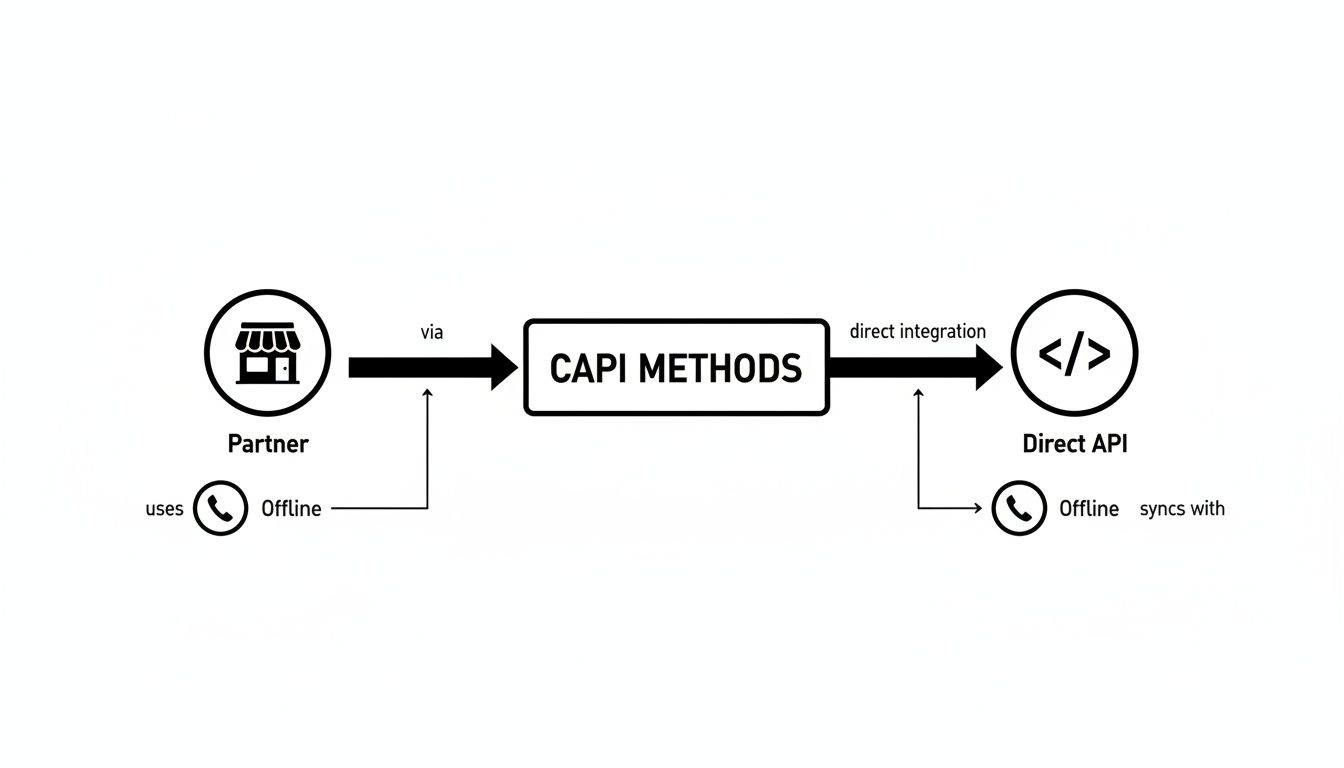
No matter which method you use, making sure every event has a unique ID is the key to accurate deduplication across all your data streams.
Boosting Ad Performance with Event Match Quality
While deduplication keeps your data accurate, Event Match Quality (EMQ) determines how useful that data is. This is a score, rated from 1 to 10 in your Events Manager, that measures how well Meta can link your server events to actual user profiles on its platforms. A low score means Meta is just guessing who your customers are.
A high score, on the other hand, is a complete game-changer. It directly improves ad delivery, lowers your Cost Per Acquisition (CPA), and makes your Custom and Lookalike Audiences way more powerful. You can learn more about how this affects your campaigns in our complete guide to Facebook Ads conversion tracking.
Your Event Match Quality score is a direct reflection of how well you're feeding Meta's optimization algorithm. A high score is like giving the algorithm a clear photo of your ideal customer; a low score is like giving it a blurry, unrecognizable sketch.
To raise your EMQ, you need to securely send more customer information with your server events. This data helps Meta pinpoint the exact user who completed an action. Of course, all personally identifiable information (PII) must be hashed before it's sent to protect user privacy.
The most impactful parameters you can include are:
- Email Address (
em): A hashed email is one of the strongest identifiers you can provide. - Phone Number (
ph): Also hashed, this gives another high-quality match point. - First and Last Name (
fn,ln): Hashed names add another layer of certainty for Meta. - Click and Browser IDs (
fbc,fbp): These cookies are crucial for connecting a user’s browser session to their Meta profile.
By consistently including these hashed data points in your Meta Conversion API payloads, you dramatically increase the probability of a successful match. Check your EMQ score in Events Manager regularly and make it a priority to improve it—it's one of the most direct levers you can pull to boost your ad performance.
Your Top Questions About the Meta Conversion API, Answered
Jumping into the technical side of the Meta Conversion API (or CAPI) can feel a bit daunting. Don't worry, it's pretty common to have a few questions. Let's clear up some of the most frequent ones so you can move forward with confidence.
Do I Still Need the Meta Pixel If I Use CAPI?
Yes, you absolutely do. This isn't an either/or situation. The best-in-class setup is to run both the Meta Pixel and the Conversions API at the same time.
Think of them as a tag team. The Pixel is your eyes on the ground, capturing everything happening in the user's browser. CAPI is your insider source, reporting back directly from your server. When they work together, you get a much stronger, more complete data picture. If an ad blocker or browser update stops the Pixel, the Meta Conversion API is right there to pick up the slack, making sure you don't miss out on crucial conversion data. Meta is smart enough to deduplicate the events, so you only see the most accurate, combined results.
What Is Event Match Quality and Why Does It Matter So Much?
Event Match Quality, or EMQ, is a simple score from 1 to 10 that tells you how good Meta is at connecting the dots between the conversion event you sent from your server and an actual user on its platform. A high score means better attribution, which leads to smarter ad spending and better results.
A high EMQ score is like handing Meta a crystal-clear photo of your customer. A low score is like a blurry, hand-drawn sketch—it makes it way harder for the algorithm to find more people just like them.
To get that score up, you need to send more hashed customer details—like an email, phone number, or name—along with your CAPI events. This gives Meta's system the confidence to say, "Yep, we know exactly who this is." That direct match is what fuels better ad targeting and helps the algorithm optimize your campaigns effectively.
Can CAPI Track Offline Conversions?
Yes, and honestly, this is where CAPI really shines. It has the superpower to track events that happen entirely offline, something the Pixel could never dream of doing on its own.
Think about these real-world scenarios:
- A customer makes a purchase in your brick-and-mortar store.
- Your sales agent closes a massive deal over the phone.
- A user upgrades their subscription through your CRM system.
By sending this information from your server or CRM straight to Meta, you can finally connect those offline sales back to the online ads that drove them. This gives you a true, full-funnel view of your marketing ROI.
Ready to stop manually downloading leads and start syncing them instantly? LeadSavvy Pro automates your lead capture from Facebook, sending new leads directly to your Google Sheet or CRM. Start for free at https://leadsavvy.pro and streamline your workflow today.