Choosing the Right Marketing Agency CRM to Scale Your Business
So, what exactly is a marketing-agency CRM? Think of it as a specialized Customer Relationship Management system built from the ground up to handle the messy, multi-client world that agencies live in. Unlike a generic sales CRM, it pulls your client communication, project management, and sales pipeline into one central hub.
Your Agency's Central Command Center

Ever feel like you're trying to conduct an orchestra where the musicians are in different rooms, all playing from different sheet music? That's the chaos of running an agency without the right CRM. It’s a mess of disconnected spreadsheets, endless email chains, and project tools that refuse to talk to each other. The result? Missed deadlines and unhappy clients.
A proper marketing agency CRM is your conductor's podium. It gives you a single, unified view of every client, project, and sales opportunity. This isn't just another sales tool; it's software designed specifically for the project-based, multi-client reality of agency life.
More Than Just a Contact List
Off-the-shelf CRMs are typically built for a straight line: a lead becomes a prospect, who then becomes a customer. Simple. But agency relationships are anything but simple. You’re juggling ongoing retainers, one-off projects, and multiple campaigns for dozens of clients all at once. An agency CRM gets this.
It’s not just a fancy place to store phone numbers. It’s a command center that helps you:
- Manage client projects, campaigns, and all the deliverables that go with them.
- Track your team’s hours to see which projects are actually profitable.
- Keep an eye on your sales pipeline and forecast revenue.
- Automate repetitive tasks like client onboarding and reporting.
This ability to manage complexity is why a good CRM is no longer a "nice-to-have" for agencies—it's essential for survival and growth.
The global CRM market is currently valued at around $101.4 billion and is projected to hit $262.74 billion by 2032. This incredible growth is driven by one thing: the need to keep customers happy. For agencies, that means efficiently managing countless client campaigns, and a CRM is the key. You can dig into more CRM market trends in Kixie's research.
At the end of the day, a marketing agency CRM brings order to the chaos. It frees your team from soul-crushing admin work so they can focus on what they do best: getting amazing results that keep clients signing on for more. It's the foundation you build scalable growth on.
Must-Have Features of a Powerful Agency CRM
Let's be honest, not all CRMs are created equal. This is especially true when you're a marketing agency trying to wrangle dozens of clients, campaigns, and projects all at once. A generic sales tool might be great for tracking deals, but it falls apart when you need a central hub for your entire operation.
A true marketing agency crm is built for this kind of organized chaos. Choosing the right one means hunting for specific features designed for your world. These aren't just flashy add-ons; they're the non-negotiables that will either fuel your growth or become a major bottleneck.
Project Management Within Client Records
One of the biggest game-changers is having project management baked right into your client records. Instead of bouncing between your CRM and a separate tool like Asana or Trello, your team can manage tasks, hit deadlines, and track deliverables from a single screen. Everything lives in one place.
Think about it. A client calls with a random question about a campaign. With integrated project management, anyone on your team can pull up their profile and instantly see:
- The real-time status of every active project.
- Recent emails, notes, and approvals.
- Upcoming milestones and deadlines.
This single source of truth cuts down on confusion and gives everyone the context they need to give a smart, fast answer. That's how you build client trust.
Pipeline Tracking for Agency Sales
The agency sales cycle is a different beast entirely. You're juggling one-off projects, monthly retainers, and potential upsells with clients you already have. A standard sales pipeline just doesn't get it, turning your revenue forecast into a wild guess.
A solid agency CRM gives you a pipeline you can actually customize to reflect how you sell. You can create different stages for different services, track where your proposals are at, and get a much clearer picture of your sales health. This helps you focus your energy on the deals that are most likely to close. If you want to dive deeper, you can explore this comprehensive feature list for a powerful agency CRM.
Key Takeaway: A specialized CRM should give you a 360-degree view of every client relationship, merging communication history, project status, and financial data into one accessible record.
Seamless Third-Party Integrations
Your CRM can't be an island. It has to play nicely with all the other tools you depend on every day, whether it's your email marketing platform, accounting software, or lead gen tools. Strong integrations are what make automation possible, saving you from the soul-crushing task of manual data entry. You can learn more about how these connections work in our detailed guide on what is CRM integration.
Thankfully, the move to cloud-based systems has made this easier than ever. In fact, cloud-based CRMs now account for 87% of all CRM deployments, a massive leap from just 12% in 2008. Agencies have flocked to them for good reason—they provide the flexibility and real-time data access you need to manage everything from anywhere.
To help you sort through the noise, it's useful to think about CRM features in two buckets: what you absolutely need to run your agency, and what's nice to have as you scale.
Essential vs. Nice-to-Have CRM Features for Agencies
Here’s a quick breakdown to help you prioritize your CRM shopping list.
| Feature Category | Essential Features | Nice-to-Have Features |
|---|---|---|
| Client Management | Centralized client records, communication history (email, calls), contact database. | Client portal for self-service, custom fields for niche data. |
| Sales & Pipeline | Customizable sales pipelines, deal stage tracking, revenue forecasting. | Lead scoring, automated sales sequences, proposal generation. |
| Project Management | Task creation and assignment, project timelines, file sharing within client records. | Time tracking, resource allocation, Gantt charts. |
| Reporting | Standard sales reports (win/loss rates), client activity dashboards. | Advanced analytics, custom report builder, predictive analytics. |
| Integrations | Email (Gmail/Outlook), Calendar, Accounting (QuickBooks), Marketing Automation. | Social media management, advanced API access,Zapier integration. |
Focus on nailing the essentials first. These are the core functionalities that will give you the biggest immediate impact. The "nice-to-have" features can always be added later as your agency grows and your needs become more complex.
How to Automate Workflows for Maximum Efficiency
Let's be honest, a powerful CRM should do more than just sit there holding your data. It needs to actively work for you. The real magic happens when you build automated workflows that take over the repetitive, soul-crushing tasks, freeing up your team to focus on what they do best: strategy and getting clients amazing results.
Think of it this way: automation transforms your CRM from a simple database into the most efficient member of your team.
The first step is to map out your entire client journey right inside the CRM. This means creating a series of automated actions that fire off at key moments—from the second a new lead comes in to the moment a client starts their onboarding. A system like this ensures nothing ever falls through the cracks and every single client gets a consistent, top-notch experience.
From Lead Capture to Client Onboarding
Imagine someone fills out a form on your website. Instead of that lead languishing in an inbox waiting for someone to notice it, an automated workflow can instantly create a new contact and deal in your CRM, assign it to a sales rep, and fire off a personalized "Hey, we got your info!" email. That immediate response can make all the difference in turning a casual inquiry into a closed deal.
The same logic applies perfectly to client onboarding. Once a deal is marked as "won," your CRM can automatically kick off a whole sequence:
- Create a new project using your go-to template.
- Assign the initial onboarding tasks to your team.
- Send a welcome packet and a link to book a kickoff meeting directly to the new client.
This flow chart gives you a bird's-eye view of how a CRM connects your core agency functions, tying the sales pipeline directly into project delivery and ongoing client management.
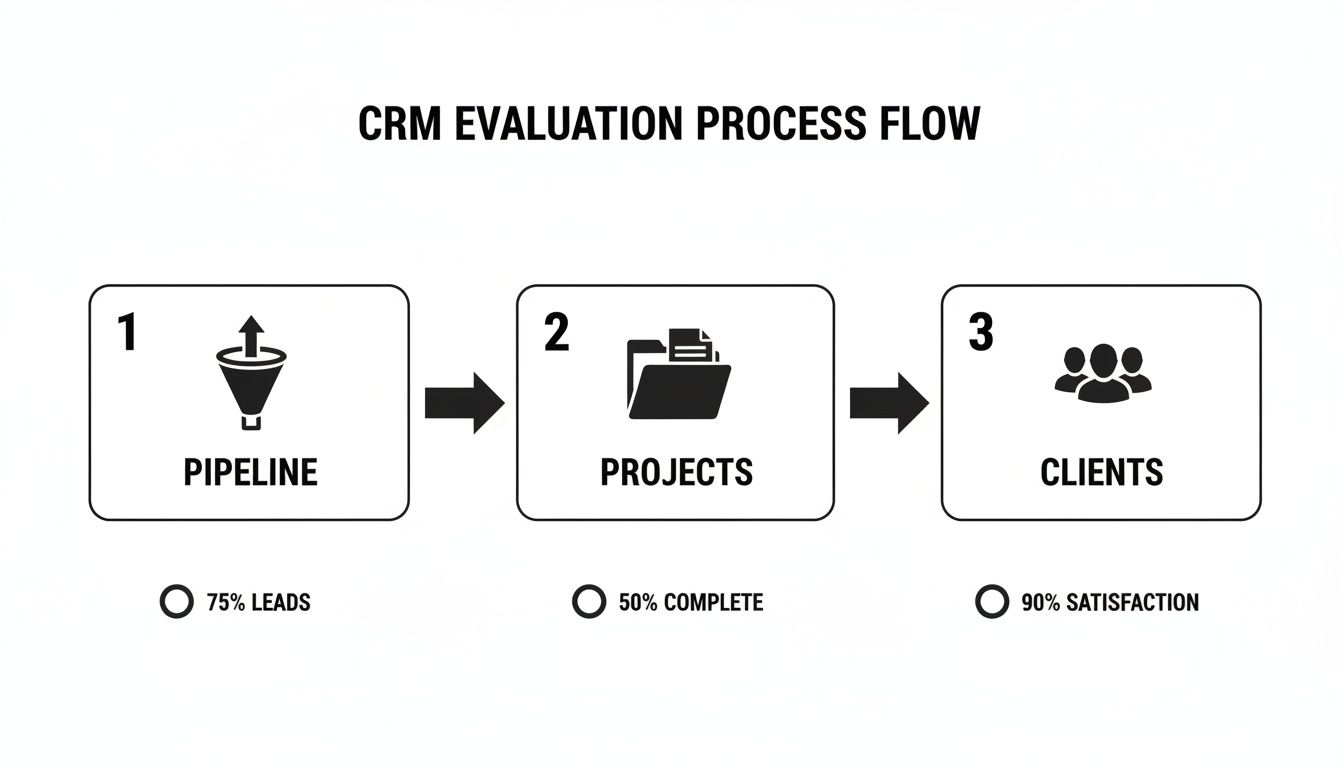
This kind of visualization shows how a properly set up CRM breaks down the walls between your departments, creating one smooth, cohesive process.
Automating High-Value Lead Sources
For agencies, one of the biggest game-changers is syncing social media leads directly into the CRM. Manually downloading CSV files from Facebook Lead Ads is painfully slow and inefficient. It creates a critical delay, and every minute you wait, that hot lead is getting colder.
This is where automation becomes your secret weapon. Using a tool like LeadSavvy Pro, you can build a seamless bridge between your Facebook campaigns and your CRM. When a prospect hits "submit" on a Facebook Lead Ad, their info is instantly and automatically pushed where it needs to go.
Key Insight: The whole point of workflow automation is to eliminate friction. When you get rid of manual data entry and slash your response times, you create a much smoother experience for both your team and your potential clients. That directly impacts your bottom line.
This simple sync can set off a powerful chain reaction:
- Instant Notification: Your assigned sales rep gets an immediate alert.
- Automated Follow-Up: The lead is dropped into a welcome email or text message sequence.
- Task Creation: A task is automatically created for the rep to call the lead within the hour.
You simply can't achieve this level of speed and organization by hand, especially when you're juggling campaigns for multiple clients. You can dive deeper into how this all works by reading our guide on what is CRM automation. By building these kinds of workflows, you're not just being more efficient—you're making it much easier to prove the ROI of your marketing efforts.
A Strategic Framework for Choosing Your CRM
Picking a CRM for your agency is a huge deal. Get it right, and you’ll unlock serious growth. Get it wrong, and you're stuck with a costly, frustrating mess that slows everyone down.
So how do you avoid that? Forget the flashy feature lists for a minute. The key is to start with a clear framework that cuts through the noise and zeroes in on what your agency actually needs to win.
Think of it like building a house. You wouldn't pick out the couches before you have a blueprint, right? Your blueprint starts with identifying your biggest operational headaches. Are you drowning in manual data entry? Is figuring out project profitability a total guessing game?
By getting crystal clear on these problems first, you create a scorecard to judge every potential CRM against. The conversation shifts from "What can this software do?" to "How will this software fix our specific problems?" This is how you end up with a genuine asset, not just another expensive subscription.
Nail Down Your Core Needs and Priorities
Before you even think about booking a demo, get your team in a room and map out your workflows. Seriously, whiteboard it. Trace the journey from a new lead to a happy client, and from project kickoff to final invoice. This simple exercise will instantly shine a light on the bottlenecks a CRM must solve.
Your priority list might look something like this:
- Centralized Client Communication: One single place to see every email, call, and note for each client. No more digging through inboxes.
- Integrated Project Management: The power to manage tasks, milestones, and deadlines right inside a client’s record.
- Accurate Revenue Forecasting: A sales pipeline you can actually customize to match how your agency sells, not some generic template.
This internal audit is the most important step you'll take. Skip it, and you're just flying blind.
Evaluate Scalability and Future Growth
The CRM that works for your scrappy five-person team today might completely buckle when you hit 20 people. You have to look beyond your immediate needs and think about where you want your agency to be in three, or even five, years.
Ask the tough questions. How well does this platform handle more users, more clients, and way more data?
A CRM should be a long-term partner in your agency's growth, not a temporary fix. Choosing a system with a clear upgrade path and a robust infrastructure prevents the painful process of migrating to a new platform down the line.
Look for a system that's built to grow with you. For a comprehensive look at the top contenders, check out our guide on the 12 best CRMs for agencies to compare scalable options.
Assess Integrations and the Total Cost of Ownership
Finally, remember that a CRM doesn't live on an island. It has to play nice with the other tools you already depend on every single day—your accounting software, your email marketing platform, your proposal tool, you name it.
Make a list of your must-have software and double-check that any CRM you're considering has solid, native integrations for them. For a major tech decision like this, it can be a game-changer to get guidance from expert business IT consulting services to help build your strategy and nail the implementation.
And don't forget to calculate the total cost of ownership (TCO). This isn't just the monthly subscription fee. Factor in one-time setup costs, data migration expenses, and any paid add-ons you'll need. Getting this full financial picture upfront protects you from nasty surprises and ensures your investment actually pays off.
Ensuring Successful CRM Implementation and Team Adoption

Even the most powerful marketing agency CRM is completely useless if your team doesn't actually use it. The real work begins after you sign the contract. This is the implementation and adoption phase, and it's the moment of truth that decides whether your new software becomes a core asset or just an expensive spreadsheet everyone ignores.
Success all comes down to a deliberate, phased rollout. Rushing this process is a classic mistake, and it always leads to messy data and a frustrated team. Instead, treat it like a strategic mission with clear steps: planning, migrating data, customizing the platform, and training your people.
The first step is one that agencies often skip: data hygiene. Migrating years of disorganized contacts and messy deal info is like moving into a brand-new house but bringing all your old junk with you. Before you import a single contact, take the time to clean and standardize your existing data. A clean start prevents bad habits from carrying over and makes sure your team trusts the information they see from day one.
Building a Foundation for Buy-In
Once your data is clean, it's time to tailor the platform to your agency's unique rhythm. This is where you customize your sales pipelines, create project templates, and build out the specific automated workflows your team desperately needs. Don't just copy and paste your old, clunky processes. Use this as a chance to refine and improve them.
But the technical setup is only half the battle. The human side of the equation is what truly makes or breaks a CRM rollout. You need genuine buy-in from the people who will be clicking around in it every single day.
To get there, focus on these crucial steps:
- Appoint a CRM Champion: Pick one person to be the internal expert and go-to resource. This champion will keep the momentum going, answer questions, and be the biggest advocate for doing things the right way.
- Conduct Role-Specific Training: Stop putting everyone through the same generic training session. Show your account managers how the CRM helps with client reporting. Teach your sales reps how it automates their follow-up sequences. Make it relevant to their job.
- Celebrate Early Wins: When the CRM helps someone land a new client or makes their job easier, shout it from the rooftops. Positive reinforcement gets everyone else excited to jump on board.
Key Insight: Successful CRM adoption isn’t about forcing a new tool on your team. It's about proving how it solves their biggest headaches, makes their jobs easier, and helps the entire agency get better results for clients.
Making Adoption Stick
Finally, you can't just set it and forget it. Ongoing support is absolutely essential. Adoption isn't a one-time event; it's a continuous process.
Schedule regular check-ins to get feedback and find out where the friction is. Are there workflows that could be better? Are people getting stuck on certain features?
By actually listening to your team and making small, iterative improvements, you turn the CRM from a management mandate into a tool everyone wants to use. This proactive approach is how you turn a software investment into the foundational engine of your agency’s growth for years to come.
Common Questions About Agency CRM Software
Jumping into the world of agency CRMs usually brings up the same handful of questions. Getting straight answers is the key to picking the right tool and not ending up with a glorified, expensive spreadsheet.
Let's cut through the noise and tackle the questions we hear most often from agency owners.
Can I Use a Standard Sales CRM for My Agency?
You can, but it’s like trying to fit a square peg in a round hole. It rarely ends well. Standard CRMs are built for a simple, one-way street: a lead comes in, moves down the sales pipeline, and becomes a customer. Done.
But that's not how agencies work, is it? We're juggling dozens of clients, each with their own projects, retainers, and campaigns running all at once. A generic sales CRM just isn't built to handle that kind of organized chaos.
A true marketing agency CRM is designed with the client relationship at the center. It lets you manage projects, track time, and report on campaign performance for each client individually. Trying to force a standard sales CRM to do this is a recipe for frustration and messy data.
What Is the Biggest Mistake Agencies Make When Choosing a CRM?
The single biggest mistake? Getting distracted by shiny features and completely forgetting about the people who have to use the software every day.
Agency owners see a long list of bells and whistles and get excited, but they fail to map out a clear plan for getting their data moved over, setting up workflows that actually make sense, and training their team.
This leads to the #1 killer of any new software: poor adoption. If your team doesn't get why they should use it or how it makes their life easier, the CRM quickly becomes a ghost town. It's no longer the central hub you paid for—it's just a neglected database that nobody trusts.
How Does a CRM Improve Client Retention?
A great agency CRM becomes your single source of truth for everything client-related. Every email, every project update, every campaign report—it's all in one place. That organized data is your secret weapon for keeping clients happy.
It allows your account managers to stop being reactive and start being proactive. They can pull insightful performance reports in minutes, spot a potential issue before the client even knows about it, and consistently prove your agency's value with cold, hard data.
That level of transparency and organization builds incredible trust. And trust is the foundation of every long-term client relationship.
How Can I Integrate Facebook Lead Ads?
Still manually downloading CSV files from Facebook? That's a huge time-waster and a lead-killer. Every minute that passes between someone filling out your form and you contacting them, their interest drops. A hot lead goes cold fast.
The best solution is to use an automation tool to build a bridge between your Facebook ads and your CRM.
This is where a dedicated tool shines.
- Instant Sync: The second a lead comes in on Facebook, it appears in your CRM. No delay.
- Triggered Actions: That new lead can instantly kick off an automated welcome email, a text message, or a task for your sales rep to follow up.
- No More Lost Leads: It ensures every single person who showed interest gets attention immediately.
This simple connection is a game-changer for your speed-to-lead, which is one of the most important factors in turning social media leads into actual paying clients.
Stop wasting time on manual downloads and never miss a lead again. With LeadSavvy Pro, you can instantly sync your Facebook leads to your CRM or a Google Sheet, triggering immediate follow-ups and giving your team the speed it needs to win. See how it works by visiting https://leadsavvy.pro and start your free plan today.