A Guide to Instagram Lead Ads That Convert
Instagram lead ads are a game-changer for grabbing customer details right inside the app. By using a pre-filled form, you make signing up ridiculously fast and easy.
This frictionless experience means you can collect emails, phone numbers, and other juicy data without ever forcing users to leave their Instagram feed.
Why Instagram Lead Ads Are a Growth Engine

Before we jump into the setup, it’s worth understanding why Instagram lead ads give you such a strategic edge. Unlike old-school ads that punt users to a clunky, slow-loading landing page, lead ads keep the whole process native to the platform. That simple tweak makes a world of difference, dramatically cutting friction and sending your form completion rates through the roof.
This is especially potent when you consider Instagram's absolutely massive and growing audience. As of early 2025, the platform's ad reach hit a staggering 1.74 billion people worldwide—that’s over 90 million new users in just one year. Instagram is still outpacing its rivals, making it a golden channel for finding new customers.
When you tap into this audience with formats like Reels—which can pull in 27% higher engagement—you get a direct line to people genuinely interested in what you're offering.
Lead Ad Performance Snapshot
To give you a clearer picture, here’s a quick look at some typical metrics that show why these ads are so effective for business growth.
| Metric | Typical Benchmark |
|---|---|
| Conversion Rate | 10-15% (often higher) |
| Cost Per Lead (CPL) | $5 – $50 (varies by industry) |
| Lead Quality | High (due to user intent) |
| Form Completion Rate | ~50% (vs. ~15% for landing pages) |
These numbers highlight just how much more efficient lead ads can be compared to traditional methods that rely on external websites.
Tapping Into a High-Intent Audience
The real magic of Instagram lead ads is their power to connect with users who are already looking for solutions. You aren't just shouting into the void; you're engaging a visually-driven audience that's open to discovering new brands and products right in their feed.
This approach is a massive advantage in the broader world of B2B lead generation. While there are plenty of channels out there, Instagram serves up a unique combo of massive scale and pinpoint precision.
Here are a few key advantages I've seen firsthand:
- Seamless User Experience: Forms get pre-populated with data from their profile. It’s so easy for users, they just tap a couple of buttons, and they’re done.
- Precise Targeting: You can layer demographic, interest, and behavioral data to zero in on your perfect customer. It's incredibly powerful.
- Cost-Effective Acquisition: By cutting out the need for complex landing pages, you often get a much lower cost per lead.
Key Takeaway: The biggest strength of Instagram lead ads is their ability to generate high-intent leads by making it incredibly simple for a user to convert. This streamlined process almost always leads to better campaign performance and a higher return on your ad spend.
Once you get the hang of this ad format, you can build a reliable and scalable engine for growing your business. For more strategies on this, check out our complete guide on social media lead generation.
Now, let's walk through how to turn this potential into real results.
Building Your First High-Converting Campaign
Alright, let's jump into Meta Ads Manager and turn that strategy into a real, lead-generating campaign. This is where the rubber meets the road. Getting these foundational steps right is critical—it’s the difference between a campaign that sings and one that just drains your budget.
Your very first click inside Ads Manager is choosing the campaign objective. For Instagram lead ads, you have to select the 'Leads' objective. This might seem obvious, but it’s a non-negotiable step that tells Meta's algorithm exactly what you want: people who are likely to stop scrolling and fill out your form. This choice frames everything that comes next.
Defining Your Audience and Budget
Once you’ve set your objective, you’ll land in the ad set configuration. Here, you’re telling Meta two things: who to show your ad to and how much you’re willing to spend. A classic rookie mistake is setting the budget too low. The algorithm needs enough data to learn and optimize, so I always recommend starting with a daily budget you’re comfortable running for at least a week straight.
Now for the fun part: targeting. This is where you can really dial things in. Don't just stick to age and location. Layer your targeting to find your ideal customer.
- Interests: Go after users based on pages they’ve liked or topics they follow, like "digital marketing" or "sustainable fashion."
- Behaviors: You can target people based on their online actions, like "engaged shoppers" who frequently click "Shop Now" buttons.
- Custom Audiences: This is huge. Upload your email list or create an audience of people who have already engaged with your Instagram profile. It’s perfect for retargeting warm leads.
Pro Tip: When you're just starting, don't strangle your campaign with super-narrow targeting. Give the algorithm some breathing room with a slightly broader audience. As the data rolls in and you see who's actually converting, you can start tightening the screws.
Choosing Your Ad Placements
Next up: deciding where on Instagram your ads will actually show up. Meta’s default Advantage+ placements can work well, but for your first campaign, I’d suggest taking the wheel and selecting your placements manually. This gives you way more control.
For Instagram, your main real estate options are:
- Instagram Feed: The classic. It’s where people casually scroll, making it great for eye-catching images and compelling ad copy.
- Instagram Stories: This is a full-screen, immersive experience. It demands short, punchy video content that grabs attention fast.
- Instagram Reels: Perfect for reaching new people with trendy, short-form videos that feel native to the platform.
Each placement has its own vibe. A square image that looks amazing in the Feed will get awkwardly cropped and look unprofessional in Stories. Always, always customize your creative for each placement. It maximizes your performance and just looks better. If you need some inspiration, check out these successful lead generation campaign examples to see what works.
Designing Creatives and Forms That Capture Leads
A killer Instagram lead ad really boils down to two things: a creative that actually stops the scroll and a form that’s dead simple to fill out. You can't have one without the other. Your ad creative is the hook—it's got to grab them with a great visual and a clear promise. The Instant Form is what closes the deal, making it almost ridiculously easy for them to hand over their info.
Think about it: Instagram is a visual firehose. Your image or video is your one shot to make an impression. It doesn't need to be a Super Bowl commercial, but it absolutely has to be clear, engaging, and relevant to what you're offering. I’ve seen so many campaigns with fantastic offers fall flat because the image was blurry or just plain boring. People scroll right past that stuff every single time.
Crafting Scroll-Stopping Ad Creatives
You've got maybe three seconds, tops, to get someone's attention. What makes you stop scrolling? It's usually something that looks cool, hits an emotional chord, or speaks directly to a problem you're trying to solve.
Here are a few things I always tell clients to focus on for their ad visuals:
- Use High-Contrast Colors: Don't be shy. Bold, vibrant colors are your best friend. They naturally pull the eye and make your ad pop in a sea of muted tones.
- Show, Don't Just Tell: Selling a service? Show a quick video of it in action. Promoting a product? Use high-quality lifestyle photos that let people picture themselves using it.
- Keep Text Overlays Minimal: Instagram is for visuals. A little bit of text to highlight a key benefit is perfect, but please don't turn your beautiful image into a wall of text.
Of course, your ad copy and headline are just as important. They give context to the visual and create the urgency to click. Try a headline that asks a probing question or states a powerful, can't-miss benefit. Then, use the primary text to build on that, explaining exactly what they'll get when they sign up.
Key Insight: The best ad copy I've ever seen doesn't list features. It speaks directly to a user's pain point and positions the offer as the perfect solution. It’s all about solving their problem, right now.
Optimizing Your Instant Form for Conversions
Okay, so they clicked. Awesome! Now, don't lose them. The Instant Form experience has to be absolutely seamless. This is where so many campaigns bleed money. A clunky, long, or confusing form will torpedo your conversion rate, no matter how amazing your creative was.
The real magic of Instagram’s Instant Forms is their ability to pre-fill information like the user's name and email, creating an almost zero-friction experience. Your only job is to not mess that up.
Seriously, think hard about every single field you add. Each question you ask adds another little hurdle. It’s tempting to try and gather a ton of data upfront, but a shorter form almost always wins. If you want to go deeper, our guide on high-converting lead capture forms has some more advanced strategies.
And don't forget the numbers behind these ads. With Instagram ad costs typically running between $0.40 to $0.70 per click and conversion rates hovering around 1-2%, every single part of your ad needs to be dialed in for a positive return. This data, highlighted in reports like this one on Instagram advertising statistics from SEO Design Chicago, shows just how efficient the platform can be for grabbing leads on a budget—if you do it right.
Automating Lead Delivery to Your CRM
So you've got leads rolling in. Great. But that's only half the battle. If you're still manually downloading CSV files from Meta Ads Manager every few hours, you are absolutely leaving money on the table.
Let’s be honest: speed is everything. A delay of just a few minutes can be the difference between landing a new client and getting a "who are you again?" response. Your leads are hottest the moment they hit submit.
This is where automation becomes your secret weapon. That manual download process? It’s a massive bottleneck that kills conversions as your leads go cold. The fix is surprisingly simple: connect your Instagram lead ads directly to the sales and marketing tools you already use.
Bridging the Gap Between Ad and Action
Think of automation as a direct pipeline for your lead data. Instead of letting leads sit idle in Ads Manager, you can instantly route them to where your team actually works. With a tool like LeadSavvy Pro, you can create a seamless connection between your Instagram campaign and your CRM—or even a basic Google Sheet.
This isn't just about saving a bit of admin time. It's about changing how your sales process works from the ground up. Immediate follow-up is a game-changer.
- Real-Time Sales Alerts: Imagine your sales team getting an instant email or Slack ping the second a lead comes in. They can engage while the prospect's interest is at its absolute peak.
- Automated Nurturing: Pipe leads straight into your email marketing platform to trigger a welcome sequence or drip campaign. You're nurturing the lead without lifting a finger.
- Data Consistency: Kiss copy-paste errors goodbye. A direct sync ensures names, emails, and phone numbers are transferred perfectly, every single time.
The flow is logical: you start with compelling creative and text, which leads a user to complete your form.
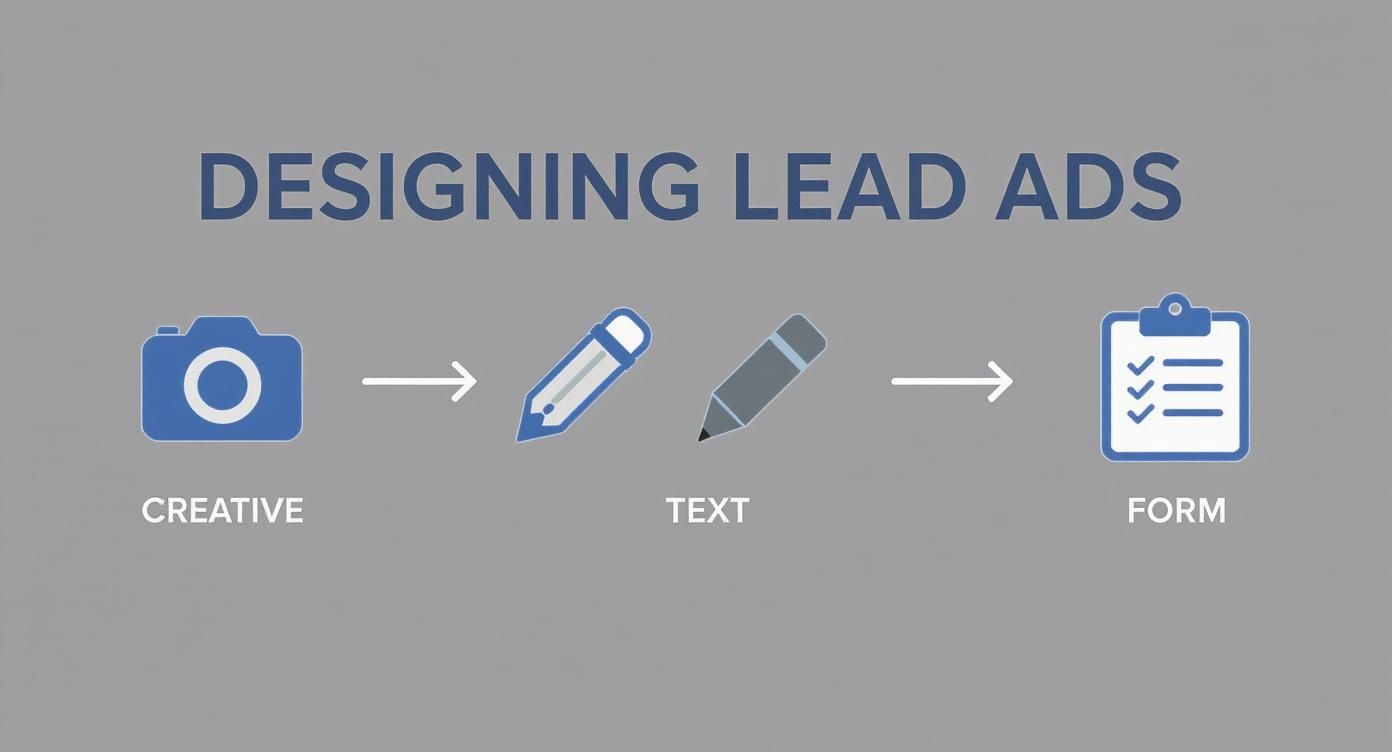
Each piece builds on the last, creating a smooth path from someone seeing your ad to becoming a lead in your system.
Setting Up Your First Automation
Getting this set up is way easier than you might think. First, you'll connect your Instagram account (through your Facebook Page) to your automation tool. From there, just pick the specific lead form you want to sync.
The next critical part is field mapping. This is where you tell the system where to put the information. For example, you’ll map the 'email' field from your Instagram form to the 'Email' column in your Google Sheet or the right field in your CRM. Check out our detailed guide on how to connect Facebook Lead Ads to a CRM to see this process broken down step-by-step.
Crucial Tip: Always, always, always run a test lead after setting up your automation. Most tools have a 'Send Test Lead' button. Use it. Make sure the data shows up correctly in your destination, whether it's Salesforce, HubSpot, or a spreadsheet. Never go live without confirming the connection is perfect.
By putting this simple automation in place, you turn your Instagram lead ads from a basic data collection form into a powerful, real-time sales pipeline. It’s a small technical setup that delivers a massive strategic advantage.
Optimizing for Higher Quality Leads at a Lower Cost
Getting your Instagram lead ads campaign live is just the first step. The real money is made in the day-to-day tweaks and optimizations. You’re aiming for two things: bringing in better quality leads while pushing your cost per lead (CPL) down.
This isn't about throwing things at the wall to see what sticks; it's about following the data. Get comfortable inside your Meta Ads Manager and start paying attention to the metrics that actually matter, like your cost per result and form completion rate. If people are clicking but not finishing the form, that's a huge red flag. It could mean your form is too long, or the ad itself is attracting tire-kickers.
Filtering for Higher Intent
One of the best moves you can make is to weed out low-intent prospects before they can even hit submit. It’s a simple change, but the impact on lead quality is massive.
The easiest way to do this is by adding a pre-qualification question. It forces someone to pause and actually engage with your ad, which is great for shaking off accidental clicks. For instance, instead of only asking for an email, try adding a multiple-choice question like, "What is your biggest marketing challenge right now?" It's a small hurdle that ensures the person on the other end is genuinely interested.
Another great trick is using the 'Higher Intent' form type when you build your ad. This adds a final review screen where people have to confirm their details are correct. It's a tiny bit of friction that works wonders for improving the quality of leads that land in your system.
Key Takeaway: Don't be afraid to add a small amount of friction to your lead form. While it might slightly increase your cost per lead upfront, the improvement in lead quality and the time your sales team saves will provide a much higher return in the long run.
The Power of A/B Testing
You can't just assume your first ad is your best ad. The secret to finding what really works—and lowering your costs over time—is constant A/B testing. This means you test one single element at a time to see what your audience responds to.
Here’s a simple framework I use all the time:
- Test Your Creative: Start with two identical ads but swap out the image or video. Does a clean product shot work better than a lifestyle photo? Does a short, punchy Reel beat a static graphic? Let the data decide.
- Test Your Copy: Once you have a winning visual, keep it the same but test two different headlines or ad copy variations. You might find a question-based headline pulls in more clicks than one focused on benefits.
- Test Your Audience: With your winning creative and copy locked in, run it against two completely different audiences. Pit a Lookalike Audience (built from your customer list) against an audience built around specific interests.
By isolating just one variable, you get clean, actionable data. It's this rinse-and-repeat process that lets you make smart decisions and make your ad budget go way further.
Using Feedback to Refine Targeting
Finally, your best source of optimization feedback isn't in Ads Manager—it's from your sales team. Those first few conversations they have with new leads are an absolute goldmine. Are the leads a good fit? Do they actually understand what you're offering?
This qualitative feedback is pure gold. If your team keeps saying the leads aren't qualified, it's a dead giveaway your targeting is off. Take that insight, jump back into Ads Manager, and tighten up your audience parameters. This closes the loop and ensures your Instagram lead ads are consistently reaching the right people.
Your Top Questions About Instagram Lead Ads, Answered
Even the most seasoned marketers run into speed bumps with Instagram lead ads. Let's walk through some of the most common questions I get asked, so you can solve problems fast and get your campaigns back on track.
Getting these details right is often the difference between a campaign that just runs and one that actually converts.
How Do I Actually Get My Leads From an Instagram Ad?
This is, without a doubt, the number one question. Yes, you can go into Meta Ads Manager and manually download a CSV file of your leads. But let's be honest: that process is slow, clunky, and costs you real money in lost conversions. When it comes to lead follow-up, speed is everything.
The only way to do this effectively is with an automation tool that syncs your leads directly to your CRM, email platform, or even a simple Google Sheet the second they come in. This is non-negotiable. It allows your sales team to follow up within minutes—not hours—while your business is still top of mind.
Should I Use a 'More Volume' or 'Higher Intent' Form?
Ah, the classic "quality vs. quantity" debate. There's a clear strategic choice here, and it all depends on your campaign goal.
-
The 'More Volume' form is built for speed. It has fewer fields and gets the user through the process as quickly as possible. This usually means more leads at a lower cost, which is perfect for top-of-funnel offers like a newsletter signup or a free guide.
-
The 'Higher Intent' form adds a final review step, forcing the user to confirm their details before hitting submit. This one little screen does a great job of filtering out accidental clicks and tire-kickers, which can dramatically improve your lead quality.
My advice? Test both. If your sales team is complaining about getting junk leads, switch to 'Higher Intent' immediately. If your goal is just to build a massive email list for nurturing, 'More Volume' is your best friend.
Why Isn't My Instagram Lead Ad Delivering?
Nothing is more frustrating than launching an ad and seeing it sit there with zero impressions. It almost always boils down to one of three things: a policy violation, a tiny audience, or a simple billing issue.
First, go back and read your ad copy and look at your creative with a critical eye. Are you making a claim that could be seen as violating one of Meta's ad policies? Even something subtle can get your ad flagged.
Next, check your targeting. If you've layered on too many interests or are targeting a tiny custom audience in a small geographic area, the algorithm simply might not have enough people to show it to. Try broadening your audience a bit.
Finally, if your ad has been stuck in review for more than 24 hours, don't just sit and wait. You can go into Meta's support portal and request a manual review to get a human to look at it.
Stop wasting time chasing manual CSV downloads and start converting leads while they're still hot. LeadSavvy Pro sends your Instagram leads right to your CRM or Google Sheets in real-time, completely on autopilot. Sign up for a free plan today and see what immediate follow-up can do for your business.