Your Guide to High-Converting Instagram Lead Ad Campaigns
Think of an Instagram lead ad as your secret weapon for capturing customer info right inside the app. It uses a slick, pre-filled form so people don't have to leave Instagram to give you their details. This small change makes a massive difference.
For businesses, it means you're building a direct pipeline of interested prospects without the usual drop-off that happens when you send people to an external website. It’s simple, clean, and incredibly effective.
Why Instagram Lead Ads Are a Must-Have
Let's get straight to the point. The biggest killer in digital marketing is friction. Every extra click, every slow-loading page, is a chance for a potential lead to get distracted and bounce.
Instagram lead ads solve this by keeping the entire process inside the platform. Someone sees your ad, taps the button, and a form pops up—already filled out with the info from their profile. All they have to do is hit "submit." Easy.
This in-app experience is a game-changer for just about any business you can think of.
- Local Service Providers: A gym can get sign-ups for a free trial class without forcing people to navigate a clunky mobile site.
- Real Estate Agents: An agent can offer a downloadable brochure for a new listing and instantly get a list of interested homebuyers.
- B2B Companies: A software company can target key decision-makers with a free demo offer, collecting their professional details with almost zero effort from the user.
Maximizing Lead Volume with Minimal Effort
That native form isn't just for convenience; it's a massive strategic advantage. These ads have completely changed how businesses generate leads on social media. We've seen this seamless experience push conversion rates to 1-2% on average, with top-performing campaigns hitting 3% or even higher. That blows most off-platform traffic ads out of the water.
In fact, Meta's own data shows that pre-filled forms can boost submissions by up to 3x compared to ads that send users to an external link. If you want to dig deeper, check out these Instagram advertising statistics to see the full picture.
The real power of an Instagram lead ad comes down to speed and simplicity. You're meeting customers right where they are and making it ridiculously easy for them to say "yes."
This whole approach taps into Instagram's massive, engaged audience to build you a direct pipeline of prospects. It sets you up perfectly for immediate follow-up, turning a passive scroll into a real business opportunity.
Building a Lead Form That Actually Qualifies
Let's be honest: a poorly designed lead form is the fastest way to burn through your ad budget and flood your pipeline with junk. Your form is the first line of defense against low-quality leads.
The technical setup happens in Meta Ads Manager, of course, but the real magic is in the strategy. It’s about building a form that doesn’t just collect information—it actively qualifies your prospects from the very first click.
More Volume vs. Higher Intent
When you go to create your Instagram lead ad form, Meta will give you a choice between two optimization goals: 'More Volume' and 'Higher Intent'. This might seem like a small detail, but it fundamentally changes the quality of leads you'll get.
-
More Volume: This option is all about speed. It minimizes friction with pre-filled fields, making it incredibly easy for someone to submit their info. It's a great choice for top-of-funnel offers like a newsletter sign-up, where your main goal is just to get as many people on your list as possible.
-
Higher Intent: This adds a simple but powerful "review" step before anyone can hit submit. It forces them to pause, check their info, and confirm they actually want to send it. This tiny bit of friction works wonders for filtering out accidental clicks and people who aren't really serious.
Think about a real estate agent running an ad for a free home valuation. They should absolutely choose 'Higher Intent'. Why? Because it helps ensure the people submitting their address are genuinely considering a sale, not just killing time browsing.
Choosing 'Higher Intent' is one of the quickest wins for improving lead quality. It tells Meta's algorithm you care more about good leads than just big numbers, which can actually help it find better audiences for you over time.
Crafting Custom Questions That Filter Prospects
Standard fields like name and email are just table stakes. The real power of an Instagram lead ad form is unlocked with custom questions that turn it into a lead qualification machine.
These aren't just random questions; they should be designed to give your sales team the exact information they need to have a productive conversation. You’re moving beyond basic contact details and asking questions that reveal a prospect's intent and whether they're a good fit for your business.
Let’s look at a few real-world scenarios:
- A SaaS Company: Instead of just getting an email, they could ask, "How many people are on your team?" Just like that, they can segment leads for different sales pitches (e.g., small team vs. enterprise).
- A Personal Trainer: A killer qualifying question would be, "What's your number one fitness goal? (Lose weight, build muscle, etc.)." This gives the trainer immediate context for a highly relevant follow-up call.
- A Marketing Agency: Asking, "What is your estimated monthly marketing budget?" instantly separates the high-potential clients from those who might not be a fit right now.
By adding just one or two smart questions, you make prospects invest a tiny bit of thought. That small commitment is often enough to weed out the "tire-kickers," leaving you with leads who are truly interested and ready to talk.
For a deeper dive into crafting questions that convert, check out our guide on building the perfect lead capture form. You can even take it a step further and make qualification more fun with a high-converting quiz for Instagram strategy.
Designing Ad Creative That Stops the Scroll
So, you've built a killer lead form. That's half the battle. Now comes the real test: creating an ad that actually gets people to stop scrolling and click.
It all starts in Meta Ads Manager by choosing the 'Leads' objective. This single click tells Instagram's algorithm exactly what you're after—high-intent prospects—and it'll optimize your campaign delivery to find them.
Nailing Your Audience and Visuals
Before you even think about the creative, you have to know who you're talking to. While you can get granular with interest targeting, one of the most powerful moves you can make is building Lookalike Audiences.
Simply upload a list of your best customers, and Instagram will find people just like them. It's a proven shortcut to putting your ad in front of a warm, highly relevant audience from day one.
The Power of Authentic Visuals
On Instagram, polished corporate ads stick out like a sore thumb. People are wired to scroll right past anything that feels too much like an advertisement. The real magic happens when your creative feels native—like it belongs in their feed.
That’s why user-generated content (UGC) is crushing it for Instagram lead ads. Think simple videos shot on a phone, candid photos, or content that looks like it came from a real person, not a marketing team. It feels genuine and builds trust almost instantly.
Here are the heavy hitters:
- Single Image: Perfect for a powerful, straightforward message. Use eye-catching photos that show your product or service in a real-world setting.
- Video: The undisputed king of engagement. Short, vertical videos (think Reels) that grab attention in the first 3 seconds are your best bet.
- Carousel: Ideal for telling a story or breaking down benefits. You can walk people through a process, showcase different features, or hit them with a series of glowing testimonials.
The format you choose really matters. A typical Instagram Lead Ad sees an engagement rate between 1-3%, but we've seen carousels outperform single images by as much as 20%. And when brands team up with influencers? The results can be explosive, with some reporting engagement rates 3x higher than their standard brand content. You can dig into more Instagram ad statistics to see what’s working across the board.
Choosing the right creative format isn't just about what looks good; it's about aligning your visual with your campaign goal. An eye-catching single image might be perfect for a simple offer, while a multi-step carousel can educate a prospect before they even click "submit."
Choosing the Right Ad Creative for Your Goal
| Ad Format | Best For | Creative Tip | Expected Engagement Uplift |
|---|---|---|---|
| Single Image | Strong, direct offers and striking visuals. | Use high-contrast images with a clear focal point. Add minimal text overlay. | Baseline |
| Video (Reels-style) | Grabbing attention fast and demonstrating value. | Keep it under 15 seconds. Use captions, as most users watch with sound off. | +15-25% |
| Carousel | Showcasing multiple features, testimonials, or telling a story. | Use the first card to hook them. Guide them through with text and arrows. | +10-20% |
| Influencer/UGC | Building authenticity and social proof. | Let the creator's style shine. Avoid over-scripting for a more natural feel. | Up to 3x |
Ultimately, the best format is the one that tells your story most effectively and gets your target audience to take action. Don't be afraid to test different formats against each other to see what resonates.
Writing Copy and Headlines That Convert
Your visual makes them pause, but your words make them act. Don't try to write an essay—your goal is to spark curiosity and clearly state the value of what you're offering.
Your headline needs to grab them by the collar by hitting a pain point or promising a desired outcome. The ad copy should then deliver on that promise, explaining what you’re offering and why they need it right now.
Keep it conversational. Talk like a human. Instead of saying, "Download our comprehensive guide," try something like, "Tired of wasting ad spend? Grab our 5-step checklist to cut costs." See the difference? One is a command, the other is a solution.
Finally, your call-to-action (CTA) button needs to be a perfect match for your offer. Use clear, action-oriented phrases like "Get Your Free Quote," "Download the Guide," or "Book Your Spot." This creates a seamless, no-friction path from seeing your ad to becoming a lead.
Putting Your Lead Follow-Up on Autopilot
Launching a successful Instagram lead ad campaign is an incredible feeling. You see the notifications rolling in and know your targeting and creative are hitting the mark. But here's the hard truth I've learned over years of running these ads: collecting leads is just the first domino to fall. The real money is made in how fast you follow up.
"Speed-to-lead" isn't just another marketing buzzword; it's the single biggest factor in turning a warm prospect into a paying customer. Manually downloading CSV files from Meta Ads Manager is slow, clumsy, and a guaranteed way to let your best leads go cold. Every hour you wait, the chance of actually connecting with that person plummets.
From Manual Chore to Automated System
This is exactly where automation becomes your secret weapon. A tool like LeadSavvy Pro is built to crush the manual work that kills your momentum. Forget checking for new leads every few hours. You can build a seamless system that works for you 24/7.
The process is refreshingly simple. Connect your Instagram account, pick the lead form you want to sync, and then tell LeadSavvy where to send the data. In just a few minutes, you can have every single new lead populating a Google Sheet or dropping directly into your CRM.
While the simple workflow of targeting, creating, and launching your ad is the foundation, automation is what makes it all pay off.
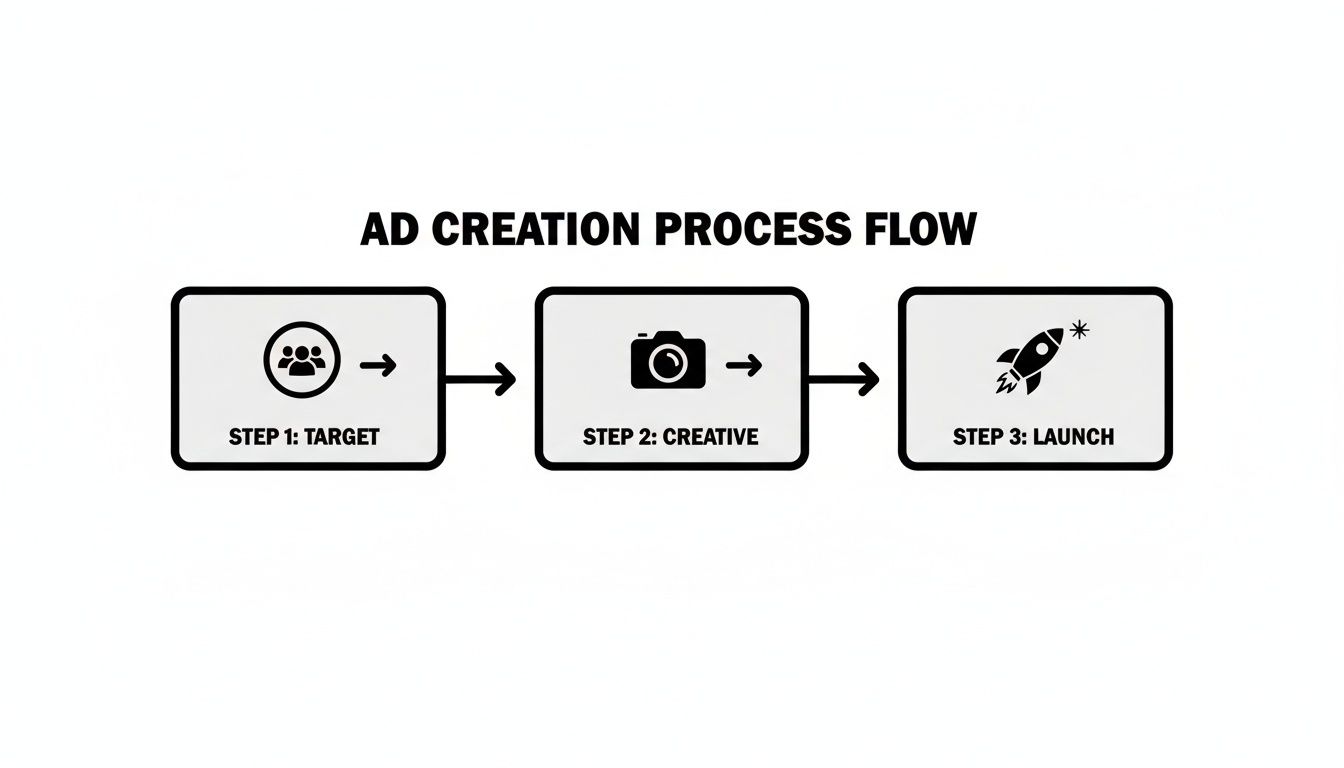
This chart shows the core ad setup, but the magic happens in that crucial, final step that most marketers overlook: immediate follow-up.
By the time you've manually downloaded a lead list, your competition might have already had a conversation with your best prospect. Automation levels the playing field and ensures you're always first in line.
Real-World Scenarios for Instant Follow-Up
Let's make this practical. Say you're a personal trainer running an ad for a free consultation. Without automation, you might download leads at the end of the day. By then, your prospect’s motivation has faded—they’ve already moved on.
With an automated workflow, the moment someone submits their info, a chain reaction kicks off instantly:
- The lead appears in your CRM: Your sales pipeline updates in real-time.
- You get a notification: An email or SMS hits your phone with the new lead's details.
- The lead gets a welcome email: They immediately receive a confirmation, building trust from the first second.
This means you can call or text that prospect while they're still thinking about their fitness goals. That immediate, personal touch is a game-changer for booking consultations. You’re no longer just collecting data; you're starting conversations when it matters most. For a deeper dive, you can learn how to easily download Instagram leads and manage them like a pro with the right systems.
This shift from a tedious chore to a dynamic system transforms your entire lead generation effort. Your Instagram lead ad becomes the starting point of an efficient, automated pipeline that nurtures prospects the moment they show interest, giving you a massive competitive edge.
Optimizing Your Campaign for Better Leads
So, you've launched your Instagram lead ad. Great! But hitting "publish" is the starting line, not the finish. The real work starts now, inside Meta Ads Manager, where every click and submission tells a story about what’s working—and what’s falling flat.
Success isn't about setting and forgetting. It's about constant tweaking.
To get a real pulse on your campaign's health, you need to obsess over two numbers: Cost Per Lead (CPL) and Lead Form Completion Rate. These metrics cut right through the vanity stats. Who cares about a high click-through rate if no one actually fills out the form?
Diagnosing and Fixing Common Pain Points
Let's get practical. If your CPL is sky-high, it's a huge red flag. It usually means your creative isn't hitting the mark or your targeting is way too broad. Before you panic and pull the plug, try A/B testing a completely different ad creative. Maybe a short, punchy video instead of that static image you've been running. A fresh visual can be all it takes to wake up your audience and drag that CPL back down to earth.
But what if your form completion rate is in the gutter? This almost always points to friction in your lead form. People are interested enough to click, but something is stopping them from hitting "submit."
The biggest killer of completion rates? Asking for too much, too soon. Every single field you add is another reason for someone to give up and scroll away.
Take a hard look at your form. Is that "company name" field really essential right now? Or is that something you can find out on the first call? I've seen clients boost their submission rates significantly just by removing one non-essential question. For more advanced strategies on turning your audience into actual leads, it’s worth mastering social media lead generation.
A Framework for Continuous Improvement
Optimization is just a cycle of asking questions and testing answers. Here’s a simple way to think about it:
- High CPL, Low Clicks? Your ad or offer isn't compelling. Time to test new headlines and visuals.
- High Clicks, Low Completions? Your form has too much friction. Strip it down to the absolute essentials.
- Good CPL, Low-Quality Leads? Your targeting is too generic or your form isn't qualifying enough. Add a single, smart custom question to weed people out.
Think of it as a feedback loop. The data shows you a problem, you test a specific fix, and you measure what happens next. By keeping a close eye on your metrics, you turn a good Instagram lead ad campaign into a lead-generating machine.
And to make sure your data is bulletproof, you should be tracking every single interaction. Using the Meta Conversion API is the best way to do this, creating a powerful cycle of improvement that keeps your pipeline full and profitable.
Common Questions About Instagram Lead Ads
Even the most seasoned marketers run into a few head-scratchers when launching a new Instagram lead ad campaign. Let's walk through some of the most common questions that pop up, so you can solve problems fast and keep your ads running smoothly.
What’s a Good Cost Per Lead on Instagram?
Honestly, there’s no single right answer. A "good" CPL is completely tied to your business and what a customer is worth to you. A local gym might be thrilled with a $10 CPL, but a B2B software company could see a $75 CPL as a huge win.
The number that really counts is your return on ad spend (ROAS). Stop worrying about industry benchmarks and start focusing on your own profitability. A CPL is good if the lifetime value of the customer you get is way more than what you paid to acquire them.
As a general rule of thumb, try to keep your CPL under 20% of your average customer's value. Then, you can work on optimizing from there.
The question isn't "What's a good CPL?" It's "Is my CPL profitable?" That's the mindset shift that matters.
Can I Run Instagram Lead Ads if I Don't Have a Website?
Absolutely. This is actually one of the biggest perks of using them. The whole process—from seeing the ad to filling out the form—happens right inside the Instagram app. You never have to send someone to an external landing page.
There is one small catch, though. Meta's advertising policies require you to include a link to your company's privacy policy in the lead form itself. Just make sure that link is live and clearly explains how you'll handle their data.
How Can I Get Better Quality Leads from My Ads?
If you're getting a ton of junk leads, the fix usually comes down to two things: your form setup and your audience targeting. Here are a couple of quick changes you can make right now to filter out the tire-kickers.
- Use a 'Higher Intent' Form: When creating your form, switch the type from 'More Volume' to 'Higher Intent'. This adds a review screen before submission, forcing people to double-check their info. It's an incredibly simple way to weed out accidental clicks.
- Add a Custom Question: This is the single best way to qualify someone. Add one or two open-ended questions that require a real, typed-out answer. That little bit of extra effort is often enough to make sure only genuinely interested people follow through.
Why Did My Instagram Lead Ad Get Disapproved?
It's frustrating when an ad gets rejected, but it almost always comes down to a violation of Meta's advertising policies. When you get that dreaded notification, check your ad against their rules, especially for these common issues:
- Over-the-top Claims: Are you promising things like "guaranteed results"? Meta cracks down hard on exaggerated claims.
- Problematic Images: "Before and after" photos are a big no-no, especially in health, wellness, or beauty.
- Asking for Sensitive Info: You can't ask for things like bank account numbers or other highly personal financial details in your lead form.
Also, always give your privacy policy link a quick click to make sure it isn't broken. A dead link is an easy reason for an ad to get flagged.
Stop wasting time on manual downloads and start converting leads faster. LeadSavvy Pro automates your entire workflow, sending new leads from your Instagram Lead Ads directly to your CRM or Google Sheets the moment they come in. Try it for free at https://leadsavvy.pro.