A Guide to FB Ads Lead Generation That Actually Converts
So, what exactly is Facebook ads lead generation? Put simply, it’s using paid campaigns to grab contact info from potential customers right there on the platform.
It's a killer strategy because you’re meeting people where they’re already hanging out. The ads often use forms that pre-fill their data, making it ridiculously easy for scrollers to become prospects. This completely removes the friction of kicking them over to a different website.
Why Facebook Is Still a Goldmine for High-Quality Leads
With new platforms popping up all the time, you might be wondering if Facebook is still the place to be for serious business growth. The answer is a hard yes, especially if high-quality leads are what you're after. Facebook has grown from a simple social network into a seriously sophisticated marketing machine.
The real magic is in its incredible targeting options. You can go way beyond basic demographics and zero in on your perfect customer based on their interests, online behavior, major life events, and even how they interact with other businesses. This means your ad spend is actually reaching people likely to be interested in your offer, instead of just shouting into the void.
The Power of Native Lead Forms
The real game-changer for fb ads lead generation is the native Instant Form. When someone clicks your ad, a form pops up right inside the Facebook app. This is a huge deal because it keeps the entire experience fast and seamless.
Instead of waiting for an external landing page to load (and hoping it works on mobile), users get a form that Facebook often fills in for them with their name and email address. That simple feature dramatically cuts down on the effort needed to sign up.
When you're trying to capture prospect info, sending them to a separate landing page can be a conversion killer. People get distracted, pages load slowly, and they have to type everything out on a tiny keyboard. Native Facebook Lead Ads solve all of that.
Let’s quickly compare the two.
Facebook Lead Ads vs Traditional Landing Pages
| Feature | Facebook Lead Ads | Traditional Landing Page |
|---|---|---|
| User Experience | Seamless, in-app form | Redirects user out of the app |
| Form Filling | Often pre-populated with user data | Manual data entry required |
| Loading Speed | Instant | Can be slow, especially on mobile |
| Conversion Friction | Minimal – just a few taps | High – multiple steps and potential for errors |
| Mobile Friendliness | Natively optimized for mobile | Varies, can be clunky |
The takeaway is simple: Facebook Lead Ads are built for speed and convenience, which almost always translates to better conversion rates.
This efficiency shows up in the numbers. Recent studies found that Facebook Ads hit an incredible average conversion rate of 7.72% for lead generation campaigns. The average cost per lead (CPL) was around $27.66 across different industries. Some sectors, like restaurants, even saw conversion rates as high as 18.25%. You can check out more of these Facebook Ad Statistics to see how your industry measures up.
Meeting Customers in Their Comfort Zone
At the end of the day, Facebook's strength is its environment. You aren't interrupting someone's work or a Google search; you're engaging with people in a space where they're relaxed, browsing, and open to discovering new things.
When your offer aligns perfectly with their interests—thanks to that precise targeting—your ad feels less like an annoying interruption and more like a genuinely helpful suggestion. By combining this engaged audience with a frictionless conversion process, Facebook locks in its spot as a top-tier channel for generating a steady flow of valuable leads for your business.
Crafting Your High-Converting Lead Ad Campaign
Alright, let's get into the good stuff. Building a Facebook lead generation campaign that actually works isn’t about just throwing an ad out there and hoping for the best. It’s a craft. You have to strategically line up your objective, audience, message, and form to create a frictionless path from a casual scroller to a hot lead.
I'll walk you through how to build a campaign in Ads Manager that's wired for conversions right from the start.
This image nails the goal perfectly: convert faster. Every single piece of your campaign should make it easier and quicker for someone to give you their information.
Choosing Your Campaign Objective and Audience
First up, you have to tell Facebook what you're trying to do. Inside Ads Manager, when you kick off a new campaign, you'll pick the "Leads" objective. This is a crucial first step. It tells Facebook’s algorithm to go find people who are most likely to fill out a form, not just click or comment.
Once your objective is locked in, it's time to decide who sees your ads. This is where Facebook’s targeting tools really flex their muscles.
- Detailed Targeting: This lets you build an audience from scratch based on demographics, what they're interested in, and their online behaviors. Think like a real estate agent targeting people aged 30-45 who are interested in "Zillow" and "First-time home buyer grants" within a 15-mile radius. That’s specific.
- Lookalike Audiences: This is easily one of the most powerful tools in your arsenal. You can upload a list of your best customers, and Facebook's algorithm will find new people with similar traits. A 1% Lookalike Audience is often the perfect place to start to find highly qualified prospects right away.
Expert Tip: Don't just stack random interests. Think about combos that scream intent. Targeting someone interested in "yoga" is way too broad. But someone interested in "yoga," "Lululemon," AND "yoga teacher training"? That's a much hotter prospect.
Writing Ad Copy and Designing Visuals That Convert
Your ad is your first handshake. You've got about two seconds to stop someone from scrolling past, so you need to make an impression fast.
Your ad copy has to hit a nerve—either a pain point or a deep desire. Ditch the feature list and talk about the solution you offer. A financial advisor shouldn't say, "We offer retirement planning services." A much better angle is, "Tired of worrying about retirement? Get a free plan to see if you're on track." See the difference? It's all about the benefit, not the service.
When it comes to visuals, video almost always crushes static images for lead gen. A quick, engaging video showing your product or a happy customer testimonial is a scroll-stopper. If you have to use an image, make it bold, high-quality, and impossible to ignore.
For a deeper technical walkthrough, check out our complete guide on https://leadsavvy.pro/post/how-to-create-facebook-lead-ads/.
Designing a Frictionless Instant Form
The Instant Form is where the conversion happens. A poorly designed form will kill your campaign, no matter how good the ad is. The average conversion rate for lead forms hovers around 9.21%, but a streamlined form can do much better. The key is to get the info you need without making people work for it.
Here’s how to set up your form to get the most submissions:
- Strong Headline: Repeat the value prop from your ad. If the ad promised a "Free Home Valuation," the form headline better say the same thing.
- Quick Intro: Use a few bullet points to quickly remind them what they're getting. Keep it short and sweet.
- Ask for Less: Only ask for what you absolutely need. Name and email are the bare minimum. If you need a phone number, tell them why ("We'll call you to schedule your free consultation"). Every extra field you add is another reason for someone to bail.
- Smart Thank-You Screen: Don't just end with "Thanks!" This is your chance to guide them to the next step. Use the call-to-action button to send them to your website, prompt them to call you, or give them a link to download the guide they just signed up for.
Of course, setting up the ads is just half the battle. To really squeeze the most value out of your budget, you have to constantly be testing and improving. Exploring professional Conversion Rate Optimisation agency partnerships can be a game-changer, ensuring every click you pay for has the highest possible chance of becoming a real lead.
Nail Your Targeting, Creative, and Placements
Getting your campaign live is a great start, but the real money is made in the optimization. Think of your initial launch as an educated guess. Now it's time to let real data turn that guess into a lead-generating machine.
This is where we get granular. We'll fine-tune your audience, test creative like a pro, and figure out exactly where your ads perform best. The whole point is to stop wasting budget on what isn't working and pour it into what is, driving down your cost per lead (CPL) along the way.
Go Deeper with Audience Targeting
Your first audience was a good starting point, but now we get much smarter. Just targeting broad interests is a fast way to burn cash in fb ads lead generation. It's all about layering your targeting to find people with serious intent.
For instance, instead of just targeting an interest like "real estate," get specific. Try targeting users who like "Zillow" AND "Mortgage loans" AND "First-time home buyer." This combo screams "I'm actually looking to buy a house," which is a far cry from someone just scrolling through pretty home pictures.
Key Insight: The more specific and layered your audience is, the better your lead quality will be. You're swapping a massive, low-intent audience for a smaller, highly motivated one. That's the sweet spot for lead gen.
Another game-changer is creating value-based Lookalike Audiences. Don't just upload your entire customer list. Instead, upload a list of your absolute best customers—the ones with the highest lifetime value. Facebook's algorithm will then go out and find new people who look just like your most profitable clients, not just any random customer.
To really master these techniques, you'll want to dig into all the different Facebook ads targeting options available. It’s how you gain that extra edge.
A No-Nonsense Approach to A/B Testing Creative
Guessing which ad creative will crush it is a losing game. You have to test your elements systematically and let the data pick the winner, not your gut feeling. This is where A/B testing (or split testing) becomes your best friend.
The golden rule? Test one thing at a time. Otherwise, you'll have no idea what actually made the difference.
Here’s a simple framework to get you started:
- Test Your Visuals: Kick things off by testing two completely different images or videos. Keep the headline and copy exactly the same. Let it run until you have a clear winner (usually the one with a lower CPL or higher click-through rate).
- Test Your Headline: Once you've found your winning visual, stick with it. Now, test two different headlines. You could try a benefit-driven angle ("Unlock Your Dream Home's Value") against a pain-point-focused one ("Tired of Guessing Your Home's Worth?").
- Test Your Ad Copy: With your winning image and headline locked in, it's time to test the primary text. Try a short, punchy version versus a longer, more detailed story.
- Test Your Form Questions: Don't forget the Instant Form itself. You can test a simple form asking for just a name and email against one that also requires a phone number. The shorter form will almost always have a lower CPL, but the leads from the longer form might be much higher quality. It's a trade-off you need to measure.
Analyze and Optimize Your Ad Placements
Not all placements are created equal. An ad that works great in the Facebook Feed might be a total flop on Instagram Stories. By default, Facebook puts your ads everywhere, but your audience probably hangs out in one or two key spots.
In your Ads Manager dashboard, find the "Breakdown" menu and select "By Delivery" > "Placement." This is where the magic happens. You’ll see a crystal-clear report of how each placement is performing.
You might find your CPL on Instagram Stories is a lean $15, but in the Facebook right-hand column, it's a bloated $50. That’s your signal. Turn off the expensive placement and shift that budget to the one that's actually working.
When you're looking at your placements, focus on these metrics:
- Cost Per Lead (CPL): This is your north star. Which placements are getting you leads at a price you can afford?
- Link Click-Through Rate (CTR): A high CTR means your ad is grabbing attention in that format.
- Lead Form Conversion Rate: How many people who click actually finish the form? Some placements drive tons of cheap clicks that never convert.
By constantly refining your audience, testing your creative, and optimizing your placements, you're turning a simple ad campaign into a smart, efficient system that improves over time. This ongoing loop is the heart and soul of successful fb ads lead generation.
Automating Your Lead Follow-Up Process
You’ve done the hard work. You’ve dialed in your audience, created killer ad copy, and your fb ads lead generation campaign is finally humming along. Leads are trickling in. So, what’s next?
This is where most businesses drop the ball. The single biggest mistake you can make is letting those fresh, high-intent leads go stale inside Facebook's ecosystem.
Every minute you wait, a lead goes cold. Manually downloading CSV files from Ads Manager once or twice a day is a recipe for disaster. Speed is everything. In fact, studies show that contacting a new lead within the first five minutes can boost your odds of converting them by a mind-blowing 900%. Automation isn’t a nice-to-have; it's a must-have.
Building a seamless bridge between your Facebook ads and your sales team is the only way to capitalize on your ad spend. This means getting lead data out of Facebook and into the right hands, instantly.
Why Manual Lead Management Fails
Let’s be real—the manual process is a painful grind. You have to log into Ads Manager, find your lead form, download the latest CSV, clean it up, and then upload it to your CRM or email list. By the time that’s done, hours—or even days—have passed.
In that time, your prospect has completely moved on. They've either forgotten they filled out your form or, even worse, they've been snapped up by a competitor who responded right away.
The Real Cost of Delay: The moment a user hits "submit" is when their interest is at its absolute peak. Making them wait doesn't just put the sale at risk; it tells them your business is slow, eroding trust before the first conversation even starts.
Creating an Instant Lead Sync
The solution is an automated workflow that syncs your leads the second they come in. Instead of wrestling with spreadsheets, a tool like LeadSavvy Pro acts as the middleman. When a new lead signs up, their info is automatically pushed to wherever you need it to go.
This connection kills the delay and makes sure no lead ever slips through the cracks. Setting it up is way easier than you think. You just authorize a connection between your Facebook Page and your destination, then map the form fields (like name, email, phone) to the right columns in a Google Sheet or fields in your CRM.
The diagram below shows how all the pieces—audience, creative, and placement—fit into your optimization strategy, all leading to the generation of these valuable leads.
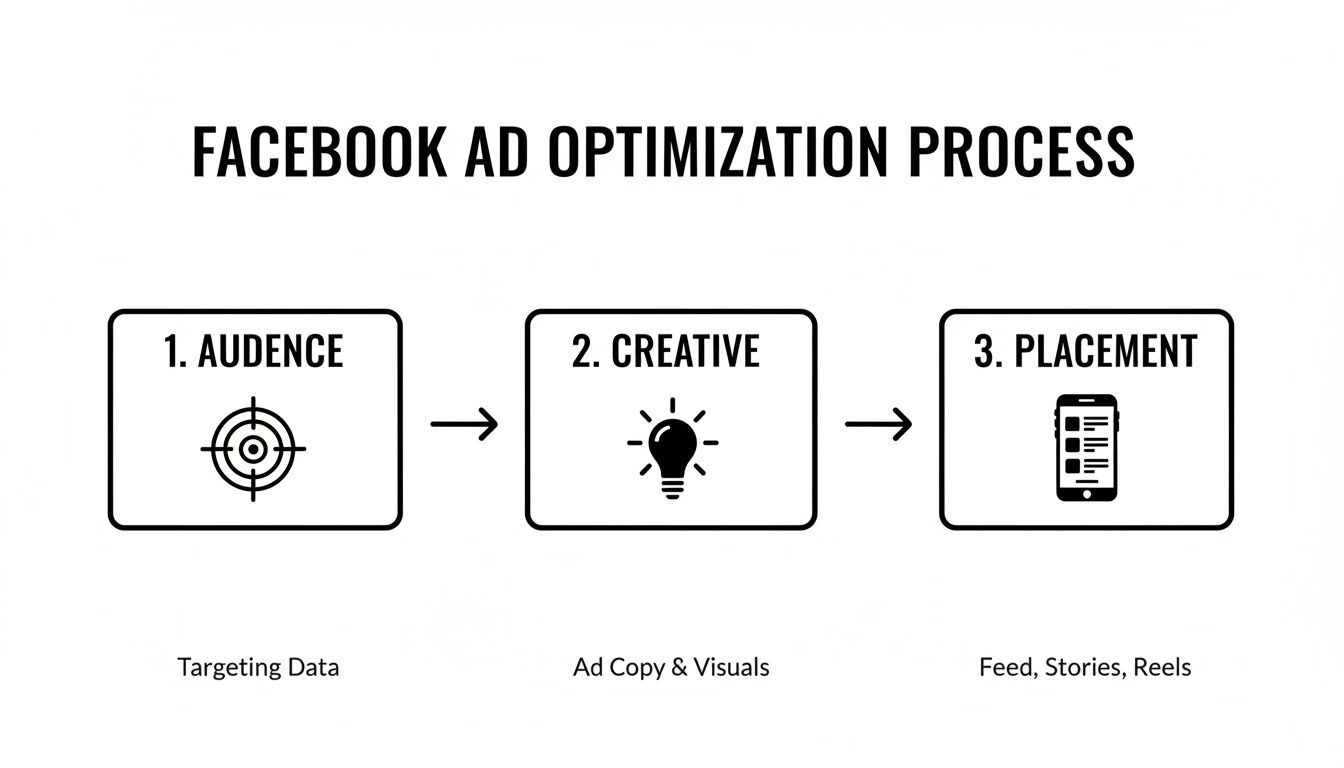
This visual is a great reminder that lead generation is a multi-step process, which makes that immediate, automated follow-up even more critical.
To see the difference in black and white, look at how the daily routine changes when you ditch the manual CSV downloads.
Manual vs Automated Lead Management Workflow
| Task | Manual Process (Without Automation) | Automated Process (With Automation) |
|---|---|---|
| Lead Retrieval | Log in to Facebook Ads Manager several times a day to download a CSV file. | Leads are captured and sent to your systems automatically, 24/7. |
| Data Entry | Copy-paste or import data from the CSV into your CRM or Google Sheet. | Data is added to your CRM or Sheet instantly, with zero manual entry. |
| Sales Notification | Manually email or message the sales team with new lead details. | The assigned sales rep gets an instant email or Slack notification. |
| Response Time | Hours to days, depending on when the CSV is checked. | Seconds to minutes. |
| Risk of Error | High. Data can be missed, formatted incorrectly, or duplicated. | Near-zero. The system handles all data mapping and transfer. |
The takeaway is simple: automation frees up your team to focus on selling, not on tedious data entry.
Setting Up Real-Time Notifications
Getting the data into your system is just the first step. The second is getting an immediate alert. A solid automation setup will also fire off real-time notifications to your sales team the moment a new lead arrives. This could be a simple email or a Slack message packed with all the lead's details.
Let’s look at a real-world example. A real estate agent is running a campaign for a hot new listing.
- Without Automation: A potential buyer fills out a form at 10 AM. The agent downloads leads at 5 PM, finally sees the new entry, and calls the prospect. By then, they’re busy making dinner and have already scheduled a showing with another agent who called them back instantly.
- With Automation: A prospect submits the form at 10 AM. The agent gets an instant email with the lead's name and phone number. They call them at 10:02 AM, book a viewing for that afternoon, and become the first agent to build that crucial rapport.
This "speed-to-lead" advantage is what separates campaigns that print money from those that just burn it. For a deeper dive, check out our guide on how to automate Facebook leads and build these exact workflows.
Popular Automation Workflows
Once you connect Facebook to your other tools, you unlock a ton of powerful possibilities. You're not just moving data; you're kicking off entire sales and marketing sequences.
Here are a few of the most effective workflows you can build:
- Instant Google Sheets Sync: This is the easiest and most popular starting point. New leads are added as a new row in a Google Sheet in real-time. This creates a clean, always-current database that your whole team can access.
- Direct CRM Integration: Push leads straight into your CRM like Salesforce, HubSpot, or Zoho. This can automatically create a new contact, assign it to a sales rep, and even trigger a follow-up task.
- Automated Email Nurturing: Connect your lead form to an email platform like Mailchimp or ActiveCampaign. New leads can be instantly dropped into a welcome email series, nurturing them with helpful content until a salesperson can reach out personally.
By taking human delay out of the equation, you maximize the value of every single lead you pay for. This isn't just about being more efficient; it's about fundamentally boosting your fb ads lead generation ROI by converting more prospects into paying customers.
Measuring Success and Scaling Your Campaigns Intelligently
Launching your fb ads lead generation campaign is just the starting line. The real work—and the real growth—begins when you start digging into the data, making smart tweaks, and figuring out how to scale what works without breaking it.
It’s time to stop chasing vanity metrics like likes and reach. Great marketing isn’t about guesswork; it’s about turning your ad spend into a predictable engine for growth.
The KPIs That Actually Matter
Your Ads Manager dashboard is a sea of numbers, but only a few truly tell you if your lead gen efforts are paying off. To cut through the noise, you really only need to obsess over these three.
- Cost Per Lead (CPL): This is your north star. It’s the bottom-line cost to get one person to raise their hand and say they’re interested. A low CPL is great, but it means nothing if the leads are junk.
- Lead Form Conversion Rate: This number shows the percentage of people who click your ad and actually fill out and submit your Instant Form. If this rate is low, it’s a huge red flag that something is wrong with your form—it might be too long, the questions could be confusing, or the offer just isn't compelling enough. For context, the average across Facebook is 9.21%, so that’s a decent benchmark to shoot for.
- Lead-to-Customer Rate: This is the ultimate metric, but you’ll have to track it outside of Facebook in your CRM or spreadsheet. It answers the most critical question: how many of these leads actually turned into paying customers? This metric reveals the true quality of the leads your ads are generating.
By focusing on these key indicators, you get a clear, actionable picture of what’s really happening.
Building Custom Reports in Ads Manager
Don’t get stuck with Facebook’s default reporting columns. They’re bloated with data you don’t need. Instead, create your own custom view to see what matters at a glance.
- In Ads Manager, find the "Columns" dropdown and click it.
- Choose "Customize Columns."
- Now, search for the metrics that tell the real story: Cost per Result (Lead), Results (Leads), Link Click-Through Rate (CTR), and maybe Cost per Mille (CPM) to keep an eye on ad costs.
- Save this view as a preset. Name it something obvious like "Lead Gen KPIs" so you can pull it up with one click next time.
This simple setup puts your most important data front and center, helping you make faster, smarter decisions on what to kill and what to scale.
Scaling Your Winning Campaigns Intelligently
So you found a winner—a campaign that’s bringing in quality leads at a CPL that makes you smile. The gut reaction is to dump more money into it. Don't.
Scaling too fast is the quickest way to kill a good campaign. It can shock Facebook's algorithm, reset the learning phase, and send your CPL through the roof.
Expert Insight: A golden rule for scaling is to never increase a budget by more than 20-30% every 2-3 days. Slow and steady wins this race, giving the algorithm time to adjust without panicking.
Beyond just upping the budget (scaling vertically), you should also think about scaling horizontally. This is all about expanding your reach in a controlled, strategic way.
- Expand Your Lookalike Audiences: Is your 1% Lookalike audience crushing it? Great. It’s time to test a broader 1-3% or even a 3-5% audience. You'll reach more people who are still very similar to your best customers.
- Test New Ad Formats: If a standard image ad in the Feed is working, what about a video version for Instagram Reels or Stories? Different placements attract different user behaviors, and tailoring your creative can unlock brand new pockets of your audience.
- Introduce New Creative Angles: Ad fatigue is real. Your winning ad won't perform forever. You should always be testing new images, videos, and copy angles before performance starts to dip. This ensures you have another validated winner ready in the wings, so you never have to deal with a sudden performance drop-off.
By combining careful budget increases with strategic audience and creative expansion, you build a sustainable growth machine. This isn't just about running one-off fb ads lead generation campaigns; it's about creating a reliable system for bringing new customers into your business.
Got Questions About Your Facebook Lead Ads?
Even the slickest lead generation campaigns run into bumps. It’s just part of the game. Let's walk through some of the most common questions I hear from advertisers and get you back on track.
"Why Are All My Leads Such Low Quality?"
This is, without a doubt, the number one complaint. You’re getting form fills, the numbers look good, but the people on the other end are either ghosting you, aren't qualified, or swear they don't remember ever filling out your form.
What’s happening? Facebook’s Instant Forms are too easy. With a couple of taps, all their info is auto-filled and submitted. It's so frictionless that people can do it by accident.
The solution is to add a little bit of intentional friction back into the process.
- Add a Custom Question: Don't just settle for name and email. Add one simple, open-ended question that forces them to type. A real estate agent might ask, "What's one non-negotiable feature for your next home?" This single step makes the user pause and think, ensuring they're actually engaged.
- Switch to the "Higher Intent" Form: Dig into your form settings and you'll see an option to switch from "More Volume" to "Higher Intent." This adds a final review screen where users have to slide to confirm their info. It's a tiny change, but it's brilliant for filtering out accidental clicks.
A Quick Story on Lead Quality: I had a client pulling their hair out over junk leads. We added just one custom question: "What's your biggest challenge with [their industry] right now?" The total number of leads dropped by 30%, but their lead-to-customer rate tripled. Every person who answered was a serious prospect.
"Why Is My Cost Per Lead (CPL) Through the Roof?"
A sky-high CPL will torch your ad budget in no time. This is almost always a symptom of a few core problems: you're talking to the wrong people, your ads are stale, or your offer just isn't exciting enough.
If your CPL suddenly shoots up, check your ad "Frequency" metric. If people have seen the same ad more than 3 or 4 times, they're tuning it out. This is classic ad fatigue. Time for fresh creative.
But if your CPL has been high from the very start, the problem is deeper.
- Is your audience too broad? Targeting a massive interest like "business" is like shouting into a hurricane. You need to layer your interests to find a more specific, motivated audience.
- Is your offer compelling enough? A bland "Contact Us" is a conversion killer. You need to offer real value upfront. Think free guides, checklists, a quick consultation, or a webinar seat. A valuable offer will almost always slash your CPL.
"How Long Should I Wait Before I Start Messing with My Campaign?"
Patience, my friend. This is where so many advertisers go wrong. Facebook's algorithm needs time and data to figure out who to show your ads to. This is the "learning phase." Making frantic changes in the first 24-48 hours is the fastest way to sabotage your own campaign.
As a rule of thumb, wait until your ad set exits the learning phase. This usually happens after it gets around 50 conversions (in this case, 50 leads) within a 7-day window.
Once you cross that threshold, you have enough data to see what’s really working. Only then should you start making smart decisions about which ads, audiences, or placements to scale up or shut down. Don't touch a thing until the data gives you a clear signal.
Tired of manually downloading CSV files and watching hot leads go cold? LeadSavvy Pro is your answer. It automatically syncs every new lead straight to your Google Sheet or CRM and hits you with real-time notifications. Get started for free at https://leadsavvy.pro and turn your follow-up into a conversion machine.