The Ultimate CRM for Marketing Agencies Playbook
So, what exactly is a CRM for marketing agencies? Think of it as a central command center built specifically for the chaos of agency life. It’s designed to juggle multiple client accounts, track ROI for dozens of different campaigns, and automatically pull in leads from all over the web.
Unlike a generic sales CRM, a true agency-grade CRM brings all your client data, communication, and campaign results into one place. It’s the single source of truth that keeps your entire team on the same page.
Why Your Generic CRM Is Holding Your Agency Back

If you're trying to force a generic CRM to work for your agency, you're not alone. Many of us start there, only to watch it crumble under the weight of our actual day-to-day work. The problem is simple: those platforms are built for a straight line—a single sales process—not the tangled, multi-client web that agencies live in.
A standard CRM is like a cheap multi-tool. Sure, it has a tiny screwdriver and some flimsy scissors, but when you need a power drill to build out a client’s campaign, it just won’t cut it.
The Multi-Client Challenge
For an agency, every single client is its own universe. Each one comes with a unique set of:
- Lead Sources: From Facebook Lead Ads and Google Ads to organic traffic and old-school referrals.
- Campaigns: Multiple initiatives running at once, all with different goals, assets, and KPIs.
- Stakeholders: A mix of contacts, decision-makers, and teams who all need different reports.
A generic CRM throws all of this into one giant, messy bucket. This lack of separation makes it nearly impossible to report on client-specific ROI, attribute leads correctly, or even keep one client's data separate from another's. You're left trying to patch things together with a confusing web of tags and custom fields, turning simple tasks into a data-entry nightmare.
A purpose-built CRM for marketing agencies should act like a set of organized, secure containers—one for each client. This structure stops data from bleeding over, makes reporting a breeze, and lets your team focus on strategy instead of grunt work.
The Growing Expectation for Integration
This isn't just about making your own life easier; clients now expect this level of sophistication. With 91% of companies with over 10 employees already using a CRM, they assume you can plug right into their tech stack.
Your ability to provide clean data, clear attribution, and automated lead routing is no longer a nice-to-have. It’s a core part of what you deliver. For more on this, you can check out these CRM adoption trends and market impacts for 2025. This shift turns the crm for marketing agencies from a simple tool into a critical piece of your service delivery and client retention strategy.
The Blueprint for an Agency-First CRM
Let's get one thing straight: the generic CRM you might be using is holding your agency back. To really scale, you need a new blueprint. A true CRM for marketing agencies isn't just a digital rolodex; it's the operational heart of your business, built to handle the chaotic, multi-client world agencies live in.
Think of it like this. A standard CRM is a shared community workshop. It’s messy. Tools are everywhere, sawdust from one project gets all over another, and you’re never quite sure who is using what. An agency-grade CRM, on the other hand, is like giving each client their own private, secure workshop, fully stocked with specialized tools just for them.
It all boils down to four non-negotiable pillars that separate a purpose-built agency platform from a generic sales tool.
1. Segregated Multi-Client Management
This is the absolute foundation. You must be able to manage clients in completely separate, walled-off environments. This isn't just about being organized—it's about privacy, security, and professional responsibility. Without total data segregation, you’re sitting on a time bomb. One wrong click could leak one client's lead list or confidential campaign data to another.
Imagine your agency represents two competing local car dealerships. A simple reporting mistake in a generic CRM could easily send Client A's lead data and ad performance metrics straight to Client B. That’s not just embarrassing; it’s a trust-destroying, potentially lawsuit-inducing catastrophe.
An agency-first CRM solves this by design, creating distinct workspaces for every single client. This guarantees:
- Data Integrity: Each client's contacts, deals, and reports are completely isolated and secure. No accidental cross-contamination.
- Customized Workflows: You can build out unique sales pipelines, automation sequences, and tagging rules that match each client's specific business process.
- Controlled Access: Your team members only see the client accounts they're actually working on, keeping everything need-to-know.
2. Granular Campaign-Level Tracking
Agencies live and die by their ability to prove ROI. It's not enough to tell a client, "we generated 50 leads this month." They want to know which ad, which campaign, and which channel produced those leads. More importantly, they want to know which of those leads actually turned into paying customers. This is where most generic CRMs completely fall apart.
A proper agency CRM connects the dots, linking every single lead back to its exact origin. This allows you to answer the tough questions with cold, hard data. You can confidently show a client that the $5,000 they spent on that specific Facebook campaign directly generated $25,000 in new sales—a clear 5x return. That's how you turn a routine report into a powerful demonstration of your value.
A CRM built for agencies doesn't just track leads; it tracks profitability. It connects the dots from ad spend to client revenue, giving you undeniable proof of your impact and helping you make smarter budget decisions.
3. Automated Lead Source Attribution
Let’s be honest, manually tagging where every lead came from is a nightmare. It’s tedious, prone to human error, and simply doesn't scale. As you add more clients and campaigns across different platforms, trying to do this by hand becomes impossible. Automated lead source attribution is the engine that makes all that valuable campaign-level tracking actually work without burning out your team.
When a new lead comes in from a Google Ad, a Facebook Lead Ad, or an organic search, the system needs to automatically capture and tag that source. No questions asked. This automation ensures your data is clean and reliable from the get-go, giving you a solid foundation for analysis. For agencies that want to get serious about this, understanding the principles of marketing automation tailored for agencies is the key to building a system that works for you, not against you.
To illustrate the difference, here’s a quick breakdown of what to look for.
Agency CRM Feature Checklist
| Feature | Standard Sales CRM | Agency-Grade CRM |
|---|---|---|
| Client Management | All contacts in one database | Separate, secure workspaces per client |
| Lead Attribution | Manual tagging or basic source fields | Automated, multi-channel attribution |
| Campaign Tracking | Tracks deals, not ad spend | Connects ad campaigns directly to revenue |
| User Permissions | Basic roles (Admin, User) | Granular access control per client account |
| Reporting | General sales performance reports | Client-specific ROI and campaign reports |
| Customization | Limited to global settings | Unique pipelines & workflows per client |
This table makes it clear: a standard CRM is built for one business, while an agency CRM is built to manage many businesses under one roof.
4. Seamless Team and Client Collaboration
Finally, a great agency CRM has to be the central hub where everyone connects. It needs to tear down the walls between your account managers, media buyers, and copywriters. Everyone on your team should have a single, real-time view of every interaction with a client's leads—from the first click to the final sale. If you need more help finding the right fit, our complete guide to choosing a CRM for an agency includes a detailed checklist.
This unified view prevents those cringe-worthy moments when two different team members contact the same lead with conflicting information. It ensures a smooth, professional journey for your client's customers and makes your entire team look like a well-oiled machine.
Mastering Your Lead Flow From Social Media to CRM
For any marketing agency, getting a client high-quality leads is only half the job. The real challenge—and where a ton of value gets lost—is what happens in those first few minutes after a lead hits submit. This is especially true for platforms like Facebook Lead Ads, a powerful tool that can quickly turn into a massive operational headache.
If your team is still downloading CSV files by hand, you're fighting a losing battle. It’s slow, full of potential for human error, and the number one reason for sluggish lead response times. In that critical window, potential customers get distracted, find a competitor, or just forget why they filled out the form in the first place. That manual drag doesn't just annoy your team; it actively hurts your clients' ROI.
This diagram shows the classic shift from a generic, broken workflow to a purpose-built solution designed just for agencies.
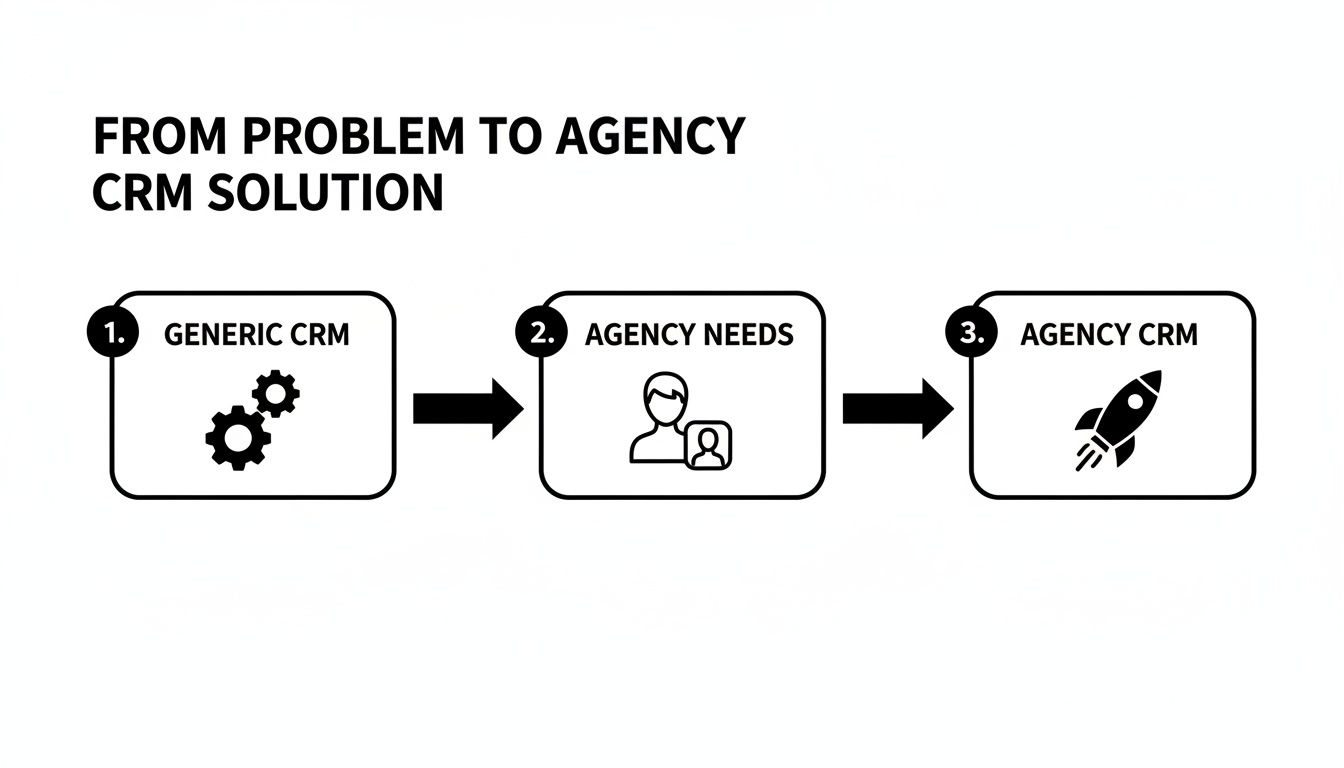
As you can see, the moment you recognize the specific pain points of an agency, you're on the path to finding a CRM that actually accelerates growth instead of slowing it down.
The Power of Automated Lead Syncing
The answer is to build a seamless bridge between where your leads come from and where they need to go, whether that's a dedicated CRM for marketing agencies or a simple Google Sheet. Automated lead syncing cuts out the manual grunt work, making sure every new lead is captured and sent to the right place in real-time.
This is where specialized tools really shine. A platform like LeadSavvy Pro, for instance, was built to solve this exact problem. Instead of your team downloading files on a schedule, it creates an always-on connection between your clients' Facebook Pages and their lead management system.
The difference is immediate and huge:
- Instantaneous Lead Capture: Leads are transferred the second they're submitted, not hours or days later.
- Zero Data Entry Errors: Automation gets rid of the typos and copy-paste mistakes that can make a lead completely useless.
- Dramatically Improved Speed-to-Lead: Your clients' sales teams can follow up in minutes, which massively increases their chances of having a real conversation and closing a deal.
Setting Up Your Automated Workflow
Connecting these systems is way easier than it sounds. You don't need any custom code or deep technical skills.
Here’s what a typical setup looks like:
- Connect Your Source: Just grant access to the specific Facebook Page you're running ads for.
- Choose Your Destination: Pick where the leads should land. This could be a central Google Sheet for simple tracking or a direct hookup to your CRM.
- Map Your Fields: This is the fun part. You just match the fields from your Facebook Lead Form (like Name, Email, Phone Number) to the columns in your spreadsheet or the fields in your CRM. This guarantees all the data ends up in the right spot, perfectly organized.
- Turn on Notifications: Set up instant alerts via email or an app to ping the sales team or account manager the moment a new lead arrives.
The real magic of an automated lead workflow is that it flips the script. It takes a reactive, manual chore and turns it into a proactive, system-driven process. This frees up your team to focus on strategy and client growth, not mind-numbing admin tasks.
The financial impact of this simple change is massive. Speed and automation have a direct line to lead conversion, especially for agencies managing social ads. Research shows that around 45% of CRM users say automation is the single most important feature. With 65% of companies reporting better customer engagement after adding automation, the writing is on the wall. Tools like LeadSavvy Pro, which automate the handoff from Facebook to a CRM or Google Sheet, are built to deliver on the features that matter most.
Once your CRM is set up to catch and manage leads, the next step is actually generating them. For a deeper dive, check out this practical guide to generating leads on social media. It's also critical to nail the connection between your ad platforms and your systems; you can learn the ropes by reading our detailed article on proper Facebook Lead Ads integration. By automating this one crucial link in the chain, you turn a major agency headache into a streamlined growth engine for your clients.
How to Choose the Right CRM for Your Agency
Picking the right CRM for your marketing agency is a huge decision, and frankly, it should feel like one. This isn't just another piece of software; it's the future operational backbone of your entire business. The right choice can unlock efficiency and boost client retention, but the wrong one? It's a straight path to wasted money, frustrated employees, and a system that creates more headaches than it solves.
So, how do you avoid buyer's remorse? You need a clear, vendor-agnostic framework. Think of it as a pre-flight checklist for your agency's growth engine. Instead of getting blinded by flashy demos and slick sales pitches, you can systematically vet each platform against what actually matters for your agency's day-to-day success.
Integration Capabilities: The Connective Tissue
Your CRM can't be an island. It has to talk to all the other tools your team and clients depend on every single day. When integrations are clunky or non-existent, you end up with data silos and force your team into mind-numbing manual copy-paste jobs—completely defeating the purpose of a central system.
Before you even think about signing a contract, you need to dig deep into how a potential CRM plays with others. The quality of these connections is what separates a streamlined workflow from just another complicated layer of tech.
Questions to Ask the Sales Rep:
- Does it offer a native, two-way sync with crucial ad platforms like Google Ads and Facebook Ads?
- How does it connect with our financial software for invoicing and revenue tracking?
- Can we hook it up to our project management tools to automatically kick off new projects when a deal is marked "won"?
Scalability: Can It Grow With You Without Penalties?
The CRM that’s perfect for your three-person shop might become a ridiculously expensive burden by the time you hit a team of fifteen. Watch out for pricing models that punish growth. Steep per-user fees or feature gates that lock essential tools behind enterprise-level plans are red flags.
A truly scalable CRM for marketing agencies is one that supports your expansion, not profits from it. You have to analyze the pricing structure with your 2-year and 5-year growth plans in mind.
Don't get fooled by an attractive entry-level price. Do the math. Calculate the total cost of ownership for the platform when your team doubles and your client roster triples. A system with predictable, value-based pricing is a far better long-term partner for an ambitious agency.
Client Reporting and White-Labeling
At the end of the day, proving your value is everything. Your CRM absolutely must have robust reporting features that let you build custom, client-facing dashboards. These reports are your proof of performance, translating all your hard work into tangible ROI that clients can actually understand.
The ability to white-label these reports—slapping your client’s logo and your agency’s branding on them—is the professional touch that turns you from a vendor into a true partner.
Questions to Ask the Sales Rep:
- Can we build fully customized, automated reports for each individual client?
- Is it possible to white-label every dashboard and report with our clients' branding?
- Can we give clients limited, view-only access to see their specific data without seeing everything else?
Ease of Use and Team Adoption
This is it. The make-or-break factor. The most powerful, feature-packed CRM on the planet is 100% useless if your team hates using it. A clunky interface, a brutal learning curve, or a workflow that feels totally unnatural will guarantee low adoption.
And when your team stops using the system, your data becomes stale, your pipeline is a work of fiction, and your expensive investment turns into "shelfware."
Focus on a platform that feels intuitive and is clearly designed for the person who has to use it all day. The best CRM for marketing agencies is the one your team actually wants to use because it makes their jobs easier, not harder. Before you sign anything, get your key team members involved in a trial run to make sure it’s a genuine fit for their daily grind.
A Practical Guide to CRM Implementation and Data Migration

Alright, so you’ve picked out the perfect CRM for marketing agencies. That’s the easy part. The real work—and where most agencies get stuck—is actually getting it up and running. A shiny new platform is just an expensive subscription if it’s full of junk data and your team won’t touch it.
This is the phase that turns a smart investment into either a growth engine or a costly mistake.
The two biggest tripwires are data migration and team adoption. These aren't just tech problems; they're people problems. They’re about breaking old habits and overcoming that natural resistance to anything new. If you don't have a solid plan for both, your CRM project is likely dead on arrival.
It’s a surprisingly common issue. Even though CRMs are everywhere, data quality is a mess. Industry stats show about 80% of companies admit their CRM data is inaccurate, and a staggering 40% of it goes stale every single year. Add in low user adoption—with failure rates anywhere from 20% to 70%—and you can see the problem. You can dig deeper into these common CRM data and adoption challenges to see just how important it is to get this right.
Laying the Groundwork with Clean Data
Before you even think about moving a single contact, you have to clean house.
Migrating messy, outdated, or duplicate data into a new CRM is like moving a pile of junk from your old garage into a brand-new one. You haven't fixed the problem; you've just given it a fancier, more expensive home. This is the one step you absolutely cannot skip.
Your pre-migration data audit should be non-negotiable.
- Identify and Merge Duplicates: Get into your spreadsheets and old systems. Find all the duplicate contacts and accounts, then merge them into one clean, definitive record.
- Standardize Your Data: Create rules and stick to them. Is it "VP" or "Vice President"? Is it "LLC" or "L.L.C."? Decide now, so your data is consistent from day one.
- Purge Irrelevant Contacts: Get rid of old leads, bounced emails, and unresponsive contacts. They’re just cluttering up your database and costing you money.
This cleanup makes sure the information you put into your new CRM for marketing agencies is actually reliable. It’s also the perfect time to get a real handle on what true data synchronization will mean for your agency moving forward.
Driving Team Adoption and Buy-In
Even with perfectly clean data, your CRM will fail if your team doesn't use it. You can't just force a new tool on your account managers and sales reps and expect them to love it. That's a surefire recipe for revolt.
You need to get their buy-in by making them part of the process from the very beginning.
Bring your key players—especially the people on the front lines with clients—into the workflow design meetings. Ask them straight up: "What's the most annoying, time-wasting part of your day?" Is it pulling manual reports? Is it digging through emails to find client communications? Then, show them exactly how the new CRM solves those specific problems.
When your team sees the CRM as a tool that kills their tedious tasks and helps them crush their goals, adoption stops being a chore. It becomes a welcome change. The conversation has to be about "what's in it for them."
Finally, train people for their roles. Your media buyer doesn't need to be an expert on the sales pipeline, and your account execs don’t need to master the marketing automation engine. Tailor your training to what each person actually does every day. This makes the information relevant, less overwhelming, and gets your team using the system confidently from the get-go.
Building Your Agency's Growth Engine
We've spent this guide breaking down what makes a CRM for marketing agencies really tick. It’s time to stop thinking of a CRM as just another software subscription and start seeing it for what it truly is: the central operating system for your entire agency. Everything else you do is built on top of it.
A generic tool will have you drowning in clumsy workarounds. But a CRM built for agencies solves your biggest headaches right out of the box. It gives you the secure, multi-client setup you need to manage your whole roster, the detailed tracking to prove ROI, and a central hub to keep your team on the same page. It turns chaos into clarity.
And when you layer smart automation on top of this core system, the results get even better.
An automated workflow, like syncing Facebook leads directly into your CRM with a tool like LeadSavvy Pro, isn't just a nice-to-have. It’s a real strategic advantage that closes the gap between someone showing interest and you closing the deal. It’s a direct line to better client results and higher retention.
This is the blueprint for a modern, scalable agency. It's about replacing mind-numbing data entry with real-time accuracy and swapping frantic problem-solving for proactive growth. It’s time to stop duct-taping broken systems together and finally build a true operational engine.
Your first step is simple but absolutely critical. Take the checklist from this guide and audit your current process. Are you just plugging leaks, or are you actually building a foundation?
From there, pinpoint your single biggest bottleneck—maybe it’s manually downloading and importing leads—and find a tool that crushes that one problem. Take that first step today. It’s how you build a leaner, more profitable, and far more successful agency.
Frequently Asked Questions
Struggling to figure out the world of CRMs? You’re not alone. When you’re trying to find the perfect fit for your agency, a lot of questions come up. Here are the answers to the ones we hear the most.
How Much Should a Marketing Agency Budget for a CRM?
The price tag on a CRM for marketing agencies can swing wildly. If you’re a small but growing shop, you can find solid options starting around $50 to $150 per month. That usually gets you the core stuff—lead management and a pipeline tracker for a handful of users.
Once your team and client list start to really grow, you'll need more firepower, like heavy-duty automation and private client portals. For mid-sized agencies, that means budgeting anywhere from $300 to $800 a month.
The real trick is to stop looking at the monthly price and start thinking about the value it unlocks. A great CRM saves you dozens of hours on grunt work and helps you close more deals. The ROI should blow the cost out of the water.
Can I Just Use a Project Management Tool Instead of a CRM?
We get this one a lot. While tools like Asana or Trello are brilliant for managing tasks and hitting deadlines, they are absolutely not a substitute for a real CRM. They're built for two totally different jobs.
Here’s a simple way to think about it:
- A Project Management Tool organizes the work. It answers, "What do we need to do for this client?"
- A CRM organizes the relationship. It answers, "Who is this client and what’s the best way to talk to them?"
The smartest agencies don't pick one over the other—they connect them. A lead you mark as "won" in your CRM can automatically fire up a new project board in your PM tool. That’s how you get a smooth, seamless handoff from the sales team to the delivery team.
What's the Single Most Important Feature for a New Agency CRM?
If you’re just starting out or growing fast, one feature beats all the others, hands down: automated lead management with crystal-clear source tracking. In the early days, growth is everything. You have to know which marketing channels are actually delivering the goods and which are just eating your budget for lunch.
You need a system that instantly grabs leads from your website forms, social ads, and everywhere else you’re fishing. This isn't just a "nice-to-have." It’s the bedrock data you need to make smart calls on where to put your time and money. Plus, it’s how you prove your value to those first few clients, building that crucial trust right from the start.
Ready to stop wrestling with spreadsheets and start automating your lead flow? LeadSavvy Pro makes it effortless to sync your Facebook leads directly to your favorite tools. Get started for free today and see how simple it can be.