Generating Auto Dealership Leads with Facebook Ads
For any auto dealership, leads are the lifeblood. They're the potential customers who’ve raised their hand, showing interest in buying a vehicle by giving you their contact information. But here's the hard truth: the biggest challenge isn't just getting those leads. It's responding fast enough to turn that initial spark of interest into a sale before your competitor down the street does.
Why Dealerships Lose Leads in the First Hour
In the car business, time is the ultimate currency. A potential buyer who just submitted their info through your Facebook ad is at their absolute peak interest level right now. They're actively engaged, phone in hand, and ready to talk.
With every minute that ticks by without a call or a text, their enthusiasm cools.
Unfortunately, I still see so many dealerships stuck with outdated, clunky lead management processes. A common story goes like this: a marketing manager manually downloads a CSV file from Facebook, maybe once a day if they're diligent. That file gets emailed to a sales manager, who then has to divvy it up and forward it to the sales team. By the time a salesperson finally makes that first call, hours have slipped away.
The Shrinking Window of Opportunity
This manual process creates a fatal gap between the moment of interest and your first contact. In that time, that high-intent prospect has already moved on. They've probably:
- Filled out a form on a competitor’s website.
- Started browsing inventory at another dealership.
- Simply lost that initial excitement that made them inquire in the first place.
Today's car buyer expects immediacy. They live in a world of instant notifications and on-demand everything, and they don't lower those expectations for a car dealership. When your first contact is delayed, you don't just seem late—you seem disorganized and uninterested.
Key Takeaway: The first hour after a lead comes in isn't just important—it's everything. Failing to connect within this golden window is the single biggest reason promising auto leads go cold.
The High Cost of a Slow Response
This isn't just a theory; it's a costly reality backed by hard data. The numbers don't lie.
A slow follow-up is a direct path to lost revenue. Every lead that slips through the cracks due to a delay is a potential sale you've just handed to a faster, more agile competitor. The table below paints a clear picture of just how quickly the odds stack against you.
The High Cost of Delayed Lead Response
| Response Time | Conversion Likelihood | Common Dealership Cause |
|---|---|---|
| Within 5 Mins | Highest | Automated SMS/call trigger, dedicated BDC rep |
| Within 1 Hour | Drops by 7x | Manual lead retrieval, emailing lists to sales |
| 2-4 Hours | Significantly Lower | Sales manager distributing leads between meetings |
| 24+ Hours | Near Zero | "We'll get to it tomorrow" mentality |
This massive disconnect is why the concept of speed-to-lead has become the most critical metric for turning digital leads into showroom appointments. Industry research consistently shows that leads contacted within the first hour are 7 times more likely to convert than those contacted just two hours later. When you consider that some average dealer response times stretch to an unbelievable 9.2 hours, you can see the scale of the problem.
For a deeper dive into these critical moments, check out our complete guide on speed-to-lead statistics. Understanding this dynamic is the first step toward building a system that actually wins. The difference between a record sales month and a disappointing one often comes down to mastering those first 60 minutes.
Creating Facebook Ads That Attract In-Market Buyers
Generating quality auto dealership leads from Facebook isn't about casting the widest net possible. It's a game of precision. A generic ad with your logo and a vague "Great Deals!" slapped on it will get you clicks, sure, but it won't get you actual buyers.
The real secret is shifting your focus from sheer volume to genuine, in-market intent.
You have to understand that you're not talking to a single, monolithic audience. You're speaking to different people with wildly different needs. A family of five looking for a safe SUV has completely different priorities than a recent college grad who just needs a fuel-efficient commuter car. Your ads need to reflect that reality.
Speaking Your Customer's Language
Great ad copy connects a vehicle on your lot to a specific customer's life. It solves a real problem or fulfills a deep desire. Ditch the boring feature lists and start telling a story that clicks with your ideal buyer.
Here’s how you can tailor your messaging for different segments:
- For the Family: "Tired of cramming the kids into a small sedan? The new 3-row Palisade has room for the whole team and their gear. Safety features you can trust, comfort they'll love. See our available inventory now."
- For the Commuter: "Gas prices are climbing, but your fuel costs don't have to. The Hyundai Elantra Hybrid delivers an impressive 54 MPG combined. Spend less at the pump and more on what matters. Get a quote today."
- For the EV Curious: "Ready to skip the gas station for good? Experience the instant torque and silent ride of the IONIQ 5. We'll answer all your questions about charging, range, and EV tax credits."
See the difference? Each one hits a specific pain point or aspiration. This targeted approach ensures your message actually lands with the right person, making them far more likely to hand over their contact info.
Pinpointing In-Market Buyers with Smart Targeting
Your killer ad copy is useless if the wrong people see it. This is where Facebook’s targeting becomes your most powerful tool for finding qualified auto dealership leads. While broad targeting can sometimes work, getting granular is where you strike gold.
The trick is to layer different targeting options to build a hyper-specific audience profile. For example, start with a geographic radius around your dealership—say, 25 miles. Then, you start layering on interests and behaviors that scream "I'm looking for a car!"
Here are a few targeting combos I've seen work wonders:
- Demographics: Target users by age and location who live within your primary market area.
- Interests: Go after people who have shown interest in specific car brands (even your competitors!), automotive publications like Car and Driver, or car loan services.
- Behaviors: This is the big one. Use Facebook's "In-Market for a Vehicle" category, which identifies users whose online activity strongly suggests they are actively shopping.
Mastering these combinations is a game-changer. To really dive deep into the specific audiences you can build, you should explore the full range of Facebook Ads targeting options.
This image from Facebook shows exactly why Instant Forms work so well. They are clean, mobile-first, and designed to make it incredibly easy for someone to give you their details without ever leaving the app. The whole point is to make the process as frictionless as possible while still grabbing the info you need.
Designing Instant Forms That Actually Qualify Leads
The Instant Form is the moment a prospect becomes a lead. Your goal here is to strike a delicate balance: make it easy enough to complete on a phone in 30 seconds, but robust enough to weed out the tire-kickers.
Pre-filled fields like name and email are fantastic for speed, but adding one or two smart custom questions can dramatically improve your lead quality.
Pro Tip: Don't just ask for contact info. A single, well-placed question acts as a powerful qualification filter. It ensures the leads hitting your CRM are from people who are serious about taking the next step.
Try adding one of these custom questions to your form:
- "What is your ideal timeframe for purchasing a vehicle?" (Multiple choice: Within 1 week, 1-3 months, etc.)
- "Are you planning to trade in your current vehicle?" (Yes/No)
- "What is the single most important feature you're looking for?" (Short answer)
This small change gives your sales team incredibly valuable context before they even pick up the phone. It helps them tailor their opening and prioritize the leads who are hot and ready to buy now.
Once you've got a solid system for creating these high-quality ads, you'll have a steady stream of valuable prospects flowing in. The next logical step is to think about scaling up. For a deeper look into growing your campaigns without letting quality slip, check out these advanced strategies for scaling your Facebook Ads.
Automating Your Lead Capture and Routing Process
Okay, so your Facebook ads are live and pulling in potential buyers. Awesome. But this next part is where most dealerships completely drop the ball. If you're still manually downloading lead files from Facebook, you're already behind. Speed is everything, and that delay is killing your conversion rates.
This is your chance to build a real competitive edge. An automated system is the bridge between a prospect clicking your ad and your salesperson making the call. It cuts out human error, destroys delays, and shrinks your speed-to-lead from hours down to seconds. Without it, you’re just too slow.
This whole process—from targeting to the final lead form—is what feeds into your automated follow-up machine.
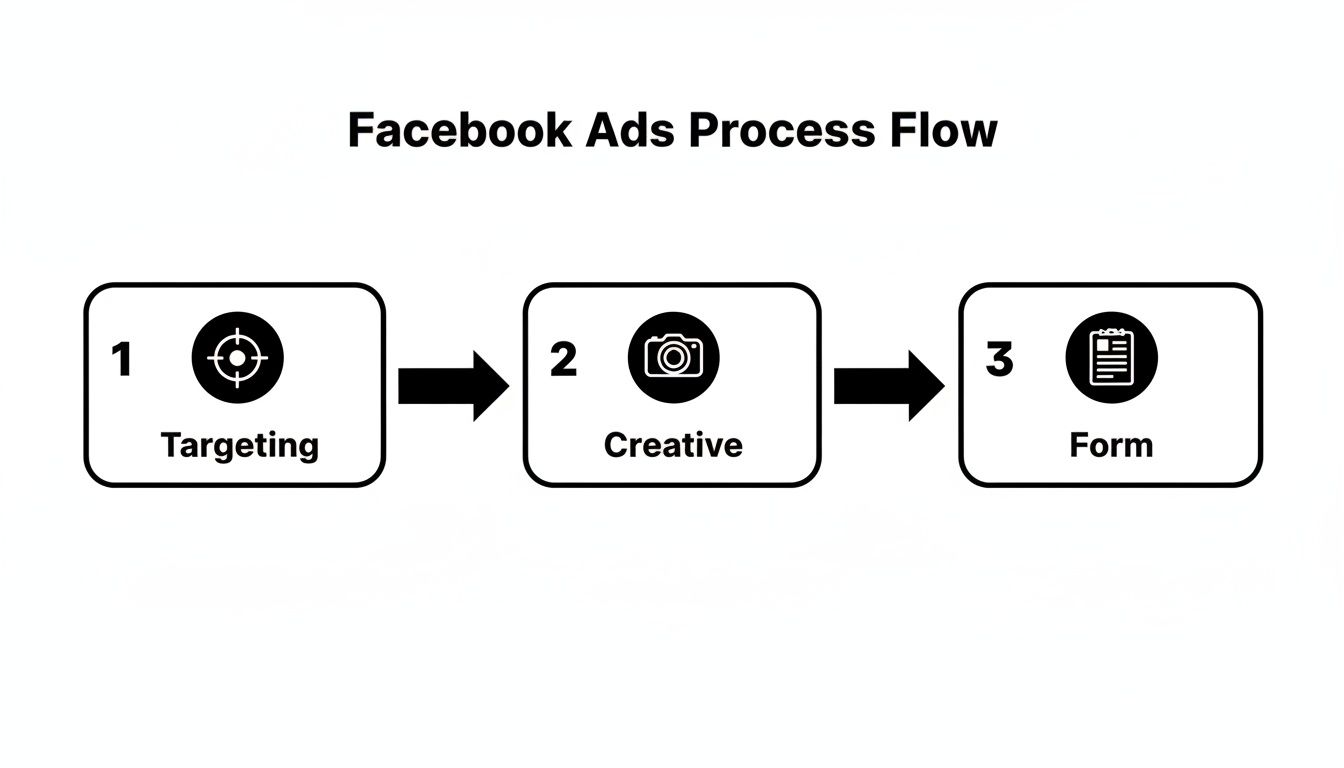
Every stage here is a critical input. Now, let's get those leads captured and routed instantly.
Choosing Your Lead Destination: Google Sheets vs. CRM
First things first: where do you want these fresh auto dealership leads to go? You’ve got two main options, and both have their place.
A Customer Relationship Management (CRM) system is the powerhouse choice. It’s your central hub for every customer interaction, every deal in the pipeline, and every follow-up task. If you have an established sales team, sending leads directly into your CRM is the ideal setup. No question.
But for dealerships just dipping their toes into automation, or anyone working with a tighter budget, a simple Google Sheet can be a surprisingly effective starting point. It's clean, collaborative, and gets the job done without the complexity.
Here’s a quick rundown to help you decide:
| Feature | Google Sheets | Full CRM System |
|---|---|---|
| Cost | Free | Monthly subscription fee |
| Setup | Simple; you can be up and running in minutes. | More complex; often requires integration work. |
| Scalability | Best for lower lead volume. | Built to handle high volume and business growth. |
| Functionality | Basic lead tracking and management. | Advanced sales pipelines, reporting, and analytics. |
Honestly, starting with Google Sheets is a great first move for many. You can always level up to a full CRM integration once your lead flow and team grow.
Setting Up the Automation Workflow
To bridge the gap between your Facebook Lead Ads and your destination (be it a Sheet or CRM), you need an automation tool. Think of it as the middleman that watches for new leads 24/7 and instantly pushes them where they need to go.
The setup is pretty straightforward and usually follows these steps:
- Connect Your Accounts: First, you’ll give the automation tool permission to access your dealership's Facebook Page and either your Google account or CRM.
- Pick Your Trigger: The trigger is always the same: a "New Lead" comes in from a specific Facebook Lead Form.
- Map Your Fields: This is the most important part. You’ll visually match the fields from your Facebook form—like "First Name," "Email," "Phone Number"—to the right columns in your Google Sheet or fields in your CRM. It’s usually a simple drag-and-drop process.
- Set Up Real-Time Alerts: Finally, you create an action to send an instant notification. This could be an email or an SMS that goes directly to a sales manager or a round-robin list the second a new lead hits.
Key Takeaway: Automation isn't just about saving a few minutes. It’s about creating an immediate, unbreakable chain of events. A new lead should simultaneously create a CRM entry and make a salesperson's phone buzz.
To really nail this, it helps to understand the core concept of What Is Marketing Automation. This is the engine that turns ad spend into actual sales. The numbers don't lie: dealers who properly implement this kind of automation see a 2 times higher return on investment compared to those stuck in manual mode.
If you’re ready to connect this directly to your dealership's existing software, our guide on choosing a CRM with Facebook integration is the perfect next step. It breaks down exactly what to look for.
Designing a Follow-Up Sequence That Actually Converts

Capturing a fresh auto dealership lead is just the opening move. The real win—the scheduled test drive, the sale—happens in the follow-up.
A lightning-fast, strategic communication plan is what turns a curious click into a customer. Without a clear plan, your sales team is just winging it, and let's be honest, inconsistency is a proven deal-killer.
The moment that lead hits your system, the clock starts ticking. Your first interactions have to be immediate and helpful. This isn't about a hard sell; it's about showing you're on the ball and ready to help.
The Critical First Hour
Those initial 60 minutes after someone submits their info are your golden window. The only goal here is to make a positive connection and confirm you got their inquiry. I’ve found a one-two punch of automation and personal touch works wonders.
First, an automated SMS should fire off the second the lead comes in. This gives the prospect instant confirmation and tells them what's coming next.
- Example Automated SMS (Sent Instantly):
"Hi [First Name], this is Mark from [Dealership Name]. Thanks for your interest in the [Vehicle Model]! A member of our team is reviewing your request now and will be in touch shortly to help. Talk soon!"
This simple text does two critical things: it gives the prospect that immediate acknowledgment they crave and buys your sales team a few precious minutes to get ready for a real conversation.
Within the next 5-10 minutes, a salesperson needs to send a personalized email. Make sure it references the exact vehicle they inquired about. This small detail shows a real human is on the case.
- Example First Email (Sent within 10 Mins):
"Hi [First Name], I saw you were looking at the 2024 Toyota RAV4 on our site. Great choice! My name is [Salesperson Name], and I'm here to help. Do you have a few minutes for a quick call today to go over any questions you have? You can also book a time directly on my calendar here: [Link to Calendar]."
Building a 7-Day Multi-Touch Cadence
After that first hour, the goal shifts to staying top-of-mind without being annoying. A smart mix of calls, emails, and texts spread out over a week is the sweet spot. The key is to add value with every single touchpoint.
Key Insight: Stop asking, "Are you ready to buy yet?" in every message. Instead, be helpful. Send a video walkaround of the car, share a comparison guide for similar models, or let them know about a new financing offer.
A structured follow-up plan ensures no auto dealership leads ever fall through the cracks. It gives your sales team a clear playbook, which kills the guesswork and lets them focus on what they do best: selling.
Here’s a sample schedule I've seen work incredibly well. It balances persistence with actual value.
7-Day Lead Follow-Up Template for Dealerships
This template gives your team a clear, actionable rhythm for the crucial first week. It’s all about mixing automated speed with a personal, human touch.
| Day | Action 1 (Automated) | Action 2 (Manual) | Goal |
|---|---|---|---|
| 1 | Instant confirmation SMS. | Personalized email & first call within 15 mins. | Make contact, build instant rapport. |
| 2 | Send a value-add email (e.g., video walkaround). | Follow-up call in the afternoon. | Provide useful info, keep the conversation warm. |
| 4 | Send an SMS checking in. "Any questions so far?" | Email with similar models or alternative inventory. | Re-engage, offer different options. |
| 7 | Final check-in email with a low-pressure offer. | Final follow-up call. | Try to book an appointment or gauge future interest. |
Following a schedule like this turns a random process into a repeatable system for success.
Qualifying Leads to Focus Your Efforts
Look, not all leads are created equal. A huge part of your follow-up process is qualification—figuring out who’s ready to buy now versus who’s just kicking tires. This lets your team pour their energy into the hottest prospects.
Start with the info from your Facebook form. Did they mention a trade-in? Did they answer a question about their purchase timeline? That stuff is qualification gold.
During that first call, your reps should aim to understand three simple things:
- Urgency: How soon are they looking to buy? This week? This month?
- Budget: Have they thought about financing or a monthly payment?
- Needs: Is the car they clicked on the perfect fit, or are they open to other options?
Based on these answers, you can sort leads into buckets. A "hot" lead who wants to buy this week gets daily attention. A "warm" lead looking to buy next month can go into a less frequent nurture sequence. This kind of smart prioritization is how you make sure your team’s time delivers the biggest return.
Measuring Success and Optimizing Your Sales Funnel
Getting your automated lead system up and running is a huge win, but the job isn't done. Honestly, it’s just the beginning. The real magic happens when you start digging into the data to see what’s working, what’s a complete waste of money, and how you can make small tweaks that lead to big results.
If you can't measure it, you can't improve it. It's an old cliché, but it’s 100% true in this game.
Your Google Sheet or CRM is now your command center. You’ve built the engine; now it’s time to get obsessed with the dashboard. Without this last piece of the puzzle, you're just throwing money at Facebook and hoping for the best, which is a terrible strategy.
Key Metrics That Actually Matter
Forget about vanity metrics like "impressions" or "clicks." They make you feel good but don't pay the bills. To really know if your pipeline is healthy, you need to tie your ad spend directly to what’s happening on the showroom floor.
Here are the only numbers that should be on your radar:
- Cost Per Lead (CPL): This is your most basic but crucial number, straight from your Facebook Ads dashboard. Just divide your total ad spend by the number of leads you got. It tells you exactly what you’re paying for a name, email, and phone number.
- Lead-to-Appointment Rate: Out of every 100 leads that hit your spreadsheet, how many actually schedule a test drive? This metric tells you instantly if your follow-up game is strong or weak.
- Appointment-to-Sale Rate: This one’s on your sales team. Of all the people who show up for their appointment, how many drive off the lot in a new car? It helps you figure out if you have a lead quality problem or a closing problem.
Tracking these three metrics gives you a crystal-clear view of the entire journey, from the first ad click to the final handshake.
The Ultimate Metric: Cost Per Vehicle Sold
While CPL is a great starting point, the number that truly defines success is your Cost Per Vehicle Sold. This is the holy grail. It tells you, down to the dollar, how much ad spend it took to sell a car through this specific channel.
The formula is dirt simple: Total Facebook Ad Spend / Total Vehicles Sold from Those Leads = Cost Per Vehicle Sold.
Knowing this number changes everything. If you find out it costs you $250 in Facebook ads to sell a $40,000 SUV, you’ll want to pour more fuel on that fire immediately. But if that number is creeping up to $1,500, it’s a massive red flag. Something in your funnel—your ad targeting, your follow-up texts, or your sales process—is broken and needs fixing right away.
Pinpointing Bottlenecks and A/B Testing for Growth
Once you have this data, the weak spots in your process become painfully obvious. Getting a super low CPL but your appointment rate is in the gutter? That's a classic sign that either your follow-up sequence is failing to connect or the leads are low-quality, even if they're cheap.
This is where you need to start A/B testing everything. Don't guess what works—let the data tell you.
- Ad Creative: Run two ads to the same audience. Does a slick video walk-around outperform a static image of the car’s interior? Test it and find out.
- Audiences: Pit two different audiences against each other. Do people who follow Car and Driver convert better than people who follow a competitor's brand page?
- Follow-Up Messages: Tweak your initial SMS. Does asking a direct question get more replies than a simple introduction?
This constant cycle of measuring, testing, and optimizing is what separates the pros from the amateurs. It turns your lead generation from a marketing expense into a predictable, scalable revenue machine.
In a market where new-vehicle sales recently hit 16.3 million units—the best year since 2019—top dealers are flooded with inquiries. Those who can efficiently manage and convert these digital leads are the ones grabbing the biggest market share. For a deeper dive into this trend, check out the latest industry insights from coxautoinc.com.
Got Questions? Let's Talk Real-World Dealership Lead Gen
Alright, so setting up an automated system for pulling in auto dealership leads sounds great in theory. But I get it—you’re probably wondering about the practical stuff. Dealership managers and marketers always want to know about the real-world hurdles, from figuring out a realistic ad budget to dealing with tire-kickers.
Let's dive into the most common questions that pop up when you're building out a new lead generation and follow-up machine. This isn't just theory; these are the challenges you'll actually face and how to handle them.
What’s a Realistic Facebook Ad Budget to Start With?
There’s no magic number here. The smartest way to approach this is to work backward from your sales goal. Don't just pull a number like $500 a month out of thin air. Instead, figure out how many cars you want to move through this channel and calculate your budget from that target.
For most local dealerships, a good starting point is somewhere between $20 to $50 per day. That’s enough to get the ball rolling, gather some meaningful data, and generate a steady stream of leads without breaking the bank right away.
Here’s a quick breakdown:
- At $20/day ($600/month): You can comfortably test one or two campaigns. This is perfect for figuring out which ad creative and audiences are hitting the mark.
- At $50/day ($1500/month): Now we're talking. This budget allows for some serious A/B testing, letting you target different segments (think SUV buyers vs. truck enthusiasts) and collect data much faster.
The real key is to obsessively track your Cost Per Lead (CPL) and, more importantly, your Cost Per Vehicle Sold. Once you know it costs you, say, $300 in ad spend to sell one car, you can scale your budget with total confidence to hit your sales numbers.
How Do We Handle Low-Quality or Unqualified Leads?
First thing's first: accept that not every lead is going to be a home run. It’s just part of the game in digital marketing. Your goal isn't to get rid of them completely but to filter and manage them so your sales team isn’t wasting precious time chasing ghosts.
Your first line of defense is your Facebook Instant Form. Just by adding one simple custom question—like "What is your purchase timeline?"—you can immediately start segmenting leads. Someone who clicks "This week" is a hot lead. Someone who says "6+ months" from now? Not so much.
Crucial Tip: Don't just toss those low-intent leads. Set up a separate "long-term nurture" sequence for them. A simple, automated email that goes out once a month with market updates or service specials keeps your dealership on their radar. When they’re finally ready to pull the trigger, you'll be the first name they think of.
This strategy ensures you squeeze every drop of value out of the leads you paid for, even the ones who aren't ready to buy today.
Can This System Plug Into Our Existing Dealership CRM?
Absolutely. In fact, you should plan on it. Kicking things off with a simple Google Sheet is a great way to get your automation process dialed in, but a direct CRM integration is the end goal for any serious dealership.
Modern automation tools make this a breeze. They act as the bridge, connecting your Facebook Page directly to popular automotive CRMs like:
- DealerSocket
- VinSolutions
- Elead
By mapping the fields from your Facebook Lead Form straight to the corresponding fields in your CRM, every new auto dealership lead instantly shows up as a fresh contact or opportunity. This gives your BDC or sales team one clean, unified view of every prospect without ever having to juggle multiple platforms. The efficiency boost and follow-up consistency are game-changers.
Stop wasting time on manual downloads and losing hot leads to delays. LeadSavvy Pro automates your entire Facebook lead capture process, zapping new prospects instantly to your Google Sheet or CRM. Start your free plan today and see just how easy it is to respond faster and close more deals.