A Modern Guide to Optimize Facebook Ads for Maximum ROI
To really get results from Facebook ads, you have to stop thinking like a tactician and start thinking like a strategist. It’s not about randomly flipping switches in Ads Manager; it’s about building a solid foundation based on clear goals and KPIs you can actually measure. This is the only way to make sure every decision you make—from who you target to what your ad looks like—is pulling in the same direction and driving real business growth.
Building Your Foundational Ad Optimization Strategy
Jumping into Facebook Ads Manager without a clear plan is the fastest way to burn through your budget. I’ve seen it happen countless times. Advertisers launch campaigns with fuzzy goals like "get more clicks" or "increase engagement," but those are just vanity metrics. They rarely have anything to do with your bottom line.
A real strategy starts long before you ever write a single line of ad copy.
The very first thing you need to do is define a crystal-clear campaign objective. What, specifically, do you want someone to do after seeing your ad? Your answer to that question directly determines which campaign objective you choose in Facebook, and that tells the algorithm exactly who to go looking for.
- Awareness: Great for getting your brand in front of a brand-new audience that has no idea who you are.
- Traffic: Use this to drive people to a blog post or a landing page where they can dig a little deeper.
- Engagement: Perfect for building up social proof and creating a community around your brand.
- Leads: This is your go-to when you need to collect contact information for your sales pipeline.
- Sales: Directly targets the people who are most likely to pull out their wallets and buy something on your site.
Moving Beyond Clicks to Core KPIs
Once your objective is locked in, you have to define the KPIs that actually matter. Clicks and impressions are secondary. You need to focus on the numbers that directly impact your bank account. For a lead generation campaign, your North Star is Cost Per Lead (CPL). If you're an e-commerce business, it’s all about Return On Ad Spend (ROAS).
Success in advertising isn't about getting the cheapest click. It's about acquiring a customer profitably. A high-cost click that converts is infinitely more valuable than a hundred cheap clicks that don't.
Setting these benchmarks gives you a yardstick to measure everything against. For example, if your average customer lifetime value (LTV) is $500, a $40 CPL is a home run. But if your LTV is only $50, that same CPL is a quick trip to going out of business. This fundamental understanding is what shifts you from just reacting to your ad performance to making proactive, data-driven decisions.
To help visualize this, let's break down the core strategic areas and their primary goals.
Core Pillars of Facebook Ad Optimization
Here's a high-level view of the key strategic areas you need to master and what you should be aiming for in each one.
| Optimization Pillar | Primary Goal | Key Metrics to Watch |
|---|---|---|
| Campaign Foundation | Align ad efforts with tangible business outcomes. | Cost Per Lead (CPL), Return On Ad Spend (ROAS), Customer Acquisition Cost (CAC) |
| Audience & Targeting | Reach the most relevant users likely to convert. | Click-Through Rate (CTR), Conversion Rate, Audience Overlap |
| Creative & Copy | Stop the scroll and compel users to take action. | Hook Rate (3-sec video views), Ad Recall Lift, Engagement Rate |
| Bidding & Budget | Maximize results within your budget constraints. | Cost Per Result, Budget Pacing, Frequency |
| Conversion Funnel | Create a seamless path from ad click to conversion. | Landing Page Conversion Rate, Lead Form Completion Rate, Cart Abandonment Rate |
Think of these pillars as the blueprint for your entire advertising operation. A weakness in one area will inevitably hurt the others.
This strategic framework isn't something you set up once and forget. It’s a living, breathing feedback loop. You’ll be constantly testing new audiences, seeing which creatives hit the mark, and refining your approach based on what the data is telling you. With this solid strategy in place, the specific optimization tactics we'll cover next will start delivering the powerful, predictable results you're looking for.
Mastering Audience Targeting for Better Results
Let's be honest: you can have the most brilliant ad creative in the world, but it’s completely useless if you're showing it to the wrong people. Effective audience targeting is the true engine of a high-performing campaign. It's about getting surgical and moving past broad, hopeful guesses.
This all starts with the assets you already have—your customer list, your website visitors, and your social media followers. These people are your low-hanging fruit because they’ve already raised their hands and shown interest in what you do.
Harnessing Your Existing Assets with Custom Audiences
This is your warm traffic. Custom Audiences are how you reconnect with people who have already engaged with your business. They're your best bet for driving repeat sales or moving prospects down the funnel.
You can build these incredibly valuable audiences from a few key sources:
- Customer Lists: Just upload a CSV of your customer emails or phone numbers. Facebook will work its magic to match them with user profiles.
- Website Traffic: Once you have the Meta Pixel installed, you can create audiences based on who visited your site, looked at specific products, or even abandoned their cart.
- App Activity: Got a mobile app? Target users based on in-app actions, like finishing a tutorial or making a purchase.
- Facebook Engagement: This is a big one. Group together people who have watched your videos, liked your Page, or interacted with your Instagram profile.
Don't just think of these for retargeting. A Custom Audience of your absolute best customers is the perfect starting point for finding your next wave of buyers.
Expanding Your Reach with Lookalike Audiences
So you've got a solid Custom Audience. Now what? You ask Facebook to find more people just like them. That's the power of Lookalike Audiences. Frankly, they are the single most effective tool for prospecting new customers who share the traits of your existing ones.
The source you pick for your Lookalike is everything. An audience built from your highest-value customers will always outperform one based on a generic pool of all website visitors. Think quality, not just quantity.
A Lookalike Audience is only as good as its seed. Garbage in, garbage out. A small, hyper-qualified seed audience of 1,000 top customers will consistently outperform a massive, low-quality seed of 100,000 general website visitors.
You also get to control how broad or narrow you want to go. Facebook lets you choose a percentage range, usually from 1% to 10% of the population in your target country.
- A 1% Lookalike is the tightest match to your source audience. You'll get higher relevance but a smaller reach. This is the perfect place to start for any conversion-focused campaign.
- A 1-3% or 3-5% Lookalike gives the algorithm more breathing room to find people. This is great for scaling campaigns that are already working well or for broader top-of-funnel goals.
Refining Your Targeting with Layering and Exclusions
To truly optimize Facebook ads, you need to think beyond single audiences and start layering. For example, you might start with a broad interest like "digital marketing," but then add a behavioral layer requiring that they also be "small business owners." This instantly carves out a much more qualified group.
For an even deeper dive into the possibilities here, check out our complete guide on Facebook Ads targeting options.
Just as important is using Exclusion Audiences. Nothing wastes your ad spend faster than showing prospecting ads to people who are already your customers.
Make it a habit to always exclude your recent customer lists and recent converters from your prospecting campaigns. It’s a simple step that saves you money, prevents ad fatigue, and ensures everyone gets the right message at the right time.
Crafting Ad Creatives That Convert
You can have the most dialed-in audience targeting in the world, but it won't matter if your creative falls flat. In a feed overflowing with content, your ad's image, video, and copy are doing all the heavy lifting. If it doesn't stop someone's thumb mid-scroll, the game is already lost.
Nailing high-performing ad creative is a mix of art and science. It's about tapping into basic human psychology but doing it within a proven, structured framework.
The AIDA Framework: Your Go-To for Ad Copy
One of the most battle-tested copywriting frameworks out there is AIDA—Attention, Interest, Desire, Action. It gives you a logical roadmap to guide someone from casually scrolling to actively clicking.
- Attention: Your first line is your hook. It has one job: stop the scroll. Ask a sharp question, drop a surprising statistic, or call out a pain point your audience knows all too well.
- Interest: Okay, you've got their attention. Now you have to hold it. Briefly expand on the problem you just introduced and show them you get it. A little empathy goes a long way.
- Desire: Here’s where you bring your solution—your product or service—into the picture. Don't just list features; sell the transformation. Paint a vivid picture of what their life looks like after their problem is solved.
- Action: It's time to be direct. Tell them exactly what to do next. Your Call to Action (CTA) should be crystal clear and match the button on your ad. Think: "Click 'Sign Up' to get your free guide now."
This structure just works because it follows a natural persuasion path. It’s an essential tool in your kit as you optimize Facebook ads.
Choosing Visuals That Actually Connect
Your ad's visual is the first thing people lay eyes on. It has to communicate your core message in less than a second. While the debate between polished stock photos and authentic, user-generated content (UGC) is always on, the trend is undeniable.
Authenticity almost always wins. A slightly imperfect photo or a real video from a customer often feels far more trustworthy and relatable than a glossy, flawless stock photo. This is especially true when you're retargeting a warmer audience that already has some familiarity with your brand.
If you need some inspiration, check out these compelling Facebook lead ad examples that do a great job of pairing strong copy with powerful visuals.
I've run countless campaigns, and here's a key takeaway: the best-performing image is almost never the one you'd expect. An image that looks like it belongs in a friend's feed will often crush a professional, studio-shot photo because it feels native to the platform.
Don't forget to experiment with different formats:
- Single Image: Simple, clean, and perfect for hammering home one core message.
- Carousel: Great for showing off multiple products, walking through different features, or telling a step-by-step story.
- Video: Still the king of engagement. Even a quick 15-second video can give your performance a massive lift by capturing attention with movement.
The A/B Testing Process That Never Ends
Never, ever assume you know which creative will be the winner. The only way to know for sure is to test. A disciplined, systematic A/B testing process is the real secret to getting better and better over time.
The golden rule here is simple: isolate one variable at a time. If you change the headline, copy, and image all at once, you’ll have no clue which element actually moved the needle.
Start with a "control" ad—this could be your current best performer or just your best first guess. Then, create variations where you change just one of these elements:
- The Headline: Test a benefit-focused headline against one that asks a question.
- The Primary Text: Try long-form, story-driven copy against a short, punchy version.
- The Visual: Pit a static image against a short video or a carousel ad.
- The Call to Action: Does "Learn More" outperform "Sign Up" or "Download"?
Let these tests run until you have enough data to make a call (usually a few days, depending on your budget). Once you find a clear winner, it becomes your new control. Then, you start the process all over again by testing a different variable. This constant cycle of refinement is how you consistently chip away at your cost per lead and find what truly resonates.
Optimizing Your Bidding and Budget Strategy
You can have the most killer creative and perfectly dialed-in targeting, but if your budget strategy is off, you'll never hit profitability. Mastering Facebook's bidding and budget options is the final, crucial piece of the puzzle. It’s how you tell the algorithm exactly how to spend your money to get what you want.
A lot of advertisers get stuck here. They stick with the default settings and don't realize they're leaving powerful tools on the table. Let's demystify these options and give you a clear framework for making every dollar count. The goal is to stop guessing and start making intentional, strategic decisions that fuel real growth.
Campaign Budget Optimization vs. Ad Set Budget Optimization
One of the first big calls you have to make is where you set your budget—at the campaign level or the ad set level. Each one serves a very different purpose, and knowing when to use which is key.
Ad Set Budget Optimization (ABO): With ABO, you're in the driver's seat. You manually set a specific daily or lifetime budget for each individual ad set, giving you total control over how much is spent on a particular audience. This is perfect when you absolutely need to guarantee spend on a specific segment, like a small but super valuable retargeting audience.
Campaign Budget Optimization (CBO): With CBO, you hand the keys over to Facebook. You set one central budget at the campaign level, and the algorithm automatically shifts that budget in real-time to the best-performing ad sets. It’s built for efficiency, pushing your money toward the audiences and creatives that are delivering the cheapest results.
Think of ABO as micromanaging your budget for pinpoint control. CBO is like giving your money to a smart portfolio manager who allocates it based on what's winning. CBO is fantastic for scaling, while ABO is your go-to for testing and ensuring delivery to specific audiences.
So, when should you use each one? Here's a quick cheat sheet.
CBO vs ABO: When to Use Each Strategy
This table breaks down the practical differences to help you decide which budget strategy fits your current campaign goals.
| Budget Strategy | Best For | Key Advantage |
|---|---|---|
| CBO (Campaign Budget Optimization) | Scaling proven campaigns, finding winning audiences, maximizing efficiency. | Automatically allocates budget to the best-performing ad sets, lowering your overall CPA/CPL. |
| ABO (Ad Set Budget Optimization) | Testing new audiences, controlling spend on specific segments (like retargeting), maintaining stable spend. | Gives you granular control over exactly how much is spent on each ad set, preventing one from dominating the budget. |
Ultimately, there's no single "best" option. Experienced advertisers use both, choosing the right tool for the job at hand. Start with ABO for testing, then switch to CBO once you've found your winners and are ready to scale.
Aligning Bidding Strategies with Your Goals
Beyond just setting a budget, your bidding strategy tells Facebook what you're willing to pay for an outcome. Getting this right is critical.
Highest Volume (Lowest Cost): This is the default setting. It basically tells Facebook, "get me the most leads you can for my budget." It's a great starting point, but it prioritizes volume over cost stability, so your Cost Per Lead (CPL) can jump around.
Cost Per Result Goal: This strategy puts you in control. You set an average cost you're aiming for per conversion, and Facebook will try to hit that average—sometimes paying a bit more, sometimes less. This is perfect when you know your numbers and have a specific target CPL you need to maintain profitability. For instance, if you know a lead is profitable at or below $30, you can set that as your goal.
In today's competitive ad space, these choices are more important than ever. The average conversion rate for Facebook lead ads is hovering around 7.72%, with the average cost per lead climbing to $27.66. Despite these rising costs, campaigns properly optimized for conversions can deliver 2-3 times higher ROI. That makes a deliberate bidding strategy non-negotiable. You can find more of these Facebook advertising benchmarks on wordstream.com.
Scaling Winners and Cutting Losers
Knowing when to pour more money into a successful campaign—or when to pull the plug on a dud—is an art. Scale too fast, and you can shock the algorithm and kill a winning ad set.
When you're ready to scale, follow this rule of thumb: increase the budget by no more than 20% every 2-3 days. This slow-and-steady approach gives the algorithm time to adjust without resetting the learning phase and sending your performance off a cliff.
On the flip side, you need to be ruthless about cutting your losses. Don't let an underperforming ad set bleed your budget dry. Set a clear, data-driven rule for yourself, like: "If an ad set spends twice my target CPL without a single conversion, I'm turning it off." This takes the emotion out of the decision and protects your bottom line. To get a better handle on this, check out our guide on how to calculate return on ad spend.
Streamlining Your Lead Capture and Follow Up
Getting a lead from your Facebook ad is a great start, but it’s only half the job. The real money is made—or lost—in what happens after someone clicks "submit." A clunky, slow follow-up process can kill your conversion rates, while a seamless one separates the campaigns that just collect contacts from those that actually drive revenue.
It all begins with your lead form. You're walking a fine line here: you need enough info for your sales team, but you don't want to scare people away with a form that looks like a tax return. Stick to the absolute essentials—name, email, and phone number are usually enough. Every extra field is just another chance for a potential customer to give up and leave.
The High Cost of Manually Downloading Leads
The biggest bottleneck I see in most lead gen campaigns is the delay between a lead signing up and a salesperson reaching out. For years, the default method was to manually download a CSV file from Facebook's Ads Manager. This workflow is an absolute conversion killer.
Think about it: a hot lead shows interest at 9 AM. But if your team only downloads leads once a day, they might not even see that person's info until the next morning. By then, that lead has gone cold. They’ve already checked out your competitors or, worse, forgotten they even filled out your form.
This old-school manual process is a disaster waiting to happen:
- Slow Response Times: The longer you wait, the less likely you are to close the deal. Studies have shown that contacting a lead within five minutes makes you exponentially more likely to convert them.
- Lost Leads: CSV files get lost, typos happen during data entry, and leads just fall through the cracks when you're moving them to a CRM by hand.
- Wasted Ad Spend: You paid good money for that click. Letting a lead go cold because of a slow internal process is like lighting your ad budget on fire.
Now, while we're on the topic of budgets, it's worth understanding the two main ways you can manage them inside your campaigns.
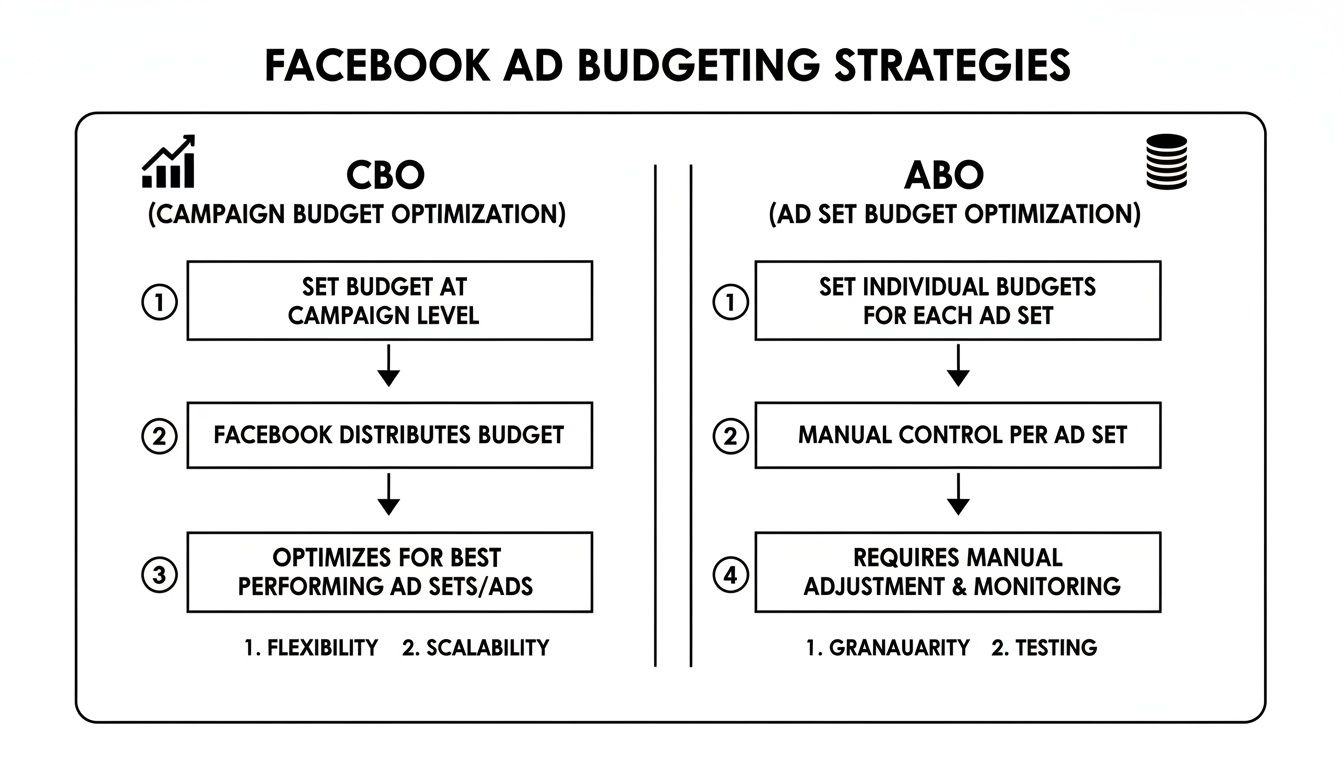
This just breaks down the core difference: Campaign Budget Optimization (CBO) lets Facebook's algorithm distribute your budget across ad sets, while Ad Set Budget Optimization (ABO) gives you manual control over how much you spend on each audience. Both have their place, but neither will save you if your follow-up is broken.
Automating Your Follow-Up for Maximum Impact
The solution is to cut out the manual work entirely. An automated workflow closes the gap between the lead form submission and your team's first touchpoint. This is where you can get a huge edge over the competition.
The moment a user hits "submit" on your lead form should be the moment your sales process kicks into gear—not hours or days later. Automation makes this instant handoff a reality, dramatically shrinking your sales cycle and boosting your conversion rates.
Imagine this: a lead fills out your ad. Instantly, their info appears in a shared Google Sheet. At the exact same moment, your top salesperson gets a Slack notification with the lead's details so they can call them back in under five minutes.
That's the power of automation. It turns your lead generation from a passive data collection chore into an active, real-time sales machine.
How to Set Up an Automated Workflow with LeadSavvy Pro
Tools like LeadSavvy Pro were built specifically to solve this problem. It acts as the bridge connecting your Facebook Lead Ads to all your other tools, and you don't need to be a tech wizard to set it up.
You can manage all your lead forms from a single dashboard, track performance, and easily decide where you want new leads to be sent.
Here’s what that automated workflow looks like in practice:
- Connect Your Facebook Account: First, you securely link your Facebook page to the platform. It's a quick, one-time setup.
- Choose Your Destination: Next, you pick where you want your leads to go. This could be as simple as a Google Sheet or a direct connection to your CRM.
- Map Your Fields: You'll match the fields from your Facebook form (like "Full Name" or "Email") to the right columns in your spreadsheet or CRM.
- Activate and Forget: Once you turn it on, the system runs 24/7 in the background. Every single lead that comes through your ad is instantly and automatically sent to its destination.
By cutting out the manual steps, you ensure every lead is captured and followed up on immediately. This maximizes the return on every single dollar you invest in your ads.
Analyzing Performance Data and Scaling Winners
Your Facebook Ads Manager is a goldmine of information, but let's be honest—it can be a bit much. The real trick isn't to get lost in every single metric. It’s about zeroing in on the numbers that tell you if you're actually making money. This is where you turn raw data into smart, profitable moves.
First things first, customize your reporting columns. Ditch the default view. You need to build a dashboard that tells the story of your campaign at a glance. What you track will obviously depend on your goals, but there are a few metrics that are non-negotiable.
Key Metrics for Clear Insights
To really get a grip on what's happening with your ads, these are the metrics you should be living and breathing:
- Link Click-Through Rate (CTR): This tells you one simple thing: is your ad compelling? If your CTR is in the gutter, it's a huge red flag for your creative or your audience targeting.
- Cost Per Lead (CPL): If you're running lead gen campaigns, this is your North Star. It’s the bottom-line number telling you exactly what you're paying to get a potential customer's details.
- Return On Ad Spend (ROAS): For e-commerce or any campaign tied to direct sales, this is the ultimate scoreboard. It answers the most important question: for every dollar I put in, how many am I getting back?
- Frequency: This shows the average number of times someone has seen your ad. Once this number creeps up—usually past 3-4—you're entering the ad fatigue danger zone.
With this data, you can start playing detective. CPL starting to climb? Check your frequency. If it’s high, your audience is probably sick of your ad, and it’s time for some fresh creative. CTR tanking? Your ad just isn't grabbing attention, which means it’s time to A/B test some new images or headlines.
To truly get the most out of your campaigns, you have to understand how to measure marketing ROI. This helps you put all your Facebook numbers into the bigger picture of your overall business goals.
A Framework for Smart Scaling
So you've found a winner. An ad set is consistently crushing your target CPL or ROAS. The gut reaction is to just crank up the budget, right? Wrong. Scaling too fast is a classic rookie mistake that can shock the algorithm, reset the learning phase, and completely kill your performance.
The secret to scaling isn't just about throwing more money at your ads. It's about spending that money smarter—either by gradually raising the stakes on what's working or by expanding into new, similar audiences.
Here's a structured way to scale your winners without ruining a good thing.
Vertical Scaling (More Budget)
This is the simplest form of scaling: just increasing the budget on a proven ad set.
- Go Slow: Don't get greedy. Increase your daily budget by no more than 20-25% at a time. Anything more is asking for trouble.
- Wait and Watch: After you bump the budget, give it at least 48-72 hours. The algorithm needs time to adjust and stabilize. Only then should you consider another increase.
Horizontal Scaling (New Audiences)
This approach is about taking your winning ad creative and finding new people to show it to.
- Start by duplicating your winning ad set. Don't touch the original!
- Now, target a new Lookalike Audience. If a 1% Lookalike was your winner, try testing a 1-3% or 3-5% version.
- You can also test new interest-based audiences that are logically similar to your original winner.
This method lets you find new pockets of customers without messing with the magic of your best-performing ad set. By combining patient vertical scaling with some smart horizontal expansion, you can grow your campaigns sustainably and turn those small wins into seriously profitable results.
Got Questions About Facebook Ads? Let's Get Them Answered.
When you're deep in the trenches of Facebook ad management, a lot of questions pop up. Getting straight, practical answers is the difference between blowing your budget and scaling a winner. Let's tackle some of the most common ones I hear.
How Long Should I Run an Ad Before I Touch It?
I know, it's tempting to jump in and start tweaking things the second you see a number you don't like. But you've got to let the algorithm do its job first.
A new campaign needs at least 3-5 days to get out of the "Learning Phase." This is when Facebook is figuring out who to show your ad to. If you make big changes too early, you reset the whole process and never get a clean read on performance. As a general rule, don't even think about making a call until you have at least 1,000 impressions.
What's a Good Cost Per Lead on Facebook?
This is the classic "it depends" question, but here's how to actually answer it for your business. A "good" CPL is completely relative. An e-commerce store might be thrilled with a $20 CPL, while a B2B SaaS company could be profitable at $150.
The only benchmark that matters is your customer lifetime value (LTV). A CPL is "good" if you can acquire customers profitably. If your LTV is $1,000, a $75 CPL isn't just good—it's a home run.
Why Are My Facebook Ad Costs Suddenly Spiking?
If your costs are creeping up, the number one suspect is almost always ad fatigue. Your audience is just plain tired of seeing the same ad.
Jump into your ad set reporting and look for the "Frequency" metric. If that number is north of 3 or 4, it’s a red flag. It's time to either swap in fresh creative or target a completely new audience. Other culprits can be more competition bidding in the auction or even seasonal trends driving up demand.
Tired of the daily grind of downloading CSV files and letting hot leads go cold? LeadSavvy Pro instantly syncs your new Facebook leads right into your CRM or a Google Sheet. Every lead gets the fast follow-up it deserves.