A Modern Playbook to Manage Sales Leads from Facebook Ads
You’ve got to be fast, automated, and organized to really win with sales leads today. The whole game is about capturing, qualifying, and engaging prospects the second they raise their hand. If you don't, you're just letting good opportunities slip through your fingers and go cold.
Stop Letting Your Hot Facebook Leads Go Cold
There’s no better feeling than a Facebook ad campaign that’s crushing it—until you realize your best leads are slowly dying in a spreadsheet somewhere. That’s the harsh reality of manual lead management. It's the silent killer of your ad spend ROI.
Without a solid system in place, even the most creative ads and perfect targeting will fall flat.
Think about a local real estate agency running a hot new campaign for a few listings. The ads are working great, pulling in dozens of high-quality inquiries every single day. But here's the catch: the marketing manager only gets around to downloading the lead CSV from Facebook once a day, usually in the late afternoon. By the time that data is cleaned up and forwarded to the sales team, hours have evaporated.
The Real Cost of a Slow Response
In that small window of time, those eager homebuyers have already started looking at other properties. Worse, they might have already gotten a call from a competitor who has their lead follow-up on autopilot. Your agency's red-hot lead is now lukewarm, at best. You essentially just paid to generate a lead for another business.
This isn’t some rare mishap; it's what happens by default when you’re stuck doing things by hand.
The window to make a real impression is shockingly small. When someone fills out your form, their interest is at its absolute peak. Every single minute you wait makes it that much harder to connect.
This delay isn’t just an annoyance—it’s a major financial drain. Research shows that contacting a lead within 5 minutes of their inquiry boosts your contact rates by a staggering 900%. But wait just 30 minutes, and the chance of closing that deal drops by 80%. Speed is everything.
Why Automation Isn't a Luxury Anymore
Manually downloading CSVs and pasting data into a spreadsheet isn't just slow; it's completely uncompetitive. It bakes unacceptable delays and human error right into a process that demands speed and precision. In today's market, automation isn’t a "nice-to-have"—it's a must-have.
Here’s exactly what you’re losing without it:
- Lost Revenue: This one’s obvious. Leads that don't hear from you quickly will find a competitor who moves faster.
- Wasted Ad Spend: You're paying good money for clicks and form fills that never even get a fair shot at converting. Your ROI takes a massive hit.
- Damaged Brand Perception: A slow (or non-existent) response makes your business look disorganized and like you don't care. That's a bad look.
- Frustrated Sales Team: Nothing kills morale faster than giving your sales team a list of stale leads. They end up wasting their time chasing people who have already moved on.
The solution is to build a direct bridge from your Facebook Lead Forms straight to your sales team. By setting up an automated workflow, you guarantee every single lead is captured, routed, and followed up on in real-time. You can explore our deep dive on speed-to-lead statistics to see just how big the impact is on your sales cycle.
This approach turns your Facebook advertising from a simple lead generation tool into a powerful, automated customer acquisition machine.
Build Your Automated Lead Management System
Let's be honest: manually downloading CSV files from Facebook is a massive time sink. It’s the single biggest bottleneck slowing down your sales process. The goal here isn't to add a bunch of complicated tech—it's to build a simple, reliable engine that closes the gap between someone showing interest on Facebook and your sales team saying "hello."
First things first, you need to connect your Facebook Page to an automation tool like LeadSavvy Pro. This is a simple authentication step that gives the platform permission to see your lead forms as they come in. Of course, for this to work, you need a steady flow of prospects. Make sure you’re using high-impact B2B lead generation techniques to keep the pipeline full.
Once you're connected, the system will automatically see all the active lead forms on your page. This connection is the bedrock of your entire automated workflow.
Choose Your Lead Destination
Okay, so your Facebook account is linked. Now for the big question: where do you want these leads to go? Your answer really depends on your team's current setup—how big you are, how comfortable you are with tech, and how complex your sales process is.
For most people, it boils down to two options: a simple Google Sheet or a more robust Customer Relationship Management (CRM) platform.
A Google Sheet is often the perfect place to start. It’s free, everyone knows how to use it, and you can get it running in minutes. Imagine a spreadsheet that updates itself in real-time, with every new Facebook lead popping up as a new row with all their details. This is a game-changer for small teams or anyone just starting to build out a formal sales process.
On the flip side, if you have an established sales team, you're probably already using a CRM. Pushing leads directly into your CRM is the more powerful move. It lets you automatically create new contacts, assign them to the right person on your team, and kick off entire sales sequences without lifting a finger.
Choosing Your Lead Destination: Google Sheets vs. CRM
Deciding where to send your leads is a crucial first step. It sets the foundation for your team's entire follow-up process. Here’s a straightforward comparison to help you figure out what makes the most sense for you right now.
| Feature | Google Sheets | CRM (via Integration) |
|---|---|---|
| Setup Complexity | Very Low – just connect and go | Moderate – requires mapping fields |
| Cost | Free | Varies by CRM provider |
| Best For | Small teams, simple sales cycles | Established sales teams, complex pipelines |
| Scalability | Limited | High |
| Primary Function | Data collection and organization | Full customer lifecycle management |
Ultimately, there’s no wrong choice here. Starting with Google Sheets is a fantastic way to prove the concept and see immediate results. You can always level up to a full CRM integration down the road as your business grows. For a deeper dive into both methods, check out our full guide on how to automate Facebook leads.
Configure Real-Time Notifications
Getting the lead data instantly is only half the job. Your sales team needs to know about it the second it happens. This is where real-time notifications turn "speed to lead" from a buzzword into your standard operating procedure.
The two most effective channels I've seen are email and Slack. They just work.
- Email Notifications: You can set up an email that automatically fires off to a specific salesperson or a group inbox (like sales@yourcompany.com) the moment a lead comes in. This email should be packed with all the crucial info: name, email, phone, and their answers to your form questions.
- Slack Notifications: If your team lives in Slack, this is even better. A dedicated channel for new leads creates instant visibility. Team members can see it, claim it, and start their follow-up right away.
This screenshot shows you exactly what it looks like inside LeadSavvy Pro. All your forms are listed, ready to be automated with a click.
The whole point is to make it dead simple to pick a form and turn on the automations.
Remember, a notification is meant to trigger immediate action. It needs to be clean, concise, and give your salesperson everything they need to make that first call without having to log into three different systems.
By connecting your Facebook Page, picking a destination like Google Sheets or a CRM, and turning on instant alerts, you’ve just built a powerful, automated system. This simple workflow kills manual data entry, shrinks your response time from hours to seconds, and guarantees no lead ever falls through the cracks again. Now your team is ready to engage with people when they're most interested.
Qualify and Route Leads for Immediate Action
Getting a lead the moment it arrives is a huge win, but that’s just the starting line. The real magic happens when you can instantly figure out who that lead is and get them to the perfect person on your team—without lifting a finger.
This is where smart lead qualification and routing turn a simple notification into a hot sales opportunity. Instead of treating every lead the same, you start separating the serious buyers from the casual browsers the second they hit “submit.”
Turning Data Into Actionable Intelligence
The key is asking the right questions directly in your Facebook Lead Form. Think beyond just name and email. Adding one or two smart qualifying questions gives you immediate context, transforming a raw lead into a piece of sales intelligence.
Let’s say you’re a real estate agent. Instead of just collecting basic contact info, you add a simple multiple-choice question to your ad: "What's your approximate home-buying budget?"
- Under $300,000
- $300,000 – $500,000
- Over $500,000
Just like that, you’ve built a powerful routing workflow. A lead with a budget over $500,000 can be automatically shot over to a senior agent’s phone via an urgent email or a Slack notification. Meanwhile, leads in the lower budget range can be dropped into an automated email nurture sequence to build the relationship over time.
This visual breaks down that simple yet powerful flow of how lead data gets from Facebook right to your team.
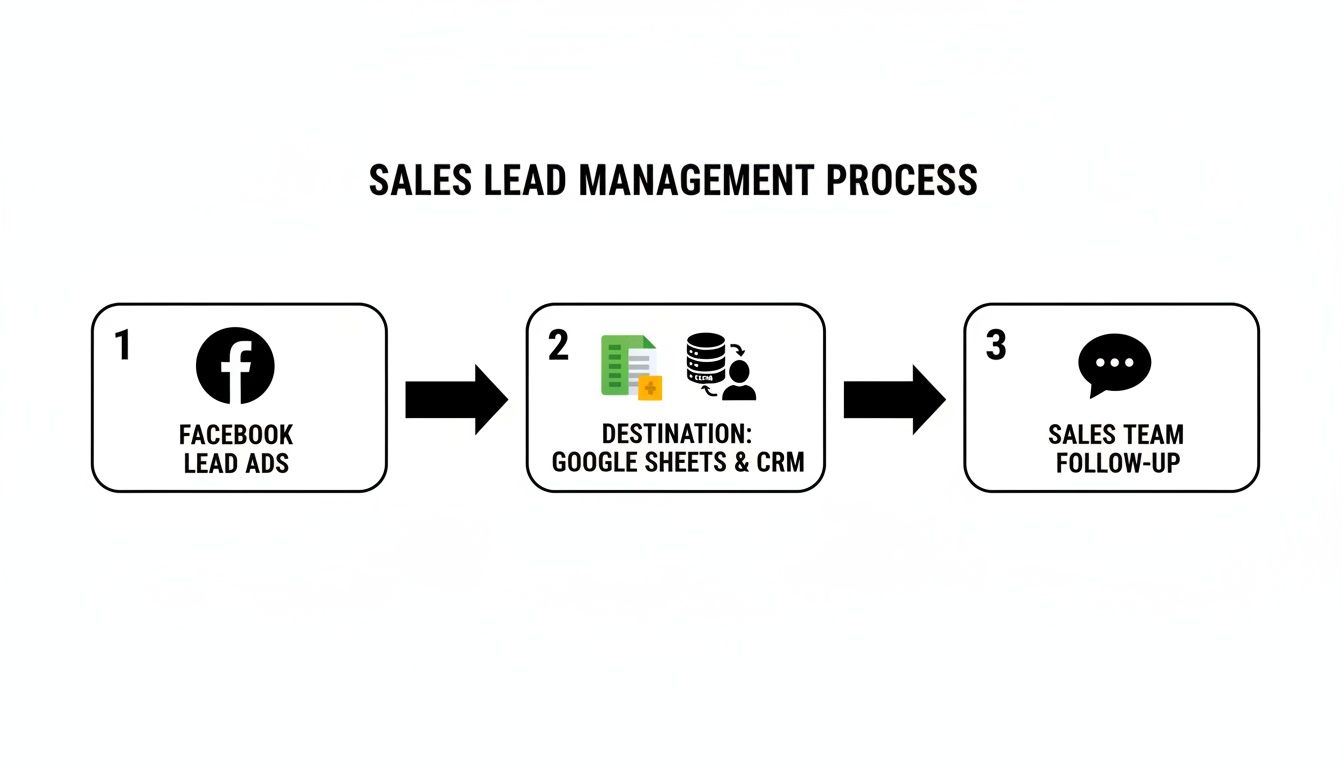
It’s all about creating a direct, automated path that kills delays and gives your team everything they need to act fast.
Setting Up Smart Routing Rules
Automated routing isn't some complex coding project. It's based on simple "if/then" logic you can set up in a tool like LeadSavvy Pro. You’re just telling the system, "If this lead meets these criteria, then send it to this person or kick off this workflow."
Here are a few killer qualification questions you can add to your forms to make this happen:
- Project Timeline: "When are you looking to start?" (e.g., Immediately, Within 3 months, 6+ months). This one is gold for prioritizing the leads who are ready to buy now.
- Company Size: "How many employees are in your company?" (e.g., 1-10, 11-50, 51+). This lets you route smaller leads to one rep and enterprise-level inquiries to your senior specialist.
- Biggest Challenge: "What’s your biggest challenge with [your service area]?" (e.g., Getting more traffic, Closing deals, Retaining customers). This arms your sales team with the perfect conversation starter.
The goal is to gather just enough info to make an intelligent routing decision without making your lead form a novel. One or two strategic questions are often all you need to completely change the game.
By adding this layer of qualification, you ensure your most valuable prospects get a VIP experience. Your senior reps spend their time on high-potential deals, while other leads are nurtured efficiently until they’re ready. This kind of segmentation is fundamental to managing sales leads effectively and making your team wildly more productive.
You stop wasting time on tire-kickers and focus all your energy where it will actually generate revenue.
Nurturing Sequences That Actually Turn Leads into Customers
Getting a lead is a huge first step, but let's be real: most leads are not ready to buy the moment they hit "submit." Think about it—only a tiny fraction are sales-ready right away. Everyone else needs a little more conversation, a bit more value, to build trust and keep you top of mind.
This is exactly where a smart, automated nurturing sequence comes in. It’s not about blasting people with sales pitches. It’s about building a genuine relationship by being helpful. By setting this up to run automatically, you can manage dozens or hundreds of leads at scale, making sure nobody falls through the cracks while your sales team focuses on the hottest prospects.
The First Touch: The Welcome Email
Your first automated email is your digital handshake. It has one job: to be immediate, helpful, and set a positive tone. All it needs to do is confirm you got their info and deliver whatever you promised in your ad—a guide, a quote, a callback, you name it.
Timing is absolutely critical here. This email needs to land in their inbox within five minutes of them filling out the form. Any longer, and you risk them forgetting why they even contacted you.
Here’s a simple template I've seen work wonders:
Subject: Here's the [Resource Name] you asked for!
Hi [First Name],
Thanks for reaching out to [Your Company Name]!
As promised, here is the link to your free [e.g., Home Buyer's Guide]: [Link to Resource]
I'll be in touch soon to see if you have any questions. In the meantime, you might find our recent post on [Relevant Topic] interesting.
Best,
The [Your Company Name] Team
See how that works? It's short, personal, and instantly delivers on your promise. No hard sell, just a friendly introduction that starts building credibility from the get-go.
The Follow-Up: Add More Value
Wait about two or three days, then it’s time for your next move. The goal here is to keep providing value and show off your expertise without asking for anything. Sharing a powerful case study or a customer success story is a fantastic way to do this.
This kind of content is pure social proof. It helps the lead see themselves achieving success with your help, shifting the conversation from what you claim you can do to what you've actually done for others.
Try a template like this for a case study email:
Subject: How [Client Name] got [Specific Result]
Hi [First Name],
Hope you found the guide useful.
I wanted to share a quick story about a client of ours, [Client Name]. They were running into issues with [Pain Point your lead might have], but after we implemented [Your Solution], they were able to [Specific, Quantifiable Result] in just [Timeframe].
You can read the full story here if you're curious: [Link to Case Study]
Thought it might spark some ideas for you.
Cheers,
[Your Name]
This approach is so effective because it’s not about you—it’s about your customer’s win. It frames your service as the solution to a problem they probably have, too.
The Re-Engagement: The Gentle Nudge
So, what happens if a lead goes dark? Don't write them off. Life gets busy. A simple, gentle re-engagement email, sent about a week after your last message, can be all it takes to bring the conversation back to life.
The key is to keep it low-pressure and helpful. You're just checking in, not chasing them down.
- Keep it short. A sentence or two is perfect.
- Ask a simple question. Make it easy for them to hit reply.
- Offer help. The email should be about their needs, not yours.
Here’s an example:
Subject: Just checking in
Hi [First Name],
Just wanted to follow up on the [Resource Name] I sent over last week.
Did you have any questions I could help with?
Best,
[Your Name]
This personal, no-fluff message gets responses where an aggressive pitch would be deleted on sight. It's a fundamental tactic for managing leads who are still thinking things over. If you want to dive deeper, we have a complete guide on automated lead nurturing that explores more advanced strategies.
By putting a simple, three-part sequence like this in place, you create an automated system that builds trust, educates your prospects, and keeps your business top-of-mind. That way, when they’re finally ready to make a move, you’re the first one they call.
Measure What Matters in Your Sales Funnel
If you aren't measuring, you're just guessing. Getting your automation set up is a massive win, but the real magic happens when you understand what’s actually working—and what’s bleeding your ad budget dry.
To get a real handle on your sales lead flow, you have to look past the flashy vanity metrics like impressions and clicks. The numbers that really move the needle are pulled directly from your Facebook Ads Manager and your CRM (or Google Sheet). This data tells the unfiltered story of your funnel's health and gives you a clear roadmap for what to fix next.
Key Metrics That Drive Revenue
Don't drown yourself in a sea of data. Instead, just focus on a handful of KPIs that paint the full picture, from the first click to a qualified opportunity.
Here are the four essential metrics I always track:
- Lead Response Time: The average time it takes for someone on your team to make that first contact after a lead hits your system. We’ve already covered it, but it’s worth saying again: speed is everything.
- Contact Rate: What percentage of leads does your team actually connect with? If this number is low, you might have a problem with lead quality, or your follow-up game is off.
- Qualification Rate: Of the leads you connect with, how many are a genuinely good fit for what you're selling? This is a direct gut check on your ad targeting and messaging.
- Cost Per Qualified Lead (CPQL): This is the big one. It goes way beyond the simple "cost per lead" you see in Facebook. This number tells you exactly how much ad spend it takes to produce one sales-ready opportunity.
Tracking these numbers is like having a diagnostic tool for your entire sales process. A sluggish response time probably means your notification workflow needs a tune-up. A low qualification rate? Time to revisit who you're targeting with your ads.
How Do Your Numbers Stack Up?
Knowing your numbers is one thing, but understanding if they’re good or bad is another. This is where benchmarks come in. They help you set realistic goals and show you where you need to put out fires first.
Of course, these numbers can swing a bit depending on your industry, but they’re a solid place to start.
Here's a quick rundown of the most important metrics to watch, plus some common industry benchmarks to give you a feel for where you should be aiming.
Essential Lead Management KPIs and Industry Benchmarks
| KPI | What It Measures | Industry Benchmark |
|---|---|---|
| Lead Response Time | Time from lead submission to first outreach | Under 5 minutes |
| Contact Rate | % of total leads you successfully speak with | 25-40% |
| Qualification Rate | % of contacted leads who are good fits | 30-50% |
| Cost Per Qualified Lead | Ad spend divided by qualified leads | Varies widely by industry |
These benchmarks provide a great starting point for evaluating your own performance.
Don't panic if your numbers aren't hitting these benchmarks right out of the gate. The goal here is continuous improvement. Just seeing that you have a high CPQL is the first—and most important—step toward fixing it.
Turning Insights into Action
Data is totally useless if you don't do anything with it. Once you have a grip on your core KPIs, you can start making smart, targeted tweaks to your process. This is how you stop wasting money and start getting a real return on your ad spend.
For example, is your Qualification Rate in the gutter? Go back to your Facebook ad. Look at the copy, the creative, the targeting. Are you being crystal clear about who this offer is for? A few simple adjustments to your ad's messaging can have a massive impact on the quality of leads you get.
Or maybe your Contact Rate is suffering. This is where you can A/B test your follow-up strategy. Try sending an initial text message right before you call. Experiment with calling at different times of the day. You'd be surprised how small changes here can lead to huge gains.
By consistently measuring, tweaking, and optimizing, you transform your lead management from a reactive chore into a proactive growth machine.
Troubleshooting Common Lead Sync Issues
Even the slickest automated system can hit a bump in the road. When a connection breaks in your lead flow, it can bring everything to a grinding halt. But don't panic. Most of these hiccups are common and can be fixed in just a few minutes if you know where to look.
The key is to be methodical. Instead of clicking around randomly, a quick, focused check will get you back up and running. Most problems fall into one of three buckets: Facebook permissions, sync failures, or notification errors.
Solving Facebook Permission Errors
This is, by far, the most frequent roadblock I see. A permission error between Facebook and your automation tool like LeadSavvy Pro usually pops up during the initial setup or if you’ve recently changed your Facebook password, which can break the connection.
You'll know this is the problem if your tool suddenly can't see your Facebook pages or lead forms at all. The fix is almost always a simple re-authentication.
Here’s the quick diagnostic checklist:
- Check Business Integration Settings: Head over to your Facebook Business Settings and find the "Business Integrations" section. Look for your tool (LeadSavvy Pro, for example) and make sure all its permissions are still active.
- The "Nuke and Pave" Method: Honestly, the most reliable fix is often the easiest one. Completely remove the integration from your Facebook settings. Then, go back into your lead tool and reconnect it from scratch. This forces a fresh handshake and resets all the permissions.
This simple "turn it off and on again" approach solves these permission headaches over 90% of the time. It’s the fastest way to give your system the updated access it needs to grab new leads.
When Leads Mysteriously Stop Syncing
So your connection seems fine, but leads just aren't appearing in your Google Sheet or CRM. This points to a sync problem. It's a bit trickier to diagnose, but still very fixable.
The best way to investigate is to run a live test. Facebook has a built-in Lead Ads Testing Tool that lets you submit a sample lead to any form without spending a dime on ads. It's a lifesaver.
Send a test lead through the system and watch it travel through each step of your workflow. This is the fastest way to see exactly where things are breaking down. Did it arrive in LeadSavvy but not your spreadsheet? Then the problem is likely with the Google Sheets connection.
If the test lead doesn't even show up in your automation tool, double-check that the specific Facebook form is still active and correctly linked in your setup. Sometimes a small change, like renaming a form on the Facebook side, is enough to break the connection.
Fixing Lost Email and Slack Notifications
You've got a perfect flow—leads are syncing to your spreadsheet like clockwork. The only problem? Your sales team is sitting in silence because notifications aren't coming through. This is a common "last-mile" problem that can completely sabotage your speed-to-lead.
When email alerts go missing, the culprit is almost always an overzealous spam filter.
- Check the Obvious First: Have your team check their spam and junk folders. You’d be surprised how often this is the entire problem.
- Whitelist the Sending Address: To stop it from happening again, have everyone add the notification email address to their contacts. Even better, create a filter that marks messages from that address as "important" and sends them straight to the inbox.
For Slack, the issue is usually simpler. Just make sure the automation tool is still authorized in the correct Slack workspace and that your notifications are pointed to an active, public channel. Private channels can sometimes cause delivery issues.
By methodically checking these common failure points, you can solve nearly any issue in minutes and keep your automated lead machine running smoothly.
Stop letting technical glitches slow you down. With LeadSavvy Pro, you get a simple, powerful tool designed to make managing your Facebook leads effortless. Start for free and see how easy it is to capture, route, and engage every single prospect in real-time. Get started with LeadSavvy Pro today.