Small Business Marketing Automation Your Ultimate How-To Guide
For any small business, marketing automation isn't some complex, enterprise-level luxury. Think of it as your secret weapon—a tireless digital assistant working 24/7 to capture, nurture, and convert leads so you don't have to. It's the system that handles the repetitive grunt work, freeing you up to focus on what you do best: running your business.
Why Marketing Automation Is Your Secret Weapon
If you're a small business owner, you're already wearing a dozen hats—marketer, salesperson, customer service rep, often all in the same hour. Juggling everything means hot leads can, and do, slip through the cracks. This is especially painful when you're running paid ads. Every lead that isn't contacted quickly is a lost opportunity and wasted ad spend.
Here's a scenario I've seen play out countless times: a local landscaping company runs a brilliant Facebook Ad campaign. The ads are pulling in dozens of leads a day, but the owner is out on job sites, unable to check his phone.
By the time he gets home and downloads the lead spreadsheet, hours have passed. Those once-interested prospects have already moved on or, worse, found a competitor who responded instantly. This manual process is slow, inefficient, and frankly, a revenue killer.
This is the exact problem small business marketing automation solves. It closes the gap between a customer showing interest and you making contact, turning your marketing spend into a reliable, consistent engine for growth.
This isn't about buying expensive, bloated software. It's about creating simple, effective workflows that connect your lead sources (like Facebook Lead Ads) directly to your communication tools (like email or a CRM). You're building an instant response system that works for you even when you're sleeping.
From Manual Drudgery To Automated Success
The difference between a manual and an automated process is night and day. A manual workflow is reactive. You're constantly checking for new leads, copying and pasting data, and hoping you don't make a mistake. It's a recipe for delays and human error, both of which cost you money.
An automated workflow, on the other hand, is proactive. It instantly grabs lead data, organizes it, and triggers the next step in your sales process without you lifting a finger. That speed is everything. Did you know that following up with a web lead within five minutes makes them nine times more likely to convert?
The financial impact is just as massive. Small businesses that embrace marketing automation see an average return of $5.44 for every $1 invested—a staggering 544% ROI over three years. Most businesses recoup their initial investment in less than six months and see an average revenue bump of 34%.
Manual Vs Automated Lead Management A Quick Comparison
To really see the difference, let’s compare how you’d handle leads from a Facebook campaign—the old way versus the smart way.
| Task | Manual Process (The Old Way) | Automated Process (The Smart Way) |
|---|---|---|
| Lead Capture | Manually download CSV files from Facebook Ads Manager, maybe once or twice a day. | Leads are instantly sent to a Google Sheet or CRM the moment they submit the form. |
| Team Notification | Copy-paste lead info into an email and send it to the sales team, often hours later. | An automatic email or Slack notification with lead details is sent to the team instantly. |
| Initial Contact | A team member calls or emails the lead hours after they showed interest. | An automated welcome email or SMS is sent immediately, confirming their submission. |
| Data Entry | Manually enter the new contact information into a spreadsheet or CRM. | The lead's information is automatically added and organized, with zero data entry required. |
| Follow-Up | Rely on memory or manual calendar reminders to follow up with the lead. | The lead is automatically added to a nurturing sequence for consistent, timely follow-up. |
This shift frees up countless hours and, more importantly, ensures every single lead gets the prompt, professional attention they expect. It levels the playing field, allowing you to compete with much larger companies by providing superior speed and consistency.
For a deeper look at how this can drive growth, particularly for online stores, check out the benefits of Ecommerce Marketing Automation.
Setting Your Goals And Choosing Your Tools
Jumping straight into picking software without a clear game plan is a classic mistake. It's a surefire way to get frustrated and waste money. Real small business marketing automation isn't about collecting a bunch of flashy tools; it's about solving actual business problems, one step at a time.
So, before you even think about pricing pages, let's figure out what you really need to accomplish.
Forget the fuzzy metrics like page views or social followers for a second. Instead, ask yourself some hard questions about where things are breaking down right now:
- Where's the biggest bottleneck in my sales process?
- How long does it take for my team to contact someone after they fill out a form? Hours? Days?
- What are the mind-numbing, repetitive tasks eating up my team's week?
The answers here point you directly to your first goal. A weak goal is "get more leads." A powerful, actionable goal is "respond to every new Facebook lead within five minutes" or "stop manually copying and pasting contacts from Facebook to a spreadsheet." These are tangible wins that immediately boost your efficiency and, ultimately, your revenue.
Defining Your Key Performance Indicators
Once you've got that primary goal locked in, you need a way to measure success. These are your Key Performance Indicators, or KPIs. They turn a vague objective into something you can actually track and improve.
For example, if your goal is to slash follow-up time, your main KPI is Lead Response Time. Your mission is to crush that number, taking it from hours down to just a few minutes.
Key Takeaway: Your first automation goal should be dead simple and solve your single biggest headache. Don't try to automate everything at once—that just leads to analysis paralysis. Nail one thing, prove it works, and then build on that success.
A couple of other crucial KPIs for a small business just getting started are:
- Contact Rate: What percentage of new leads do you actually talk to? Good automation makes this number shoot up because the follow-up is instant.
- Cost Per Qualified Lead: How much are you spending to get a lead that's actually ready to talk business? Automating the initial qualification helps you get a much clearer picture of this cost.
This focused approach lets you see the value of your efforts almost immediately, making it easy to justify any small investment you make.
Building Your Lean Automation Stack
You don't need a massive, expensive, all-in-one platform to get results. For small businesses, the smartest move is building a "lean stack"—just a few affordable, specialized tools that play nicely together. This keeps costs rock-bottom while still delivering a powerful punch.
Here’s a super common, budget-friendly setup for automating Facebook leads:
This screenshot shows just how simple it can be. You're just connecting your Facebook page and telling it to send new leads straight to a destination like Google Sheets.
This simple workflow is the heart of your lean stack. It creates a seamless bridge between where you get your leads (Facebook) and where you manage them. To see other great options, check out our guide on other essential marketing automation tools for small business.
The real beauty of this combo is its simplicity and near-zero cost. You can use a tool like LeadSavvy Pro to instantly grab leads from your Facebook Lead Forms and sync them directly to a free Google Sheet. Just that one connection achieves the goal of eliminating manual downloads and gives you a real-time lead database. As you grow, you might also explore the top AI chatbot platforms to automate those first "hello" conversations.
The data doesn't lie—this stuff works. Getting your automation right can deliver an 80% increase in lead volume and 77% higher conversion rates. By 2026, automation has helped ensure 451% more qualified leads reach sales teams, with 57% of marketers prioritizing lead nurturing via automation.
With a clear goal and a lean stack, you're ready to build your first workflow.
Building Your First Facebook Lead Automation Workflow
Let's move past the theory and get our hands dirty. This is where you see how a real automation workflow comes together, solving one of the biggest headaches for small businesses: getting leads out of Facebook without ever touching a CSV file again.
Our mission is simple: create a direct pipeline so that the second a prospect fills out your Facebook Lead Form, their info lands neatly in a Google Sheet. At the same time, your team gets an instant heads-up.
Using a tool like LeadSavvy Pro, you can build this entire thing in less than 15 minutes. No coding required. This is the perfect first step in small business marketing automation because it delivers an immediate win—it kills a tedious manual task, turbocharges your response time, and builds an organized database of every single lead.
Connecting Your Lead Source
First things first, you need to tell your automation tool where to look for the leads. In our case, that's your business's Facebook Page.
Inside a platform like LeadSavvy Pro, this is literally as easy as clicking "Connect" and logging into your Facebook account. The software securely pulls up all the business pages you manage. Just pick the one running your lead ads.
That’s it. This one-time handshake gives the tool permission to listen for new leads in real-time, so you never miss a submission.
From there, you’ll specify which lead forms to monitor. You might have different forms for different offers—a "Free Quote" form, a "Download Our Guide" form, whatever. You can tell the system to pull leads from all of them or just one specific campaign. This targeting is key to keeping your different funnels organized.
Choosing Your Data Destination
Okay, your leads are coming in. Where should they go? While you can send them straight to a fancy CRM, starting with a simple Google Sheet is the smartest move for most small businesses.
Why Google Sheets?
- It's free and familiar. No new software costs, and your team already knows how to use it.
- It makes ROI tracking dead simple. You can easily add columns to track a lead’s status, how many times you've called, and the final sale value. This gives you a crystal-clear view of which ads are actually making you money.
- It’s a low-risk starting point. Before you commit to an expensive CRM, a spreadsheet helps you map out your lead flow and figure out what data you really need.
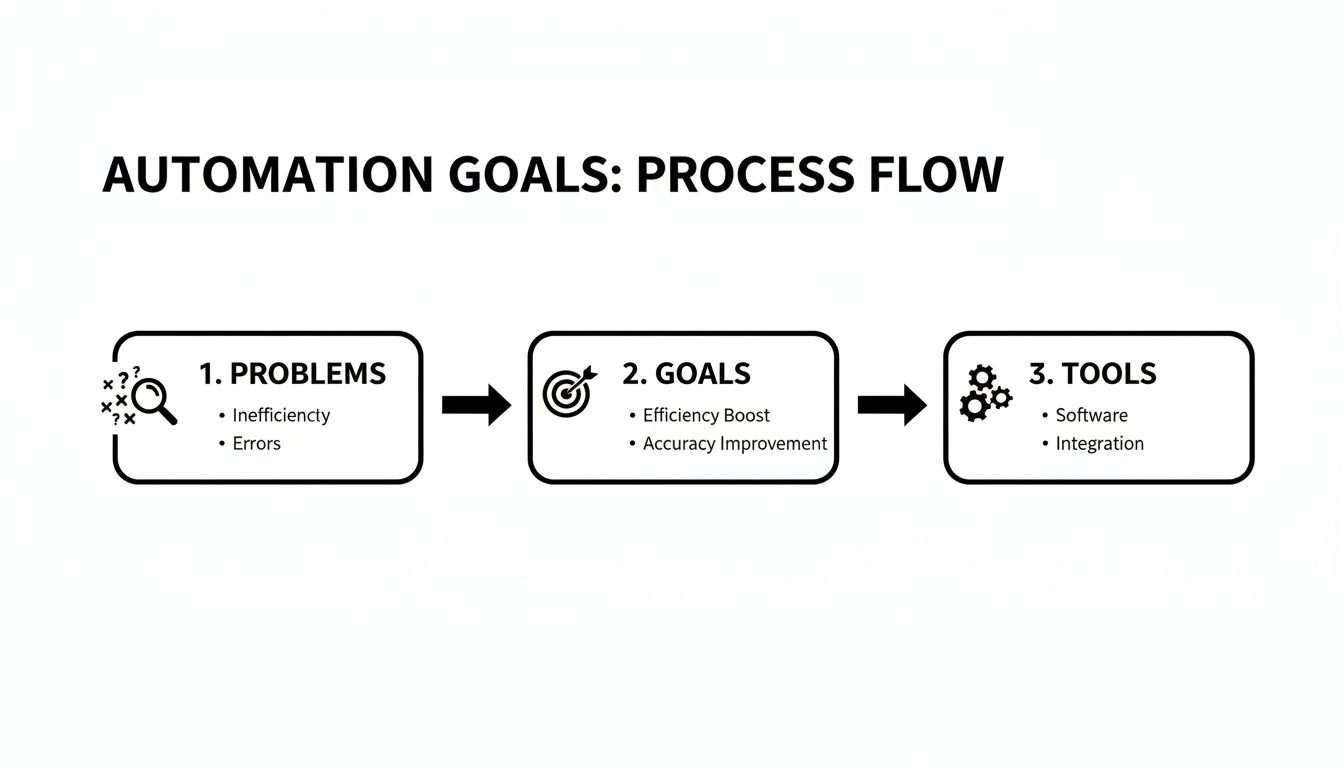
This diagram shows the basic logic: identify the problem (lost leads), set a goal (capture them instantly), and pick the right tools for the job.
Connecting to Google Sheets is just as straightforward. You'll authenticate your Google account, then either pick an existing spreadsheet or create a new one right from the dashboard. The tool automatically maps the fields from your Facebook form (Name, Email, Phone, etc.) to columns in the sheet. Every time a new lead comes in, a new row instantly appears. Magic.
Setting Up Instant Notifications
In sales, speed is everything. A lead that has to wait hours for a response is a dead lead. That’s why instant notifications are a non-negotiable part of your first workflow.
Your automation tool should let you fire off an email notification the moment a lead is captured. This alert needs to go to you and anyone else on your team responsible for follow-up.
Expert Tip: Don't settle for a generic "You have a new lead!" alert. A good notification email includes all the lead’s submitted info right in the body. This gives your sales team everything they need to make that first call without having to open another app or spreadsheet.
This single step can shrink your lead response time from hours to minutes, which massively increases your chances of actually connecting with the prospect and closing the deal.
Activating And Testing Your Workflow
Once you've connected your source, destination, and notifications, you just need to flip the switch and activate the workflow. Now it's live and listening.
But never, ever just assume it works. You have to test it.
Facebook has a built-in Lead Ads Testing Tool that lets you submit a dummy lead without spending a dime on ads. Use it. Send a test lead through your new system.
Within seconds, three things should happen:
- A new row with your test info pops up in your Google Sheet.
- An email notification hits your inbox.
- The lead shows up in your automation tool's dashboard.
If all three happen, congrats—you’ve just built your first small business marketing automation workflow. This system is now your 24/7 assistant, making sure no Facebook lead ever falls through the cracks again. To dive deeper, check out our in-depth guide to automate Facebook leads.
Automating Your Initial Lead Nurturing Sequence
So, you’ve captured a new lead. Their info is flowing perfectly into your Google Sheet. That’s a huge win, but it’s really only half the battle.
The moment someone hits "submit" on your form, a clock starts ticking. What you do in the next five minutes can literally make or break the entire relationship. This is exactly where your initial nurturing sequence comes into play.
That first touchpoint isn't just a courtesy; it's a critical strategic move. An immediate, automated response confirms their submission, sets a professional tone, and—most importantly—keeps you top of mind while their interest is still red-hot. This single action is a cornerstone of effective small business marketing automation.
Crafting the Perfect First-Touch Email
Your first automated email, often called an autoresponder, has a few key jobs. It needs to be timely, valuable, and crystal clear. Think of it as the digital handshake that kicks off the conversation.
The goal here isn't a hard sell. Not at all. Instead, you're building trust and delivering on whatever promise you made in your ad. If your Facebook Lead Form offered a free guide, this email delivers it. If it was for a free consultation, this email confirms their request and tells them what to expect next.
This immediate follow-up is ridiculously powerful. The data shows that triggered emails—like an instant autoresponder—now drive 75% of revenue for many businesses. Even better, automated workflows can generate up to 30 times more revenue per recipient than manual email blasts.
Key Takeaway: The first automated email should focus on delivering immediate value. Fulfill your ad's promise, thank the lead, and clearly outline the next step. This builds instant goodwill and shows you're a pro.
What to Include in Your Autoresponder
Keep it simple. A cluttered or confusing email will get ignored or deleted. Stick with a clean layout and a direct message.
- A Clear Subject Line: Something like "Here's the [Guide Name] You Requested" or "Thanks for Your Interest in [Your Company]!" works perfectly. It’s direct and tells them exactly why you’re in their inbox.
- Personalization: Always use their first name. Nearly every automation tool can pull this data right from the lead form. It’s a small touch that makes a massive difference.
- Deliver the Goods: This is the most important part. Provide a clear, clickable link to the resource they asked for or confirm the details of their request. Don't make them hunt for it.
- Set Expectations: Briefly explain what happens next. Will you call them within 24 hours? Will they get more tips over the next week? Let them know.
To help you get started, here’s a simple template you can adapt. This framework covers the essential elements you'll need for an effective first-touch email.
Sample First-Touch Nurturing Email Template
This fill-in-the-blanks template gives you a solid starting point. Just swap in your own details and you're good to go.
| Email Element | Example Content / Instructions |
|---|---|
| Subject Line | Here’s your free guide, [First Name]! |
| Opening | Hi [First Name],
Thanks for your interest in [Your Company]! We’re excited to help you [achieve specific goal]. |
| Value Delivery | As promised, here is your free guide: [Link to Your Guide or Resource].
It covers everything you need to know about [topic of the guide]. |
| Next Steps | We'll be in touch within the next business day to see if you have any questions. In the meantime, feel free to check out our blog for more tips. |
| Closing | Best, The [Your Company] Team |
This simple structure works because it's focused, delivers on your promise, and sets the stage for the next interaction.
Alerting Your Team for Rapid Follow-Up
While the autoresponder is nurturing your new lead, a parallel automation should be pinging your sales team. As we covered before, a great workflow sends an instant email or Slack message with the new lead's details.
This two-pronged approach is the secret sauce. The lead gets an immediate, professional confirmation, satisfying their need for an instant response. At the same time, your team gets a real-time alert, empowering them to follow up personally while the lead is still "hot."
Together, these automated actions dramatically shorten your sales cycle and boost conversion rates. To build on this, you can explore more strategies for automated lead nurturing.
Measuring Success And Optimizing Your System
So, your new automation is up and running, catching leads 24/7. That's a huge win, but don't close the laptop just yet. The real magic of small business marketing automation isn't just that it does the work for you; it's about the data it gives you to make smarter moves.
This isn't a "set it and forget it" machine. It's a powerful learning tool. That Google Sheet you set up? It's no longer just a contact list—it's your command center, showing you exactly what’s working and what's falling flat.
Identifying Your Core Metrics
To get real answers from your data, you have to know what to look for. Forget about drowning in dozens of metrics. We're going to focus on a few simple, powerful numbers that tie directly back to your business goals. These are the stats that tell you if your ad dollars are actually making you money.
Start by adding a few columns to your Google Sheet to manually track what happens after the lead comes in. Simple columns like "Status" (e.g., Contacted, Qualified, Closed), "Sale Value," and "Notes" will do the trick. Just like that, you've turned a basic spreadsheet into a lightweight CRM.
Now you can easily calculate a few key performance indicators (KPIs) that truly matter.
- Lead Response Time: How long does it take from the moment a lead comes in (your sheet already has this timestamp) until your team actually reaches out? Your automation has probably already cut this from hours down to minutes. Keep an eye on it to make sure your team is jumping on those instant notifications.
- Contact Rate: Out of all the leads you get, what percentage do you actually end up speaking with? If your response time is lightning-fast but your contact rate is low, you might have a lead quality problem. Or maybe you just need to try calling at different times.
- Cost Per Qualified Lead: This is where the lightbulbs really start going off. Divide your total ad spend by the number of leads you've marked as "Qualified." This tells you the real cost of finding a great prospect, not just any old name and email address.
Your Google Sheet is now an intelligence hub. By analyzing which ad campaigns produce leads with the highest contact rates and lowest cost per qualified lead, you can confidently shift your budget to the campaigns that deliver real results.
This is how you stop guessing and start knowing. It's how you fine-tune your ad spend and actually see a return on your investment.
Analyzing Your Results For Continuous Improvement
With your KPIs in hand, you can start asking the right questions. Your neatly organized data has the answers. Use the simple filter function in your Google Sheet to spot patterns.
For instance, filter your sheet to only show leads from "Ad Campaign A." What's its contact rate? Now, do the same for "Ad Campaign B." If Campaign B has a much higher contact rate and more leads marked as "Closed," you know exactly where to put more of your ad budget next month.
You can also look for trends over time. Are the leads that come in on weekends more likely to convert? Does one of your ad images generate better-quality leads than another? This kind of insight was practically impossible when you were fumbling with messy CSV downloads.
A Simple Troubleshooting Checklist
Look, even the best systems have hiccups. If leads stop flowing or something just feels off, don't panic. Run through this quick checklist to find the usual suspects.
- Check Your Facebook Connection: Did you change your Facebook password recently? This is the number one culprit. Often, the connection to your automation tool just needs to be re-authenticated.
- Verify the Correct Form is Selected: Just launched a new ad campaign or created a new lead form? Make sure you've selected that specific form inside your automation workflow. If you haven't, the tool doesn't know to watch it for new leads.
- Inspect Google Sheet Permissions: Check that the sharing permissions for your Google Sheet haven't been changed. Your automation tool needs "Editor" access to add new rows.
- Review Field Mapping: Pop into your workflow and double-check that the fields from your Facebook form (like "Full Name" or "Email") are pointed to the correct columns in your Google Sheet. A mismatch can send data to the wrong place or cause it to not show up at all.
By keeping a regular eye on your metrics and using this checklist when things go sideways, you turn your automation from a simple tool into an intelligent system. It becomes an engine for constant improvement, helping you make marketing decisions that directly grow your bottom line. And that's the whole point of small business marketing automation.
Your Top Questions About Marketing Automation Answered
Diving into marketing automation can feel like a big step. It’s smart to have questions about the cost, the tech, and what it really does for your business. Let's clear up some of the most common things we hear from small business owners and agency pros just like you.
Can My Small Business Actually Afford This?
Yes, absolutely. Forget the myth that automation is only for enterprise companies with six-figure budgets. The trick is to start lean. Don't buy a giant, all-in-one platform. Just solve your biggest headache first.
For most, that means getting your Facebook leads into a spreadsheet without manual work. A simple tool like LeadSavvy Pro can connect your Facebook Lead Forms directly to a free Google Sheet. This kind of "lean stack" costs next to nothing but gives you back hours of your time and makes you look like a pro to new leads. You can build a game-changing system for less than you spend on coffee in a week.
How Technical Do I Need to Be?
You really don't need to be a tech wizard. Modern automation tools are built for the rest of us—the business owners, the marketers, the agency account managers. They’re not made for coders.
Most platforms use simple, visual dashboards where you just click to connect one app to another. If you've ever granted an app permission to access your Facebook account, you have all the technical skill you need. Most setups even come with quick video guides that walk you through it, so you can have your first workflow running in under 15 minutes.
Will This Make My Business Sound Like a Robot?
This is a huge fear, but it's completely backward. Good small business marketing automation does the opposite—it makes you more human. By taking over the boring, repetitive tasks, it frees you up to have real, meaningful conversations with your hottest leads.
Think about it: automation handles the first touch. The instant "Thanks for reaching out!" email. The immediate notification to your sales team. That speed and professionalism make a great first impression and set the stage for you to follow up personally.
Automation ensures every single person gets a fast, polite "hello." That's way better than the dead silence they'd get if you were stuck in a meeting or manually exporting a CSV file. It improves the customer experience, it doesn't kill it.
How Quickly Will I See Results?
The payback from your first, simple automation is often immediate. The second you flip the switch on a workflow that sends Facebook leads to a Google Sheet, you’ve solved a real problem.
You’ll feel the impact right away:
- Time Saved: You instantly get back the time you used to spend downloading and copying lead lists. That's a win on day one.
- Faster Responses: Your lead follow-up time shrinks from hours (or days) to just minutes. This alone can seriously boost your conversion rates.
- Organized Data: Suddenly, you have a clean, live database of every lead. No more messy files or lost contacts.
While bigger goals like boosting monthly revenue will take more time to see, the operational wins and efficiency gains happen the moment you go live.
Ready to stop downloading CSVs and start talking to leads the moment they reach out? LeadSavvy Pro makes it dead simple to connect your Facebook Lead Forms to Google Sheets or your CRM. Try our free plan and get your first automation running in minutes.