Optimising Facebook Ads: A Quick Guide to Higher ROI
Before you touch a single setting in your campaigns, you have to know what you're working with. Optimizing your Facebook ads always, always starts with a deep-dive audit. It’s about establishing a clear baseline—understanding your current performance metrics, checking for audience fatigue, and seeing which creatives are actually doing the heavy lifting.
This initial audit is the bedrock of every strategic decision you'll make from here on out.
Conducting a Comprehensive Facebook Ads Audit
Trying to scale campaigns or test new ideas without a clear picture of your account's health is like driving blind. A proper ad audit is your first, non-negotiable step. It goes way beyond surface-level stats like clicks and impressions to show you what’s truly driving results.
This isn't about finding fault; it's about spotting opportunities.
Think of it as a check-up for your ad account. You wouldn’t start a new fitness plan without knowing your starting weight and health stats, right? Same logic. An audit helps you diagnose the real issues, confirm what’s working, and write a precise prescription for better performance.
Analyzing Your Campaign Structure and Objectives
First things first, let's look at your campaign structure. A messy account with confusing naming conventions or a jumbled setup almost always wastes money. Are your campaigns cleanly separated by their objective, like lead generation versus conversions?
A classic mistake is running a "Traffic" campaign but hoping for high-quality leads. It’s a recipe for disaster. Meta’s algorithm will do exactly what you told it to—get you cheap clicks, not valuable conversions. Your goal is to make sure every campaign has one clear job that lines up with your business goals.
- Campaign Objectives: Does the objective you picked (e.g., Leads, Sales) actually match the outcome you want?
- Ad Set Grouping: Are your audiences logically grouped, or are you throwing completely different target groups into the same ad set?
- Naming Conventions: Can you look at a campaign name and instantly know its purpose, audience, and the creative angle being used? If not, it's time for a cleanup.
Diving Deep into Performance Metrics
Once the structure is clean, it's time to crunch the numbers that actually matter. Forget the vanity metrics and focus on the data that hits your bottom line. To really get a handle on this, you need a solid grasp of effective Facebook advertising strategies to interpret the data correctly.
Here are the key metrics to put under the microscope:
- Cost Per Result (CPR): How much are you actually paying for each lead, sale, or other key action?
- Return on Ad Spend (ROAS): For every dollar you put in, how much revenue are you getting back?
- Click-Through Rate (CTR): What percentage of people who see your ad click on it? A low CTR often points to a weak creative or a mismatch with your audience.
- Frequency: On average, how many times has each person seen your ad? A frequency score creeping up past 3-4 is a major red flag for ad fatigue. People are tuning you out.
A thorough audit almost always reveals the same thing: 80% of your results are coming from just 20% of your ads. Your job is to find that winning 20%, figure out why it works, and stop wasting money on the rest.
Evaluating Audience and Creative Performance
Finally, you need to review who you're targeting and what you're showing them. Are your audiences broad enough to give the algorithm some breathing room, or are they so narrow that your costs are skyrocketing? Check for audience overlap between your ad sets—it’s a sneaky problem that makes you bid against yourself.
An often-missed piece here is your tracking setup. If your tracking is off, Meta’s algorithm can't find your ideal customer effectively. We break this down in our guide to setting up reliable Facebook ad tracking.
At the same time, look at your creative. Pull up your top-performing ads and find the common threads. Is it the imagery? The copy? The call to action? By identifying these winning patterns, you build a data-backed blueprint for your next round of creative tests, making sure every new ad is built on a foundation of what’s already proven to work.
Refining Your Audience and Placement Strategy
Your ad creative can be flawless, but if it's hitting the wrong people in the wrong places, it's going to fall flat. Seriously. Optimizing your campaigns means digging deeper than generic interest targeting to master who you reach and where you reach them. This is all about precision.
The absolute foundation of a powerful audience strategy is your own data. I’m talking about your customer email lists, website visitor data from your Meta Pixel, or people who've engaged with your app. This is pure gold because it’s a list of people who already know you and have shown some level of interest.
This is where you start building your Custom Audiences.
- Website Visitors: Got people checking out your pricing page? Or a specific product category? You can group them together and serve them a hyper-relevant ad.
- Customer Lists: Upload a list of your existing customers. You can either re-engage them with new offers or—just as importantly—exclude them from campaigns built for brand-new customers.
- Engagement Audiences: Create lists of users who have watched your videos, liked a post on your Instagram profile, or engaged with your Facebook Page. They're warm and ready for the next step.
Unlocking Growth With Lookalike Audiences
Once you've pinpointed your best customers with Custom Audiences, you can find more people just like them. This is what Lookalike Audiences were made for.
You give Meta a "source" audience (like your highest-value customers), and its algorithm goes to work finding new users who share similar traits and online behaviors. For example, creating a 1% Lookalike Audience from a list of your top-spending clients will generate an incredibly potent group of new prospects. It’s hands-down one of the best ways to scale your campaigns efficiently.
For a deeper dive into these powerful tools, check out our complete guide to Facebook ads targeting options.
Pro Tip: Don't just create one Lookalike and call it a day. Test different source audiences against each other. A Lookalike built from recent purchasers might perform completely differently than one built from people who abandoned their cart. Test and find out.
Mastering Placements for a Mobile-First World
Where your ad shows up is just as crucial as who sees it. While letting Meta's Advantage+ Placements do its thing is often a solid starting point, you need to understand placement performance to get the most out of every dollar.
Let’s be clear: we live in a mobile world. Your ad strategy has to reflect that.
This isn't just a buzzword; the data is overwhelming. We're seeing CTRs 33-52% higher on mobile than on desktop. The benchmarks show a mobile CTR of 1.34% on Facebook (desktop is 1.01%) and 1.11% on Instagram (desktop is 0.73%). With mobile getting 94-98% of all traffic, the message is impossible to ignore. People scroll on their phones, period.
To give you a clearer picture, here’s a quick breakdown of how average Click-Through Rates (CTR) stack up across different Meta placements.
Platform and Placement CTR Comparison
| Placement/Device | Average CTR | Key Insight |
|---|---|---|
| Mobile Feed (Facebook) | 1.34% | This is prime real estate. Users are actively scrolling and engaged. |
| Desktop Feed (Facebook) | 1.01% | Still valuable, but a significantly smaller slice of the traffic pie. |
| Mobile Feed (Instagram) | 1.11% | Highly visual and competitive; creative needs to pop immediately. |
| Desktop Feed (Instagram) | 0.73% | The lowest performer. Indicates users prefer the mobile app experience. |
| Stories & Reels | 0.75% – 1.2% | Highly variable, but full-screen vertical ads that feel native can crush it. |
This data tells a simple story: prioritize vertical, mobile-first formats.
- Instagram & Facebook Stories: These are full-screen, immersive placements that demand vertical video or images. A square image from your feed ad will look lazy and out of place here.
- Reels: Short-form video is king. If you can create Reels ads that entertain first and sell second, you'll see incredible results.
- In-Stream Video: These are the ads that play before, during, or after other videos. Your creative has to grab attention in the first three seconds, or you've lost.
Stop thinking of your creative as one-size-fits-all. A brilliant Facebook Feed ad will likely bomb in Stories if it isn't adapted for that vertical, sound-on environment. Always, always preview your creative in each major placement. That little bit of extra effort can make a massive difference in your final numbers.
Implementing a High-Impact Creative Testing Framework
Let's be honest: your best ad creative has a shelf life. No matter how incredible it is out of the gate, audience fatigue will eventually set in. This isn't a maybe; it's a guarantee. That’s why building a systematic, always-on testing framework isn't just a nice-to-have—it's the only way to find your next winning ad and keep your campaigns profitable.
The goal here is to move past guesswork and create a repeatable engine for growth. It's about building a data-driven system that tells you exactly which ad components are working and lets you methodically shift your budget away from the ones that aren't. This is how you stay ahead of the curve.

Structuring Your Creative Tests for Clear Results
Effective testing is all about discipline. The single biggest mistake I see marketers make is testing way too many variables at once. If you change the image, the headline, and the body copy at the same time, you have zero clue which element actually moved the needle.
Instead, you have to isolate your variables. Start with your current best-performing ad (your "control") and change just one thing. For example, you could test:
- Three different headlines against the same winning image and body copy.
- A static image versus a short video, keeping the same headline and call to action.
- Long-form, story-driven copy versus short, punchy copy with the same visual.
When you change only one thing at a time, you can confidently attribute the success or failure to that specific element. Once you find a new winning headline, that ad becomes your new control. Then you move on to test the next variable, like the primary text or the call to action. It’s a simple, methodical cycle of continuous improvement.
Comparing Different Ad Formats
Beyond the words and visuals, the actual format of your ad plays a massive role. You should be constantly testing different formats to see what your audience actually prefers to engage with.
- Single Image: The classic. Still incredibly powerful for grabbing attention with one strong visual.
- Video: Unbeatable for telling a story or showing a product in action. Don't overthink it—we've seen simple, phone-shot videos crush highly produced content.
- Carousel: Perfect for showing off multiple products, features, or even different testimonials in one interactive ad.
Never assume video is automatically the best choice. I've personally managed campaigns where a simple, powerful static image drove a significantly lower cost per lead than a video we spent thousands on. The only way to know for sure is to test them against each other. You can get some great ideas from our collection of Facebook lead ads examples.
Your audience's preferences will dictate the winning format. A carousel ad might be perfect for an e-commerce brand showcasing a new collection, while a direct-to-camera video testimonial could be the top performer for a service-based business.
Knowing When to Use Dynamic Creative
Okay, manually testing every single ad component can get old, fast. This is where Meta's Dynamic Creative feature is a game-changer.
Instead of building dozens of individual ads, you just give Meta a menu of creative assets:
- Multiple headlines
- Several images or videos
- A few different descriptions
- Various calls to action
Meta’s algorithm then gets to work, automatically mixing and matching these parts to create hundreds of unique ad combinations. It serves these different versions to your audience and quickly learns which combinations drive the best results, pushing more budget toward the winners.
Dynamic Creative is an incredible tool for rapidly finding winning angles without all the manual setup. It's especially useful when you're going after a broad audience and aren't sure which message will land. Use it to find your core winning elements, then take those insights to build out your standard, manually-controlled campaigns for scaling.
Getting Your Bids and Budgets Right
A killer ad is only half the battle. If you get your spending strategy wrong, even the most brilliant creative will fall flat. This is where so many advertisers burn through cash without seeing results.
Let’s be clear: getting this right is the difference between methodically scaling your campaigns and just, well, spending money. It all starts with understanding how to use Meta’s bidding and budget tools to your advantage.
Choosing Your Bid Strategy
Meta gives you a few options here, but for most lead gen campaigns, it boils down to two main players: Lowest Cost and Cost Cap. They might sound similar, but they work in completely different ways, and picking the right one is critical.
-
Lowest Cost (or Highest Volume): This is Meta's default, and it's built for one thing: speed. The algorithm’s only goal is to get you the most leads possible for your budget, as fast as it can. The cost per lead will fluctuate—sometimes a lot—but it’s designed to spend your full daily budget to maximize sheer volume. I almost always start new campaigns here to get data flowing quickly.
-
Cost Cap: This is all about control. You tell Meta the absolute maximum average price you’re willing to pay for a lead. The algorithm then goes hunting for conversions at or below that cost. If it can't find them, it will simply pull back on spending. This is perfect once you know your target Cost Per Acquisition (CPA) and need to maintain stable, profitable results.
Be careful not to choke your campaigns with an unrealistic Cost Cap. If your ads are consistently bringing in leads for around $25, setting a cap at $10 won't magically lower your costs. Instead, your ads will just stop delivering. Always base your cap on real performance data.
Campaign Budget vs. Ad Set Budget: Where to Spend
The next big decision is where you set your budget. Do you control it for each audience individually at the ad set level, or do you give Meta the reins at the campaign level? This choice is fundamental to how you test and scale.
Ad Set Budget Optimization (ABO)
With ABO, you’re in the driver's seat. You manually set a specific budget for each ad set. This means you have total control over how much is spent testing each audience or creative.
ABO is non-negotiable for the testing phase.
Picture this: you're testing a Lookalike audience against a broad interest-based one. Using ABO ensures each audience gets, say, $50 per day to prove its worth. Without it, the algorithm might blow the whole budget on one ad set before the other even gets a fair shot.
Campaign Budget Optimization (CBO)
CBO, which Meta now calls Advantage Campaign Budget, is the complete opposite. You set one unified budget at the campaign level, and Meta’s algorithm automatically shifts that money to the best-performing ad sets in real-time.
This is your secret weapon for scaling.
Once you’ve used ABO to find your winning audiences and ad creative, you put them all together into a single CBO campaign. The algorithm then takes over, doing the heavy lifting by pushing more money toward the winners. It maximizes your overall campaign efficiency without you having to constantly babysit ad set budgets.
Optimizing Your Post-Click Experience
Getting the click is a great first step, but it’s definitely not the finish line. The real work of turning a prospect into a customer kicks off after they tap your ad. This post-click experience, especially for lead gen campaigns, is one of the most overlooked—and most powerful—levers you can pull to optimize your Facebook ads.
Think of it this way: your ad creative makes a promise. Your lead form or landing page is where you have to deliver on it. Any confusion, friction, or delay here will absolutely demolish your conversion rates, no matter how amazing your ad was.
Designing Lead Forms That Actually Convert
When you’re using Facebook’s built-in Lead Forms, the game is all about making the process as smooth and painless as possible. People are scrolling fast on their phones, and a long, complicated form is a guaranteed way to make them bounce.
The trick is finding that sweet spot between gathering the info you need and not overwhelming the person on the other side of the screen.
Here’s how I approach it:
- Keep Your Form Fields to a Minimum: Seriously, only ask for what you absolutely need to qualify and contact a lead. Name and email are the usual suspects. Do you really need a phone number right off the bat? Every single field you add will cause some people to drop off.
- Use Pre-Filled Fields: Take full advantage of Facebook's ability to auto-populate fields like name and email. This is a simple move that drastically cuts down the effort for the user, making them way more likely to hit "submit."
- Ask Smart Qualifying Questions: If you have to add more fields, make them work for you. Use multiple-choice questions instead of asking someone to type out a long answer. A real estate agent, for instance, could ask, "What is your timeframe for buying a home?" with options like "1-3 months," "3-6 months," or "6+ months." This gives your sales team crucial context without creating a lot of friction.
This next diagram shows how to think about your budget strategy, from testing your initial ideas to scaling what works.
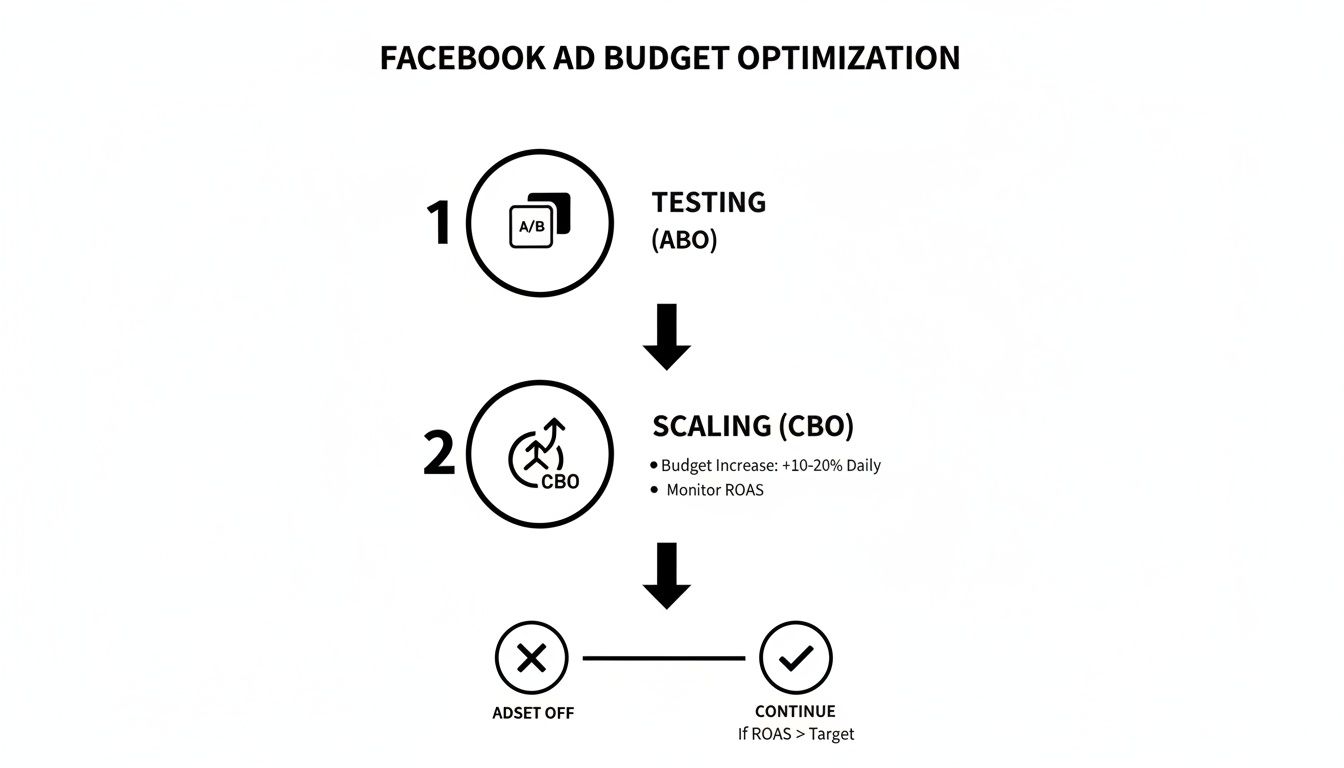
It’s a simple workflow: use Ad Set Budgets (ABO) to test different variables with a controlled spend. Once you find the winners, shift them into a Campaign Budget Optimization (CBO) campaign and let Meta’s algorithm do the heavy lifting to scale efficiently.
The Real Bottleneck: Manual Lead Management
So you’ve tweaked your form and leads are starting to come in. Awesome! But now you’re hitting the single biggest roadblock in the entire process: actually getting that lead from Facebook into the hands of your sales team.
If you're still manually downloading a CSV file from Facebook once or twice a day, you are literally losing money. When it comes to lead follow-up, speed is everything.
A lead's interest cools exponentially with every minute that passes. Responding within the first five minutes increases your chances of converting them by a staggering amount. Waiting hours—or even a full day—is like throwing your ad spend away.
This is exactly why automation isn't just a "nice-to-have"; it's a non-negotiable part of effective lead management. Manually exporting and importing data is slow, introduces human error, and is a massive time sink. It creates a delay that gives your competitors the perfect opening to swoop in.
Automating Lead Delivery for Lightning-Fast Follow-Up
The solution is to build a direct, automated pipeline from your Facebook Lead Form straight to your CRM or even a simple Google Sheet. This makes sure your sales team gets a notification the instant a new lead comes in, letting them follow up while the prospect is still thinking about your offer.
Tools like LeadSavvy Pro are built for this exact problem. They act as the bridge, completely cutting out the tedious manual CSV download. This one change can have a massive impact on your results.
It's also worth noting that Facebook Lead Generation campaigns consistently outperform other objectives in click-through rates. These campaigns see an average CTR of 2.53%, which is a full 61% higher than traffic campaigns. This is largely because the user intent is higher and the offers are better aligned. You can read the full research on these 2026 benchmarks to dive deeper into the data.
Your Top Facebook Ad Optimization Questions, Answered
As you get deeper into managing your Facebook ads, you'll find the same questions popping up. We all hit these hurdles. Getting straight answers is the key to moving forward with confidence.
Let's cut through the noise and tackle the most common challenges I see advertisers face.
How Often Should I Actually Tweak My Facebook Ads?
The temptation to constantly fiddle with a live campaign is real, but you have to fight it. My advice? Check in daily for any big red flags—things like a sudden crazy spike in spend or a broken ad link. A quick five-minute scan is all you need.
But for the bigger, more significant changes—like adjusting your budget, overhauling your audience, or swapping out creative—you need to give it time. Wait at least 3-7 days.
Meta’s algorithm needs that window to get out of its “learning phase” and find its groove. If you make major changes every day, you’re just hitting the reset button over and over, and your ads will never get a chance to perform. Make your bigger strategic moves based on a weekly review of your core metrics, like CPA and ROAS.
What Is a Good Cost Per Lead on Facebook?
This is the million-dollar question, and the answer is always the same: it depends. A "good" Cost Per Lead (CPL) is completely different for every business. It all comes down to your industry, your profit margins, and how much a customer is worth to you over time.
Think about it: a $25 CPL could be an incredible win for a local gym signing up new members on a high-ticket contract. But for an e-commerce store selling $15 t-shirts? That's a total disaster.
Don't get hung up on chasing vague industry benchmarks. Instead, do the math and figure out your own maximum allowable CPL. This is the absolute most you can afford to pay for a lead and still be profitable. The real goal isn't to hit some random number—it's to consistently drive your own CPL down while making sure your lead quality stays high.
Why Are My Ads Getting Clicks But No Conversions?
Ah, the classic mystery. Clicks but no conversions almost always signals a disconnect between the promise you made in your ad and the reality of what happens next. Something is causing friction and making people bail before they convert.
Let's break down the user's journey to find where things are going wrong:
- Check Your Ad Creative: Is your ad setting clear, honest expectations? Or is it leaning a little too heavily into clickbait? A sensational headline might get you a ton of cheap clicks from curious onlookers, but it won't attract qualified leads who are actually ready to take action.
- Scrutinize the Post-Click Experience: What happens after the click? Is your landing page or lead form a pain to use on a phone? Does it take forever to load? Is the form ridiculously long? Any friction at this stage is a conversion killer.
- Re-Examine Your Audience Targeting: Are you sure you’re targeting people who are ready to buy? Or are you just reaching a broad audience of people who are simply curious? A wider audience might get you clicks, but a more refined, intent-based audience will get you conversions.
Should I Use Campaign Budget Optimization or Ad Set Budgets?
This isn't about which one is "better." It's about using the right tool for the job at the right time. The best advertisers I know use a smart workflow that involves both Ad Set Budgets (ABO) and Campaign Budget Optimization (CBO) at different stages.
Here's the playbook:
-
Test with Ad Set Budgets (ABO): When you're in the testing phase with new audiences or new creatives, ABO is your best friend. It gives you full control, letting you force a specific amount of budget to each ad set. This ensures you get enough data on each variable before the algorithm picks a premature "winner."
-
Scale with Campaign Budget Optimization (CBO): Once you've used ABO to find your winning combinations, it's time to scale. Move those proven ad sets into a new CBO campaign. Now, you can let Meta’s algorithm do the heavy lifting, automatically shifting your budget to the top performers in real-time. This maximizes your overall results without you having to manually move money around all day.
This two-step process—test in ABO, then scale in CBO—is a proven framework for optimizing your campaigns methodically and profitably.
Stop losing leads to manual downloads and slow follow-up times. LeadSavvy Pro instantly syncs your Facebook leads to a Google Sheet or CRM, empowering your team to respond in minutes, not hours. Try LeadSavvy Pro for free and start converting more leads today!