Facebook Ad Not Delivering? Your Ultimate Troubleshooting Guide
You've poured your heart, soul, and budget into crafting the perfect Facebook ad. You hit "Publish," expecting the leads to start rolling in, and then… crickets. The impression count is stuck at a big, fat zero. It's a frustratingly common scenario, but before you start tearing your campaign apart, let's run through a quick checklist.
More often than not, the fix is simpler than you think.
Your Quick Fix Checklist for a Non-Delivering Facebook Ad
When a Facebook ad refuses to deliver, it's usually one of a few usual suspects. It could be something as simple as Meta's ad review process taking its sweet time, a tiny mistake in your campaign settings (like a budget that's too tight), or a technical hiccup with your tracking pixel that’s leaving the algorithm flying blind.
Before you go down a rabbit hole of complex diagnostics, this quick checklist can often get you back on track in minutes.
| Problem Area | Common Cause | Immediate Action to Take |
|---|---|---|
| Ad Status | Ad is still "In Review." | Be patient for up to 24 hours. If it's longer, duplicate the ad set. |
| Budget & Bids | Daily budget is too low or bid cap is too restrictive. | Increase the daily budget slightly or switch to a less restrictive bid strategy. |
| Audience | Targeting is too narrow or audiences are overlapping. | Broaden your targeting by removing a few layers. Use the audience overlap tool. |
| Tracking | Meta Pixel or Conversions API isn't firing correctly. | Use the Events Manager diagnostics tool to test your pixel events. |
This table covers the most frequent roadblocks. By starting here, you can quickly rule out the simple stuff before diving deeper.
Understanding Common Delivery Blockers
The most common reason for a zero-impression ad is the simplest: it’s still stuck in the review queue. Every single ad has to pass Meta's automated (and sometimes manual) review to check for policy compliance. This usually wraps up in under 24 hours, but it can drag on, especially during busy seasons like holidays or if something in your ad triggers a manual review.
But what if your ad status says "Active" and it's still not spending a dime? That’s your cue to dig into the campaign setup itself.
You'd be surprised how often a small detail throws everything off. For instance, setting a daily budget that's too low for a broad audience is like trying to win a race with an empty gas tank. The algorithm just doesn't have enough fuel to even enter the auction, let alone win it. The same goes for setting a bid cap that's way below what your competitors are paying.
Another classic mistake is getting a little too specific with your audience. While laser-targeting is a huge advantage of Facebook ads, it's easy to overdo it. If you stack dozens of interests, behaviors, and exclusions, you might shrink your potential audience down to a size so small that Facebook can't find anyone to serve your ad to. Also, watch out for major audience overlap between your ad sets—you could be forcing your own campaigns to bid against each other, causing one (or both) to stall out.
This flowchart gives you a great visual path for your initial troubleshooting.
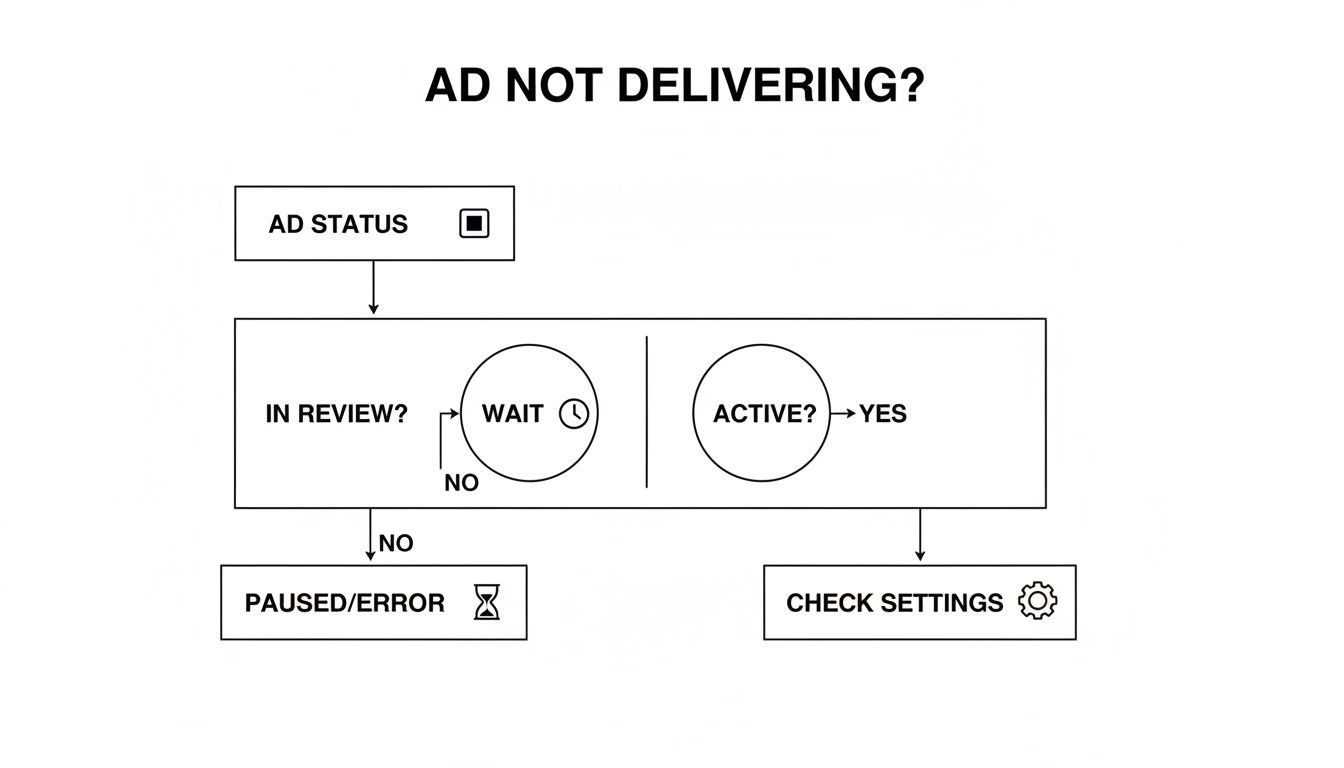
As you can see, the first move is always to check the ad's status. If it's "In Review," your best bet is to wait it out. If it's "Active," it's time to start investigating your settings.
Initial Troubleshooting Steps
Finally, don't overlook technical gremlins, especially when it comes to tracking. If your Meta Pixel isn't firing on your website or your Conversions API (CAPI) is misconfigured, the algorithm is getting zero feedback. For any campaign optimized for conversions, this is a total dead end. The system has no idea who's converting, so it has no clue who to show the ad to next.
A broken tracking signal is like giving the algorithm a map with no landmarks. It has no way to find the right path to your ideal customer, so it often chooses not to start the journey at all.
By methodically working through these three areas—review status, campaign settings, and tracking health—you can solve the vast majority of delivery issues. Understanding these fundamentals is key, as they are often among the common reasons why digital marketing campaigns fail. These basic checks will save you a ton of headaches and ensure you’re not missing an easy fix.
Thinking Like the Facebook Ad Auction System
Ever feel like your perfectly crafted ad is just shouting into the void? When you're stuck with the dreaded "Facebook ad not delivering" error, it's almost always because you're not speaking the algorithm's language. You have to get inside its head to understand what’s going wrong.
It’s a common misconception that the biggest budget automatically wins. The reality is much more nuanced.

Think of the ad auction less like a bidding war and more like a sophisticated matchmaking service. Meta's number one goal is keeping its users happy and engaged on the platform. If they start showing people irrelevant, low-quality ads, users will leave. That's bad for everyone.
This is exactly why your ad’s Total Value is what truly matters, not just how much money you throw at it.
The Three Pillars of the Ad Auction
To actually win an auction and get your ad shown, you need to score high across three key areas. Meta combines these to calculate that all-important Total Value. Getting these right from the start is the secret to building campaigns that actually deliver.
- Your Bid: This one’s straightforward—it’s the max amount you’re willing to pay for a result (like a click or a lead). But while it’s a factor, a huge bid can’t save you if the other two pillars are weak.
- Estimated Action Rates (EAR): This is Meta's best guess on whether someone will actually take the action you want. The algorithm looks at your ad creative, your account’s past performance, and the user’s own history to make a prediction. If your ad looks like something that person would typically scroll past, your EAR plummets.
- Ad Quality Score: This score is all about the user experience your ad provides. It’s heavily based on feedback—both good (clicks, shares, comments) and bad (people hiding your ad). Things like a spammy landing page or clickbait-y copy will absolutely destroy this score.
At the end of the day, a high bid combined with a low EAR and a terrible quality score is a recipe for disaster. Meta would much rather show a user a lower-bidding ad that's super relevant than a high-bidding one that offers a garbage experience.
Key Takeaway: An ad with a $10 bid but a low quality score will almost always lose to an ad with a $5 bid that has a high quality score and estimated action rate. Quality consistently trumps budget.
Decoding the Learning Phase
One of the most frequent culprits behind a stalled ad is something called the learning phase. When you launch a new ad set, the algorithm needs to gather data to figure out who is most likely to convert. It's basically running small tests on different pockets of your audience to see what sticks.
To get out of this phase, Meta's system needs a decent amount of data. The magic number is generally around 50 optimization events (like leads, purchases, or link clicks) within a 7-day window.
If your ad set can't hit that number fast enough, it gets slapped with a "Learning Limited" status. This is where you see choppy, inconsistent, or even zero delivery. This usually happens for a few key reasons:
- Your budget is too small to get to 50 events in a week.
- Your audience is too narrow, and the algorithm can't find enough people.
- Your optimization goal is too ambitious for a new campaign (like optimizing for purchases with a brand-new pixel).
Let’s say you're selling a very niche product to a cold audience. If you jump straight to optimizing for purchases, the algorithm has zero data to work with. It struggles to find those first few buyers, never gathers enough data, and your delivery flatlines. A much smarter move would be to start with a higher-funnel goal like "Add to Cart" or "Landing Page Views." This gives the algorithm the initial data it needs to get the wheels turning before you switch to a purchase goal later on.
Finding Delivery Blockers in Your Ad Set and Campaign
Your ad status says "Active," but you’re seeing zero impressions. It’s a classic head-scratcher. More often than not, the problem isn't some random glitch—it's hiding in plain sight within your campaign or ad set settings. A single misconfigured detail in your budget, bidding, or audience targeting can quietly kill your ad's delivery before it ever gets a chance.
Think of your campaign settings as the rules of engagement for the ad auction. If your rules are too strict, you’re basically telling Meta's algorithm not to even bother showing up. Let’s walk through a systematic check to find these hidden delivery blockers.
Are Your Budget and Bids Too Restrictive?
This is one of the most common culprits. A $5 daily budget might feel like a safe way to dip your toes in the water, but if you’re targeting an audience of millions, it’s just not enough for the algorithm to gather data or even win a few impressions. It needs enough spend to actually learn what works.
It's the same story with manual bid caps. If you tell Facebook you’ll only pay $0.50 per click in a market where the average cost is $2.00, your ad will lose almost every auction it enters. You've priced yourself out of the market from the start.
Here’s what to ask yourself:
- Is my daily budget realistic for my audience size? For larger audiences, you need a budget that can get you at least a few hundred impressions to start.
- Am I using a restrictive bid cap? If you are, try switching to the "Highest Volume" bid strategy. This lets Meta bid more competitively for you and often kicks delivery into gear.
- Is my Account Spending Limit reached? This one is sneaky. A forgotten account-wide limit will stop all campaigns dead in their tracks, no matter what their individual budgets are.
Diagnosing Audience and Targeting Issues
An overly restrictive audience is another silent campaign killer. Precise targeting is powerful, but it’s dangerously easy to go too far and shrink your potential reach down to almost nothing. This happens when you layer too many interests, behaviors, and demographic filters on top of each other.
For instance, targeting "women aged 25-30, who live in Austin, Texas, are interested in yoga, and veganism, and sustainable fashion" might sound like you’re hitting the perfect niche. In reality, your potential reach could drop to just a few thousand people. An audience that small makes it incredibly difficult for the algorithm to find users and escape the learning phase.
Meta’s algorithm needs a steady flow of data—ideally at least 50 conversion events per week per ad set—to optimize properly. If you aim for 'purchases' on a brand-new campaign with no conversion history, the AI is left scrambling, and delivery stalls. Over-segmenting is just as bad. Stacking dozens of niche interests or piling on exclusions can shrink your audience to the point of no return. In fact, data shows that aggressive demographic layering can slash your reach by 70-80% in crowded markets.
You also need to watch out for Audience Overlap, which is when your own ad sets end up competing against each other. Facebook has a tool for this, and it’s a must-use.
Using this tool helps you see if you're accidentally driving up your own costs by making two ad sets fight for the same users. If the overlap is significant (think over 20-30%), it’s time to consolidate those ad sets or add exclusions to keep them separate. For a deeper dive into navigating these settings, check out our comprehensive Facebook Ads Manager tutorial.
Uncovering Scheduling and Placement Errors
Finally, simple logistical mistakes can stop a campaign cold. I’ve seen it happen plenty of times: the campaign-level end date is set before the ad set's end date. As soon as that campaign end date hits, everything inside it shuts down, no matter what the individual schedules say.
Placements are another area to check. If you’ve manually selected only a few placements—like only Instagram Stories—you are drastically limiting where your ad can be shown. While that might be a strategic choice for a retargeting campaign, it can starve a new campaign of delivery opportunities, especially if those few spots are highly competitive.
Pro Tip: When you’re troubleshooting, always start with Advantage+ Placements (formerly Automatic Placements). This gives the algorithm maximum flexibility to find the cheapest and most effective spots for your ad. It's a great way to rule out placement restrictions as the cause of your delivery problems.
If you're finding these kinds of delivery blockers, it often comes back to your targeting or creative. For some more specific ideas, check out these actionable Facebook ad strategies for local businesses. A systematic review of these settings is almost always the key to figuring out exactly why your ad isn't running.
How Ad Creative and Policy Issues Stop Campaigns Cold
Even with a perfectly tuned campaign, a bad ad creative can stop everything dead in its tracks. If all your settings look right but your Facebook ad still isn't delivering, the problem is often the ad itself—the image, the video, the copy, or even the landing page you’re sending people to. These are the first things people see, and believe me, Meta's algorithm is a tough critic.
Sometimes, it's a straightforward policy violation you didn't even know you were committing. Meta's Advertising Policies are massive, and some of the most common mistakes are surprisingly subtle. For instance, while the strict 20% text rule on images is officially gone, ads with too much text can still struggle to get decent reach.

Other classic no-nos include making over-the-top claims ("Lose 30 pounds in 30 days!") or getting too personal in your copy ("Tired of being in debt?"). These rules exist to keep the platform from feeling spammy, and breaking them will get your ad rejected or severely throttled almost instantly.
It’s Not Just About Rules—It’s About Quality
Beyond the black-and-white policies, your ad's overall quality is a huge factor. Meta uses what it calls Ad Relevance Diagnostics to figure out if your ad is actually something its audience wants to see. It’s broken down into three main scores:
- Quality Ranking: How your ad stacks up against other ads competing for the same eyeballs.
- Engagement Rate Ranking: How likely people are to interact with your ad compared to others.
- Conversion Rate Ranking: How your ad’s expected conversion rate compares to the competition.
If you’re consistently ranking "Below Average" here, especially after the ad has been running for a bit, Meta will pump the brakes on its delivery. Negative feedback is a killer—if people are hiding your ad or reporting it, the algorithm takes that as a clear signal that you're providing a bad experience and shuts it down.
This quality-first mindset is why a whopping 62% of small businesses say their Facebook ads are failing. They get impressions, but no results. It all comes back to relevance.
Creating Ads That Actually Get Seen
So, how do you get past this? Your creative needs to be both compliant and compelling. You aren't just trying to avoid getting rejected; you're trying to earn your place in the news feed. The goal is simple: make ads people actually want to see.
Always, always review your creative against Meta's policies before you hit publish. It’s a simple step that can save you a world of headaches.
Pro Tip: Don't forget your landing page is part of the ad experience. A slow, clunky page that isn't mobile-friendly will wreck your quality score just as fast as a bad ad image. The journey from the ad to your site needs to feel seamless.
From there, it's all about making your ad genuinely engaging. High-quality visuals are non-negotiable. Use crisp, eye-catching images or short, thumb-stopping videos. Your copy should speak directly to your audience's problems and offer a clear, believable solution—no clickbait or hype. Following these Facebook ads best practices is your best bet for creating ads that both users and the algorithm will love.
And don't be afraid to A/B test. Try a question-based headline against one that focuses on benefits. Pit a lifestyle photo against a clean product shot. These tests give you real-world data on what works, helping you build ads that Facebook's system is excited to show to more people.
Is Your Ad Tracking Holding You Back?
In a world obsessed with privacy, the data you can collect is pure gold for your ad campaigns. If your conversion ad on Facebook isn’t delivering, the very first place I’d tell you to look is your tracking setup. A wonky Meta Pixel or a botched Conversions API (CAPI) implementation can literally starve the algorithm of the info it needs to find customers, killing your ad delivery before it even gets a chance to start.
Think of these tracking tools as the eyes and ears of Meta’s delivery system. Every time someone views a product, adds to their cart, or hits that "buy" button, the Pixel and CAPI ping a signal back to Facebook. This is how the algorithm learns who your ideal customer is and, more importantly, how to find more people just like them.
If that data stream dries up, the system is flying completely blind.
Why the Pixel Alone Doesn't Cut It Anymore
For years, the Meta Pixel was the only game in town. It was the gold standard. But with ad blockers becoming standard and privacy updates like Apple's iOS 14, the browser-based Pixel has become way less reliable. Just relying on the Pixel today means you're almost certainly dealing with some serious data gaps.
This is exactly why the Conversions API is so important now. CAPI works on the server side, creating a direct, much more reliable connection between your website’s server and Meta’s. Because it’s a server-to-server link, it doesn’t get tripped up by ad blockers or browser settings, letting you claw back a ton of that lost data.
Running CAPI alongside the Pixel gives you a redundant, rock-solid tracking foundation. This two-pronged approach gives the algorithm a much fuller picture of what users are doing, which leads to smarter optimization and far more consistent ad delivery. You can get into the nitty-gritty of this in our guide on how to track Facebook ads effectively.
How to Diagnose Your Tracking Issues
You don’t need to be a developer to figure out if your tracking is the culprit. Meta gives you some pretty straightforward tools to spot problems fast. Your first port of call should always be the Events Manager in your Facebook Business Suite.
Here’s a quick-and-dirty diagnostic process I use:
- Head to Events Manager: Find your data sources and click on your Pixel.
- Fire up the "Test Events" Tool: This tool is great. You just pop in your website URL and start clicking around like a real customer. You should see events like PageViews and AddToCarts firing in real-time right there in the Events Manager.
- Check for Errors: The diagnostics tab is your friend. It'll flag common screw-ups like duplicate events or missing parameters and usually tells you how to fix them.
For a quick check on any page, the Meta Pixel Helper Chrome extension is a must-have. It’s a little icon in your browser that lights up and shows you exactly what events are firing (or not firing) on the page you're on.
A broken tracking setup will cripple your optimization. A faulty Pixel or a missing Conversions API can easily lead to a 20% attribution loss from ad blockers and privacy rules alone. That data gap means the algorithm can't learn who actually converts, causing your ad delivery to sputter and stall out.
Don't Overlook the Landing Page Experience
Even with flawless tracking, a terrible landing page can send all the wrong signals and get your ad delivery throttled. The algorithm looks at the entire user journey, and that includes what happens after the click. If people land on your page and immediately hit the back button, it tells Meta your ad is irrelevant or your site is just plain bad.
Slow load times are a classic conversion killer. We're all impatient. If your landing page takes more than 3 seconds to load on a phone, a huge chunk of your visitors are gone. This drop-off not only loses you potential sales but also signals to Meta that your ad leads to a poor user experience, which directly hurts its ability to deliver. Your tracking and your landing page experience are two sides of the same coin when it comes to solving delivery problems.
Your Relaunch Plan to Fix and Scale Your Campaign
Alright, so you've played detective and figured out why your Facebook ad went silent. The temptation is to just tweak the broken ad set and flip the switch back on. Don't do it.
Simply editing a stalled ad often leaves you stuck with its bad history. A much cleaner, more effective approach is a strategic relaunch. This is your chance to start fresh, apply your fixes, and build a campaign that’s actually set up to scale.
I always recommend duplicating the problematic ad set and launching the new version with your fixes baked in. This gives the Facebook algorithm a completely clean slate and a new learning phase, free from any of the negative performance data tied to the original.
Resetting and Broadening Your Campaign
Your first move is simple: duplicate the ad set where delivery choked. This is your fresh start. Now, working inside this new version, you can apply the solutions you found.
Was your audience too narrow? Now's the time to give it some breathing room. But don't just gut your targeting all at once. Instead, remove the single most restrictive interest or behavior first. Watch the potential reach estimate. Small, deliberate adjustments are what keep your targeting relevant while giving the algorithm more people to work with.
The same goes for your budget. If it was too low, a modest bump can work wonders. You don't need to double your spend overnight. Often, just adding enough to your daily budget to reach a few thousand more people is all it takes to feed the algorithm the data it needs to exit the learning phase and get your ad delivering.
Crafting a Seamless Lead Capture Workflow
Getting your ads running is only half the battle. If you get clicks but your lead capture process is a mess, you're just lighting money on fire. The absolute last thing you want is for perfect leads to go cold while you're fumbling with CSV file downloads from Facebook.
Speed is everything. The second a lead comes in, the clock is ticking. Your odds of converting them drop dramatically after the first 5 minutes. This is where automation isn't just a nice-to-have; it's a necessity.
Manually downloading lead forms is a massive bottleneck that kills deals. By the time you get that CSV uploaded, your prospect has already forgotten they filled out your form or, worse, found a competitor who responded instantly.
Instead of fighting with spreadsheets, you can use a tool like LeadSavvy Pro to close the gap between your ad and your sales team. It makes sure no lead ever gets lost in limbo.
Here’s what that streamlined flow looks like:
- Instant Syncing: The moment someone submits your Facebook Lead Form, LeadSavvy Pro grabs it and sends it where it needs to go.
- Multiple Destinations: You decide the destination. Send it to a Google Sheet for tracking, your CRM for immediate follow-up, or both at the same time.
- Real-Time Notifications: You and your team get an email the instant a new lead arrives. This lets you pounce while their interest is at its absolute peak.
This instant connection does more than save you a headache. It creates a powerful feedback loop. When your team can follow up immediately, they qualify leads faster. That fresh sales data can then be fed back into your campaigns, helping the algorithm find more people just like your best customers.
By combining your fixes into a clean relaunch and pairing it with an automated lead management system, you’re not just solving a delivery problem. You're building an efficient, scalable machine that turns ad impressions into actual revenue.
Frequently Asked Questions About Ad Delivery
When you're staring at a campaign that refuses to spend, you're not alone. I get these questions all the time from advertisers trying to crack the code of Facebook ad delivery. Here are some quick answers to the most common headaches.
How Long Does The Facebook Ad Review Process Usually Take?
Most of the time, Facebook will get your ad reviewed and approved within 24 hours.
But don't be surprised if it takes a bit longer, especially during crazy busy times like Black Friday. Sometimes, an ad just gets flagged for a manual check, which adds to the wait.
My rule of thumb? If you’re still stuck in the "In Review" vortex after 48 hours, it's time to take a closer look for any sneaky policy violations you might have missed. And a pro tip: avoid launching a big campaign on a Friday afternoon unless you're happy to wait until Monday for it to go live.
Can My Ad Account Spending Limit Stop Ad Delivery?
Yes, absolutely. This is one of the easiest things to miss and it trips up even seasoned advertisers. Think of the account spending limit as the master kill switch for all your campaigns.
Once your total ad spend hits that cap you set for yourself, every single campaign grinds to a halt. It doesn't matter what your individual campaign budgets are. Everything pauses until you either increase the limit or it resets for the next billing cycle. You can find this setting hiding under "Billing & Payments" in your Ads Manager.
Why Is My Ad Delivering But Getting Zero Clicks?
Okay, so you're getting impressions, but the clicks just aren't there. What gives? The problem is almost always one of three things: your ad creative, your copy, or your audience targeting.
Your ad is definitely being shown to people, but for whatever reason, it’s not grabbing their attention enough to make them stop scrolling and actually tap on it.
A rock-bottom click-through rate (CTR) isn't just a bad metric; it's direct feedback from your audience. They're telling you loud and clear that your message, your visuals, or your targeting is off the mark and needs a total rethink.
What Is The Learning Limited Status?
Seeing that "Learning Limited" status can be frustrating. It pops up when your ad set isn't getting enough conversions to properly exit the learning phase. The magic number Meta looks for is typically 50 optimization events (like purchases or leads) within a week.
When you don't hit that number, Meta's algorithm can't get a good read on who to show your ads to, which leads to unstable performance and wasted budget. The fix usually involves broadening your audience, bumping up your budget, or simplifying your campaign by aiming for an easier conversion goal to get those numbers up.
When your ads finally start pulling in those quality leads, don't let them sit on ice. LeadSavvy Pro makes sure you never miss an opportunity by automatically syncing every form submission to a Google Sheet or your CRM. This means you can follow up in minutes, not hours. See how it works at https://leadsavvy.pro.