Set Up an Automatic Reply Text Message for Facebook Leads
An automatic reply text message is a pre-written SMS sent the moment a prospect takes action, like submitting one of your Facebook lead forms.
Think of it as an instant digital handshake. It confirms you got their info and immediately opens a direct line of communication while their interest is red-hot. For any business running lead ads, this is the single most critical first touchpoint for turning a click into a real conversation.
Why Instant Text Replies Convert More Facebook Leads
When someone sees your Facebook ad and actually takes the time to fill out your form, their intent is at an all-time high. But that moment is incredibly fragile.
Waiting even thirty minutes to follow up can be the difference between a warm, engaged lead and a cold one who’s already forgotten why they reached out. In lead conversion, speed isn't just a good idea—it's everything.
This is where an automated text message becomes your secret weapon. It instantly bridges the gap between their click on Facebook and a real-world conversation with you.
The Psychology of Peak Interest
Let's say a local gym runs a Facebook ad for a "Free 7-Day Pass." A user, feeling motivated to get in shape, clicks the ad and submits their name and phone number.
- Scenario A (The Slow Way): An hour later, an automated email lands in their cluttered inbox. It gets buried under a dozen other promotions and might be opened days later, if ever. By then, that initial spark of motivation is gone. Opportunity lost.
- Scenario B (The Instant SMS Way): Seconds after they hit "submit," their phone buzzes. A friendly text pops up: "Hey [Name], thanks for grabbing your 7-day pass at PowerFit Gym! When works for a quick tour this week?"
This immediate, personal interaction catches them right at their peak interest, making them feel seen and valued. This rapid response acknowledges their action while they're still thinking about your offer, which skyrockets the chances they'll actually reply. Smart, automated messaging like this is a core piece of modern AI lead conversion strategies that streamline your entire sales process.
The Unbeatable Advantage of SMS
When you look at the raw numbers, it's not even a fair fight between SMS and email for immediate follow-up. In a world of overflowing inboxes, a simple text message cuts through the noise like nothing else.
The data doesn't lie: SMS messages have an incredible open rate as high as 98%, and most are read within just three minutes of being delivered. For comparison, a good email open rate is somewhere around 20-30%.
This massive performance gap is exactly why relying on email alone for lead follow-up is a losing strategy. It gets even better (or worse, if you're still just using email). The average response rate for a text is a stunning 45%, while email limps along at a mere 6%.
These aren't minor differences; they are game-changing stats that directly impact your revenue.
SMS vs Email for Immediate Lead Follow-Up
The performance difference between SMS and email for immediate lead response is stark. Here’s a quick breakdown that shows why automated texts are so much more effective.
| Metric | Automatic SMS Reply | Standard Email Reply |
|---|---|---|
| Open Rate | Up to 98% | ~20-30% |
| Time to Open | ~3 minutes | ~90 minutes |
| Response Rate | ~45% | ~6% |
| Visibility | Instant notification, high priority | Often lost in spam/promotions folder |
| Engagement | Conversational and immediate | Formal and often delayed |
As the table makes clear, if your goal is to start a conversation now, SMS is the only real option.
You can dig deeper into just how much response times impact your bottom line by checking out these crucial speed to lead statistics.
A system like LeadSavvy Pro, which syncs your Facebook lead data instantly, is the first domino to fall. It’s what makes this powerful first touchpoint possible and sets the stage for a winning conversation every time.
Building Your Lead-to-Text Automation Workflow
Alright, let's get into the fun part—connecting all the pieces to build your automated response system. This is where you turn a fresh Facebook lead into an immediate, engaging text message conversation, all without touching a single line of code.
The whole process is actually pretty simple. A potential customer fills out your Facebook ad, an automatic reply text message hits their phone instantly, and just like that, you've opened a direct line for a real conversation.
This diagram lays it all out, showing how a simple flow creates a seamless experience for your new leads.
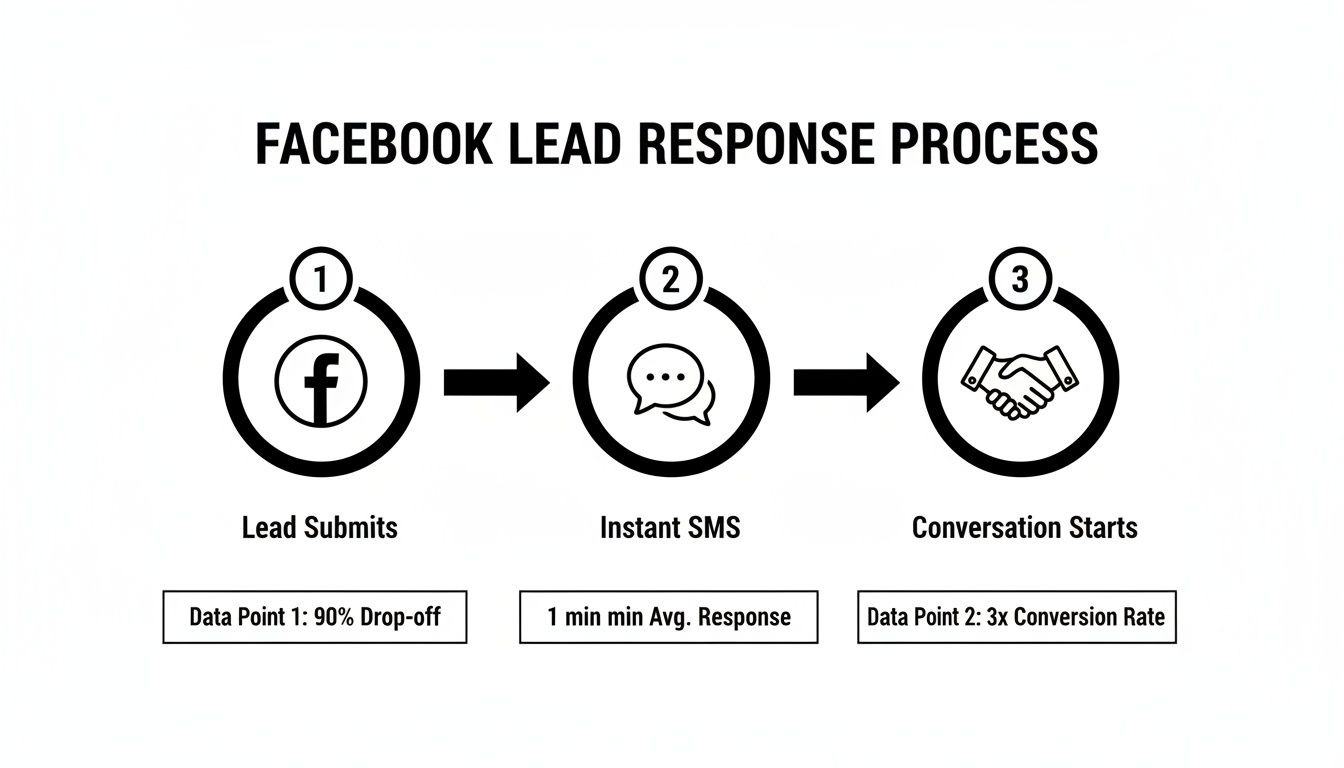
This quick, three-step journey is the secret to grabbing a lead's attention while their interest is at its absolute peak.
Setting the Stage for Automation
First things first, you need to get your lead data out of Facebook and into a place your tools can actually use. This is where something like LeadSavvy Pro becomes essential. It syncs every new Facebook lead directly into a Google Sheet in real-time.
Forget about manually downloading CSV files every few hours. This gives you a live, constantly updated database that other automation tools can watch.
Once your leads are flowing into that Google Sheet, you've created the perfect trigger for your entire system. Every time a new row gets added, it will kick off the process of sending that crucial first text.
For a deep dive into this initial setup, check out our complete guide on how to automate Facebook leads and get your data pipeline running smoothly.
Connecting Your Tools with Zapier
With your leads neatly organized in Google Sheets, it's time to build the bridge to your SMS platform. A no-code tool like Zapier is perfect for this. Zapier acts as the middleman, constantly watching for new leads in your sheet and then telling your SMS service to fire off a message.
Think of it like setting up a chain of digital dominos.
- The Trigger: The first domino to fall is the "New Spreadsheet Row" event in Google Sheets. You just point Zapier to the exact sheet that LeadSavvy Pro is populating.
- The Action: The second domino is the "Send SMS" event in a service like Twilio or whatever SMS provider you're using.
You simply tell Zapier what data from the spreadsheet goes where. For instance, you'll map the "Phone Number" column from your Google Sheet to the "To Number" field in Twilio. It's surprisingly straightforward.
Mapping Your Data for Personalized Messages
Now for the part that really makes a difference: personalization. When you're setting up that "Send SMS" action in Zapier, you're not going to send a generic, boring text. You'll map specific fields from your Google Sheet right into the message body.
This is how you turn a cold, robotic message into a warm, personal greeting. By mapping the lead's first name, your text can start with "Hey John!" instead of a bland "Hello."
Here’s a quick look at how you’d map the essentials:
- To Number: Connect this to the column in your sheet that contains the lead's phone number.
- From Number: This will be your dedicated business number from your SMS provider (like your Twilio number).
- Message Body: This is where you craft your template. You'll insert personalization tokens, like
{{FirstName}}, which Zapier pulls from the corresponding column in your Google Sheet.
This simple mapping ensures every automatic reply text message feels like it was written just for that person. It dramatically boosts your chances of getting a positive response and starts the relationship off on the right foot.
Crafting Reply Templates That Actually Get a Response
Alright, you've got the automation workflow hooked up. Now for the fun part: deciding what your message will actually say.
Let's be honest, a generic, robotic "We received your request" is a dead end. It’s the digital equivalent of a dial tone. The goal here isn't just to notify; it's to start a real conversation. That requires a more human touch for your automatic reply text message.
The difference between a text that gets ignored and one that gets an answer usually boils down to two things: a personal touch and a clear purpose. It needs to feel like a human sent it, even if we know a machine did the heavy lifting.
The Power of Personalization
The quickest win for making an automated text feel personal is simply using the lead's name. You're already collecting their first name from the Facebook lead form—put that data to work!
Using a personalization token like {{FirstName}} instantly turns a cold broadcast into a warm, one-to-one greeting.
Think about it. Which one lands better?
- Before: "Thanks for your interest. We'll be in touch."
- After: "Hey {{FirstName}}, thanks for reaching out to us! This is Mike from PowerFit Gym."
That tiny change makes a massive difference. It shows you see them as a person, not just another entry in a spreadsheet.
Templates for Every Goal
Your reply's content needs to connect directly back to what the lead just did. What did they sign up for? What was the promise of your ad? Your message must deliver on that promise immediately and guide them to the next logical step.
Here are a few battle-tested templates you can adapt for common scenarios:
-
For Scheduling a Demo/Call:
"Hey {{FirstName}}, thanks for your interest in a demo. To make it easy, here’s a direct link to my calendar to pick a time that works for you: [Your Scheduling Link]. – Sarah" -
For a Free Download (e.g., an Ebook):
"Hi {{FirstName}}! Your free guide to home staging is on its way to your inbox. I'm here if you have any questions after you read it. – Alex, Prime Real Estate" -
For a Special Offer/Coupon:
"Hi {{FirstName}}, thanks for claiming your 20% off coupon for CleanSweep Services! You can redeem it on your first cleaning by mentioning this text. Ready to book? – Jess"
Each example is brief, personal, and delivers value right away. No fluff, just the good stuff.
Key Takeaway: The best templates aren't just notifications; they're conversation starters. They confirm the action, deliver on the ad's promise, and make it obvious what should happen next.
The All-Important Call-to-Action
Every single automatic reply text message you send must have a clear Call-to-Action (CTA). A message without a CTA is like a road that leads nowhere. You've got their attention—now tell them exactly what you want them to do next.
A strong CTA isn't pushy; it's helpful. It removes friction and makes it dead simple for the lead to take the next step.
Let’s compare weak CTAs to strong ones:
| Weak CTA (Passive) | Strong CTA (Action-Oriented) |
|---|---|
| Let me know if you have questions. | What's the main thing you're hoping to achieve? |
| We will call you soon. | Is now a good time for a quick 5-min call? |
| Visit our website for more info. | You can see our full pricing right here: [Link] |
See the difference? The strong CTAs almost always ask a simple question. This is a game-changer. A question-based CTA is one of the most effective ways to get a reply, turning a one-way blast into a two-way dialogue. This simple framing shift can dramatically boost your response rates.
Taking It a Step Further with Advanced Timing and Follow-Up Sequences
Getting that first automatic reply out the door is a massive win. But the real magic happens when you move beyond a single text. A smart, timed sequence is what turns a flicker of interest into a genuine sales conversation.
This is where you graduate from a simple notification system to a full-blown nurturing campaign that works for you 24/7.
The first message is absolutely critical. It needs to hit their phone within five minutes of them submitting their info on Facebook. This is non-negotiable. After that initial text, the real strategy kicks in: planning for silence. What do you do if they don't reply?
The Simple Follow-Up Blueprint
For most businesses, you don't need a crazy complex system. A simple, effective sequence is more than enough to dramatically boost your engagement. My advice? Don't overcomplicate it. Start with a proven blueprint and then build from there as you learn what works.
Here's a great starting point for your automatic reply sequence:
- Message 1 (The Instant Reply): Sent within 5 minutes of the lead coming in. This is your warm welcome and initial call-to-action.
- Message 2 (24 Hours Later): If you haven't heard back, a gentle nudge can get the conversation going again. Something simple like, "Hey {{FirstName}}, just following up on my text from yesterday. Still interested in learning more?" works wonders.
- Message 3 (3 Days Later): This is your final, low-pressure check-in. I like to use something like, "Hi {{FirstName}}, wanted to check in one last time. Let me know if you have any questions!" It keeps the door open without ever feeling pushy.
This basic structure ensures you stay top-of-mind without annoying the lead. If you want to dive deeper into building out more complex campaigns, our guide on automated lead nurturing covers some more advanced strategies.
Using Behavior to Trigger Smarter Messages
Once you're comfortable with a time-based sequence, you can get even smarter by using behavioral triggers. This means your automation doesn't just run on a clock—it reacts to what your lead actually does.
For instance, did you include a link to your booking calendar in that first text? You can set up your system to send a completely different follow-up depending on whether they clicked it or not. This is where automation becomes truly powerful, tailoring the conversation based on a lead's specific actions and engagement level.
The impact here is huge. Industry data shows that over 54% of SMS revenue comes from these kinds of automated, behavior-triggered flows. And when you consider that 83% of millennials in key markets open texts within 90 seconds, you have the perfect storm for quick, targeted follow-ups that drive real results. You can find more stats about this on txtcartapp.com.
Avoiding Common Pitfalls and Staying Compliant
Automating that first touchpoint with a new lead is a game-changer, but it absolutely comes with responsibilities. Setting up an effective auto-reply isn't just about what you say—it's about following the rules to protect your business and start building genuine trust from the very first text.
Let's be clear: ignoring compliance isn't an option. It can lead to some seriously hefty fines and, arguably worse, tarnish your brand's reputation before you even get a chance to have a real conversation. Think of these rules less as roadblocks and more as guardrails that keep your communication ethical and effective.
Understanding the Rules of the Road
You don't need a law degree to get the basics of SMS compliance right. The two big frameworks you’ll hear tossed around are the TCPA (Telephone Consumer Protection Act) in the United States and GDPR in Europe. While the fine print differs, they're built on the same core principle: people must consent to get marketing messages from you.
When someone fills out your Facebook Lead Form, they are giving you what's known as "express written consent" to contact them about that specific inquiry. That’s fantastic news for you. But it’s not a blank check to text them about anything and everything forever.
The most critical takeaway is this: your very first message must give them a clear and easy way to opt out.
Non-Negotiable Rule: Every automated text sequence must include opt-out language. A simple "Reply STOP to unsubscribe" at the end of your first message is the gold standard. It's an industry best practice and a legal must-have under TCPA.
Forgetting this simple step is one of the fastest ways to land in hot water and immediately alienate the very leads you worked so hard to get. It’s a tiny addition that shows you respect their inbox and keeps you on the right side of the law.
Mistakes That Can Wreck Your Reputation
Beyond the legal stuff, a few common blunders can make your automated texts feel spammy or intrusive, completely undermining the trust you're trying to build. Dodging these is just as important as following the letter of the law.
Steer clear of these common mistakes:
- Sending Texts at Odd Hours: Just because your system can run 24/7 doesn't mean it should. A lead who fills out your form at 2 AM does not want their phone buzzing a minute later. Set your automation to only send messages during normal business hours. It's a simple sign of respect.
- Using Generic Link Shorteners: Links from services like
bit.ly/3xY7zQare often flagged as spam by mobile carriers, and they just look sketchy to users. Use a branded shortener or, better yet, the full URL. It looks far more professional and dramatically improves deliverability. - Forgetting to Test Your System: Before you flip the switch, run through the entire flow yourself. Fill out your own Facebook form. Did the text show up instantly? Were the personalization tokens (
{first_name}) filled in correctly? A broken automation makes a terrible first impression.
By keeping these details in mind, your automatic reply text becomes a powerful tool for building strong customer relationships, right from that very first "hello."
Measuring Success and Optimizing Your Messages
Setting up an automated reply is a great start, but it's just that—a start. The real magic happens when you start paying attention to what’s working and what’s falling flat. After all, you can't improve what you don't measure.
This isn't about getting bogged down in a sea of spreadsheets. It’s about making small, smart tweaks that lead to big wins over time.
Key Metrics to Monitor
To get a clear picture of how your campaigns are doing, you need to watch a few key numbers. These metrics tell the story of how your leads are actually interacting with your messages.
- Delivery Rate: What percentage of your texts are actually landing on your leads' phones? If this number is low, you might have an issue with bad phone numbers coming from your lead forms or a problem with your SMS provider.
- Click-Through Rate (CTR): Are you sending a link to a calendar or your website? CTR tells you how many people are actually clicking it. This is a direct measure of how persuasive your call-to-action is.
- Response Rate: This one’s huge. How many leads are replying to your text? A high response rate is a fantastic sign that your message is hitting the mark and starting real conversations.
- Conversion Rate: This is the bottom line. Of all the people who got a text, how many ended up booking that appointment, making a purchase, or taking whatever action you wanted them to?
Keeping an eye on these will show you exactly where the friction is in your follow-up process so you can fix it.
Simple A/B Testing for Better Results
You don't need a fancy lab coat to start optimizing your texts. A/B testing is just a straightforward way of trying out two different versions of a message to see which one gets a better reaction. It lets your audience’s behavior drive your strategy.
It can be as simple as testing two different opening lines.
Test A (The Direct Approach): "Hey {{FirstName}}, thanks for your interest. Here's the link to book your demo: [Link]"
Test B (The Engaging Question): "Hey {{FirstName}}, thanks for reaching out! Quick question before I send the link—what's the #1 thing you're hoping our tool can solve for you?"
You could run Test A for a week, track your response rate, then switch to Test B for the next week and compare. You’d be surprised how often a tiny change, like asking a simple question, can dramatically boost engagement.
This cycle of testing, learning, and adjusting is how you turn a good automation system into a lead-closing machine that gets the most out of every single dollar you spend on Facebook ads.
Of course. Here is the rewritten section, crafted to sound like an experienced human expert, following the specific style and tone of the provided examples.
Common Questions About Automated Text Replies
Diving into SMS automation is a game-changer, but it’s totally normal to have a few questions before you commit. We get asked these all the time by businesses setting up their first automatic reply system.
Let's clear up the common sticking points so you can launch your new follow-up strategy with total confidence.
What’s This Going to Cost Me?
This is usually the first thing people ask, and the answer is surprisingly affordable—probably less than your weekly coffee budget. The cost breaks down into two simple parts.
First, you need the tool that connects Facebook to your SMS platform.
- The Automation Bridge: A tool like Zapier acts as the middleman. You can often start with their free plan to get a feel for it. As you get more leads, you’ll likely upgrade to a paid plan, which usually starts around $20-$30 per month.
- The SMS Sender: This is the service that actually sends the texts, like Twilio. You pay per message, but the cost is tiny—we're talking fractions of a cent per text. For most businesses, this adds up to just a few bucks a month.
All in, you can get a powerful, fully automated system up and running for under $50 a month. It’s a tiny investment when you think about the potential return from instantly engaging every single lead.
Can I Just Use My Personal Phone Number?
Technically, you could, but it's a terrible idea for a few big reasons. It completely blurs the line between your personal and work life, looks unprofessional to potential customers, and makes it impossible for your team to help manage conversations.
Using a dedicated business number isn’t just a nice-to-have; it's a must for any serious business. It protects your privacy, builds brand credibility, and lets you manage all your communications in one place as you grow.
Services like Twilio or OpenPhone give you a dedicated business number for a low monthly fee. This small investment is one of the clearest signals that separates a professional operation from a side hustle and, most importantly, keeps your personal number private.
What Happens When Someone Actually Replies?
This is where the real magic begins and your team takes the wheel. The automatic reply text message has one simple, crucial job: to get the conversation started immediately. Once the lead texts you back, the automation’s work is done.
From that moment on, a real person on your team should jump in to continue the chat. This handoff from bot to human is incredibly smooth and effective. Your lead feels heard instantly thanks to the automation, and then they get the personal attention of a team member who can answer their specific questions. It's the perfect mix of speed and a genuine human touch.
Ready to stop letting hot leads go cold? LeadSavvy Pro is the fastest way to sync your Facebook leads directly to your tools, making instant SMS replies a breeze. Start for free and see the difference immediate follow-up can make.