Lead Management Software: Boost Your Sales with Intelligent Automation
So, what exactly is lead management software? Think of it as an automated traffic controller for your sales pipeline. It’s the system that captures, qualifies, and hands off new leads to your sales team in real time, replacing the old, chaotic method of downloading CSV files with a slick, organized process. This tech makes sure every single person who shows interest gets attention, fast.
The Bridge Between Interest and Action

Picture this: you're running a killer Facebook ad campaign, and it's generating dozens of leads every day. Awesome, right? But without an automated system, those valuable prospects are just sitting in a file, waiting for someone to manually download, sort through, and assign them.
By the time a salesperson finally reaches out, hours—or even days—have gone by. That initial spark of interest has gone cold. This delay is exactly where most sales opportunities die.
Lead management software fixes this huge problem by closing the gap between a customer's click and your team's first conversation. It acts as an instant digital bridge, creating a seamless handover from your marketing efforts to your sales reps.
From Chaotic Spreadsheets to Coordinated Action
At its core, this software is all about replacing clunky manual workflows with smart, automated processes. Instead of fumbling with spreadsheets, your team can get back to what they do best: building relationships and closing deals.
Here’s a quick look at what that change feels like:
- Instant Capture: Leads from any source—Facebook Lead Ads, website forms, you name it—are pulled into your system the second they hit submit. No more waiting.
- Intelligent Routing: The software automatically sends new leads to the right salesperson based on rules you set, like territory, availability, or the specific product they're interested in.
- Real-Time Alerts: Your sales reps get an immediate ping via email or another notification, letting them follow up within minutes, not hours.
To really get a handle on this, it helps to understand the bigger picture of What Is Lead Generation Marketing. This software is the engine that turns a freshly generated lead into a real sales opportunity.
Lead management software isn't just an organizational tool; it’s a strategy for squeezing every drop of value out of your marketing spend. It ensures the momentum you build with your ads is never lost.
The difference between wrestling with spreadsheets and using a dedicated tool is night and day. Let's break it down.
Manual Lead Tracking vs Automated Lead Management Software
| Process Step | Manual Method (e.g., CSV Downloads) | Automated Lead Management Software |
|---|---|---|
| Lead Capture | Manually download CSV files multiple times a day from each ad platform. | Leads are captured instantly and automatically from all sources (Facebook, web forms, etc.). |
| Data Entry | Copy-paste lead details into a central spreadsheet or CRM. High risk of human error. | Data is automatically populated into the system with 100% accuracy. |
| Lead Distribution | A manager manually assigns leads to sales reps, often causing bottlenecks and delays. | Leads are routed instantly to the right rep based on predefined rules (e.g., territory, workload). |
| Sales Rep Notification | Reps are notified via email or a messaging app, often hours after the lead came in. | Reps receive instant notifications on their preferred channel (email, SMS, app) within seconds. |
| Follow-Up Time | Typically hours or even days. The lead has likely moved on or been contacted by a competitor. | Can be as fast as 5 minutes or less, dramatically increasing contact and conversion rates. |
| Tracking & Reporting | Requires complex spreadsheet formulas and manual data compilation. It's tedious and often inaccurate. | Real-time dashboards provide instant insights into lead volume, conversion rates, and team performance. |
Looking at this, it’s clear that manual methods just can't keep up. Automation isn't just about saving time—it's about creating a better experience for the lead and giving your sales team a fighting chance to close the deal.
And the market agrees. The global lead capture software space was valued at USD 2.36 billion in 2025 and is expected to rocket to USD 5.69 billion by 2035. Software itself accounts for an estimated 65% of that revenue, signaling a massive industry-wide shift away from manual processes. This growth is driven by one simple truth: speed wins sales.
Core Features Your Lead Management Platform Needs
Not all lead management software is created equal. While a lot of platforms will try to wow you with a dizzying list of options, there are a few core features that are non-negotiable for turning raw interest into actual revenue.
Think of these as the essential parts of a high-performance engine. Without them, you’re just spinning your wheels. The right tool should feel like a true extension of your sales team—working 24/7 to make sure no opportunity ever slips through the cracks.
Instant Lead Capture and Consolidation
This is ground zero. Your software absolutely must grab lead information from all your sources the moment it comes in. That means your Facebook Lead Ads, your website contact form, a webinar registration—everything. This alone eliminates the soul-crushing task of manually downloading CSV files day after day.
Imagine having a digital doorman who never sleeps, instantly welcoming every prospect and jotting down their details. That’s what automated capture does. All your leads, no matter where they came from, flow into one centralized place. Finally, a single source of truth for your entire sales pipeline.
A study found that responding to a web lead within five minutes makes you nine times more likely to convert them. Instant capture is the first step in making that speed possible.
Real-Time Notifications and Intelligent Routing
Once a lead is in your system, speed is everything. The platform has to send real-time notifications to your sales team through whatever channel they use, whether it’s email or a messaging app. This is the immediate alert that signals a hot prospect is ready to talk right now.
But just getting an alert isn't enough. Intelligent lead routing automatically assigns that new lead to the right person based on rules you set up ahead of time. For example, you could route based on:
- Geography: A lead from Texas automatically goes to your Dallas-based rep.
- Product Interest: A question about a specific service gets sent to the product specialist.
- Workload: A round-robin system ensures leads are distributed evenly among the team.
This one-two punch ensures the most qualified salesperson engages the lead instantly, which dramatically boosts your chances of success.
Seamless Integrations and Actionable Analytics
Your lead management software can't be an island. It has to connect effortlessly with the other tools you already rely on every day. Key integrations to look for are your CRM, your email marketing platform, and even simple but powerful tools like Google Sheets.
This creates a connected workflow where data moves automatically between systems. It's a core concept we dive into in our guide on what is CRM automation.
Finally, the platform must give you actionable analytics. You need a clear dashboard showing critical metrics like lead volume by source, conversion rates, and your team's average response time. This data is the only way you’ll truly understand what’s working, where to best spend your ad budget, and how to make smart decisions that fuel real growth.
How to Automate Facebook Lead Capture in Real-Time
If you’re still manually downloading leads from Facebook Ads, you're losing sales. It's a simple fact. Every minute you spend messing with CSV files is a minute a competitor could be on the phone with your prospect.
Lead management software acts as a super-fast bridge, connecting Facebook directly to your sales team and cutting out that costly delay.
Getting this set up is way easier than it sounds. You don't need to be a coding genius; it's just a matter of connecting your tools with a few clicks. The whole point is to get a new lead's information into a salesperson's hands the instant they hit "submit" on your Facebook form.
Connecting Your Lead Source
First things first, you need to give the software permission to talk to your Facebook Business Page. This is a secure, standard authorization process that simply lets the tool see and grab your lead form data as it comes in. You'll just pick the page you’re running ads for and the specific lead form you want to sync up.
This single step completely eliminates the need to log into Facebook Ads Manager over and over again. Instead of you having to pull data out, the system is now set up to catch it automatically.
This simple diagram breaks down how a lead flows through an automated system.
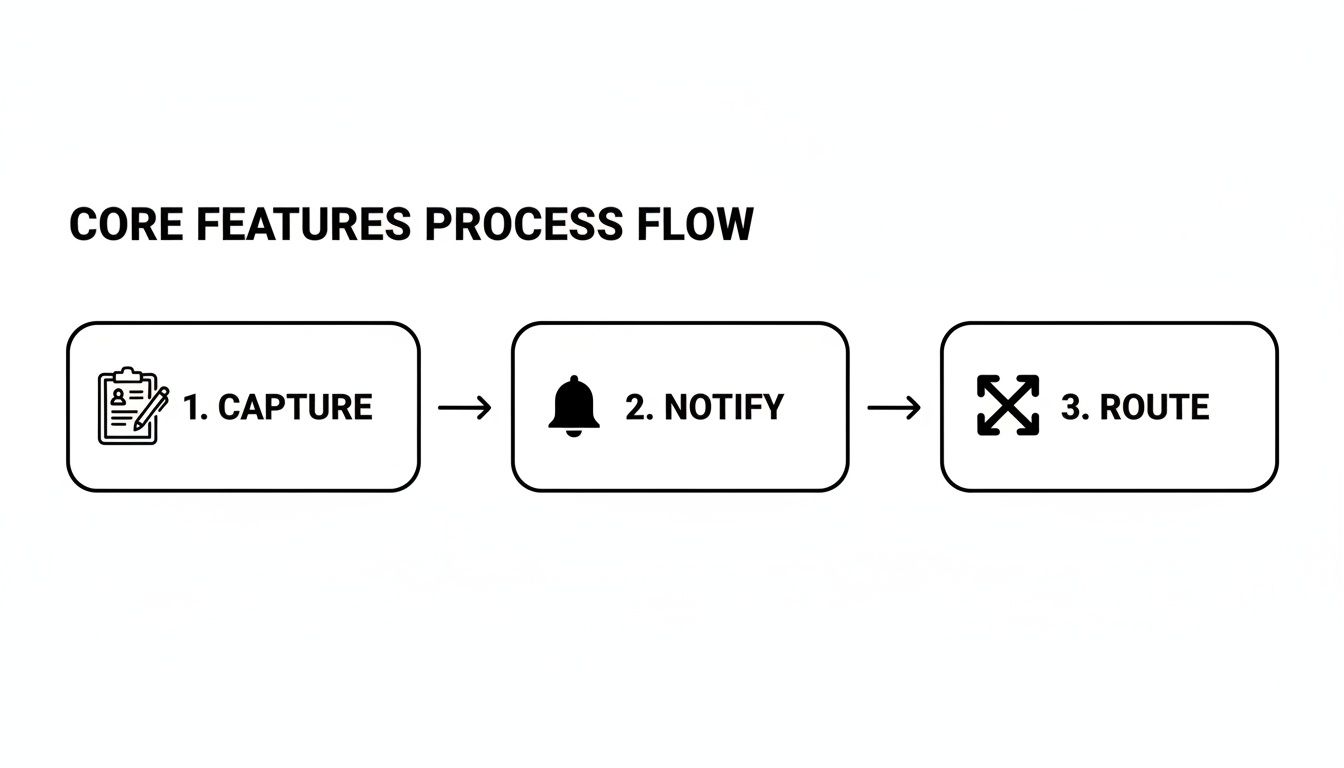
As you can see, it's a seamless journey from the moment of capture to notifying your team and routing the lead where it needs to go. This is the heart of an effective setup.
Choosing a Destination and Mapping Fields
Next up, you tell the software where to send the lead. Do you want it to pop up in your CRM? Maybe you just need it added to a Google Sheet, or perhaps you just want a simple email notification. This destination is where your sales team will live and work these new prospects.
Once you’ve connected your endpoint, you just have to map the fields. It’s like a digital game of connect-the-dots. You’ll match the "Full Name" field from your Facebook form to the "Contact Name" column in your spreadsheet, "Email" to "Email," and so on.
This is where the magic really happens. This mapping process creates a permanent, automated workflow. Every single lead from that form will now follow these exact rules, ensuring your data is 100% accurate and consistent without anyone lifting a finger.
For a more granular look at this process, check out our guide to automate Facebook leads. It's a one-time setup that pays off forever.
Activating Real-Time Sync and Notifications
The last step is the easiest: just flip the switch and turn the automation on.
From this moment on, every single person who submits that Facebook Lead Form will trigger the entire workflow in seconds. A lead fills out the form, the software snags it, and it appears in your CRM or spreadsheet instantly.
At the exact same time, the system fires off a real-time notification to the right person on your sales team. This immediate alert is what makes it possible to follow up within minutes—not hours—dramatically boosting your chances of having a real conversation and closing a deal. This is the true power of a purpose-built lead management software solution.
The Business Impact of Automated Lead Management

Let's move past the features and talk about what really matters: results. Bringing in a proper lead management software isn't just about getting organized. It's a direct investment in your company's growth, and you'll see the returns in faster sales, a happier team, and a much healthier bottom line.
By taking all the tedious, manual tasks off your team's plate, you create an environment where opportunities are jumped on, not missed. This is the real magic—shifting from a reactive, "get to it when I can" approach to a proactive sales machine. Suddenly, your ad spend starts turning into real, measurable revenue.
Radically Improved Speed-to-Lead
When it comes to converting a new lead, nothing is more important than speed. The second someone fills out your Facebook form, their interest is at an all-time high. That window closes fast. Automation shrinks the gap between their click and your first touchpoint from hours down to minutes.
Think about it. A prospect hits "submit," and five minutes later, their phone rings with your sales rep on the other end. Now, picture your competitor downloading a CSV file at 5 PM. By then, that lead is cold, or worse, they've already talked to you. Who do you think wins that deal?
Higher Conversion Rates Across the Board
It’s simple math: faster follow-ups mean more conversations, and more conversations mean higher conversion rates. When your team engages a prospect while their problem is still fresh in their mind, the whole sales process just flows better.
On top of that, automated routing sends the lead to the right salesperson every time. This perfect matchmaking of expertise to customer need means you're always leading with your best, which has a massive impact on your ability to close. To get the most out of your platform, be sure to pair it with solid lead generation best practices.
By ensuring the right person follows up at the right time, lead management software systematically removes friction from your sales funnel, making it easier for prospects to become customers.
Boosted Team Productivity and Morale
Let's be honest, your sales team wants to sell, not do data entry. Manually downloading, cleaning up, and handing out leads is a soul-crushing task that kills motivation and eats up precious selling time.
Automating this entire workflow frees your reps to do what they actually get paid for: building relationships and closing deals. This doesn't just make them more productive; it makes them happier. A team armed with a steady stream of high-quality, real-time leads is an empowered team.
Flawless Data Accuracy and Deeper Insights
Any time a human is manually moving data, mistakes happen. Typos, missed fields, and leads sent to the wrong person—these small errors cause valuable opportunities to slip through the cracks. Automation guarantees that every bit of info is captured perfectly, every single time.
This clean data also powers much more accurate reporting. You get a crystal-clear picture of which campaigns are knocking it out of the park and which ones are duds. Industry benchmarks show companies using automated lead management see at least a 10% revenue bump within six to nine months. Even better, some studies show automation can boost the number of sales-ready leads by up to 50%. It’s proof that accurate, real-time data is a game-changer.
How to Choose the Right Lead Management Software
Picking the right lead management software can feel like a massive decision, but it really doesn't have to be a headache. The best tool isn't the one with the most bells and whistles; it's the one that solves your actual problems without making your team's life more complicated.
First things first, map out your current lead process. Seriously, grab a whiteboard or a piece of paper. Where are your leads coming from? What happens the moment they arrive? Pinpoint the single biggest bottleneck. Is it the mind-numbing delay from manually downloading CSV files? Or maybe it's the inconsistent data entry from your team? Slow handoffs?
Whatever that main pain point is, the right software will fix it directly. Don't get distracted by flashy dashboards or a laundry list of features you'll never use. Focus on the core functions that will give you an immediate win.
Key Evaluation Criteria for Your Shortlist
As you start comparing your options, measure them against these critical points. This will help you find a solution that actually empowers your team, not one that gathers dust. A tool that's a pain to use or doesn't connect with your existing systems is just expensive shelfware.
Your evaluation should be all about practical use, not just a long feature list. Look for a focused tool that does its main job incredibly well.
Here’s what to look for:
- Ease of Use: Can someone on your team who isn't a tech wizard set it up and manage it without calling for help all the time? A clunky interface is a productivity killer, plain and simple.
- Critical Integrations: It absolutely must connect smoothly with your most important platforms—especially Facebook Lead Ads, your CRM, and even simple tools like Google Sheets.
- Transparent Pricing: Is the pricing model straightforward and scalable? Watch out for solutions with sneaky hidden fees or long-term contracts designed to lock you in.
- Responsive Support: When you run into a snag, how fast can you get a real human to help you out? Good support isn't a "nice-to-have"; it's a must.
It's a classic paradox: while 45% of companies are looking for automation in their tools, a whopping 43% of sales leaders admit their current CRM is just too complex. This gap highlights a massive need for user-friendly, focused tools that deliver powerful automation without the brutal learning curve.
Finding the Right Fit for Your Business
Ultimately, you're looking for a platform that feels like a natural extension of your sales process. In a lot of cases, a specialized, easy-to-use tool delivers way more value than a bloated, all-in-one system that tries (and fails) to do everything. Our guide on the best lead management software breaks down the top contenders to help you narrow your search.
Think about your team's day-to-day reality. If your biggest headache is just getting Facebook leads over to your sales reps instantly, then a tool built specifically for that will give you the fastest return on your investment. Prioritize simplicity and effectiveness, and you’ll make a choice you won't regret.
Getting Started and Dodging Common Pitfalls
Let's be honest, rolling out new software isn't just about the technology—it's about getting your people and your process dialed in. A great launch makes your team see the value right away and sidesteps the usual frustrations that can sink a new tool before it even gets going.
The trick is to start with one clear, specific goal. Don't try to solve every problem at once. Instead, pick one thing to nail, like slashing your average lead response time from a few hours down to just a few minutes. This gives everyone a simple, measurable target to hit and makes it easy to see if you're winning.
Once you have your goal, you need to get your team excited. You can't just drop a new tool on them and expect a parade. Frame it as something that gets rid of their most tedious tasks—like manually typing in lead info—so they can spend more time actually talking to people and closing deals.
A Simple Roadmap for a Smooth Launch
Before you go all-in and switch your entire operation over, run a small test. It's the smart way to work out the kinks without causing a huge disruption.
Just connect one of your Facebook ad campaigns to the software and let one or two of your best sales reps run with the new automated flow. This little pilot program is your low-stakes sandbox to get everything running perfectly.
After you've smoothed out the process, write it down. A simple one-page guide showing the new workflow from A to Z is a lifesaver for training your current team and getting new hires up to speed quickly.
Sidestepping the Most Frequent Mistakes
Even the slickest software will fall flat if it’s implemented poorly. Keep an eye out for these common missteps that can sabotage your launch and kill your chances of seeing a real return on your investment.
A very common mistake is picking a system that's way too complicated. All those fancy features might look great in a demo, but 43% of sales leaders say their CRM is just too hard to use. A tool that's powerful but simple will always win against one that leaves your team confused.
Here are the biggest traps to watch out for:
- Forgetting to Train Your Team: Never just assume people will figure it out. You have to schedule a real training session to walk everyone through the new process and answer their questions.
- Messing Up Notifications: Make sure alerts are set up to hit your reps instantly on the apps they actually live in, whether that's email, Slack, or text. A notification that no one sees is a completely wasted opportunity.
- Buying an Overly Complicated System: It’s so tempting to go for the software with a million features, but resist. A focused tool that does one thing really well is always more valuable than a bloated platform that tries to do everything.
Got Questions About Lead Management? We've Got Answers.
Jumping into new software can bring up a few questions. That's totally normal. Even when you can see the upside, it's the practical, day-to-day stuff that matters.
Let's clear the air on some of the most common questions we hear. My goal is to show you that this isn't some complex, enterprise-level headache. It's an accessible, affordable, and incredibly powerful tool for businesses of any size.
Is This Software Only for Big Companies?
Not at all. This is probably the biggest misconception out there. While giant corporations have their own massive, complicated systems, many of the best lead management tools today are built specifically for small and medium-sized businesses.
The whole point is to solve one core problem: getting your leads from places like Facebook to your sales team, instantly. These tools are designed with easy-to-use dashboards, simple pricing, and quick setups that don't require an IT department. Honestly, smaller, more nimble teams often see the most dramatic results, and they see them fast.
If you're spending any time at all manually downloading CSV files, you're big enough for a lead management tool. Don't think you're "too small" for automation—you're exactly who it's built for.
What if My Team Isn't Super Tech-Savvy?
A very fair question. The last thing you need is another complicated piece of software that nobody knows how to use. The good news is that the best tools are built for simplicity. The setup is usually a guided, click-by-click process to connect your accounts and tell the system where to send your leads.
Most good providers will give you everything you need to get rolling without a single headache:
- Video Walkthroughs: Simple, step-by-step videos that show you exactly what to do.
- Real Human Support: Access to a support team that can answer your questions and get you unstuck.
- Clean Dashboards: Intuitive interfaces that just make sense, no training manual required.
The goal here is to save you time and technical frustration, not create more of it.
How Much Is This Going to Cost?
You don't need a huge budget. While prices can vary, many of the most effective solutions—especially those focused on that core job of lead delivery—are very affordable. You can often find a free starter plan that handles a certain number of leads each month, which is perfect for just trying it out.
From there, paid plans usually scale based on how many leads you get or how many different apps you want to connect to. This "pay-as-you-grow" model means you're only paying for what you actually use, making it a seriously cost-effective tool for any business.
Ready to finally stop downloading CSVs and start talking to hot leads instantly? LeadSavvy Pro automates your entire lead capture process in just a few minutes. See for yourself with our free plan and feel the difference.