How to Qualify Sales Leads and Boost Your Conversion Rate
Before you even think about qualifying a lead, you need to know exactly who you're trying to sell to. It sounds obvious, but it’s the step most teams get wrong.
Start with a Rock-Solid Ideal Customer Profile
You can't qualify anyone without a clear benchmark for what a “good lead” actually is. Many sales teams just wing it with vague buyer personas, but a data-driven Ideal Customer Profile (ICP) is a completely different animal. It’s your sales team’s North Star, making sure everyone is hunting for the same high-value prospects.
Think of it this way: selling without an ICP is like trying to find a specific person in a massive crowd, but you have no idea what they look like. You’ll end up talking to a lot of random people and wasting a ton of time. An ICP gives you a detailed description, so you can spot the right people instantly.
This isn't just some marketing theory; it’s the strategic bedrock of your entire sales process. A sharp ICP empowers your team to filter out the time-wasters from the very first interaction.
Look at Your Best Customers First
The absolute best way to build your ICP is to analyze the customers who already love what you do. These are the people with the highest satisfaction, who stick around the longest, and who get the most value out of your product. They are your "perfect fit," and decoding their common traits is the key to finding more just like them.
Start by pulling data on your top 10-20 customers. You're looking for patterns across a few key areas:
- Firmographics: This is the easy stuff—objective, organizational data like company size (by employee count or revenue), industry or vertical, and where they're located.
- Behavioral Data: How did they find you in the first place? Did they show up after a webinar, download a specific guide, or read certain blog posts before they bought?
- Pain Points: This is the goldmine. What specific, nagging problems were they trying to solve? Understanding the "before" state of your best customers helps you spot prospects who are stuck in that same frustrating place.
A great ICP is more than a list of attributes; it’s a story about the real problems you solve. It shifts your team's focus from "who can we sell to?" to "who can we help the most?"
Turn Your Data into a Usable Profile
Once you’ve got all this info, don't just leave it in a spreadsheet. Condense it into a clear, one-page document that your sales team can actually use every day.
For example, instead of just writing "SaaS industry," your ICP might get specific: "Mid-sized B2B SaaS companies (50-200 employees) that are struggling with messy lead attribution and can't prove marketing ROI."
This profile becomes your ultimate filter. Every new lead that comes in gets measured against this benchmark. Does the company size fit? Are they in the right industry? And most importantly, are they showing signs of the exact problems your product was built to fix? Answering these questions is the first and most critical step in qualifying sales leads the right way.
Creating a Lead Scoring Model That Prioritizes Revenue
So, you’ve nailed down your Ideal Customer Profile. Awesome. Now what? The next step is to build a system that automatically flags the hottest leads for your sales team, so they’re not wasting time chasing dead ends.
That system is a lead scoring model. Think of it as a methodical way to assign points to every lead based on who they are and how they’re interacting with your brand. It ensures your reps always focus their energy on the opportunities most likely to close.
This whole process is about replacing guesswork with data. Instead of treating every single form submission as equal, you're creating a clear hierarchy. A lead who perfectly matches your ICP and just spent five minutes on your pricing page is worlds apart from an anonymous visitor who only downloaded a top-of-funnel checklist.
A solid model acts as an objective filter, turning a chaotic flood of inquiries into a clean, prioritized list of people ready to talk.
This infographic breaks down the core pillars of data that feed into a strong lead scoring model.
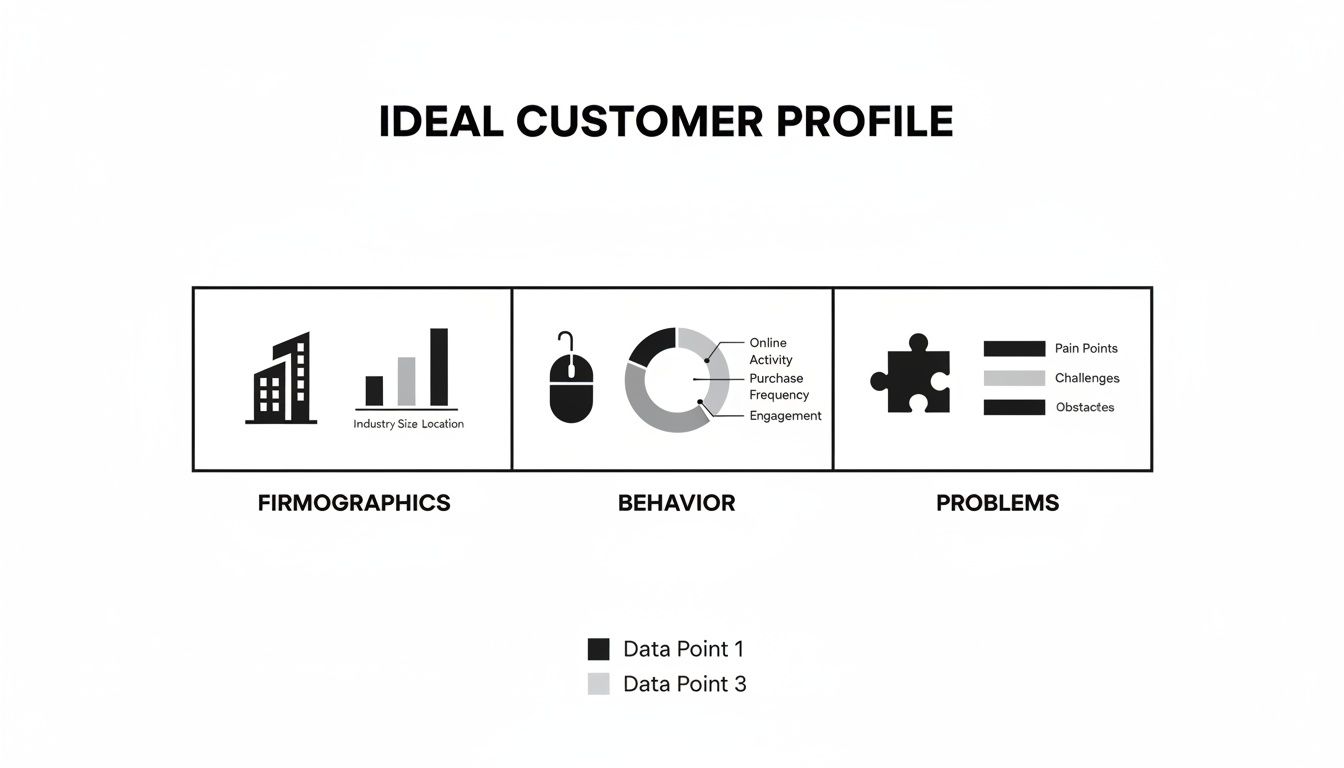
As you can see, it’s the combination of company details (firmographics), user actions (behavior), and their specific pain points that creates a full picture of a qualified lead.
Differentiating Explicit and Implicit Data
To build a scoring model that actually works, you need to understand the two different kinds of information you'll be scoring. Each one tells a different part of the story.
Explicit Data is the stuff leads tell you directly. It’s the hard data they hand over in your forms or information you can easily find, like on their LinkedIn profile.
- Job Title: A "Director of Marketing" is a much stronger signal than an "Intern."
- Company Size: If you sell to companies with 50-200 employees, leads in that sweet spot get more points.
- Industry: Leads from your target industries are obviously a better fit.
Implicit Data, on the other hand, is all about their behavior. You have to infer their interest based on the actions they take on your website or with your marketing. This is where you find the real buying intent.
- Website Visits: Did they just browse the blog, or did they go straight to your pricing and case study pages?
- Content Engagement: Attending a product demo webinar is a massive buying signal.
- Email Clicks: Are they actually opening and clicking the links in your follow-up emails?
Your scoring model needs a healthy mix of both. A perfect ICP match (explicit) who shows zero engagement (implicit) is still a cold lead. Likewise, high engagement from a bad-fit company is just a waste of your sales team's time. The magic happens when both line up.
Building a Sample Scorecard
Let's make this tangible. The idea is to assign points to different attributes and actions. When a lead’s score hits a certain threshold—let’s say 100 points—they officially become a Sales Qualified Lead (SQL) and get automatically routed to a sales rep for follow-up.
If you want to dive deeper into the fundamentals, check out our detailed guide on what is lead scoring.
Here’s a simple scorecard to show you how this looks in practice.
Sample Lead Scoring Model
This table gives you a basic framework. You assign point values based on how strongly each criterion correlates with a successful sale for your business.
| Category | Criteria | Points Assigned |
|---|---|---|
| Explicit Data | Job Title is Director or above | +30 |
| Company has 50-200 employees | +20 | |
| Company is in a target industry | +20 | |
| Implicit Data | Attended a product demo webinar | +40 |
| Visited the pricing page | +25 | |
| Requested a case study | +15 | |
| Subscribed to the blog | +5 |
Remember, this isn’t a "set it and forget it" system. You have to treat it like a living document. Review your model every quarter.
You might discover that leads who download a specific case study have a 25% higher close rate. That’s a clear signal to bump up the points for that action. To help connect these scores to actual dollars and cents, a lead value calculator can be a pretty handy tool.
Asking Insightful Questions to Qualify Leads and Uncover Pain
So, your lead scoring system flagged a promising contact. Great. But an automated score only tells you a lead looks good on paper. Now the real work begins.
A genuine conversation is the only way to confirm their intent and dig into the deep-seated problems that actually drive someone to buy. This is where you shift from ticking boxes on a checklist to having a real consultation.
The goal isn't to mechanically run through a script. You're a consultant, not an auditor. Instead, you'll use proven frameworks as a mental guide to steer the conversation, making sure you cover all the critical bases without sounding robotic.

Popular Sales Qualification Frameworks
Think of these less as rigid scripts and more as conversational toolkits. Each one helps you prioritize different pieces of information, so you can adapt your approach depending on how complex the sale is.
- BANT (Budget, Authority, Need, Timeline): This is the old-school classic. It's direct, efficient, and perfect for shorter sales cycles where you need to quickly find out if the foundational pieces are in place. No frills, just facts.
- CHAMP (Challenges, Authority, Money, Prioritization): A smart, modern twist on BANT that puts Challenges first. When you start the conversation by focusing on their pain points, talking about budget and authority later feels much more natural and helpful.
- MEDDIC (Metrics, Economic Buyer, Decision Criteria, Decision Process, Identify Pain, Champion): This is the powerhouse framework for complex, high-ticket B2B sales. MEDDIC is incredibly thorough—it forces you to understand not just if they can buy, but how their company makes decisions, who really signs the checks, and who will be your champion fighting for the deal internally.
The best salespeople I know don't stick to just one framework; they blend them. They might start by digging into challenges (CHAMP), then validate the budget and timeline (BANT), and as the deal gains traction, they'll get granular on the decision process (MEDDIC).
Crafting Open-Ended Questions That Get Real Answers
The line between a good qualifying call and a great one comes down to the questions you ask.
Closed-ended questions—anything that can be answered with a simple "yes" or "no"—are conversation killers. Open-ended questions are what get people talking, sharing stories, and revealing the context you need to build trust.
For example, instead of bluntly asking, "Do you have a budget for this?" (which almost always puts people on the defensive), try a softer, more exploratory approach.
Example Scenario: A SaaS Company
- Weak Question: "Who is the decision-maker?"
- Stronger Question: "Could you walk me through what the process for bringing on a new tool like this typically looks like at your company?"
See the difference? The first one sounds like you're challenging their authority. The second one invites them to share their internal playbook, which will naturally reveal all the key players and steps involved. It’s collaborative, not confrontational.
Here are a few more powerful, open-ended questions you can adapt:
- To Uncover Need (BANT/CHAMP): "What's changed in the business that made you start looking for a solution for this now instead of six months ago?"
- To Understand Timeline (BANT): "Let's say you had a magic wand and this problem was solved tomorrow. What's the first thing that would change for your team?"
- To Identify the Economic Buyer (MEDDIC): "When your team has invested in similar software before, who was the person that typically gave the final sign-off?"
These kinds of questions do more than just qualify a lead. They transform a sales call into a problem-solving session, building the trust and mutual understanding you need to actually move the deal forward.
Automating Your Lead Routing for Faster Response Times
Once your scoring model flags a hot lead, the clock starts ticking. A prospect’s interest is never higher than in the moments right after they reach out, and every minute you wait, that interest cools. In this game, manual lead management is the enemy of speed.
This is exactly why an automated lead routing workflow is non-negotiable. The whole point is to instantly get the right lead to the right sales rep without anyone having to lift a finger. You’re essentially eliminating the human bottlenecks that let high-value opportunities go cold.
And the impact of speed is huge. Research shows a lead is 9 times more likely to convert if you contact them within just five minutes of their inquiry.
Building a Simple Automation Workflow
You don't need a crazy-complex system to get this done. A tool like Zapier can act as the digital glue between where your leads come from and where your sales team works, creating a totally seamless handoff.
Let's say you're running a campaign with Facebook Lead Ads. The old-school way was to download a CSV file once a day to see who filled out the form. With a simple automation, you can create a "Zap" that fires the instant a new lead comes in.
Here’s a dead-simple example of connecting Facebook Lead Ads to Google Sheets.
This visual shows the trigger (a new Facebook lead) and the action (creating a new row in a Google Sheet), which can then ping a sales rep. This one simple connection gives your team real-time access. For more workflow ideas, check out our guide to the best lead routing software.
This setup means that instead of leads sitting idle for hours, they land directly in a shared, accessible spot. Better yet, you could route them straight into your CRM.
Key Takeaway: Automated routing isn't just about being efficient; it’s about meeting modern buyer expectations head-on. People expect an immediate acknowledgment, and automation is the only way to deliver that at scale.
Beyond the basics, leveraging an AI receptionist can seriously upgrade how you capture and route leads, making sure no one falls through the cracks.
By setting up these automated pathways, you’re building a system where your team is always the first to follow up. That alone will dramatically improve your odds of qualifying and converting your best leads.
Implementing a Follow-Up Cadence That Nurtures and Converts
Getting that initial lead qualification is just the opening move. Here’s a scenario I see all the time: a lead perfectly matches your ICP, but they just aren't ready to pull the trigger today.
Throwing that lead away is a massive, costly mistake. This is exactly where a strategic follow-up cadence becomes your most powerful tool for turning future interest into current revenue.
This isn’t about spamming them with generic "just checking in" emails. A strong cadence is a multi-touch, multi-channel sequence designed to add real value and keep your solution top-of-mind. You’re nurturing the relationship without being a pest, making sure you’re the first call they make when things change.
A Practical Cadence Example
For a warm lead who isn't quite ready, you need a balanced approach. It’s a mix of persistence and value.
Try a 7-touchpoint sequence over two weeks:
- Day 1: Send a personalized email. Reference their initial interest and attach a relevant case study that solves a problem they mentioned.
- Day 3: Pick up the phone. Your goal is to understand their current process. If they don't answer, leave a voicemail that offers a quick, valuable tip—not just a callback request.
- Day 5: Follow up with a second email. This time, include a short video demo or a link to a helpful blog post you wrote. Keep it light and useful.
- Day 7: Send a LinkedIn connection request. Make sure to add a brief, personalized note reminding them how you connected.
- Day 10: Make one last phone call. Try a slightly different angle or offer a different piece of value.
- Day 12: Send a polite and professional "break-up" email. Leave the door open for them to re-engage when the time is right.
- Day 14: If you get no response, move them to a long-term monthly nurture list.
This mix of channels—email, phone, social—prevents your outreach from just becoming background noise. The golden rule is that every single touchpoint has to offer something useful. It reinforces your position as a helpful expert, not just another salesperson.
Qualification isn't a single event; it's a continuous process. A lead might not meet your timeline criteria today, but a well-executed cadence ensures you're there when they do.
Metrics That Reveal the Truth
So, how do you know if your qualification and follow-up efforts are actually working? You have to track the right data. Gut feelings don’t scale, but these metrics will give you a crystal-clear picture of your pipeline’s health.
Focus on these key performance indicators:
- Lead-to-Opportunity Rate: This is the big one. What percentage of your initial leads turn into actual, legitimate sales opportunities? It's the ultimate measure of your qualification accuracy.
- Conversion Rate by Source: Are the leads from your LinkedIn Ads converting better than those from organic search? This tells you exactly where your best-fit customers are hanging out.
- Sales Cycle Length: How long does it take, on average, to close a deal from the first touch? If this number starts shrinking, your qualification process is getting more efficient.
Analyzing these numbers tells you exactly where you need to make adjustments. For example, a low Lead-to-Opportunity rate might mean your lead scoring is too generous or your follow-up emails aren't hitting the mark. This data-driven approach is the only way to truly refine how you qualify sales leads for maximum impact.
Answering Your Top Lead Qualification Questions
Even with a killer process, questions are going to pop up. Getting the little details right is what separates a good lead qualification strategy from a great one, helping you sidestep those common trip-ups. When everyone on the team is on the same page, the whole machine just runs smoother.
This isn't just about semantics; it's about preventing the classic friction between marketing and sales, making sure the handoff is seamless and the pipeline stays full.
What Is the Difference Between an MQL and an SQL?
This is easily one of the most common hangups, but getting it right is non-negotiable for team alignment.
A Marketing Qualified Lead (MQL) is someone who’s kicked the tires a bit. They downloaded an ebook, signed up for your newsletter, or attended a webinar. They've basically raised their hand and said, "Hey, I'm interested," but they're not ready to talk to a salesperson. Not yet, anyway. For a deeper dive, check out our complete MQL definition guide.
A Sales Qualified Lead (SQL) is what happens next. It's an MQL that the sales team has looked at and said, "Yep, this one's legit." They've been vetted and confirmed to have a real need, the budget to make a move, and the authority to sign on the dotted line. This entire guide is built to help you turn those promising MQLs into SQLs that are actually ready for a conversation.
The handoff from MQL to SQL is where so many funnels fall apart. A crystal-clear, agreed-upon definition stops marketing from tossing unqualified contacts over the fence and lets sales focus on opportunities with real potential.
How Many Times Should You Follow Up with a Lead?
There's no single magic number here, but the general consensus lands somewhere between 6-8 attempts. This isn't just about phone calls; it's a mix across email, social media, and the phone.
The real key? Add value with every single touchpoint. Don't just "check in." Share a relevant article you found, send a quick video tip, or pass along a new case study.
And what about that lead who perfectly fits your ICP but goes silent? Don't just toss them out. Move them to a long-term, low-intensity nurturing sequence. It keeps you on their radar without being a pest.
Should a Lead Scoring System Be Static or Dynamic?
Your lead scoring system should absolutely be dynamic. A "set it and forget it" mindset is a recipe for an outdated, inaccurate model.
You should be reviewing and tweaking your scoring model at least every quarter. Your business changes, your ideal customer might shift, and you'll always be gathering new data on what actions actually lead to a sale.
For example, you might find out that prospects who watch a specific product demo are three times more likely to close than you originally thought. That's a huge insight you can only get by regularly updating your model to keep it sharp and aligned with what's happening in the real world.
By automating your Facebook lead capture with LeadSavvy Pro, you can make sure every new lead gets plugged into your dynamic scoring and routing workflows instantly. Stop wasting time on manual CSV downloads and start qualifying leads the second they come in. Get started with LeadSavvy Pro for free.