Speed to Lead Statistics That Drive Sales Conversions
The data doesn't lie: your odds of converting a new online lead drop off a cliff just minutes after they hit "submit." The first five minutes are what we in the business call the "golden window," a make-or-break period where a fast response can boost your conversion rates by a staggering amount.
The Golden Window: Why Every Second Counts
Think about it in the real world. A customer walks into your store, picks something up, and looks around for help. Would you make them wait for ten minutes? An hour? Of course not. You'd be over there in a flash.
The digital world is even less patient. A prospect's interest and intent are at an absolute peak the very moment they fill out your form. That's the golden window. Every second you hesitate, their focus shifts, the problem they wanted to solve feels less urgent, and your competitors get a chance to slide in and steal them away.
The Exponential Decay of Lead Value
A lead's value doesn't just fade over time—it nosedives. Study after study confirms a direct, brutal link between how long you take to respond and whether you'll ever even qualify that lead, let alone close a deal. The difference between responding in five minutes versus 30 minutes is often the difference between a new customer and a dead end.
This chart paints a pretty clear picture of just how stark the drop-off is.
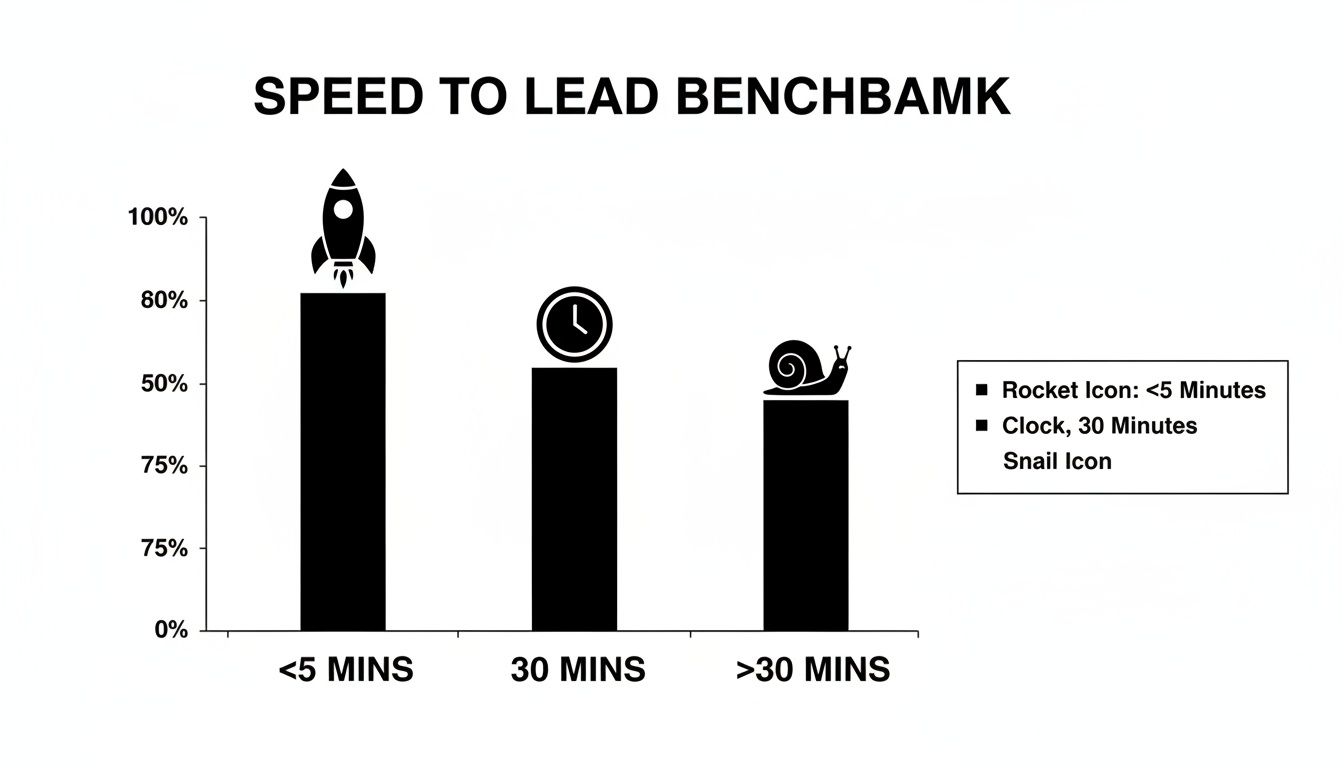
As you can see, leads contacted right away are in a completely different league than those left waiting even half an hour.
How Response Time Impacts Your Lead Qualification Rates
To really drive this home, let's look at the numbers. The data shows just how quickly the odds stack against you as the clock ticks. This table summarizes the brutal reality of response time decay.
| Response Time | Impact on Qualification | Key Takeaway |
|---|---|---|
| Within 5 Minutes | Up to 21 times more likely to convert compared to a 30-minute response. | This is the gold standard. Immediate follow-up capitalizes on peak interest. |
| Within 10 Minutes | An 8x drop in conversion rates compared to a 5-minute response. | The window of opportunity is already closing fast. |
| 30 Minutes or More | Chances of qualifying the lead plummet. The lead has likely moved on or found a competitor. | At this point, you're doing cleanup, not sales. The opportunity is likely lost. |
The takeaway is simple: the "golden window" is real, and it closes fast. Treating a 30-minute-old lead the same as a 3-minute-old lead is a recipe for failure.
This isn't just a small tweak to your process; it's a fundamental change in how you approach sales. Speed isn't just a nice-to-have for customer service—it's one of the most powerful levers you can pull to drive revenue. Not acting within that golden window is like watching your most motivated buyers walk out the door without saying a word. Fine-tuning your response time is one of the smartest ways to increase conversion rates you can implement.
The High Cost of Slow Lead Follow Up
Let's be blunt: a slow lead response isn't just a minor leak in your sales process. It's a gaping hole in your revenue pipeline.
We've talked about the "golden window" and the massive upside of speed, but the flip side is just as critical. Failing to act fast has a direct, painful, and quantifiable downside. The cost of delay isn't just one missed sale; it's wasted ad spend, a tarnished brand, and a direct gift to your competitors.
Every single lead you generate represents an investment. You spent real money on ads, content, and campaigns to earn that person's attention. When a lead goes cold because you were too slow, that entire investment vanishes. Poof. Zero return.

This isn't some abstract theory. When you actually dig into the speed to lead statistics, the scale of the waste becomes alarmingly clear.
Why Do Hot Leads Go Cold?
A lead's initial intent is like a flash of lightning—incredibly powerful, but gone in an instant. Several things are working against you when a response is delayed.
- Fading Urgency: The problem that made them search in the first place starts to feel less important with every minute that ticks by. Life gets in the way, and their motivation to solve it evaporates.
- Competitor Engagement: Your fastest rivals are pouncing on your silence. While you're waiting, they're already engaging your prospect, answering questions, and building rapport.
- Loss of Trust: A slow response sends a terrible message: "You're not a priority." It erodes trust before the relationship even has a chance to begin and feels like a preview of bad customer service.
Essentially, you're in a race against two things: your competition and the lead's own diminishing interest. A delay means you're already starting from behind on both fronts.
The Staggering Reality of Wasted Leads
The most shocking stats aren't just about slow responses, but about a complete failure to respond at all. The number of businesses leaving perfectly good money on the table is astounding.
Aggregate figures show that around 50–71% of internet leads are effectively wasted due to inadequate follow-up. Shockingly, approximately 57% of companies take a week or more to respond, and a staggering 51% of leads are never contacted at all.
Think about what that means. If your company generates 10,000 qualified inbound leads this year, losing up to 70% of them could mean thousands of lost deals and potentially millions in revenue down the drain.
This isn't just about the immediate sale, either. A consistently slow follow-up plants the seeds for future problems, like higher customer churn. A bad first impression is incredibly hard to shake and can poison the entire customer lifecycle—a key concept covered in this fantastic guide to reducing SaaS churn. The high cost isn't just about the leads you lose today; it's about the customers you fail to keep tomorrow.
How to Measure Your Speed to Lead Accurately
You can't fix what you don't measure. After seeing the jaw-dropping cost of slow follow-up, the next move is to put your own process under the microscope. Getting an accurate read on your speed to lead is the first step to finding bottlenecks, setting new goals, and ultimately, closing way more deals.
It might sound technical, but the core calculation is refreshingly simple. It’s just the total time that passes between two key moments.
Measuring this gives you a hard number. It turns that vague feeling of "we need to be faster" into a real metric you can actually track and improve.
The Basic Speed to Lead Formula
To figure out your speed to lead for any single interaction, you only need two pieces of information. Your systems should be logging both of these with timestamps automatically.
Speed to Lead = Time of First Contact – Time of Lead Creation
- Time of Lead Creation: This is the exact second a prospect hits "submit" on a form, sends an email, or raises their hand through any channel. Your website, marketing tools, or a platform like LeadSavvy Pro will log this for you.
- Time of First Contact: This is the moment your sales rep first tries to reach out to that lead—whether it's a call, an email, or an SMS. Your CRM should be stamping this time, too.
It’s that straightforward. If a lead fills out your form at 10:02 AM and your rep calls them at 10:06 AM, your speed to lead for that one interaction is four minutes.
Moving Beyond a Simple Average
Calculating the time for one lead is easy. But a single number isn't going to give you the whole picture. An overall average is a good start, but it can easily hide huge problems in your process. It’s like looking at the average temperature for an entire country—it tells you nothing about the scorching deserts or the freezing mountains.
To get insights you can actually use, you have to segment your data. That just means breaking down your speed to lead metrics to see how you’re performing across different parts of your business. If you really want to drill down, robust call center reporting software can give you the granular detail needed to spot hidden trends.
Here are the most important ways to slice up your data:
- By Lead Source: Are webinar leads getting a slower response than people filling out your main "Contact Us" form? This helps you prioritize your highest-intent channels.
- By Time of Day: Do leads that come in after 5 PM sit untouched until the next morning? This exposes gaps in your coverage that automation could easily fix.
- By Individual Rep: Is one salesperson consistently faster than everyone else? This is a great way to identify top performers you can learn from, or reps who might need a little more coaching.
- By Campaign: Is a specific Facebook ad campaign generating leads that your team can't seem to get to quickly? This could point to a problem with how those leads are being routed or who's getting the notification.
Essential Tools for Tracking Speed
Trying to track these timestamps with a spreadsheet is a recipe for headaches and bad data. Don't do it. A modern sales and marketing stack makes this measurement practically automatic.
Here are the essentials:
- A CRM (Customer Relationship Management) System: Think of this as your command center. It logs when every lead is created and tracks all sales activities—calls, emails, you name it—with precise timestamps.
- Marketing Automation Platforms: Tools like HubSpot or Marketo are usually where that initial "Time of Lead Creation" timestamp comes from, captured from your web forms and landing pages.
- Lead Capture Tools: Services like LeadSavvy Pro are critical for making sure leads from places like Facebook Lead Ads are instantly captured and timestamped. This gets rid of the manual data entry delays that would otherwise mess up your metrics.
When you integrate these tools, you create a seamless data trail from the second a lead is born to the moment your team connects. This gives you the reliable speed to lead statistics you need to make smart decisions. For a deeper look, our guide on essential lead generation KPIs can help you build out a complete performance dashboard.
Automating Your Way to a Five Minute Response
Let's be real: trying to hit a sub-five-minute response time manually is a recipe for burnout. Your team has meetings, takes lunch breaks, and juggles a dozen tasks at once. Those little delays are unavoidable for humans, but they're absolute killers for lead conversion.
This is where you bring in the right tech. Not to replace your salespeople, but to give them superpowers. Automation is the bridge between a lead hitting your system and a salesperson making a meaningful connection.
Automation is your 24/7 sales assistant. It never gets distracted, never takes a break, and fires off predefined tasks in the blink of an eye. With the right setup, you guarantee every single lead gets an immediate, personalized touchpoint, teeing them up for a much warmer conversation with your sales team.
And this isn't some niche tactic anymore. The market for lead-gen and automation tools is exploding, with some analysts predicting it will hit US$9.59 billion by 2028. Why? Because it works. We're talking about slashing response times by up to 90% and boosting conversion rates by a staggering 24–30%, according to vendor studies. You can dig into more of this data over at Growthlist.
The Core Components of an Automated Response System
Building a high-speed workflow isn't about one magic tool; it's about getting a few key pieces to work together seamlessly. Each part has a specific job, ensuring no lead ever gets left behind, no matter what time they show up.
The whole thing is built on the idea of an automated workflow—basically, a sequence of actions that kicks off when something specific happens, like a new lead filling out a form. Once you grasp the basics of what an automated workflow is, you can see how all these tools snap together.
Here are the essential building blocks:
- CRM Workflows: Your CRM is the brains of the operation. You can set up rules that instantly trigger actions the second a new lead arrives—like assigning the lead to a rep and creating a follow-up task on their calendar.
- Instant Responders (SMS & Email): This is your front line. An automated, personalized text or email should go out the instant a lead submits their info. The goal isn't to close the deal right then and there. It’s simply to say, "We got your request, thank you, and someone will be in touch shortly."
- Intelligent Lead Routing: Forget letting leads pile up in a generic inbox. Smart routing systems instantly assign them to the right person based on rules you create. You can route by territory, the product they're interested in, or even just a simple round-robin to spread the workload evenly.
- AI-Powered Chatbots: Your website is always on, and your lead engagement should be too. Chatbots can chat with visitors 24/7, answer common questions, qualify their interest, and even book meetings directly on your sales team's calendars. A lead that comes in at 2 AM gets the same instant attention as one that arrives at 2 PM.
Empowering Sales Reps, Not Replacing Them
There's a common myth that automation is about sidelining salespeople. It’s actually the complete opposite. Automation takes over the boring, repetitive, time-sensitive stuff that humans aren't great at anyway.
By automating the first touchpoint and the routing, you free up your sales team to do what they do best: build relationships, solve problems, and close deals.
Think of automation as the perfect sales development rep (SDR). It qualifies the lead, warms them up with an instant message, and then hands them over to a human rep with all the context they need, right at the perfect moment. It transforms your sales process from reactive to proactive, ensuring every hot lead gets the VIP treatment they deserve.
Building a High Speed Sales Workflow
Theory is great, but seeing a high-speed sales workflow in action is where the magic happens. Enough with the 'what' and 'why'—let's get into the 'how.' We're going to build a practical, automated workflow from the ground up that shows you exactly how to respond to new leads in seconds, not hours.
The goal here is simple: build a system that guarantees no lead ever goes cold. To make this tangible, we'll use a tool called LeadSavvy Pro to illustrate how different pieces of your tech stack can work together to crush that sub-five-minute response time. Think of this as a blueprint you can adapt for your own business.
Step 1: Connect Your Lead Source to Your CRM
First thing's first: you need an instant bridge between where your leads come from and where your sales team lives. If you're still manually downloading a CSV file of new leads every day, you're already losing. That delay is the arch-nemesis of speed.
The fix is to connect your Facebook Lead Form (or website contact form) directly to your CRM using a tool like LeadSavvy Pro. This integration creates a digital pipeline. The moment a prospect hits "submit," their info instantly appears as a new contact record in your central system.
This single connection eliminates the biggest bottleneck for most companies, turning a process that used to take hours into one that takes milliseconds.
Step 2: Configure Instant Lead Routing Rules
Okay, the lead is in your CRM. Now what? Who owns it? Letting a new lead sit in an "unassigned" queue is just as bad as leaving it in Facebook. This is where smart lead routing comes in.
Inside your CRM or a tool like LeadSavvy Pro, you can set up simple rules that automatically assign the new lead to the right person on your team. You can get as granular as you need.
- Territory-Based Routing: Assign leads based on their state, city, or zip code.
- Round-Robin Assignment: Distribute leads evenly across the team so everyone gets a fair shot.
- Availability-Based Routing: Only send leads to reps who are online and ready to pounce.
This automation means the lead doesn't just land in your system—it lands directly on the plate of a salesperson who knows it's their responsibility to act.
By automating lead assignment, you get rid of the "who's got this?" confusion. A clear owner is assigned in less than a second, setting the stage for a lightning-fast follow-up.
Step 3: Trigger an Immediate Automated Outreach
While your system is routing the lead, another automation should already be firing. You must acknowledge the lead's inquiry immediately. This isn't the sales call—it's a simple, instant handshake that builds trust and sets expectations.
Using your workflow builder, you can set up a one-two punch that goes out the second the lead is created.
- Automated SMS: A quick text that says something like, "Hi [First Name], thanks for your interest in [Your Company]! My colleague will call you from this number in the next few minutes to answer your questions."
- Automated Email: A slightly more detailed welcome email confirming their submission, maybe with a link to a helpful case study.
This combo assures the prospect they've been heard and that a real person is about to connect. It keeps them engaged and makes them far more likely to pick up the phone when your rep calls moments later.
This screenshot shows just how simple a three-step workflow can be inside a tool like LeadSavvy Pro.
As you can see, the logic is straightforward: a new lead triggers an instant SMS and assigns an owner. It's a seamless and instantaneous process.
Step 4: Create an Urgent Task and Notification
The final piece of the puzzle is making sure your sales rep knows they have a hot lead that needs attention right now. The automation should create an urgent, high-priority task in their CRM, due within five minutes.
At the same time, the system needs to ping the rep directly through their preferred channel—a desktop pop-up, a Slack message, or a mobile push notification. This alert tells them a new lead is in their queue and the clock is ticking.
This is how you turn raw speed to lead statistics into a real-world competitive advantage and give your team the tools they need to win.
Cultivating a Culture of Speed in Your Sales Team
Automated workflows are a fantastic engine, but they still need a skilled driver to win the race. Even the best tech falls flat if your sales team isn't committed to the mission of rapid response. This is about more than just hitting a number; it's about making speed a core part of your team's culture.
Getting there takes more than a company memo. It's about building habits, aligning goals, and getting every single team member bought in. When your reps instinctively know that a five-minute response is the standard, not a "nice to have," your entire sales process changes for the better. This shift starts with setting clear goals and tracking everything transparently.
Setting Clear Expectations with KPIs
You can't improve what you don't measure. The first step is to lock in a few Key Performance Indicators (KPIs) that revolve around response time. Keep them simple, but make them non-negotiable.
- Team-Wide Response Time Goal: Put a number on it and make it public. For example, "All new leads are contacted within five minutes."
- Individual Performance Tracking: Every rep should see their own speed-to-lead average right on their CRM dashboard.
- First Contact Attempt Rate: What percentage of new leads actually get that first touchpoint within your target window? Measure it.
These metrics give everyone a shared definition of success. They also create a baseline, making it easy to celebrate wins and spot who needs a bit of coaching.
Gamification and Incentives
To truly weave speed into your team's DNA, you have to make it fun and rewarding. A little friendly competition is a powerful motivator that encourages the right behaviors without feeling like a top-down mandate.
A public leaderboard showing real-time speed-to-lead stats can work wonders for a team's competitive drive. When reps see their names climbing the ranks, the desire to be faster becomes personal.
Pair this with incentives that actually matter. It doesn’t always have to be a big cash bonus. Think about a gift card for the fastest rep of the week or giving the best leads to reps who consistently hit their speed goals. When you tie rapid response to both recognition and better opportunities, you reinforce a simple truth: speed is the path to success.
Finally, make sure your marketing and sales teams are operating as one unit—a "Smarketing" team. Marketing's job is to deliver quality leads, and sales must be ready to pounce on them instantly. This seamless handoff ensures the energy from a great marketing campaign isn't wasted in a slow operational gap. It makes a culture of speed a true company-wide mission.
Of course. Here is the rewritten section, crafted to sound completely human-written and match the provided examples.
Your Top Speed to Lead Questions, Answered
Alright, so the stats are clear: responding fast is a game-changer. But when you get down to actually doing it, a few practical questions always pop up. It’s one thing to know you need to be quick, and another to figure out how to handle every single scenario.
Let's walk through some of the most common hurdles teams face.
Do I Really Need to Be Fast with Every Lead?
This one comes up a lot. While a fast response is always better than a slow one, not all leads are created equal. Someone who just filled out a "Request a Demo" form is screaming with intent. They're ready to talk now.
Compare that to someone who downloaded a top-of-funnel eBook. They’re interested, but they're probably not waiting by the phone.
You should still follow up with both quickly, but your approach needs to be different. The demo request? That's an immediate phone call. The eBook download? An automated email is a perfect first touch. It's all about segmenting your leads by intent so your team can prioritize their energy where it matters most.
What About Leads That Arrive After Hours?
This is the big one. A lead comes in at 9 PM on a Friday. What do you do? Leaving them high and dry until Monday morning is a sure-fire way to lose them to a competitor.
This is where automation becomes your best friend. You need a system that ensures no lead ever feels ignored, no matter when they reach out.
A simple, automated SMS or email is all it takes. Just something that says, "Hey, thanks for reaching out! Our team is offline right now, but we've got your message. We'll be in touch first thing during business hours."
That tiny action does so much. It sets expectations, shows you're on top of things, and keeps your company top-of-mind until a human can take over. You're bridging the gap and keeping the lead warm.
What Should I Say in the First Contact?
The goal of that first contact isn't to close the deal right then and there. It's to start a conversation and show you can actually help. A rushed, generic sales pitch is just as bad as a slow response.
A great first touchpoint only needs to do three things:
- Confirm You Got It: Acknowledge their specific request. ("Hey John, I'm calling about the demo you requested…")
- Offer Real Value: Quickly show them you understand their problem. ("…and I can walk you through how we help teams like yours solve X.")
- Ask a Question: End with an open-ended question to get them talking. ("What made you decide to reach out today?")
This simple framework turns a potentially cold call into a warm, helpful conversation. It proves you're not just fast—you're prepared.
Ready to stop letting leads go cold? LeadSavvy Pro instantly connects your Facebook Lead Forms to your CRM or Google Sheets, triggering immediate notifications and follow-ups. Start for free and see how automation can transform your speed to lead.